@BlondeOfWar Everytime i am too angry, happy, when i laugh, every strong emotions it happen. It's been three years since I was diagnosed, and I've learned to be mindful of my surroundings, but the hardest part is constantly trying to suppress my feelings to stay in control.
@JL_75000 Pas si fun fact: tous les rhinocéros, meme sauvages sont issus de réintroduction humaine. Certe il a permis sa conservation mais il est lui même a l'origine de sa quasi disparition
@_BeFootball Franchement ça peut être pas mal Chevalier en cas de départ de Donnaruma ,il est jeune et français. Les gens qui disent y’a pas de français au PSG ne pourront rien dire
@choqlautremonde@WaterStyle61623@CerfiaFR Même dans ce cadre là le suivi est hyper strict, l'ordonnance ne peut être signée de n'importe qui. Je suis justement sous cette substance dans ce cadre ci. Pour compenser le dysfonctionnement de certains récepteurs neuro.
@yag23__@Eddy_St_Germain@This_Vie@ActuFoot_ https://t.co/CHVZq6JPL6
Si on reste dans le domaine sportif, c'est pas parce que c'est ton état que c'est mieux. Et quand c'est des fonds chinois ou US personne ne dis rien. Oui malheureusement l'argent est le 12 ème joueur aujourd'hui
@akafaceUS On a piece like this, given its build, it can hurt. Everyone has their own painful areas, their own ability to withstand it.
After session,you relax and your nerves take over. Without realizing it, you're holding a position, contracting more than normal. I'd call it fatigue here
@neige2407 Semblerait que ce soit a priori l'inverse, son rôle de commentatrice la force a une certaine retenue qui rend le truc pas naturel pour elle. D'après une interview que j'ai je ne sais plus où 😅
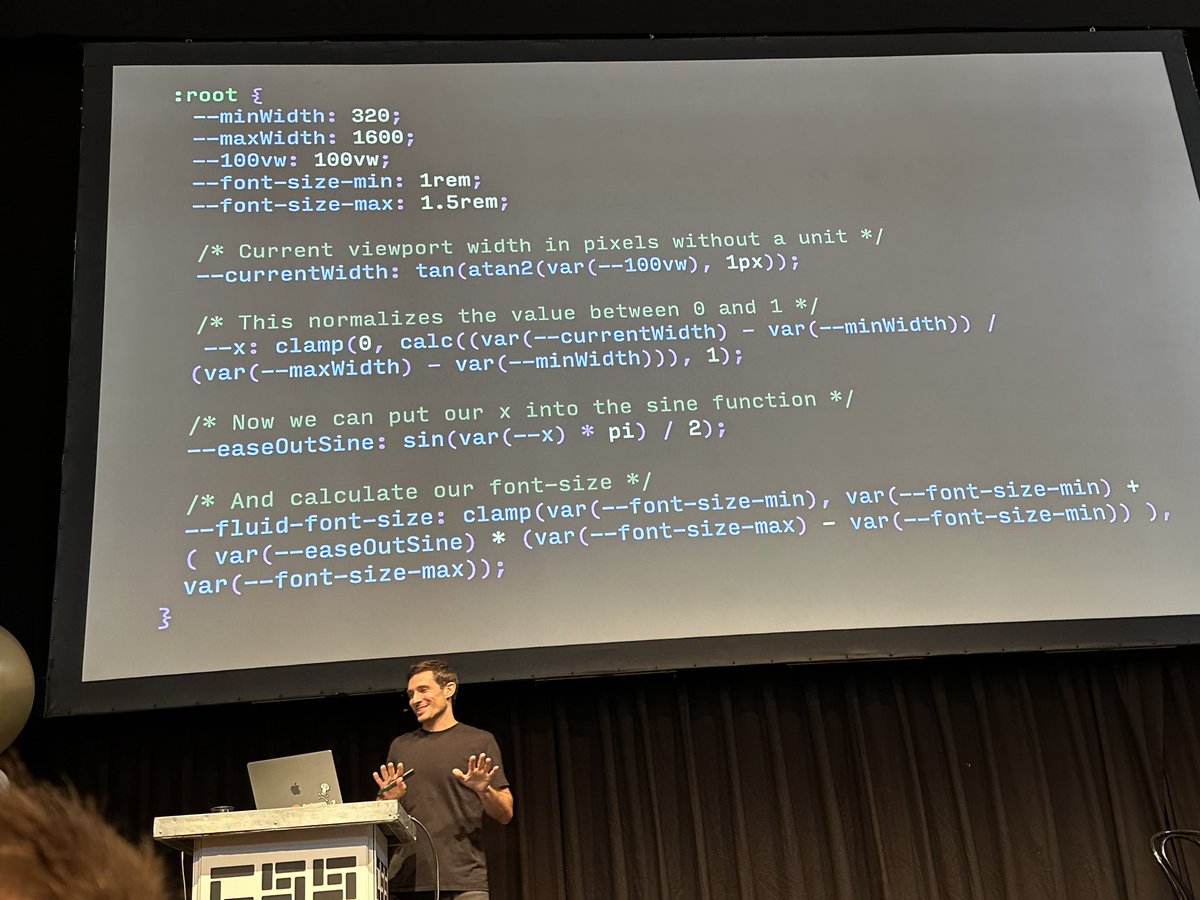
Matthias mentioned @Jane0ri’s awesome hack using tan(atan2(val, 1px)) to work around getting unitless values
https://t.co/QQEnaHgUeY
(We’re talking about this on the #csspodcast this season too!)
#cssday@CSSDayConf
Figma to Vue.js: Bridging Design and Development Seamlessly.
Learn how to leverage Figma and Vue.js to create web applications that match your design vision.
Discover the benefits of this powerful combination and how to optimize your workflow.
https://t.co/8YGecQtwie
CSS Trick 🤙
You can use scroll-driven animations on the inline axis to create list animations like in these cards 🫶
article {
animation: vibe;
animation-timeline: view(inline);
animation-range: cover 40% cover 60%;
}
@keyframes vibe { 50% { scale: 1; filter: grayscale(0); }}
Here you use a view() timeline with the inline axis set inside the function. This means you can hook into the horizontal scroll position of an element inside its scroller 🙌
In this demo, you set a default smaller scale and make each card grayscale 🤏
article {
scale: 0.8;
filter: grayscale(1);
}
Then the animation happens as each card enters from the right at 0% and leaves to the left at 100% 🎞️ 50% is the halfway point and in your keyframes you make each card grow and saturate at that point before returning to its original state ✨ scroll-snap provides a nice look-and-feel here and on mobile 🫰
It's really as straightforward as that but made so much easier with a few lines of CSS 💙 For the parallax effect, you can animate a background-position on the card or the object-position on an img depending on what you go with 🤙
Lastly, you can use this today with progressive enhancement by wrapping your scroll-driven animation code in @supports and @media ⚡️ Users without support still get a decent experience!
@CodePen link below! 👇
I needed some rules for how a card in "list" format would respond to a shrinking viewport. I found it useful to show every step. First things shrink, then they are hidden.
This is the worst case scenario. @Superthread_ doesn't usually look this busy 😅
Software architectural patterns are reusable solutions to commonly occurring design problems in software architecture that provide a structured way to organize and design a software system to achieve specific qualities such as flexibility, scalability, and maintainability.
1. Event-Driven Architecture (EDA):
- In an event-driven architecture, the flow of the system is determined by events such as user actions, sensor outputs, or messages from other systems. Components in the system communicate through events, and event handlers respond to these events.
- 🔑 Key Concepts: Events, Event Handlers, Asynchronous Communication.
2. Layered Architecture:
- Layered architecture organizes the system into distinct layers, where each layer has a specific responsibility. Communication typically occurs only between adjacent layers, and each layer provides specific functionality.
- 🔑 Key Concepts: Presentation Layer, Business Logic Layer, Data Access Layer.
3. Monolith:
- A monolithic architecture is a traditional approach where all components and modules of a software application are tightly integrated into a single codebase and deployed as a single unit. This contrasts with distributed architectures like microservices.
- 🔑 Key Characteristics: Single Codebase, Tight Integration, Single Deployment Unit.
4. Microservices Architecture:
- Microservices break down a software application into small, independently deployable services. Each service focuses on a specific business capability and communicates with others through APIs. Microservices promote scalability, maintainability, and flexibility.
- 🔑 Key Characteristics: Independent Deployability, Service Isolation, Decentralized Data Management.
5. Model-View-Controller (MVC):
- MVC is a design pattern that separates an application into three interconnected components: Model (data and business logic), View (user interface), and Controller (handles user input and updates the model and view accordingly).
- 🔑 Key Components: Model, View, Controller.
6. Master-Slave Architecture:
- In a master-slave architecture, one central node (the master) controls and manages one or more subordinate nodes (the slaves). The master distributes tasks to the slaves, and they report back to the master.
- 🔑 Key Components: Master Node, Slave Nodes, Task Distribution.
These architectural patterns provide different ways to structure and design software systems based on various requirements, such as scalability, maintainability, and ease of development. The choice of an architectural pattern depends on the specific needs and goals of the application or system being developed.
👍🏿 Subscribe to our newsletter - https://t.co/hxARDoA98l
#systemdesign #coding #interviewtips
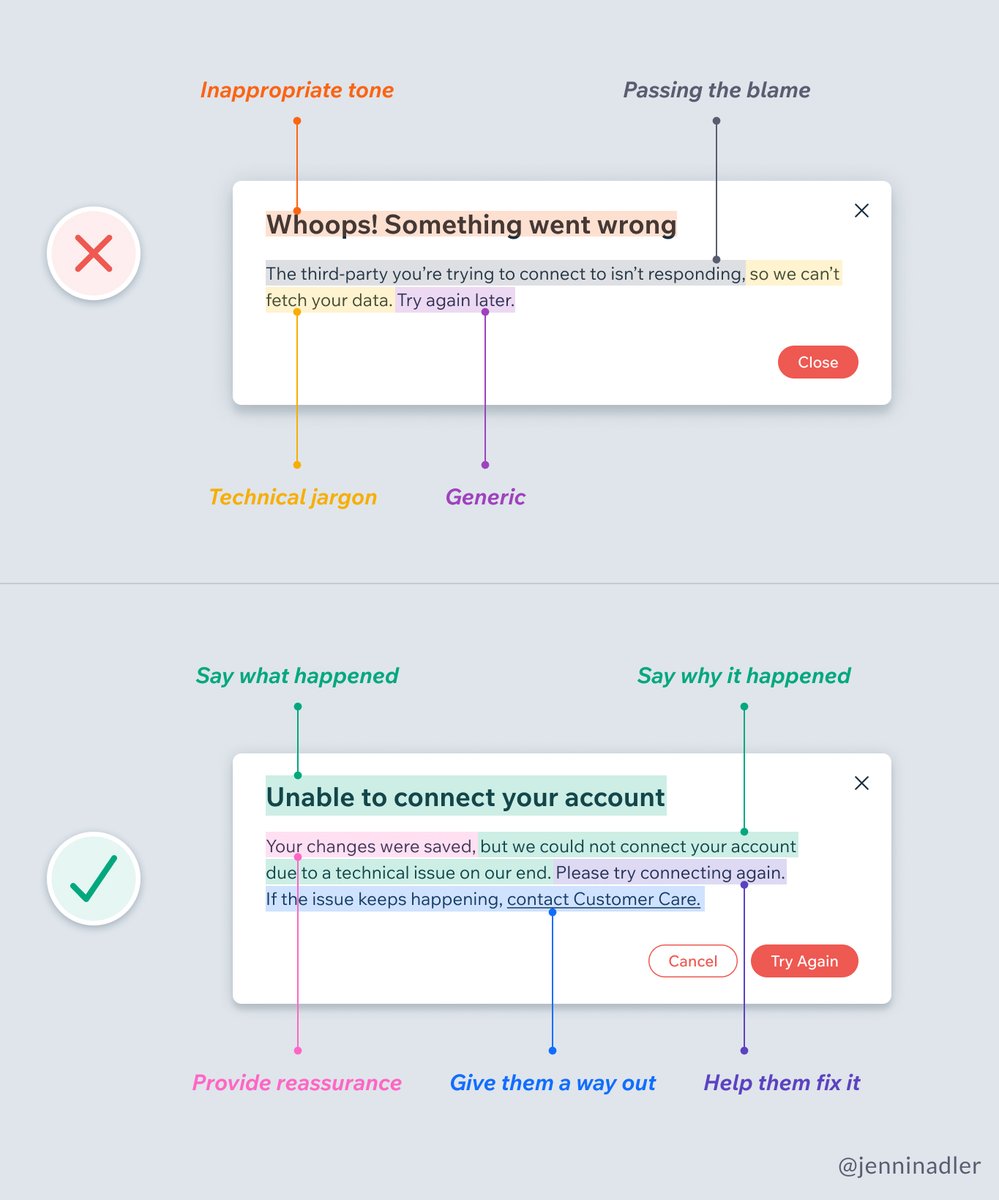
🚨 Error message design tips
✅ Say what happened and why
✅ Provide reassurance
✅ Be empathetic
✅ Help them fix it
See how the Wix team improved 7,643 error messages in their product 🤯
Link below 👇
by @jenninadler#uxdesign#copywriting#uxui
CSS Tip! 🤙
You can create this magnetic :hover effect with CSS anchor positioning, :has, and zero JS 🔥
article { anchor-name: --develop; }
ul:has(li:hover) { --anchor: --develop; }
ul::after {
inset:
anchor(var(--anchor) top)
anchor(var(--anchor) right)
... ;
}
How do you keep it clean when entering/exiting the list? Use transition-delay ⭐️
ul:has(li:hover) { --active: 1; }
ul::after {
opacity: var(--active, 0);
transition: opacity 0.2s, inset 0.2s 0.2s;
}
ul:hover::after {
transition: opacity 0.2s 0.2s, inset 0.2s;
}
This is a cool trick you can use. Delay the opacity on enter and then delay the position on exit. That way you don't get a weird effect on enter/exit 🙏
This one's a "Future" CSS tip 🔮 But, the demo will work in all browsers in some way. The idea is to progressively enhance it.
1. No JavaScript and no Anchor Positioning? Highlight on hover ✏️
2. No Anchor Positioning? Use JavaScript with a single event listener to update the inset values using elementFromPoint and .closest 🫶
3. If there is Anchor Positioning support, use that and don't fire the JavaScript. You can check with CSS.supports('anchor-name: --anchor') ✨
That's it!
@CodePen link below! 👇