I'm giving Claude Code for FREE
(yes the world's best AI -- at no cost at all)
My mission is to get the next billion people to write great software, but so many are constrained by costs.
We solved this by combining AI with ads (only contextual and relevant ads, no spam).
In return, you get the best AI models without needing a credit card.
For the next batch, I will choose 500 people randomly who have done the following steps:
1. Comment "GIVE ME SANTA CLAUDE" below
2. Like and retweet this
3. Follow @NamanyayG and @supermemory
4. Sign up on the link in the next tweet
Watch this quick video to understand how it works!
@AnxiousHolly Yo, starting with the iPhone 6 series, that main camera went full-on bump mode, leaving the flat cam days of the iPhone 5S and earlier in the dust! 📸
@KudariVinay@SmokeAwayyy No, he just requires you to type the numbers only. That means you should only enter “151206 152204 082512 062202” and not include any additional “decode'”. Your answer is not acceptable.
With 17.6 set to come out either tomorrow or Tuesday, I wanted to take the time to emphasize something important right now:
AVOID 17.6 - STAY ON 17.5.1 OR LOWER (lower = better)
17.6 backported the root helper change that was first seen in the 18.0 betas, which means that even if TrollStore was to ever happen on 17.0.1+, stuff like TrollStore Filza, TrollStore CocoaTop, and any app that uses a Root Helper are dead, and that TrollStore will need significant changes to have a chance at working (due to TrollStore currently using a Root Helper).
To summarize what you should do:
- If you are on 17.5.1 or earlier, STAY
- If you are on an older version of iOS and have to update for any reason, Delay OTA to 17.4.1
- If you are on a 17.6 beta or 18.x beta, Go to 17.5.1
This is not by far all we need...
JAILBREAK
1. bypass the SecurePageTableMonitor (iPhone 13 and above)
2. exploiting the kernel
3. having a stable and usable PUAF KRW
4. bypass the PointerAuthentication(PAC also stands for PointerAuthentication, it prevents a process to manipulate the pointers of other processes(a pointer basically points to a memory address, thats also what a process does when it loads a dynamic library for example, it creats a pointer to the function in that library to call it))
5. bypass the PageProtectionLayer in order to be able to write to the protected memory pages in the kernel.. We dont need actually a PAC bypass if we get a PACless PPL bypass like that that we got for iOS 16(dmaFail)
6. having a stable and usable Read Write Permitive on the Page Protected Pages (PPLRW)
7. building a PhysRW permitive to have full access to the physical filesystem
POST JAILBREAK
8. patching our own ucred to unsandbox, platformise and give our selves root
9. loading our binpack to the trustcache
10. doing STABLE dyld patches to be able to hook launchd with a dylib.
11. hooking launchd using dyld
12. spawning jbd
13. handing off our KRW, PPLRW, PHYSRW Permitive using some sort of buffer
14. userspace reboot... boomerang will do the rest
REGARDING BOOTSTRAP
Pretty much no location on the iOS file system is good for dylib linking cause of the system wide file sandbox map, we would mostlikely need a KTRR bypass, a stable one to change that map. The only location we can throw our bootstrap in is /private/preboot
as long as apple doesnt change how the map blockage works, cause if they do we are screwd.
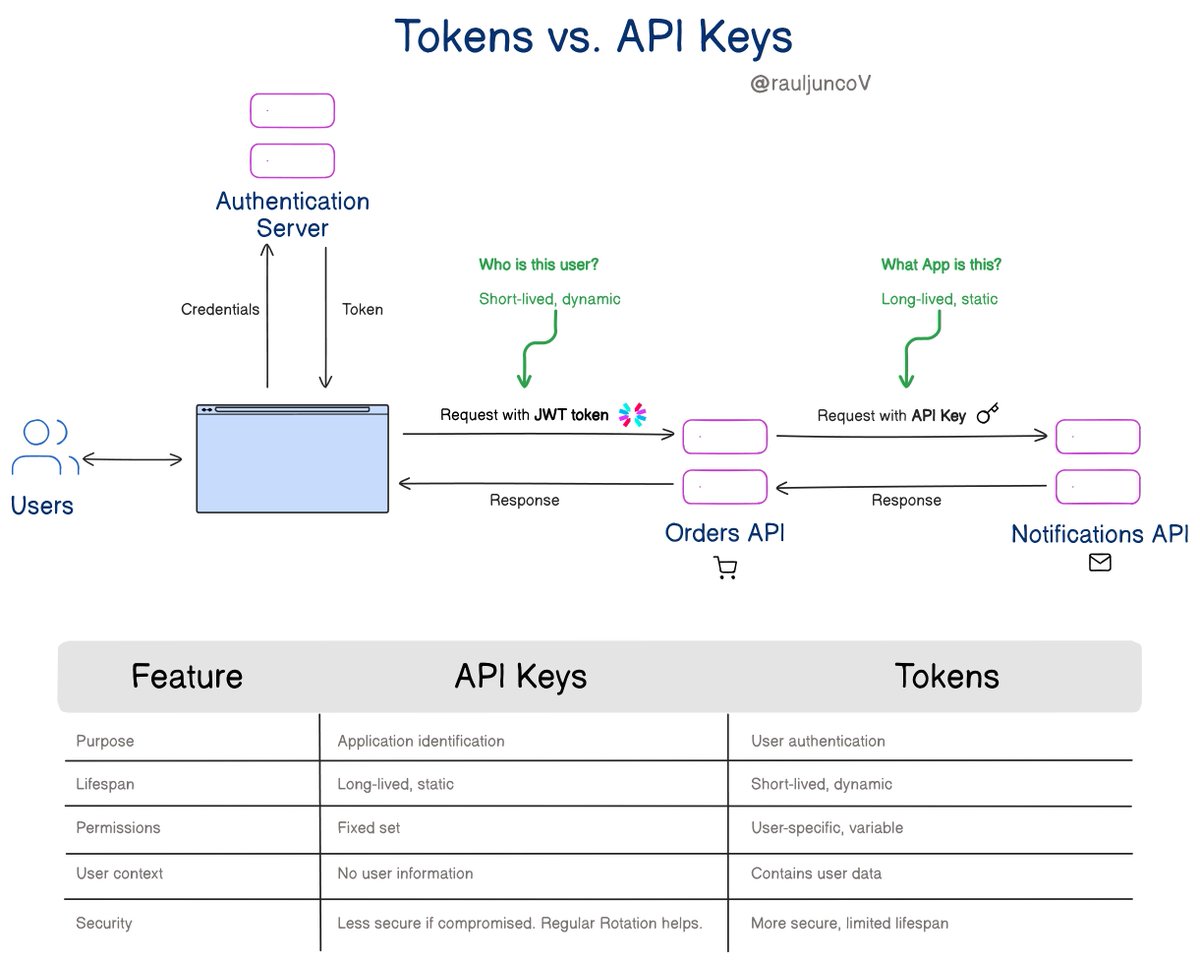
An Interview question every developer should know.
What's the difference between Tokens and API keys?
We use API keys and tokens for authentication and authorization.
But they serve different purposes and have distinct characteristics.
Tokens (like JWT - JSON Web Tokens):
Carries user context and permissions for authentication and authorization.
Encoded with a user ID, permissions, and expiration time, often in JWT format.
Critical for user-specific access, like accessing a user's profile data in an e-commerce platform.
It is issued by an authentication server after user login and contains user-specific information.
API Key:
Primarily for identifying the application or the consumer making the API call.
They are long strings we pass in the header or as a query parameter in the API request.
You use API keys when access does not involve user context. For example, accessing a public API or service-to-service communication.
They are long-lived and created through the API provider's platform or admin console.
In simple terms:
- Tokens are for managing user sessions, permissions, and context.
- API keys are for identifying applications.
Which one have you used the most?
After more than 2 years, I finally discovered the root cause of the issue where newly installed apps don't immediately appear...
It's a stock bug and happens when you have at least one home screen page hidden.