All Paid Courses (Free for First 4500 People).
𝗣𝗮𝗶𝗱 𝗖𝗼𝘂𝗿𝘀𝗲 𝗙𝗥𝗘𝗘 (PART - 1)
1. Artificial Intelligence
2. Machine Learning
3. Prompt Engineering
4. Claude,Chatgpt,Grok
5. Data Analytics
6. AWS Certified
7. Data Science
8. BIG DATA
9. Python
10. Ethical Hacking
(72 Hours only )
Like + RT + comment ' Drive '
Must Follow me so I can DM you.
Kafka vs AutoMQ — What's the difference?
Kafka operates as a distributed pub-sub messaging system. Allowing applications to publish and subscribe to real-time data feeds.
Its strengths? High throughput, scalability, fault-tolerance, and a mature ecosystem.
But Kafka is also complex and costly.
AutoMQ is a new generation of Kafka technology with 7k stars on GitHub: https://t.co/Wp4dv5DCmx
It's an open source, production-ready Kafka replacement that’s 9x cheaper, much easier to scale, and cloud-native.
What has attracted many developers to pay attention to AutoMQ on GitHub? Its innovation in Apache Kafka:
• Separation of compute and storage: This makes Kafka's Broker stateless, allowing compute and storage to scale independently.
• Fully built on object storage supporting the S3 API protocol, significantly reducing Kafka storage and operational costs.
• Reliance on cloud storage’s internal multi-replica mechanism to ensure data durability. There are no partition data replicas within the AutoMQ cluster.
That means no manual scaling, no downtime-heavy partition reassignments, and no massive cloud bills just to store data that could live in S3.
→ While it trades off some latency for cost efficiency, it’s ideal for teams looking for scalable and hassle-free event streaming without the operational complexity and costs of Kafka.
→ If ultra-low latency is required, the commercial version of AutoMQ additionally offers a low-latency write solution built on top of S3.
Key AutoMQ highlights/differentiators:
Cut Kafka TCO by 90%:
↳ Cut your storage/compute/network costs.
Self-balancing and self-healing:
↳ Built-in ability to automatically balance traffic, eliminate hot spots and self-healing.
Rapid scaling in seconds:
↳ Quickly replenish GB/s capacity in a business-insensitive manner. Forget capacity over-provisioning.
Streaming from Kafka topic to iceberg table without ETL:
↳ Built-in data lake support makes analysis easier.
100% Kafka compatibility:
↳ Enabling seamless migration, with monthly integration of the latest features and optimizations from the upstream Kafka community.
Low latency solution on S3(commercial only):
↳ P99 write < 10ms. Leverage low-latency cloud storage for acceleration
Check it out (link at top of post)
Thanks to @AutoMQ_Lab for providing a great alternative for event streaming and partnering on this post.
💬 Do you use Kafka or another message broker? ↓
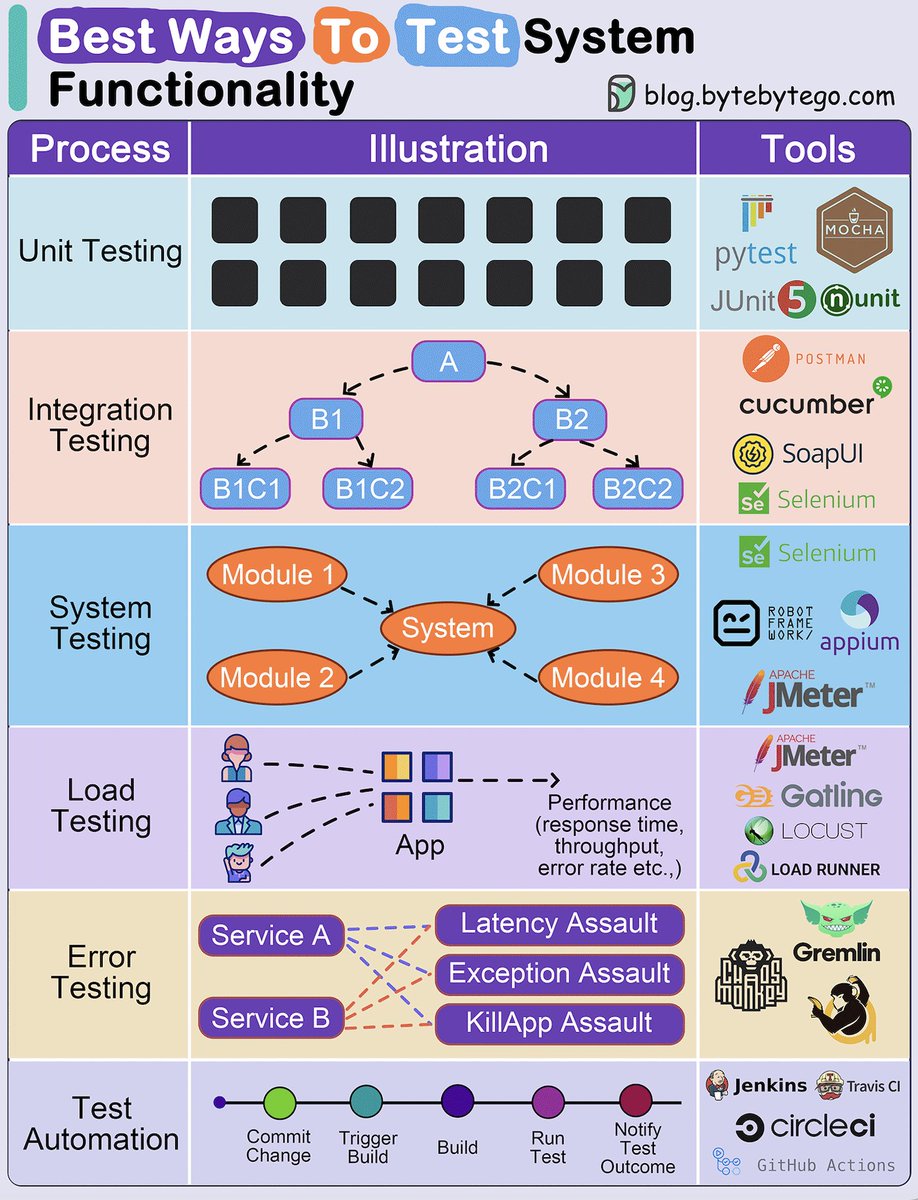
Best ways to test system functionality.
Testing system functionality is a crucial step in software development and engineering processes.
It ensures that a system or software application performs as expected, meets user requirements, and operates reliably.
Here we delve into the best ways:
1. Unit Testing: Ensures individual code components work correctly in isolation.
2. Integration Testing: Verifies that different system parts function seamlessly together.
3. System Testing: Assesses the entire system's compliance with user requirements and performance.
4. Load Testing: Tests a system's ability to handle high workloads and identifies performance issues.
5. Error Testing: Evaluates how the software handles invalid inputs and error conditions.
6. Test Automation: Automates test case execution for efficiency, repeatability, and error reduction.
Over to you: How do you approach testing system functionality in your software development or engineering projects?
Over to you: what's your company's release process look like?
–
Subscribe to our weekly newsletter to get a Free System Design PDF (158 pages): https://t.co/uc5M7CdXXC
Microsoft has launched one of the most comprehensive course on Generative AI!
This course is 18 lessons, where each lesson covers its own topic so start wherever you would like!
Lessons are labeled either "Learn" lessons explaining a Generative AI concept or "Build" lessons that explain a concept and code examples in both Python and TypeScript when possible.
Here's the link to the courses: https://t.co/3qwqKAAlIM
↓
If you're interested in AI Engineering, I write a weekly Newsletter @ML_Spring!
Join 8k+ reader now: https://t.co/plfkEj9PVz
There are over 1,000 engineering blogs. Here are my top 9 favorites:
- Netflix TechBlog
- Uber Blog
- Cloudflare Blog
- Engineering at Meta
- LinkedIn Engineering
- Discord Blog
- AWS Architecture
- Slack Engineering
- Stripe Blog
Over to you - What are some of your favorite engineering blogs?
–
Subscribe to our weekly newsletter to get a Free System Design PDF (158 pages): https://t.co/uc5M7CdXXC
Have you heard of the 12-Factor App?
The "12 Factor App" offers a set of best practices for building modern software applications. Following these 12 principles can help developers and teams in building reliable, scalable, and manageable applications.
Here's a brief overview of each principle:
1. Codebase:
Have one place to keep all your code, and manage it using version control like Git.
2. Dependencies:
List all the things your app needs to work properly, and make sure they're easy to install.
3. Config:
Keep important settings like database credentials separate from your code, so you can change them without rewriting code.
4. Backing Services:
Use other services (like databases or payment processors) as separate components that your app connects to.
5. Build, Release, Run:
Make a clear distinction between preparing your app, releasing it, and running it in production.
6. Processes:
Design your app so that each part doesn't rely on a specific computer or memory. It's like making LEGO blocks that fit together.
7. Port Binding:
Let your app be accessible through a network port, and make sure it doesn't store critical information on a single computer.
8. Concurrency:
Make your app able to handle more work by adding more copies of the same thing, like hiring more workers for a busy restaurant.
9. Disposability:
Your app should start quickly and shut down gracefully, like turning off a light switch instead of yanking out the power cord.
10. Dev/Prod Parity:
Ensure that what you use for developing your app is very similar to what you use in production, to avoid surprises.
11. Logs:
Keep a record of what happens in your app so you can understand and fix issues, like a diary for your software.
12. Admin Processes:
Run special tasks separately from your app, like doing maintenance work in a workshop instead of on the factory floor.
Over to you: Where do you think these principles can have the most impact in improving software development practices?
--
Subscribe to our weekly newsletter to get a Free System Design PDF (158 pages): https://t.co/uc5M7CdXXC
Top 9 website performance metrics you cannot ignore:
Load Time: This is the time taken by the web browser to download and display the webpage. It’s measured in milliseconds.
Time to First Byte (TTFB): It’s the time taken by the browser to receive the first byte of data from the web server. TTFB is crucial because it indicates the general ability of the server to handle traffic.
Request Count: The number of HTTP requests a browser has to make to fully load the page. The lower this count, the faster a website will feel to the user.
DOMContentLoaded (DCL): This is the time it takes for the full HTML code of a webpage to be loaded. The faster this happens, the faster users can see useful functionality. This time doesn’t include loading CSS and other assets
Time to above-the-fold load: “Above the fold” is the area of a webpage that fits in a browser window without a user having to scroll down. This is the content that is first seen by the user and often dictates whether they’ll continue reading the webpage.
First Contentful Paint (FCP): This is the time at which content first begins to be “painted” by the browser. It can be a text, image, or even background color.
Page Size: This is the total file size of all content and assets that appear on the page. Over the last several years, the page size of websites has been growing constantly. The bigger the size of a webpage, the longer it will take to load
Round Trip Time (RTT): This is the amount of time a round trip takes. A round trip constitutes a request traveling from the browser to the origin server and the response from the server going to the browser. Reducing RTT is one of the key approaches to improving a website’s performance.
Render Blocking Resources: Some resources block other parts of the page from being loaded. It’s important to track the number of such resources. The more render-blocking resources a webpage has, the greater the delay for the browser to load the page.
Over to you - What other website performance metrics do you track?
Reference: Cloudflare Docs
--
Subscribe to our weekly newsletter to get a Free System Design PDF (158 pages): https://t.co/uc5M7CdXXC
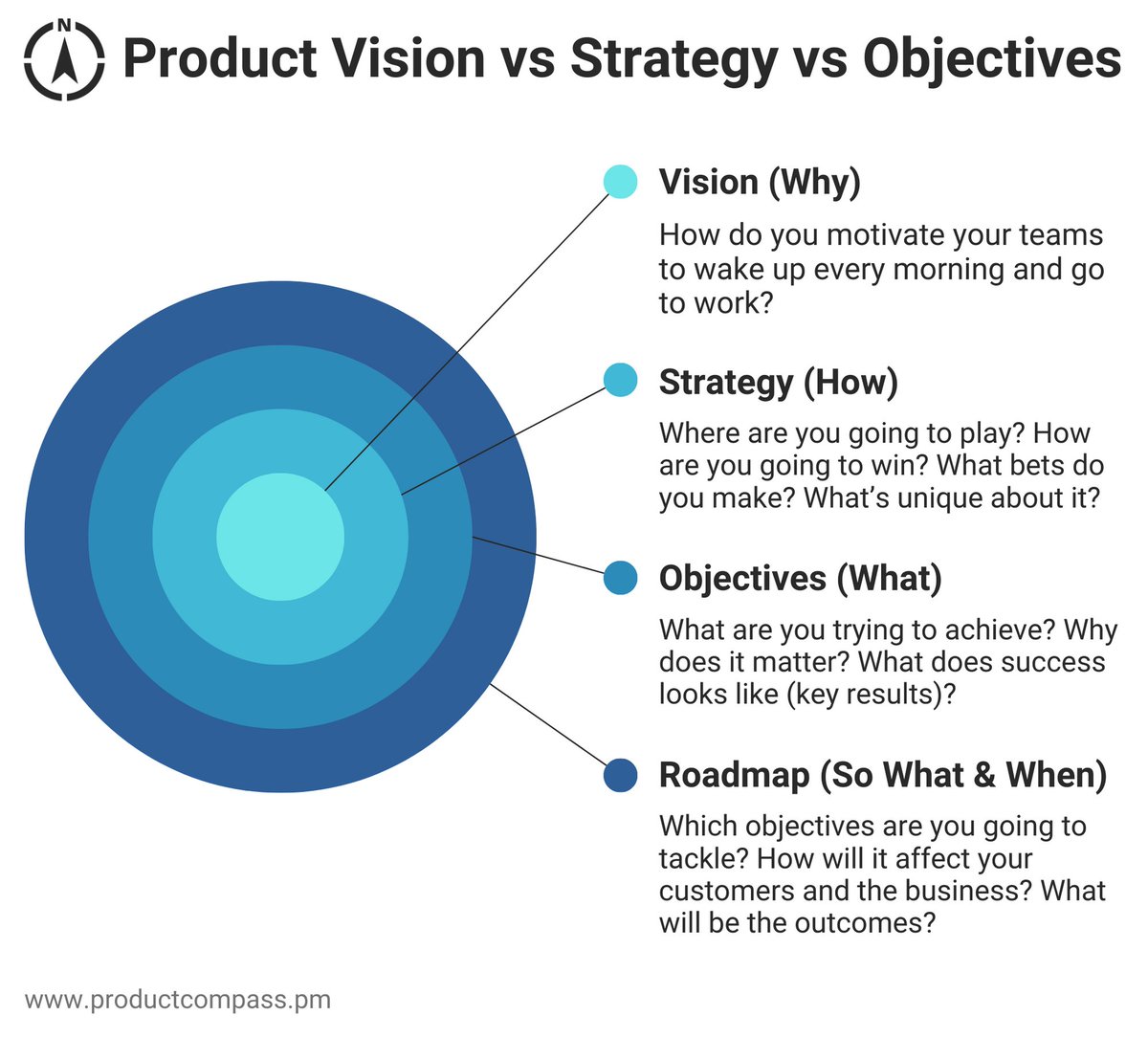
Many PMs struggle to explain the difference between Vision, Strategy, Objectives, and Roadmap.
But those are extremely simple concepts.
Let's tackle them one by one: 🧵