Unlock local, agentic workflows with Gemma 4 12B and Google AI Edge, directly on your laptop. Experience 100% on-device AI:
• Generate code in AI Edge Gallery (new to Mac)
• Dictate and edit text via AI Edge Eloquent (new to Mac)
• Serve Gemma 4 12B locally with LiteRT-LM
Dive in: https://t.co/gr7tOrZmc0
Today we’re launching another highly requested feature: Source Attribution! 🥳
No more guessing. Now you can see the exact formula (prompts + sources) used to make each of your artifacts. Want to make an adjustment? Just tap "Iterate" and customize to your heart’s content 💖
We’re sharing 4 exciting updates to help faculty and staff do more this year. From higher limits in Google NotebookLM to no-cost practice NEET exams in Gemini, see how we're evolving to support your educator and learner needs.
For more information: https://t.co/K0nZxFWpyE
Today we launched Gemini 3.1 Flash TTS, our most expressive and controllable text-to-speech model yet.
This launch [excitement] includes audio tags! 🗣🏷 Audio tags [explanatory] are a seamless way to guide vocal style, pace, and delivery using natural language commands embedded directly in your text. Want a different tempo or tone? [amazement] Just tag the audio to steer the AI-speech output!
The model supports 70+ languages (24 of which are high-quality evaluated languages, including: Japanese, Hindi, and Arabic). Watch the audio tags in action in the demo below ↓
You can now add custom cover art and descriptions to any of your notebooks 🥳
This is perfect for curating an aesthetic grid or putting a personalized touch on your notebook before sharing it with the world.
(We recommend uploading a 16x9 image, specifically of your hero)
Last month we launched Lyria 3.
Today, we’re introducing Lyria 3 Pro: our most advanced music model yet, from @GoogleDeepMind. 🎶
Now you can create tracks up to 3 minutes long with more creative control. We’re also bringing Lyria to more Google products starting today.
We heard you wanted more examples of Cinematic Video Overviews. Here's a few of our faves, created by the most talented, creative, intelligent people we know (you!)
Please keep sharing your example videos and prompts. We love to see them 🥰 🧵
I accidentally discovered how to compress a semester of learning into 48 hours.
A grad student at MIT showed me his NotebookLM setup. I thought he was just organized. Then I watched him pass a qualifying exam on a subject he'd never studied before.
Here's exactly what he did:
First: he didn't upload a textbook.
He uploaded 6 textbooks, 15 research papers, and every lecture transcript he could find on the subject.
Then he asked NotebookLM one question:
"What are the 5 core mental models that every expert in this field shares?"
Not "summarize this." Not "explain this topic."
Mental models. The stuff that takes professors years to develop.
But the next part is what broke my brain.
He followed up with:
"Now show me the 3 places where experts in this field fundamentally disagree, and what each side's strongest argument is."
In 20 minutes he had a map of the entire intellectual landscape of the field:
the debates, the consensus, the open questions.
Most students spend a full semester just figuring out what those debates even are.
Then he did something I've never seen before.
He asked:
"Generate 10 questions that would expose whether someone deeply understands this subject versus someone who just memorized facts."
He spent the next 6 hours answering those questions using the source material. Every wrong answer triggered a follow-up:
"Explain why this is wrong and what I'm missing."
By hour 48, he could hold a conversation with his thesis advisor without getting destroyed.
The tool didn't change. The questions did.
Most people treat NotebookLM like a fancy highlighter.
These students are using it like a private tutor who has read everything ever written on the subject.
The difference between a semester and 48 hours isn't the amount of content.
It's knowing which questions to ask.
Introducing Cinematic Video Overviews, the next evolution of the NotebookLM Studio. Unlike standard templates, these are powered by a novel combination of our most advanced models to create bespoke, immersive videos from your sources.
Rolling out now for Ultra users in English!
Google isn’t trying to win the AI race.
They’re trying to own the entire AI Agent ecosystem.
While everyone argues ChatGPT vs Claude, Google quietly built:
Models → Gemini Pro, Flash, Deep Think, Gemma
Design → Stitch, Whisk, Imagen
Research → NotebookLM, AI Mode
Video → Veo, Flow, Google Vids
Coding → Antigravity IDE, Gemini CLI, Jules
Agents → A2A, ADK, FileSearch API
The scary part?
All of these tools talk to each other.
That means:
10x faster prototypes
End-to-end AI workflows
Production-ready agents on GCP
The next AI war won’t be model vs model.
It’ll be ecosystem vs ecosystem.
Save. Share. Build.
Veo 3.1 templates in @GeminiApp give you a head start on your videos. 🎬
Now, you can start with a high-quality visual foundation instead of a blank prompt. Pick an aesthetic that fits your mood, then use prompts to layer in the characters and scenery that make it yours.
🎨 Rapidly prototype interactive 3D concepts with Gemini.
Learn how to use Gemini in the Canvas web app to build 3D environments and interactive models using WebXR APIs.
Start building → https://t.co/JvmiVIULW2
Explore more examples below 🧵
Stuck on a tough topic? 🤯
Guided Learning in the @Geminiapp walks you through it, step-by-step. Don’t just get quick answers—get real understanding that sticks.
Save this for after the break when you're ready to master the next chapter! https://t.co/FXTE5EySCW
gemini 3 pro
• our most intelligent model yet
• SOTA reasoning
• 1501 Elo on LMArena
• next-level vibe coding capabilities
• complex multimodal understanding
available now in Google AI Studio and the Gemini API
Gemini 3 is coming to Google Search, starting with AI Mode. ⚡ Here’s what to know:
🏆 This marks the first time we’ve brought a Gemini model to Search on day one.
🔎 Our newest model brings incredible reasoning power to Search because it’s built to grasp unprecedented depth and nuance for your hardest questions.
🔧 Gemini 3 in AI Mode can dynamically create the ideal visual layout for responses on the fly — featuring interactive tools and simulations — tailored to your query.
🔓 Starting today, Google AI Pro and Ultra subscribers in the U.S. can use Gemini 3 Pro, our first model in the Gemini 3 family of models, by selecting “Thinking” from the model drop-down in AI Mode.
Custom video overviews are officially 100% rolled out to ALL users! 🤩
What have been some of your favorite prompts you’ve tried? Do we need to add some more presets? Drop the prompts and example video overviews below!
Google merilis AI tools yang seru. Cara belajar kita bakal lebih menarik lagi pakai tools namanya: Learn Your Way.
Simak dan bookmark!
Menggunakan LearnLM,nantinya kita bisa bikin teks bacaan ke format belajar yang interaktif. Saat ini belum bisa customize, tapi pilihan-pilihan materi belajar sudah ada.
Mulai dari ekonomi, sosiologi, biologi, kimia, sampai computer science. Coba-coba dulu!
🚨 BREAKING: Google Research just dropped the textbook killer.
Its called "Learn Your Way" and it uses LearnLM to transform any PDF into 5 personalized learning formats. Students using it scored 78% vs 67% on retention tests.
The education revolution is here.
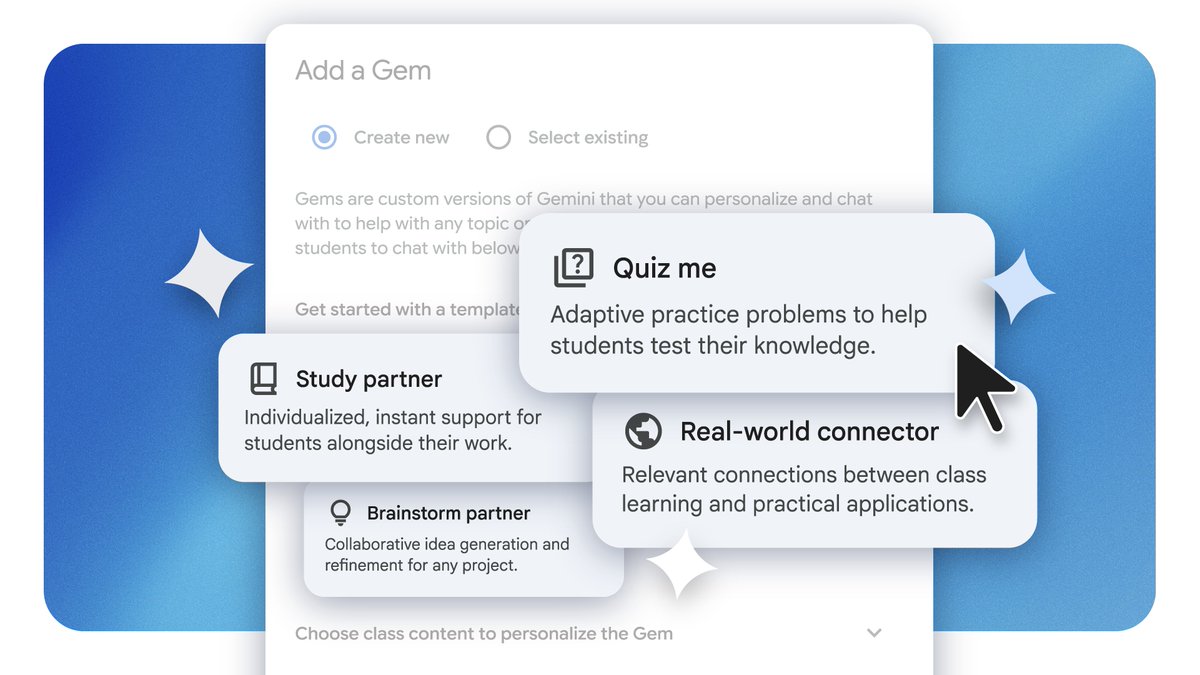
You can now create custom #AI learning experiences using #Gems in #GoogleClassroom! ✨
Pick a template like Study partner or Brainstorm partner, use class materials, and provide personalized support for students built from your curriculum 📚
Try it out https://t.co/w79oEriymG