Best YouTube Channels To Learn…
Cybersecurity - John Hammond
Networking - David Bombal
Python - Code With Harry
React - Codevolution
UI/UX - GFXMentor
JavaScript - Traversy Media
Java - kunal kushwaha
DevOps - Techworld with Nana
Blockchain - Telusko
AI/ML- Krish Naik
Web Development - Traversy Media
AWS - Code With Harry
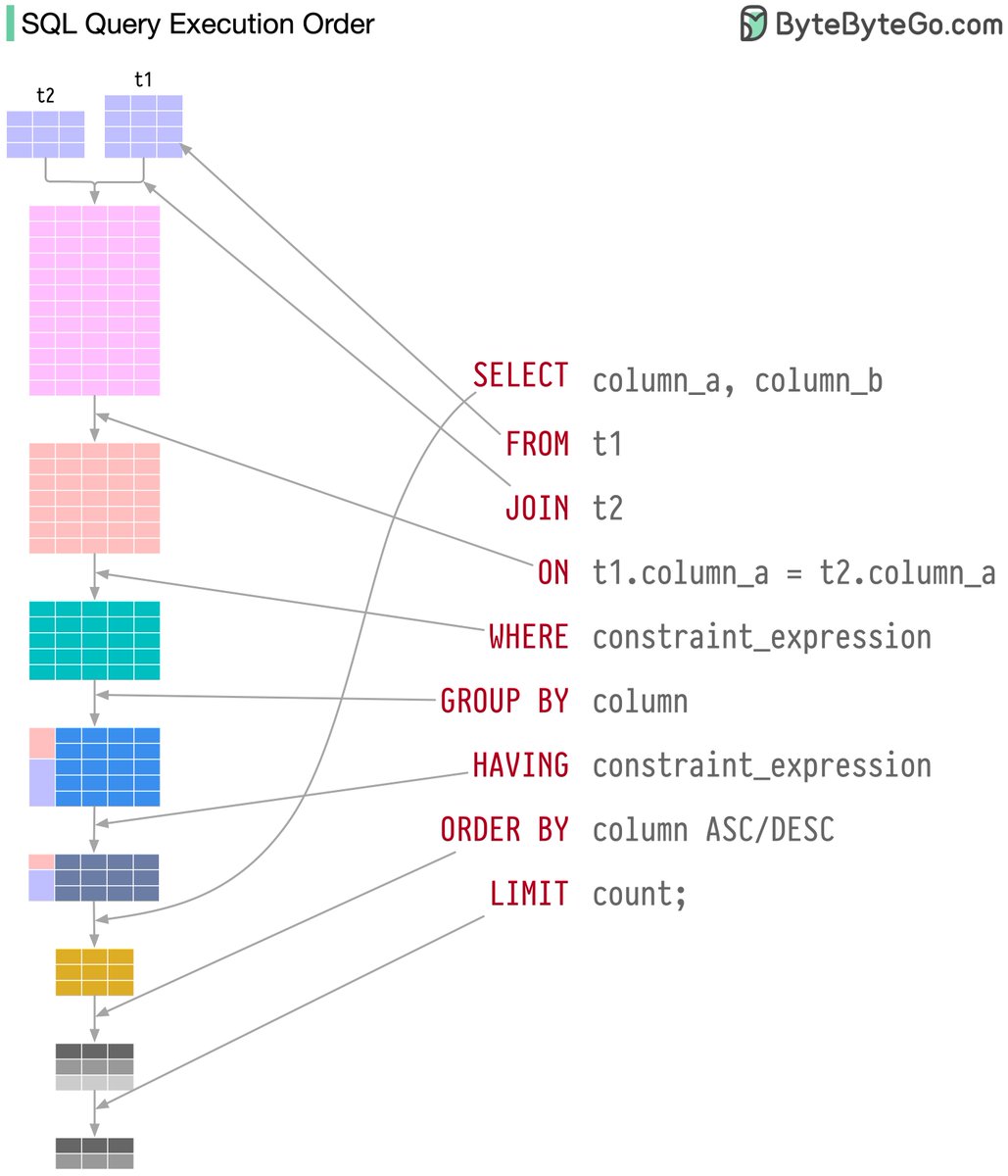
Visualizing a SQL query
SQL statements are executed by the database system in several steps, including:
- Parsing the SQL statement and checking its validity
- Transforming the SQL into an internal representation, such as relational algebra
- Optimizing the internal representation and creating an execution plan that utilizes index information
- Executing the plan and returning the results
–
Subscribe to our weekly newsletter to get a Free System Design PDF (158 pages): https://t.co/FIzCeaWsZV
HOW TO STRUCTURE YOUR BACKEND CODE IN EXPRESS JS (with detailed folder explanations)
📁
├── 📄 app.js
├── 📁 bin
├── 📁 config
├── 📁 controllers
│ ├── 📄 customer.js
│ ├── 📄 product.js
│ └── ...
├── 📁 middleware
│ ├── 📄 auth.js
│ ├── 📄 logger.js
│ └── ...
├── 📁 models
│ ├── 📄 customer.js
│ ├── 📄 Product.js
│ └── ...
├── 📁 routes
│ ├── 📄 api.js
│ ├── 📄 auth.js
│ └── ...
├── 📁 public
│ ├── 📁 css
│ ├── 📁 js
│ ├── 📁 images
│ └── ...
├── 📁 views
│ ├── 📄 index.ejs
│ ├── 📄 product.ejs
│ └── ...
├── 📁 tests
│ ├── 📁 unit
│ ├── 📁 integration
│ ├── 📁 e2e
│ └── ...
├── 📁 utils
│ ├── 📄 validation.js
│ ├── 📄 helpers.js
│ └── ...
└── 📁 node_modules
app.js : It's like the control center of your web application. It's where you set up and manage everything.
bin : Think of this as a place for starting your web server. It's where you have scripts that make your website work.
config : These are like settings for your website, such as where your database is or how your website should behave.
controllers : This is where you put the brains of your website explains the name controllers. Each file here handles a different part of your site, like customer stuff or product stuff.
middleware : Imagine these as helpers that help your website do things like checking if you're logged in or keeping a record of what people do on your site.
models : This is where you describe what your data looks like. If your website is a store, this is where you say what a product is or what a customer is.
routes : These are like the paths to different parts of the website. If the website is a city, these are the streets and highways.
public : Think of this as your storage room for things everyone can see, like images, styles, and scripts.
views : If your website is like a book, these are the pages. This is where you put together what people see on the screen.
tests : These are like exams for your website to make sure it works correctly. You create different kinds of tests to check different parts of your site.
utils : These are like handy tools you use to make your website better, like checking if someone's email is valid or formatting dates nicely.
node_modules : This is like your toolbox filled with tools (libraries and code) that you use to build your website. It's automatically filled with things your project needs.
Alright. that's a wrap. Follow me @mysticwillz for more tips like this.🙌🙌
DAY 16 of #20DaysOfReact
HOW TO STRUCTURE YOUR FRONTEND CODE IN REACT.
[with explanation]
📁src
|
|_ 📁components
| |_ 📁Cards
| | |_ 📄MainCards.jsx
| |_ 📁Buttons
|_ 📁api
| |_ 📄Auth.js
| |_ 📄Event.js
|_ 📁Pages
| |_ 📁HomePage
| | |_ 📄HomePage.jsx
| |_ 📁LoginPage
| |_ 📄LoginPage.jsx
|_ 📁contexts
| |_ 📄AuthContext.js
| |_ 📄EventContext.js
|_ 📁hooks
| |_ 📄useAuth.js
| |_ 📄useEvent.js
|_ 📁utils
| |_ 📄HelperFunctions.js
| |_ 📄Date.js
|_ 📁assets
| |_ 📁images
| | |_ 📄logo.svg
| | |_ 📄background.jpg
| |_ 📁styles
| |_ 📄global.css
| |_ 📄theme.js
|_ 📄App.jsx
|_ 📄index.js
Here is a brief explanation:
- src: This is the main folder where your React app lives.
- components: Think of this like a box of LEGO pieces. It holds small, reusable parts of your app, like building blocks. Inside, you have separate folders for different types of blocks:
Cards: These are special blocks that you can use to create things like information cards.
Buttons: Here, you keep different types of buttons you can use in your app.
- api: This is like a special toolbox where you keep tools for talking to the internet.
Auth.js: It probably has stuff for logging in and keeping your app secure.
Event.js: This could handle things like scheduling events or activities in your app.
- Pages: Imagine this as a storybook with different pages of your app.
HomePage: This page contains all the stuff for your app's main screen.
LoginPage: This is where users can log in to your app.
- contexts: Think of these like invisible helpers that carry messages between different parts of your app.
AuthContext.js: It helps parts of your app know if someone is logged in or not.
EventContext.js: This one helps your app share information about events.
- hooks: These are like shortcuts or tricks to make parts of your app work better.
useAuth.js: It helps with all the stuff related to logging in and out.
useEvent.js: This one makes working with events easier.
- utils: This is your toolbox of handy tools for your app.
HelperFunctions.js: Contains tools for doing all sorts of jobs in your app.
Date.js: It might help you handle dates and times in your app.
- assets: This is where you keep pictures, designs, and styles for your app.
images: Stores the pictures your app uses, like a logo or background.
styles: Holds the rules for how your app should look.
- App.jsx: Imagine this as the main stage where your app comes to life. It decides what to show and how everything should work.
- index.js: This is like the stage manager. It tells your app to get ready and appear on the screen for everyone to see.
This organized structure helps you build and manage your website in a neat and organised way, making it easier to understand and work on, especially when your project gets bigger and more complex and you have to make changes very often.
I am not saying that this is the only or the best way, this is what I usually follow and thought about sharing it.
How SQL injections work, and how to protect your system from them.
SQL injection is a type of attack where the attacker runs damaging SQL commands by inserting malicious SQL code into an application input field or URL.
For example, imagine an app that returns all your information after logging in. That query may look like the following:
SELECT * FROM users
WHERE username = 'USER_INPUT';
If an attacker were to submit a malicious input, the query could change to the following:
SELECT * FROM users
WHERE username = '' OR '1'='1';
This query will return all users as '1'='1' will always return true.
𝗬𝗼𝘂 𝗰𝗮𝗻 𝗽𝗿𝗼𝘁𝗲𝗰𝘁 𝘆𝗼𝘂𝗿 𝘀𝘆𝘀𝘁𝗲𝗺 𝗳𝗿𝗼𝗺 𝗦𝗤𝗟 𝗶𝗻𝗷𝗲𝗰𝘁𝗶𝗼𝗻 𝗯𝘆 𝗱𝗼𝗶𝗻𝗴 𝘁𝗵𝗲 𝗳𝗼𝗹𝗹𝗼𝘄𝗶𝗻𝗴:
𝟭. 𝗨𝘀𝗲 𝗽𝗿𝗲𝗽𝗮𝗿𝗲𝗱 𝘀𝘁𝗮𝘁𝗲𝗺𝗲𝗻𝘁𝘀 𝗼𝗿 𝗽𝗮𝗿𝗮𝗺𝗲𝘁𝗲𝗿𝗶𝘇𝗲𝗱 𝗾𝘂𝗲𝗿𝗶𝗲𝘀:
User input cannot be executed because prepared statements and parameterized queries ensure a distinct separation between user input and SQL code.
𝟮. 𝗩𝗮𝗹𝗶𝗱𝗮𝘁𝗲 𝗮𝗻𝗱 𝗰𝗹𝗲𝗮𝗻 𝗶𝗻𝗽𝘂𝘁𝘀:
Use expected formats and constraints to validate user input, and clean inputs to get rid of characters that may be interpreted as SQL code.
𝟯. 𝗙𝗼𝗹𝗹𝗼𝘄 𝘁𝗵𝗲 𝗹𝗲𝗮𝘀𝘁 𝗽𝗿𝗶𝘃𝗶𝗹𝗲𝗴𝗲 𝗽𝗿𝗶𝗻𝗰𝗶𝗽𝗹𝗲:
Limit the permissions for database accounts used by applications and services to only what is required for their functionality. This limits the system's vulnerability to SQL injection attacks.
Messi winning another Ballon d’Or before Mbappe and Haaland means he has defeated every generation he has faced. That's some m0nster sh!t right there. 🐐
एउटा आम माफी पाएको अपराधीले राष्ट्रिय टेलिभिजन आएर खुलेआम भन्दैछ हत्याराहरुको नाम अनि कसरी कानुनको बिश्वास गरुँ अनि कसरी आफूलाई सुरक्षित महसुस लाजमर्दो गद्दार सरकार?सायद यहिँ त होला गणतन्त्रको उपलब्धि।
#बिनोदविनोदी#बिरोजी#आँगन_साहित्य
@centregoals Everyday it happens in Palestine and no one cares but once they’re getting a taste of their own medicine and everyone suddenly wakes up. Hypocrisy at its best! 👏🏼👏🏼👏🏼👏🏼👏🏼
Future CSS Tip! 🚀
You can create auto-resizing text inputs with one line of CSS 🤯
textarea {
form-sizing: content; 👈 That's it!
}
The size of your input will grow to fit your content. If you want to constrain the size, do something like this:
textarea {
form-sizing: content;
min-height: 2lh;
max-height: 10lh;
}
This one's awesome. Think about how much effort it will save you 🙌 No more JavaScript to sync a textarea height to fit the content 🔥
Perfect for chat interfaces, messaging, comments, etc. 📢
@CodePen link below! 👇