📹 Technical Optimization for AI search: In the 6th episode of the AI Search Roadmap series I go through the top mistakes, principles, best resources and do's and dont's for technical optimization for AI search with the amazing @torylynne, @Jammer_Volts, and @patrickstox:
* Top tech optimization errors for AI search
* Steps and criteria for technical optimization for AI search
* Tools and resources for tech optimization for AI search
Thanks to @Similarweb for the episode and series sponsorship!
Watch it fully here: https://t.co/bY5Q5XvFN3
People always ask me what it's like working with @tobi.
Here's @sama's answer: he writes the software himself, he sends OpenAI more detailed product feedback than anyone else on earth, and he stays six to eight months ahead of every other CEO.
Nothing in this clip surprised me. This is just what every day at @Shopify looks like.
Okay, This is a big Hermes Desktop update 👀
Hermes can now actually use the Preview pane.
Not just open a page.
Not just read a page.
Use it.
Click. Type. Scroll. Navigate. Annotate.
Inside the same visible browser pane you are watching.
That is a big deal.
It means Hermes Desktop is starting to feel a lot less like a chat window attached to tools and a lot more like an agent that can work through web tasks in front of you.
Think about the use cases:
→ Open documentation and show you exactly where a setting lives
→ Walk through a setup flow and point out what to click
→ Search a site, open the right result, and keep moving
→ Work through a dashboard while you supervise
→ Annotate important controls on a crowded page
→ Reproduce a web issue step by step
→ Fill out multi-step web workflows with you watching
→ Find the right tutorial or guide and take you straight to it
That changes the feel of Hermes Desktop.
Because now Hermes is not just telling you what to do.
It can show you, point to it, and act on it in the same workspace.
This one opens up a lot!!!
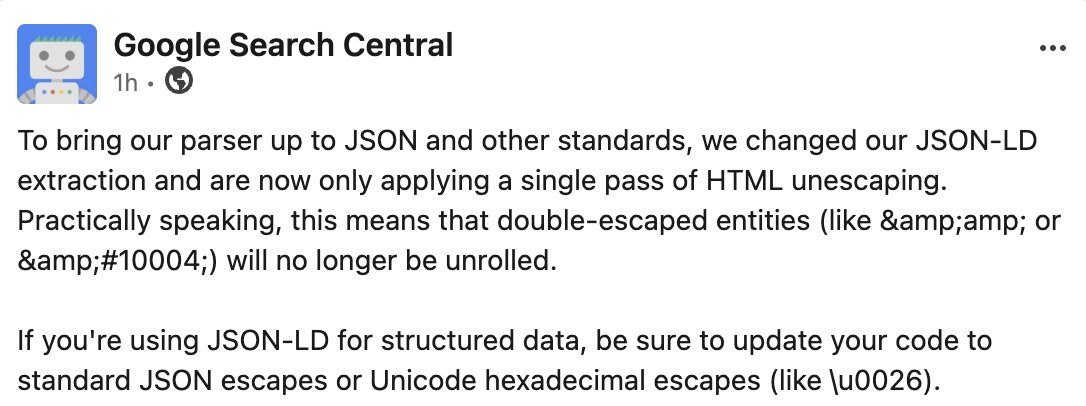
Google's crawler now strictly enforces standard JSON formatting when reading your site's structured data, schema markup, instead of auto-correcting double-escaped HTML text https://t.co/Y0eyoZTbfA
Last month you told us Remote Control was the thing you'd most like us to fix, so we've been working hard on reliability.
Here's what's better today: 🧵
There’s a phenomenon where talented individuals can achieve 10x their potential thanks to AI when working on their own thing
But when the same individual is put into a large organization, they at most increase their potential by 20% (and sometimes it’s even decreased)
This is why I’m seeing more and more talented people leave large companies. (The only exceptions are probably top AI labs like OpenAI/Anthropic)
If you are having trouble making the div & script Google gave us for Preferred sources centered, and without having an ugly box around it, this code snippet worked for me:
<style>
/* Remove background, border, and shadow from Google's widget container & iframe */
div[google-add-preferred-source-btn],
div[google-add-preferred-source-btn] *,
div[google-add-preferred-source-btn] iframe {
background: transparent !important;
background-color: transparent !important;
box-shadow: none !important;
border: none !important;
}
</style>
<div style="width: 250px; margin: 0 auto; background: transparent !important; box-shadow: none !important;">
<div google-add-preferred-source-btn></div>
</div>
Computer use, the browser tool, the Skills API, and the Files API are now generally available on the Claude Platform.
Automate work in applications that have no API with fewer round trips per task, and build Claude Managed Agents on versioned skills and reusable files.
Use Hermes Agent however you want.
Modify it, extend it, share it, fork it. Use it locally or in the cloud. Use the desktop app or the TUI or text it or talk to it from your smart fridge. Set up your great-aunt with it or run a Fortune 500 on it. Give it your own keys, use it through Nous Portal, or use local models on your own stack. Use one model or fifteen or blend them with MoA. Use it to plan an elopement, debug an EVM event, summarize a lease, troubleshoot that pesky issue with your car, reverse a DataFrame, or autorespond to your boss's emails. Run it on a Mac Studio, a $35 SBC, a hand-me-down ThinkPad, a Docker container, a Hermes Cloud VPS that costs as much as a cup of coffee, or eight of each at once. Create a shared bot that answers questions no one on your team can. Ask it to modify itself. Use it to parse a WhatsApp backup, answer your mother's questions about a power bill, or set a cron to scan the group chat and notify you when someone mentions that deadline you're avoiding. Put it in charge of remembering why you named the branch that. Put it in charge of filing your email into folders or cleaning up all the files named report_final_draft1.pdf. Have it scan the news weekly to settle that stupid bet you made with your brother that one time. Ask it to send your wife an article about cats every morning which she will pretend to be annoyed by even though it really makes her day.
Most social media tools suck.
(I've tried them all over 7 years of doing this).
They claim to help you go viral.
They claim that you'll grow fast on social media.
They claim that they'll make it easy on you, so you can just grow your following without having any form of skill or understanding.
And now they're trying to go fully agentic, which only works if you know what you're doing (we'll talk about that later, we built the MCP for social media).
Plus, when everyone has an advantage, it is no longer an advantage.
I promise you, I love AI, but having it write everything for you, especially as a beginner, is a death sentence.
You may get lucky and have one, two, or three posts do well.
You may gain a lot of followers (because that's what they promise to get you to buy), but then what?
Can you replicate it?
Does your audience actually care about who you are?
Or are you just a one hit wonder like every other creator who tries to get-followers-quick?
The creators you love... the ones who put out ideas that actually change your life, understand that the creative process (capturing, resurfacing, and synthesizing ideas) is your competitive edge when everyone is racing to put out as much slop as possible.
So we built an actual solution.
For the people who know deep down that the toys and gimmicks being marketed to you aren't a long term strategy.
It's called Eden. The second brain for creators.
It has every scheduling, analytics, auto-dm, and outlier research (for all platforms) features that everyone else has - built by someone who knows what's useful and what's not.
But it also has the ideation process built in, which cannot be skipped.
Here's what it looks like, and how to write a post people actually care about:
1) Save inspiration from anywhere (and read + highlight)
Capturing ideas, posts, links, and highlights inside of an agent or AI chat sounds like hell.
Not everything needs to, or should be, jammed into a chat UI.
In Eden you can:
- Paste any social post link (we transcribe any post)
- Integrate with Kindle, Snipd, or Readwise
- Pull in X or Substack bookmarks
- Jot down quick ideas or write inside docs
- Open any YouTube transcript or article in Reader mode and highlight it
We auto-categorize and tag everything for you, so our Deep Synthesis agent can find novel connections and relations across your library - making it easy to surface idaes you thought you lost.
2) Research what's working, study top creators
Outlier tools are the bread and butter for every creator.
When you do research for a YouTube video, you look for high performing titles and thumbnails, and you study what worked for others.
But what about every other platform?
We have a social corpus of 3m+ posts across all platforms and growing.
You can scroll the Discover page for inspiration, search any creator and filter by top posts, or use Deep Social in the AI chat to search across all of them.
This is what gives the MCP access to trending topics without scraping millions of posts yourself.
3) Create with everything in one place, build swipe files
I don't think I will ever give up writing.
I love sitting down in the morning, opening up a page, researching good ideas, and turning it into something worth sharing.
In Eden, you work on Boards.
You can paste social posts and build shareable swipe files, or you can add your outlines and drafts while having your library, chat, or ideas open right next to it.
4) Chat with anything to get the information you need
Claude and ChatGPT are essential, but they are blind.
They can't read social links. They can't see what's trending.
When you're writing scripts, articles, posts, or drafts - you need to be able to pull information from the sources you research. In today's world, that usually means social posts, YouTube videos, and articles.
5) Draft, schedule, and publish to all platforms
X, Instagram, LinkedIn, Substack, Threads, TikTok, and YouTube shorts.
And yes, we are one of the first to support article scheduling to X and Substack.
You don't have to copy paste to every platform anymore.
You simply write, schedule, and let it go out to all platforms.
6) Or do it all from the MCP
I don't believe that the future of content is fully agentic.
But, that doesn't mean that AI can't help with researching top posts, ideation, and scheduling content.
You do the writing and thinking, let AI handle the busy work and resurfacing of ideas you need to find.
With Eden, you don't need to give up your Claude, Hermes, or other agentic workflows. You simply connect the MCP and now you can build your own agentic content system, if that's your cup of tea.
Eden is the Social Media MCP.
You don't have to pay for scrapers anymore.
You can finally access trends, any social link, and any account.
You can access your analytics, build content dashboards with our infrastructure (that you don't need to maintain as a full time job), and post.
We've actually built 4 skills for deep topic research, personal brand strategy, building a content command center, and more - we'll link those below.
All in all:
If you're a creator, Eden is your base.
It's where you write, research, and publish every single day.
Try it free below:



![Marie_Haynes's tweet photo. If you are having trouble making the div & script Google gave us for Preferred sources centered, and without having an ugly box around it, this code snippet worked for me:
<style>
/* Remove background, border, and shadow from Google's widget container & iframe */
div[google-add-preferred-source-btn],
div[google-add-preferred-source-btn] *,
div[google-add-preferred-source-btn] iframe {
background: transparent !important;
background-color: transparent !important;
box-shadow: none !important;
border: none !important;
}
</style>
<div style="width: 250px; margin: 0 auto; background: transparent !important; box-shadow: none !important;">
<div google-add-preferred-source-btn></div>
</div>](https://pbs.twimg.com/media/HQL-VrxW0AAN22R.jpg)


