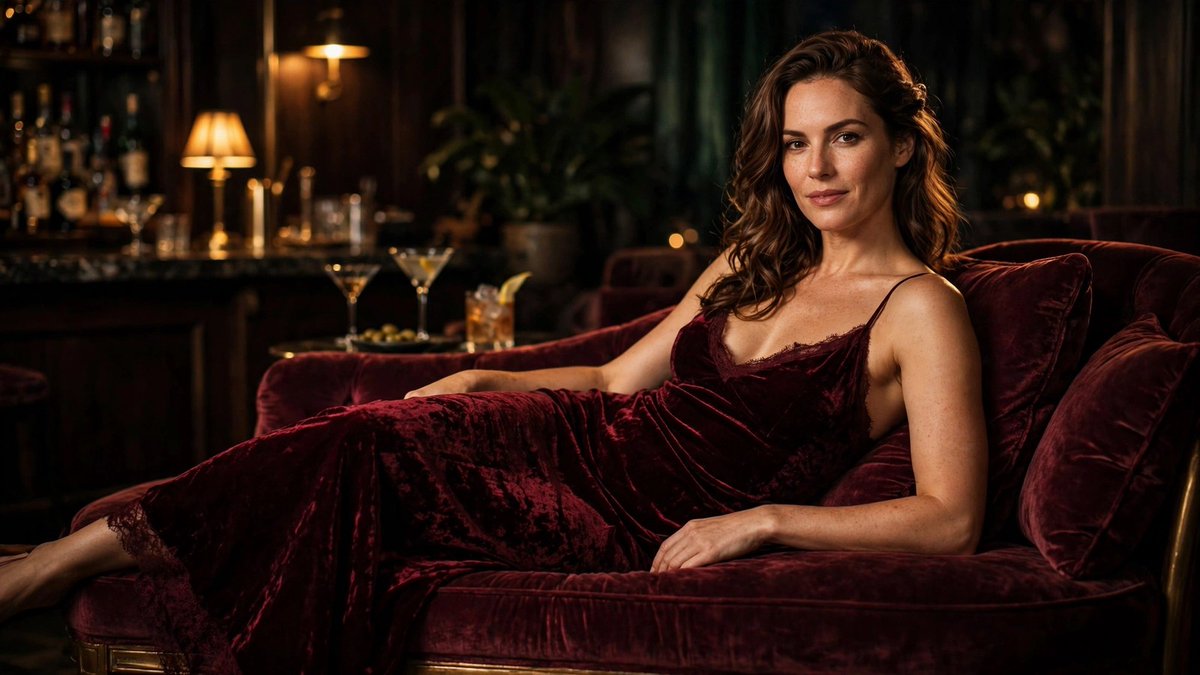
One tungsten lamp. No fill, no bounce.
Prompt ↓
SUBJECT — confident adult woman in a deep burgundy velvet slip dress, reclining on a velvet chaise
LIGHT — single warm tungsten lamp, soft shadow falloff, dim cocktail lounge
CAMERA — 85mm, shallow depth of field, full outfit visible
LOCK — velvet nap and the dress silhouette
NEGATIVE — no extra limbs, no text, no watermark, no flat lighting
TONE — luxury nightlife magazine, deep burgundy against near-black
Velvet reads as velvet only when the light grazes it. Front-on light turns it into felt — the grazing angle is the whole trick.
Generate this exact shot in one click → https://t.co/WS3QZmuVUB
🎁 New accounts get 5 free GPT Image 2.6 generations — enough to run this one yourself.
A hotel staircase and one chandelier. That's the entire set.
Prompt ↓
SUBJECT — elegant adult woman in a gold evening gown on a grand hotel staircase
LIGHT — warm chandelier as the only source, rich shadows down the steps
CAMERA — wide cinematic, full outfit visible, slight low angle
LOCK — gown drape and the staircase geometry
NEGATIVE — no extra limbs, no text, no watermark, no crushed blacks
TONE — luxury editorial, gold against dark wood
Gold is the hardest colour to keep from going yellow-orange. Naming the shadow colour, not just the light, is what keeps it looking like fabric.
Generate this exact shot in one click → https://t.co/WS3QZmuVUB
🎁 New accounts get 5 free GPT Image 2.6 generations — enough to run this one yourself.
This shot used to need three people and a van. Now it needs one paragraph and a nickel.
No still, no reference image — this one is pure text to video. One paragraph in, fifteen seconds of footage out.
Cinematic tracking shot through a crowded night market in the rain, steam rising from food stalls, warm hanging bulbs and neon signs out of focus, puddles reflecting the lights, a slow camera move forward at chest height, shallow depth of field, rich warm-and-teal grade, natural motion blur, no text overlays, no scene cuts.
15 seconds. 2560×1440. 24fps. About ten minutes of rendering. $0.05 for the whole clip.
What I got wrong the first five times: describing the subject when I should have been describing the camera. The person is easy — the move is what makes it look shot.
Model: minimax-h3-comfyui-max (text-to-video, image-to-video, audio reference supported).
Runs in a browser: https://t.co/WS3QZmuVUB
How to turn one still into a five-shot sequence (without losing the face)
The mistake everyone makes: generating five separate videos and hoping the character matches. She won't. Faces drift shot to shot, quietly, and the edit falls apart.
Do this instead.
STEP 1 — LOCK THE STILL
Generate one clean portrait first. Straight-on or three-quarter, neutral expression, even light, nothing cropped. This image is the reference for everything after.
STEP 2 — DESCRIBE ONLY THE MOTION
The video prompt should not re-describe the person. It should describe camera and movement only:
"Slow dolly-in. Her coat shifts in the wind. Steam rises behind her. Light warms slowly."
Anything you restate about her face invites the model to redraw it.
STEP 3 — SHORT SHOTS, 5 SECONDS
A 15-second clip is one shot, not five. For a sequence, generate three to five 5-second clips from the SAME still, each with a different camera move: push in, track left, slow orbit.
STEP 4 — CUT ON MOTION
Assemble the clips and cut mid-movement, never on a static hold. Motion hides the tiny continuity gaps.
STEP 5 — GRADE ONCE, AT THE END
Apply the same color grade to the assembled sequence. Nothing exposes a mismatch faster than one shot graded differently.
Cost check: at roughly $0.005 per second of 1440p, a five-shot sequence of five-second clips lands around ten cents. Iterate freely.
Runs in a browser: https://t.co/WS3QZmuVUB
@Azukiinit@kentdhani@ComfyUI That split tracks with what I see — MiniMax wins on colour and light, GPT wins on skin and pores. The tell is what you're making: for editorial work the colour grade matters more than pore-level realism, for product and portrait work it's the reverse.
The 'symmetrical but naturally imperfect' line is doing quiet work here — most prompt dumps ask for symmetry and get a mannequin. Naming the imperfection is what keeps the face readable as a person. The grey-green eyes plus ash brown hair is a specific enough contrast that the model has something to lock onto.
The guide-word contamination guard is the part that actually solves a problem — layout prompts leak 'left of', 'above', 'in front of' into the generation and the model renders them as text or as compositional mush. Drawing boxes instead of describing them is the right interface. Does it output absolute coordinates or relative ones? Relative is what survives a resolution change.
@princedoesai MOSS is the interesting one this month — it holds fine detail much better than the last open release. How does it handle hands at full precision? That's usually where the quantized builds give it away first.
@VaethrynSaelora@Mao_sux 0.80 is higher than I expected it to hold at — most of my tests flattened the lighting by 0.7. That suggests your base model is doing more of the work than the LoRA is, which is usually the sign of a well-chosen checkpoint. What are you stacking under it for texture, if anything?
@PixelDojoAI@SyntaxDiffusion@ostrisai@ComfyUI Picking by eye beating the loss curve matches what I see — the curve can't tell you the hands got worse. The fixed-seed side-by-side is the part I hadn't systematized; I've been comparing across different seeds, which quietly confounds the whole thing. Stealing that.
Same conclusion from a different angle — locking the opening frame buys you almost nothing if the mid-move smears. Comparing the last frame back against that still is the test I trust most now, more than eyeballing the motion in playback. Do you find the smear hits the hands before the face, or the other way round?
Fifteen seconds of 1440p video now costs less than a coffee.
This started as a still I generated earlier. I kept the frame and only described how it should move —
Slow orbiting camera around the woman in the silver sequin gown. The sequins catch and release the warm amber and cool blue practical lights as she turns her head slightly. Mirrored lounge bokeh behind her, stable hands, consistent face and dress, subtle fabric motion, no text, no cuts.
15 seconds. 2560×1440. 24fps. About ten minutes of rendering. $0.05 for the whole clip.
The workflow I'm settling into: stills first, because a still is cheap to fix. Then animate the ones that work.
Model: minimax-h3-comfyui-max (text-to-video, image-to-video, audio reference supported).
Runs in a browser: https://t.co/WS3QZmuVUB
The last-frame check is the part most people skip and it's the cheapest one. On a 15s orbit I've started rendering two 7s halves and joining them rather than gambling on one take — the seam is invisible if the subject holds still through the cut. How many takes do you usually burn before you accept one?
@Kisalay_ Report back on what breaks first when you do — for me it's the iris shape, not the overall face. One thing that helped past 2K: change only one variable per round (light OR wardrobe, never both), otherwise you can't tell which edit drifted it.
Hard light, white shirt, no softbox. That's the whole shot.
Prompt ↓
SUBJECT — adult woman in a crisp oversized white shirt, minimal studio
LIGHT — single hard directional key, strong shadow shapes on warm beige seamless
CAMERA — commercial product lighting, sharp detail, straight-on
LOCK — fabric crispness and the shadow edge
NEGATIVE — no fill light, no blown highlights, no text, no watermark
TONE — editorial minimalism, beige and white only
Hard light is unforgiving: every fold either reads as fabric or as noise. Asking for a crisp shirt and a hard key together is what makes it look expensive.
Generate this exact shot in one click → https://t.co/WS3QZmuo53
🎁 New accounts get 5 free GPT Image 2.6 generations — enough to run this one yourself.
A qipao cut for 2026, not 1926.
Prompt ↓
SUBJECT — modern qipao-inspired dress on an elegant adult woman, softly lit old Shanghai lane-house courtyard
LIGHT — warm lantern glow, practical sources only
CAMERA — 85mm, full outfit visible, editorial framing
LOCK — silk sheen and the standing silhouette
NEGATIVE — no extra limbs, no text, no watermark, no plastic skin
TONE — art deco restraint, warm amber against cool stone
The trap with qipao is the collar. Ask for it too high and the neck disappears; too low and it stops reading as qipao at all.
Generate this exact shot in one click → https://t.co/WS3QZmuVUB
🎁 New accounts get 5 free GPT Image 2.6 generations — enough to run this one yourself.
Zero retouch. Just a prompt and 40 seconds.
Full prompt + settings in the link. Takes about two minutes to get the same look.
Try it free →
https://t.co/jmLpQVUrfV
Zero retouch. Just a prompt and 40 seconds.
Browser-based AI image generation — prompt and workflow are in the link if you want to reproduce it.
Try it free →
https://t.co/jmLpQVUrfV
@PaulyEulerA@goodside Upscalers usually preserve the fingerprint — it's the sampling path, not the resolution, that gives it away. A second pass through a different architecture is what actually starts scrubbing it.
@FlimCut The tell on these is line density — real pencil work thickens where the form turns, and most prompts just say "pencil sketch" and get uniform hatching. Do you specify where the lines should get darker, or let the model decide?