3 months ago I started building a coding agent that runs in the cloud.
It's since written every line of code I've shipped, including itself.
Today, I'm open sourcing it. Introducing Open Agents.
For Army Veteran Kenneth Warkocki, sailing was the event he felt most apprehensive about – but it was also a lifelong goal. With support from Warrior Sailing, he discovered the power of purpose and teamwork on the water.
This is what adaptive sports can do: build confidence, create connection, and help Veterans reach new horizons.
Thank you to Warrior Sailing, the Department of Defense, and Eisai for making this experience possible.
Learn more: https://t.co/ct0TzJpUiM
Just when you think @tannerlinsley and his team at @tan_stack couldn’t possibly deliver more value than they already have… they slap you in the face with the innovation stick.
What a time to be alive!
TanStack DB is an extremely gratifying realization of the years-long vision I had for React Query from day 1.
To be honest, most of us wouldn't have been ready for sync back then and many still aren't, which is exactly why Query exists today, as an incrementally adoptable tool to bring you (and pretty much any existing FE tech you have) out of the data fetching stone-ages into the modern JS world.
But that's just the first step.
We knew from the start that despite being transformative, Query could only get us so far, even if that was 90% of the way. A foundation for us to stand on to conquer the the last mile.
DB delivers similarly massive UX/DX improvements and simply put, goes where Query never could, all while likely removing code you had to write in Query (or any other pseudo-sync-engine client)
We're just getting started. DB is already a game-changer for DX and UX even though it's beta.
Buckle up.
I'm using agents to write a lot of code now.
Just 6 months ago it didn't really work well, so if you haven't tried in a while, this is your sign.
Let me explain practically how I've been using them, where they still kind of suck, and what tools I've had success with.
I'm using a combination of Cursor, Claude Code, and v0 for a variety of different tasks. You might first ask: wait, why three tools?
The reality of AI models today (and AI products) is that it's unlikely a single tool will be able to reliably handle everything. At least that's what I've seen, your mileage may vary.
Let's talk through each tool.
Cursor (Primary IDE)
I've been using Cursor as my primary IDE for about 4 months. Before that, I spent 6 months flipping between Zed and Neovim (after using VS Code for a long time). Cursor is really good.
(I have a longer video on Cursor/IDEs if you want more details: https://t.co/0QW3UMExgr)
For me, Cursor brings the familiarity of VS Code with the best AI interface for general programming (reading files, quick edits, tab completion). Sounds silly but the built-in git diff of VS Code is extremely goated and I prefer it over many other things.
I've only started to briefly experiment with background agents, because at about the same time I started trying out Claude Code. Cursor seems to keep getting better on every release, so I'm going to stick with it.
Claude Code (Agentic Loops)
Claude Code is the first CLI agent I've been extensively testing. There are others in the space (including OSS versions) which likely have similar properties, so it's too soon for me to say one is dramatically better than others.
But more than anything, Claude Code has shown me the power of extremely fast loops with agents. It feels a bit faster than Cursor's agent, but this could also be the UX (it's really well designed). Claude Code has access to a bunch of tools, including web search, and is able to spin up subtasks to do even more work in parallel.
In practice, I've found it to be extremely good when you can control the entire "loop". Write some code, check if it compiles, if not fix it. Then try the tests. If they fail, fix it. Rinse and repeat for linting or other steps. This is where Software 1.0 best practices meet Software 2.0 (AI-era).
Having deterministic, fast ways to verify correctness in your apps is key for agents. You want tests. And they can't take 10 minutes to run. You want typed languages and even linters (I begrudgingly accept them now). This way the autonomous agents can "self heal" and fix their own mistakes.
I sometimes fire off a prompt to Claude Code and see along the way, it fixed 2 or 3 issues from TypeScript / tests. It's worth really internalizing this point and thinking about how it will impact your tooling choices in the future.
Claude Code still feels expensive, but relative to the value and time saved, it's likely worth it for many people (again, your mileage may vary). I want to try out some others: OpenCode, Amp, and a few other ones hitting the market soon.
v0 (Web Agent)
I've been using v0 for the longest since it's built at Vercel. The first version (*cough* a v0) was pretty basic, and the models at the time really weren't that great (1.5 years ago).
But v0 has gotten dramatically better since then. At some point, probably 6 months ago or so, it crossed a threshold where quality started to become *really good*.
It wasn't one specific thing, but many small things. The underlying model (a preprocessing / classification step, a regularly updated base model like Claude 4, and a custom trained AutoFix model) helps fix errors other base models would hit generating code, plus it's able to weave in user preference data and general knowledge of web tools like Next.js / React / etc.
(More on the v0 model if you're curious: https://t.co/hvY6dE6oTo)
I started using v0 for prototyping and making nice UIs. Then I expanded to do animations like framer-motion. And now I'm doing full-stack, backend code on the Next.js side (APIs, talking to databases, etc).
Still, I previously would hit a point where I needed to eject v0 and go to Cursor. Which sucked because then my time in v0 was basically done, and the models in Cursor wouldn't be as good at web stuff as v0. But now both of those are fixed.
I can use the v0 model inside of Cursor, and v0 now has two-way git sync. This means that I can push commits locally in Cursor, go back to the v0 UI, and it just automatically pulls in the latest code and keeps on cooking. This is huge because now I can use Cursor and v0 together without it feeling like a duct-tape mess.
Browser-based Agents
My exploration here is still in progress. The Claude Code GitHub integration didn't work when I tried it first, and haven't revisited since, so have been really only using it locally.
I have been using OpenAI Codex a bit more on some of my side projects, essentially as yet another agent that can run in the background (in parallel). For example, I've asked it to think critically about the app architecture and suggest alternative approaches. Or ask it to explain how it thinks the code works, and then compare that to reality. Or even just say "are there any obvious bugs or red flags". It's like a swarm (hehe) or people working for me.
I'm using Devin at Vercel to merge a ton of small PRs to our docs. Those things that die off in a Slack thread somewhere, or die in a Linear backlog. I just @ mention Devin in the thread, it makes the PR, and then we ship it.
Funny enough, we also built a custom lil' GitHub Action which uses the AI SDK to have an "AI code reviewer". This then checks the output and suggests improvements. More agents in the loop. I haven't tried CodeRabbit but similar idea there.
(A bit more on this here, Devin has been one of my favorites: https://t.co/Wx584LtAiy)
My recommendation to you all is: try out new tools, revisit old workflows. Things have likely gotten much better since you last tried. The state of the art will be redefined again in 6 months, and we'll have to start this over again. Part of being a great engineer is learning to love the process (and learning to learn).
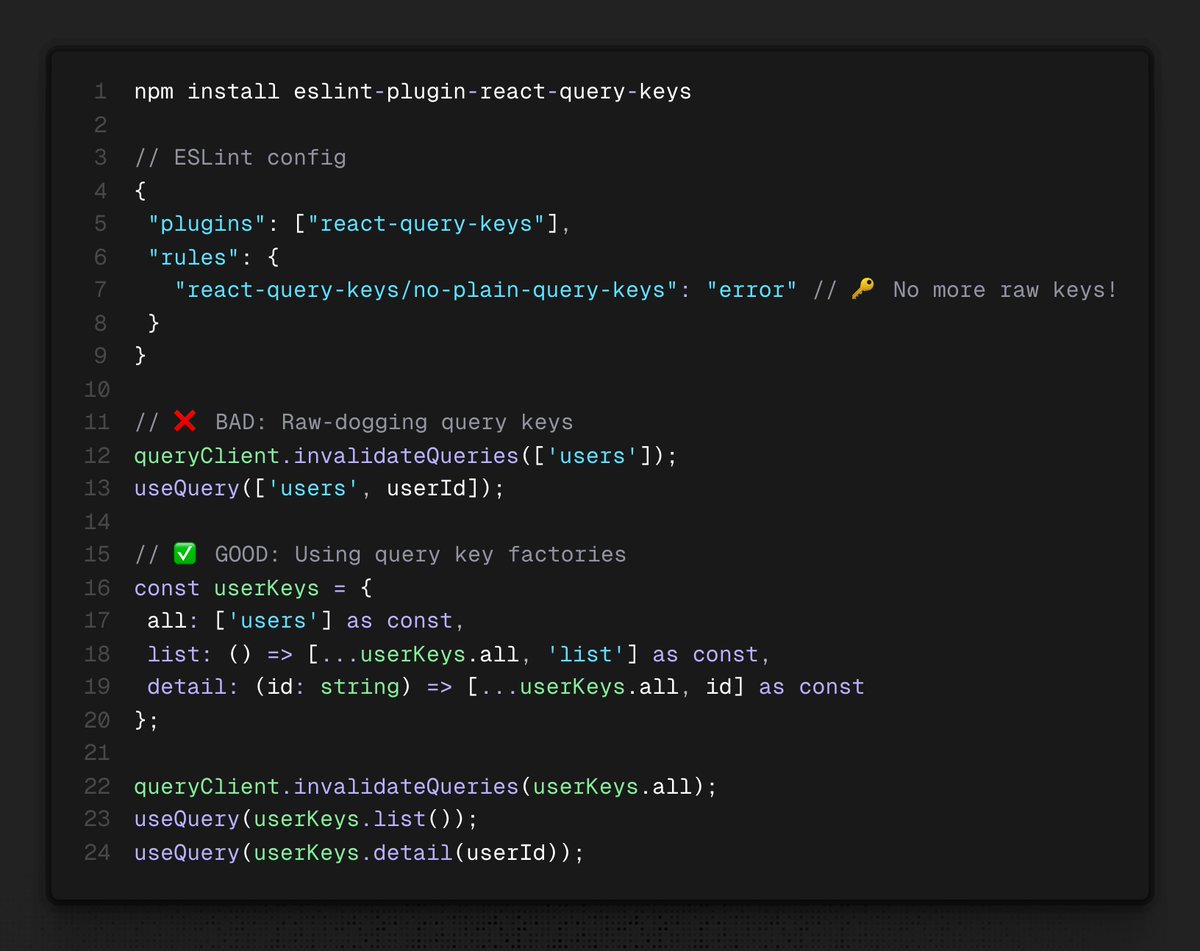
Stop raw dogging your query keys—Introducing a new React Query lint plugin ✨
Stick to the query key factory pattern.
◇ Prevent typos and duplicate keys
◇ Make cache invalidation predictable
◇ Maintain consistent query key structure
This paper is wild - a Stanford team shows the simplest way to make an open LLM into a reasoning model.
They used just 1,000 carefully curated reasoning examples & a trick where if the model tries to stop thinking, they append "Wait" to force it to continue. Near o1 at math.
@stoolpresidente saw the violet cheesesteak review if you want another bomb ass cheese steak Colonial Corner is like 50 years in the making super good. https://t.co/A12fB12R3q
@MyDeathMachine Colored icons (i’m dyslexic and use color to different)
Rainbow brackets
Project formatting (I am on a ton of projects with different formatting need autodetect)
Formatting in editor (doesn’t seem to respect "preferred_line_length": 120)
Emmet support
I found this library where you can pas it your path, and it will add all the extra points + arc curves to add rounded corners - just like Figma does.
https://t.co/P9JGP6u2N9