Welcome to the next generation of digital finance in Europe 🇪🇺
OKX is MiCA-authorised, offering a single unified account with institutional-grade infrastructure and deep liquidity.
Switch now: 8% deposit bonus + €400 new user reward. €10M in rewards up for grabs.
The end of regulatory arbitrage is good for crypto.
Competition should be based on products, technology, execution, governance, and trust — not on who can operate with the fewest rules.
That is better for users, better for the industry, and ultimately better for innovation.
Tokenized equities are one of the most important RWA use cases.
We expect to see xStocks on X Layer soon, bringing global equities onchain and expanding access to capital markets.
Access to global markets should be as open as access to information.
Happy to see CoinAnk integrating with our Agentic Payment Protocol.
APP is designed to become the future payment channel for API service providers in the agent economy.
Onchain markets are opening up.
@XLayerOfficial Exchange OS lets any builder deploy spot, perpetuals, or outcomes markets.
Open-protocol, permissionless infrastructure.
Tokenized equities and ETFs are part of what comes next.
Market infrastructure as a shared layer instead of something every venue rebuilds.
The same vision Centrifuge has been pushing for since 2017.
Joining Exchange OS to push it further: distribution, capital efficiency, and the next wave of composability for tokenized assets.
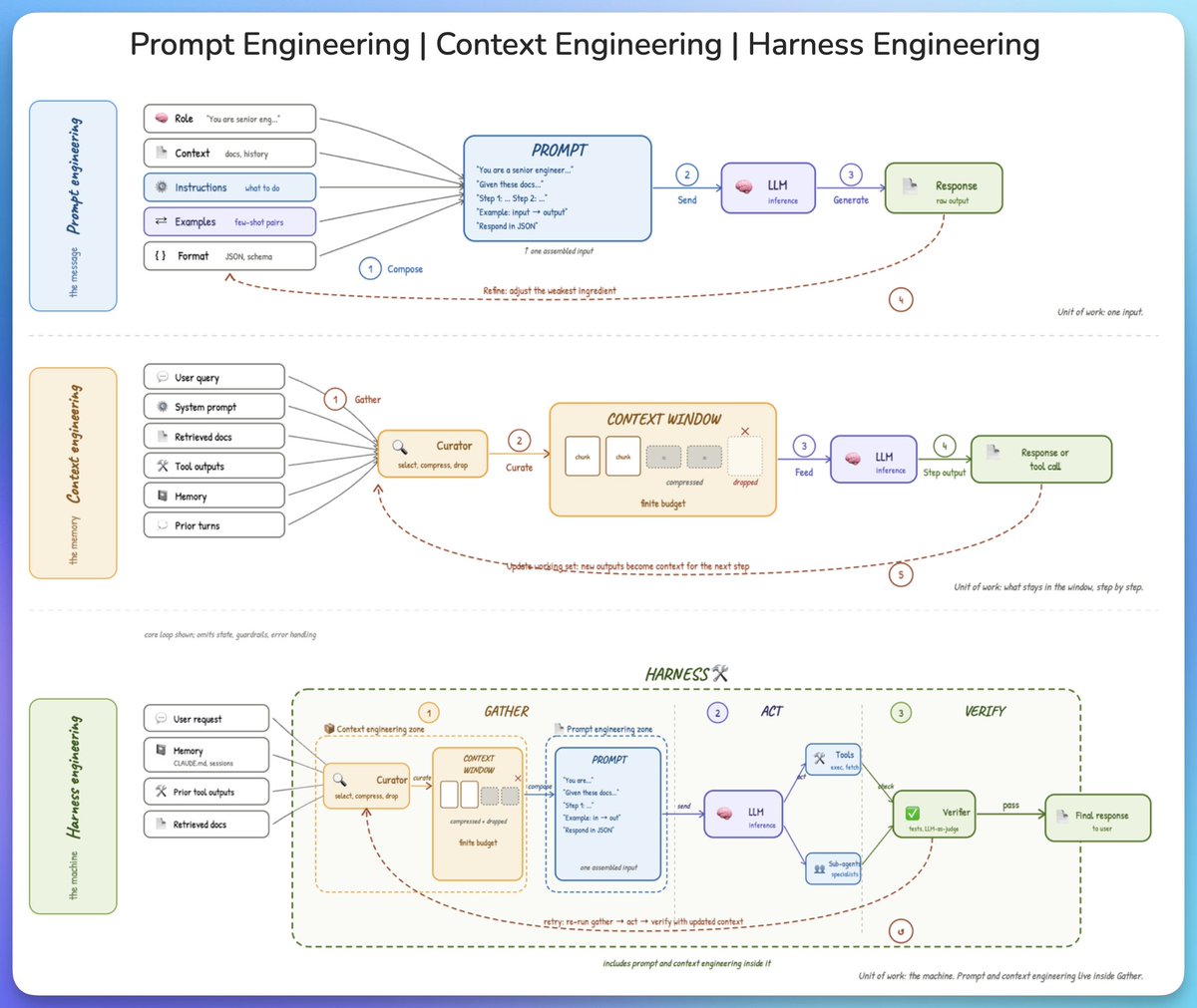
from prompt to context to harness engineering.
three terms keep coming up in AI engineering, and they get conflated all the time. here is the cleanest way to understand what each one is and how they fit together.
𝗽𝗿𝗼𝗺𝗽𝘁 𝗲𝗻𝗴𝗶𝗻𝗲𝗲𝗿𝗶𝗻𝗴 𝗶𝘀 𝘁𝗵𝗲 𝗺𝗲𝘀𝘀𝗮𝗴𝗲.
the model has no memory of anything before this single call, so the prompt has to carry the full universe of what it needs to know. that means a role, some background, the instructions, a few examples, and a format.
these get assembled into one input and sent to the model. when the output falls short, the skill is figuring out which ingredient is actually letting you down, not rewriting the instructions every time.
the unit of work is one input.
𝗰𝗼𝗻𝘁𝗲𝘅𝘁 𝗲𝗻𝗴𝗶𝗻𝗲𝗲𝗿𝗶𝗻𝗴 𝗶𝘀 𝘁𝗵𝗲 𝗺𝗲𝗺𝗼𝗿𝘆.
across multiple steps, the window is finite and the information available is not, which forces a curation step. without it, important details get buried under stale tool outputs and old turns, and the model's attention degrades on the things that actually matter.
a curator selects what stays, compresses what is useful but bulky, and drops the rest. each step's output then feeds into the next step, where good curation is more about knowing what to throw away than packing more in.
the unit of work is what stays in the window, step by step.
𝗵𝗮𝗿𝗻𝗲𝘀𝘀 𝗲𝗻𝗴𝗶𝗻𝗲𝗲𝗿𝗶𝗻𝗴 𝗶𝘀 𝘁𝗵𝗲 𝗺𝗮𝗰𝗵𝗶𝗻𝗲.
on its own, a model just generates text. the harness is what turns it into something that can take actions, check its own work, and recover when a step goes wrong.
the full loop has three phases:
- 𝗴𝗮𝘁𝗵𝗲𝗿 pulls together everything the model needs
- 𝗮𝗰𝘁 runs the model and calls tools or sub-agents
- and 𝘃𝗲𝗿𝗶𝗳𝘆 checks the output with tests or a judge
on failure, the whole loop retries with updated context, which is the entire difference between calling an API and running an agent.
the unit of work is the machine itself.
here is the part that ties it together.
prompt engineering and context engineering both live inside 𝗴𝗮𝘁𝗵𝗲𝗿. the harness is the outer container, context is what it curates, and the prompt is what it finally hands to the model.
zoom out and the unit of work gets bigger. zoom in and you are back at the prompt.
i also published this deep dive (article) on agent harness engineering, covering the orchestration loop, tools, memory, context management, and everything else that transforms a stateless LLM into a capable agent.
the article is quoted below.
One folder runs my entire content business.
Here is everything inside ~/.claude:
✦ CLAUDE .md → your employee handbook for Claude.
Every time you open a new chat, Claude reads this.
Before it says a word, it knows who you are.
Put in here:
- Your writing rules and tone
- Your banned words and phrases
- The projects you are working on
- The things Claude should never do
Without it, Claude is a stranger every session.
With it, Claude feels like it knows your work.
✦ CLAUDE.local.md → your personal overrides.
Your personal overrides on top of CLAUDE.md.
Never hits the team repo. Never shared.
The stuff that is yours alone:
- Preferences your teammates do not need to see
- Anything you want Claude to know about you
- Personal shortcuts and style rules
✦ settings.json → the control room.
Decides which tools Claude can use without asking.
Also holds your hooks registry.
☑︎ Default model selection
☑︎ Permissions allowlist
☑︎ Hooks registry
✦ commands/ → your slash shortcuts.
For example: /today, /create, /ideas.
200+ word prompts compressed into 8 characters.
You type one word. The whole workflow fires.
☒ No copy-pasting prompts
☒ No re-explaining yourself every session
✦ skills/ → keyword that trigger workflows.
Each one is a complete system Claude runs on demand.
Type "create" and it writes a post in my voice.
Type "infographic-maker" and it builds the graphic.
Type "ig-scripts" and it turns scripts into Reels.
This alone saves me 4 hours every single week.
✦ agents/ → where Claude stops being a chatbot.
I have 12 sub-agents in 2 agent teams.
- One does strategy
- One does design
- One builds
- One reviews
- One publishes
You brief the first. It hands off automatically.
You come back when the pipeline is done.
✦ hooks/ → scripts that fire on every tool use.
Before Claude reads a file, a hook checks it.
After it writes something, a hook reviews it.
These are your guardrails.
Claude cannot go off-script even if it tries.
✦ plugins/ → pre-built packs. One install.
Mine include:
- Vercel
- Telegram
- claude-mem
- frontend-design
These are bundled commands and MCPs.
✦ channels/ → bridges to iMessage and Telegram.
This is what makes it genuinely mobile.
Send a message from your phone.
- Claude fires the skill.
- Runs the entire workflow.
- Sends the output back to you.
No laptop, terminal or desk required.
✦ mcp.json → every connected tool in one file.
Mine has:
- playwright (so Claude can browse the web)
- figma (so it can read my designs)
- gmail (so it can check my inbox)
Every tool you connect here is one Claude can reach.
That is it. One folder.
Everything Claude needs to run your work.
Start with CLAUDE .md and nothing else.
Build the rest as you actually need it.
Full beginner guide here
https://t.co/GXvwuzHk5l
Repost ♻️ to help someone in your network.
Anthropic AI engineer just showed how to give AI agents real memory in 4 steps - and it changes everything
in 28 minutes he shows exactly how agents can remember across sessions, completely free
worth more than any $500 AI engineering course
here's what he covers:
• why agents forget everything between sessions
• memory stores - agents read, write across sessions
• dreaming - agents that improve their own memory
• 95% cache hit rate, so it stays cheap
most people are still copy-pasting context into every new chat - while the people who figured this out are building agents that get smarter every single night
watch full video then read article below