Hay luto en Hollywood tras conocerse la muerte de la joven actriz Kaylee Hottle, de 18 años, quien sufrió un accidente automovilístico en Maryland, Estados Unidos👇https://t.co/DB9IUFHUHD
This is the best way to learn how LLMs work.
Interactive. 3D. Step-by-step.
Covers:
→ Embedding
→ Layer Norm
→ Self-Attention
→ MLP
→ Transformer layers
→ Softmax
→ Output
Stop reading papers. Start seeing.
Link in comments.
Save this immediately.
Someone open-sourced a PDF parser that converts 100 pages per second to Markdown.
100% free. on a CPU. no GPU. no cloud. no API key.
→ 100 pages per second.
→ handles tables, nested layouts, complex docs.
→ built-in OCR for 80+ languages via hybrid mode.
→ official LangChain integration.
It's called OpenDataLoader and it just took the #1 spot in every PDF-to-Markdown benchmark.
The wildest part is that docling scores 0.86 and is 15x slower. marker needs a GPU and is 1,000x slower. Pymupdf4llm is fast but scores 0.40 on tables.
This thing beats every one of them. on a CPU.
Built with the PDF Association and the veraPDF team the people who literally write the PDF standards.
8.6k stars. Apache 2.0. zero proprietary dependencies.
Git was HARD until I learned these 19 commands:
1 git add
→ It lets you add changes from the working directory into the staging area
2 git commit
→ It lets you save a snapshot of currently staged changes in the local repository, with a message
3 git push
→ It lets you upload commited changes from the local repository to a remote repository
4 git fetch
→ It lets you download changes from a remote repository, without applying them locally
5 git merge
→ It lets you combine changes from one branch into another
6 git pull
→ It lets you fetch and then merge changes from a remote repository into the local branch
7 git diff
→ It lets you see the changes not staged or commited yet
8 git diff HEAD
→ It lets you see changes between the current working directory and the latest commit
9 git status
→ It shows you the current state of the working directory and staging area
10 git branch
→ It lets you see all local branches
11 git checkout
→ It lets you create a branch or switch between branches
12 git log
→ It shows you commits on the current branch with extra details
13 git stash
→ It lets you temporarily save uncommitted changes and apply them later
14 git rebase
→ It lets you apply commits from one branch to another
15 git reset
→ It lets you undo changes in the working directory and move back to a specific commit
16 git revert
→ It lets you undo changes by creating a new commit
17 git cherry pick
→ It lets you apply commits from one branch to another
18 git bisect
→ It lets you narrow down bugs quickly
19 git init
→ It lets you create an empty repository
What else should make this list?
===
👋 PS - Want to run AI Agents in production with trust?
Hard-coded credentials work for a demo, but production agents need a way to handle critical actions like making a purchase or sending a document—without over-privileged access.
Auth0 for AI Agents features Asynchronous Authorization backchannel authentication (CIBA), so your agents can work autonomously in the background and only trigger a notification when human approval is required.
• Rich Consent: Agents render specific authorization data so users know what they're approving.
• Secure User Identity: Link agent actions directly to specific user preferences and history.
Move past the “framework” stage and build agentic workflows that are secure by design.
Start building for $0 and stop worrying about DIY-ing Auth:
→ https://t.co/hbVDiQmhhS
===
♻ Save now & RT to help other software engineers learn git.
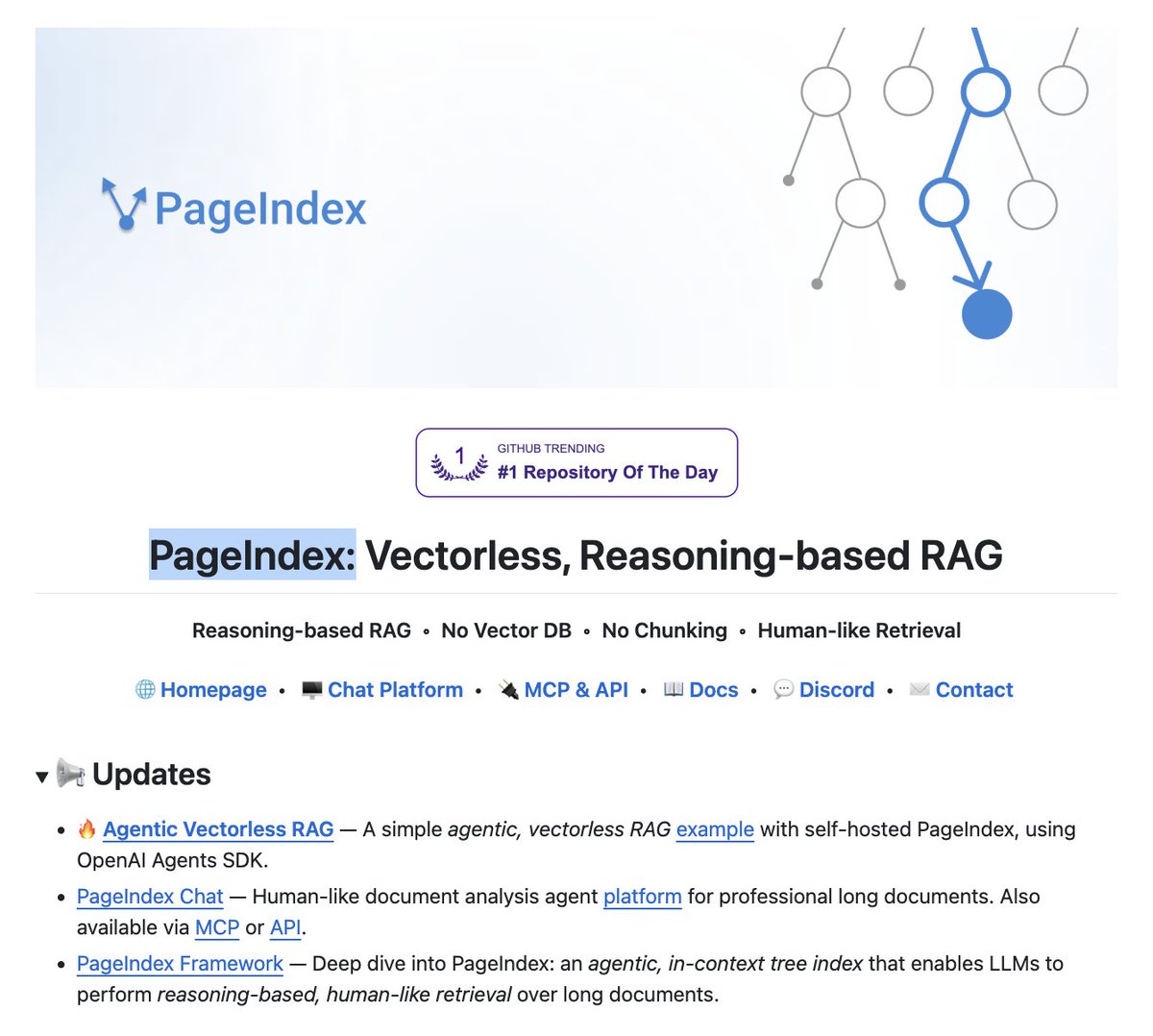
The entire RAG industry is about to get cooked.
Researchers have built a new RAG approach that:
- does not need a vector DB.
- does not embed data.
- involves no chunking.
- performs no similarity search.
It's called PageIndex. Instead of chunking your docs and stuffing them into pinecone, it builds a tree index and lets the LLM reason through it like a human reading a book.
hit 98.7% on financebench. beats every vector RAG on the leaderboard.
no embeddings. no chunking. no vector DB.
100% open source.
Con el plan de Claude por 20 $/mes ya tienes TODO lo que necesitas.
Solo evita estos 17 errores que comete el 99% de la gente:
1. Subes PDFs tal cual → 1 página = 3.000 tokens Solución: Pega el texto en Google Doc → descarga como .md (menos de 200 tokens)
2. Creas archivos en Cowork demasiado pronto Solución: Primero planea todo en el chat normal. Solo pásalo a Cowork cuando lo tengas clarísimo.
3. Escribes prompts de 500 palabras
Solución: 29 palabras bastan: “Quiero [tarea] para conseguir [objetivo]. Hazme preguntas con AskUserQuestion.”
4. Dices “rehaz todo” por corregir una parte Solución: “Solo rehaz la sección 3. Mantén todo lo demás igual. Sin comentarios. Solo la salida.”
5. Mandas 3 mensajes separados para 3 tareas Solución: Un solo mensaje: “Resume esto, lista los puntos y sugiere un titular.”
6. Escribes “No, quería decir…” y acumulas historial Solución: Edita el mensaje original → corrígelo → regenera.
7. Usas Opus hasta para corregir gramática Solución: Sonnet o Haiku para tareas rápidas.
Guarda Opus + Extended Thinking para lo importante.
8. Metes 50 archivos en Cowork “por si acaso” Solución: Solo lo que necesita esta tarea. Para emails ni uses carpetas.
9. Nunca reinicias el chat y lo dejas eterno.
Solución: Cada 15-20 mensajes → resume + copia el brief → sesión nueva.
10. Mezclas 3 temas en un mismo chat.
Solución: Tema nuevo = chat nuevo. Siempre. El contexto muerto = tokens muertos.
11. Tu “about me” tiene 22.000 palabras.
Solución: Redúcelo a menos de 2.000.
Al final de cada sesión pídele: “Escribe un session-notes.md” y usa este prompt: https://t.co/w1c58dGs9F
12. Dejas búsqueda y conectores siempre activados Solución: Desactívalo todo por defecto. Activa solo cuando la tarea lo necesite.
13. Subes el mismo PDF a 5 chats distintos Solución: Usa Projects. Súbelo una sola vez y todos los chats lo usan sin gastar tokens extra.
14. Te saltas las Preferencias Personales
Solución: Ajustes → Preferencias Personales. Define tu tono y estilo UNA vez. Se queda para siempre.
15. Reescribes los prompts desde cero cada vez Solución: Crea tu biblioteca de prompts. Misma estructura, solo cambias la variable.
16. Ejecutas manualmente el mismo informe cada semana Solución: Usa /schedule → “Todos los lunes a las 7 am crea mi briefing semanal.”
17. Usas Claude para cosas que no puede hacer bien Solución: Conoce tus herramientas. Imágenes → Gemini. Búsqueda en tiempo real → Grok.
CC @rubenhassid
Prompts para hacer Investigación
Para cada elemento de una investigación (o hacer un informe riguroso) un Prompt Te ayuda a redactar o recoger información: Título, Conclusiones, Referencias, Hipótesis, Método
🌋Continuamos con el monitoreo constante del volcán Puracé que se encuentra en estado de alerta Naranja 🔶. En las últimas 24 horas se han generado emisiones de ceniza con columnas que alcanzan hasta los 800 metros de altura y se reportan señales sísmicas asociadas al movimiento de fluidos debajo del cráter.
Para más detalles de su actividad, les compartimos el #BoletínExtraordinario del día que pueden consultar en el siguiente enlace 👉🏼 https://t.co/E2XNuje8rz
🔴 ¡EL COPILOT CIENTÍFICO de GOOGLE!
Google acaba de presentar un sistema multi-agente basado en Gemini 2.0 que imita el proceso de búsqueda de conocimiento científico a través de la proposición, evaluación y refinamiento automático de hipótesis!
Let's f*cking goooo! 🔥
Para 2030, los teléfonos desaparecerán.
Mientras todos miran la IA, Google y Samsung reinventan la realidad en silencio, haciendo obsoletas las pantallas.
Esto es lo que debes saber sobre las gafas de IA de Google y cómo cambiarán cómo vemos, pensamos y vivimos.
𝐅𝐑𝐄𝐄 𝐃𝐚𝐭𝐚 𝐒𝐜𝐢𝐞𝐧𝐜𝐞 𝐂𝐨𝐮𝐫𝐬𝐞𝐬 𝐰𝐢𝐭𝐡 𝐂𝐞𝐫𝐭𝐢𝐟𝐢𝐜𝐚𝐭𝐞𝐬 𝐢𝐧 𝟐𝟎𝟐𝟓:
1. Python
👉 https://t.co/JlkqmluR6l
👉 https://t.co/gsSME89AZR
2. Introduction to Programming with Python
👉 https://t.co/eKcM89ooSN
3. SQL
👉 https://t.co/60E5b3BQ0C
👉 https://t.co/FRcfRddemm
4. Excel
👉 https://t.co/MFOGoEHbYL
👉 https://t.co/BcDQekjBZy
5. PowerBI
👉 https://t.co/xtFHxf7sNB
6. Tableau
👉 https://t.co/LnkV93fvB1
7. Mathematics & Statistics
👉 https://t.co/UkJwpbSnk8
👉 https://t.co/R6gq6gpDCT
8. Data Science: Inference and Modeling
👉 https://t.co/Qufh6C25ay
9. Data Analysis with Python
👉 https://t.co/3N3nlj9euz
👉 https://t.co/aywbtaxSs9
10. Data Visualization
👉 https://t.co/jd6FoFY3EK
11. Data Visualization (Harvard University)
👉 https://t.co/7rQcGUkNlk
12. Data Pre-Processing
👉 https://t.co/vETpB3qo8W
13. Data Cleaning
👉 https://t.co/ttarcRgJ9M
14. Machine Learning (Harvard University)
👉 https://t.co/d87TUiLpZd
15. Deep Learning
👉 https://t.co/tQPGF5edlK
16. Machine Learning
👉 https://t.co/k6YTXO1voe
👉 https://t.co/N2BRbNW2FV
17. Capstone Project
👉 https://t.co/0TbD8v3oup
18. Python for Data Science, AI & Development
👉 https://t.co/gTbLYAFn8B
19. IBM Data Science Professional Certificate
👉 https://t.co/vX16mR6Yab
20. What is Data Science? (IBM)
👉 https://t.co/qtj1cxw3yU
21. Tools for Data Science
👉 https://t.co/dm4r2rE0UP
22. Data Science Specialization
👉 https://t.co/0PKzVSmtJh
23. IBM Data Analyst Professional Certificate
👉 https://t.co/rOKkFeq23g
24. AI For Everyone
👉 https://t.co/dQOjiOz10e
25. Data Science, Machine Learning, Data Analysis, Python & R
👉 https://t.co/sFjUGvOuW1
Happy Learning 🌟
-------------------------------------
if you found this post helpful:
1️⃣ Join Telegram for more Free Coding Courses with Notes: https://t.co/mKUXQ8IEQw
2️⃣ Follow @manishkumar_dev for more such content.
#datascience #machinelearning #dataanlytics #datascientists #python
🖋️Prompt Engineering Techniques
This is one of the most comprehensive collections of Prompt Engineering tutorials available today
This repository serves as a comprehensive resource for learning, building, and sharing prompt engineering techniques
https://t.co/6vpsmvMDHR
#EstrenoRTVCPlay | Disfruta un documental que con ayuda de imágenes y sonidos de archivo, muestra la evolución del cine colombiano y su relación con los cambios de nuestra sociedad. 🎞️🎬
Mira aquí 'Memorias de un país filmado' 👉https://t.co/dTPmb1m7ru








![brenzhills's tweet photo. Con el plan de Claude por 20 $/mes ya tienes TODO lo que necesitas.
Solo evita estos 17 errores que comete el 99% de la gente:
1. Subes PDFs tal cual → 1 página = 3.000 tokens Solución: Pega el texto en Google Doc → descarga como .md (menos de 200 tokens)
2. Creas archivos en Cowork demasiado pronto Solución: Primero planea todo en el chat normal. Solo pásalo a Cowork cuando lo tengas clarísimo.
3. Escribes prompts de 500 palabras
Solución: 29 palabras bastan: “Quiero [tarea] para conseguir [objetivo]. Hazme preguntas con AskUserQuestion.”
4. Dices “rehaz todo” por corregir una parte Solución: “Solo rehaz la sección 3. Mantén todo lo demás igual. Sin comentarios. Solo la salida.”
5. Mandas 3 mensajes separados para 3 tareas Solución: Un solo mensaje: “Resume esto, lista los puntos y sugiere un titular.”
6. Escribes “No, quería decir…” y acumulas historial Solución: Edita el mensaje original → corrígelo → regenera.
7. Usas Opus hasta para corregir gramática Solución: Sonnet o Haiku para tareas rápidas.
Guarda Opus + Extended Thinking para lo importante.
8. Metes 50 archivos en Cowork “por si acaso” Solución: Solo lo que necesita esta tarea. Para emails ni uses carpetas.
9. Nunca reinicias el chat y lo dejas eterno.
Solución: Cada 15-20 mensajes → resume + copia el brief → sesión nueva.
10. Mezclas 3 temas en un mismo chat.
Solución: Tema nuevo = chat nuevo. Siempre. El contexto muerto = tokens muertos.
11. Tu “about me” tiene 22.000 palabras.
Solución: Redúcelo a menos de 2.000.
Al final de cada sesión pídele: “Escribe un session-notes.md” y usa este prompt: https://t.co/w1c58dGs9F
12. Dejas búsqueda y conectores siempre activados Solución: Desactívalo todo por defecto. Activa solo cuando la tarea lo necesite.
13. Subes el mismo PDF a 5 chats distintos Solución: Usa Projects. Súbelo una sola vez y todos los chats lo usan sin gastar tokens extra.
14. Te saltas las Preferencias Personales
Solución: Ajustes → Preferencias Personales. Define tu tono y estilo UNA vez. Se queda para siempre.
15. Reescribes los prompts desde cero cada vez Solución: Crea tu biblioteca de prompts. Misma estructura, solo cambias la variable.
16. Ejecutas manualmente el mismo informe cada semana Solución: Usa /schedule → “Todos los lunes a las 7 am crea mi briefing semanal.”
17. Usas Claude para cosas que no puede hacer bien Solución: Conoce tus herramientas. Imágenes → Gemini. Búsqueda en tiempo real → Grok.
CC @rubenhassid](https://pbs.twimg.com/media/HGHYMoBWIAAno-N.jpg)