Starting from the tip from @artichokes_art, I tried this using letters to see if Midjourney can generate words.
Prompt: "H:: E:: L:: L:: O::, shop sign --ar 5:3"
Success rate is 1 in 4.😆
Here it is. Retweet and try this.
Share your results by replying to this thread.
Midjourney gives you so much creative freedom to express yourself.
Whether you're creating movie trailers, or just playing around to come up with a certain way to communicate a feeling through images, crafting your shot is something you have to consider.
Here is an example where I'm using the same subject (a woman sitting in a diner) and applying different lighting conditions as well as camera angles.
Note: In this case, I have not used any explicit style tokens or names of any movie directors.
Lighting is key to evoke different moods (melancholic, hopeful, etc.)
Camera angles can also change the mood, tone and narrative of a scene.
Give it a go and see how these things improve your images.
⚡️SAGRADA FAMILIA ⚡️
Inspired by one of the most inspiring buildings in the world, Sagrada Familia located in Barcelona - never visited the city, but I need to go there one day!
Made with #midjourneyartwork
Prompts in alt
#AIArtwork#midjourneyart
Midjourney tutorial: Make 'spot the difference' pictures for your kids (and adults too!)
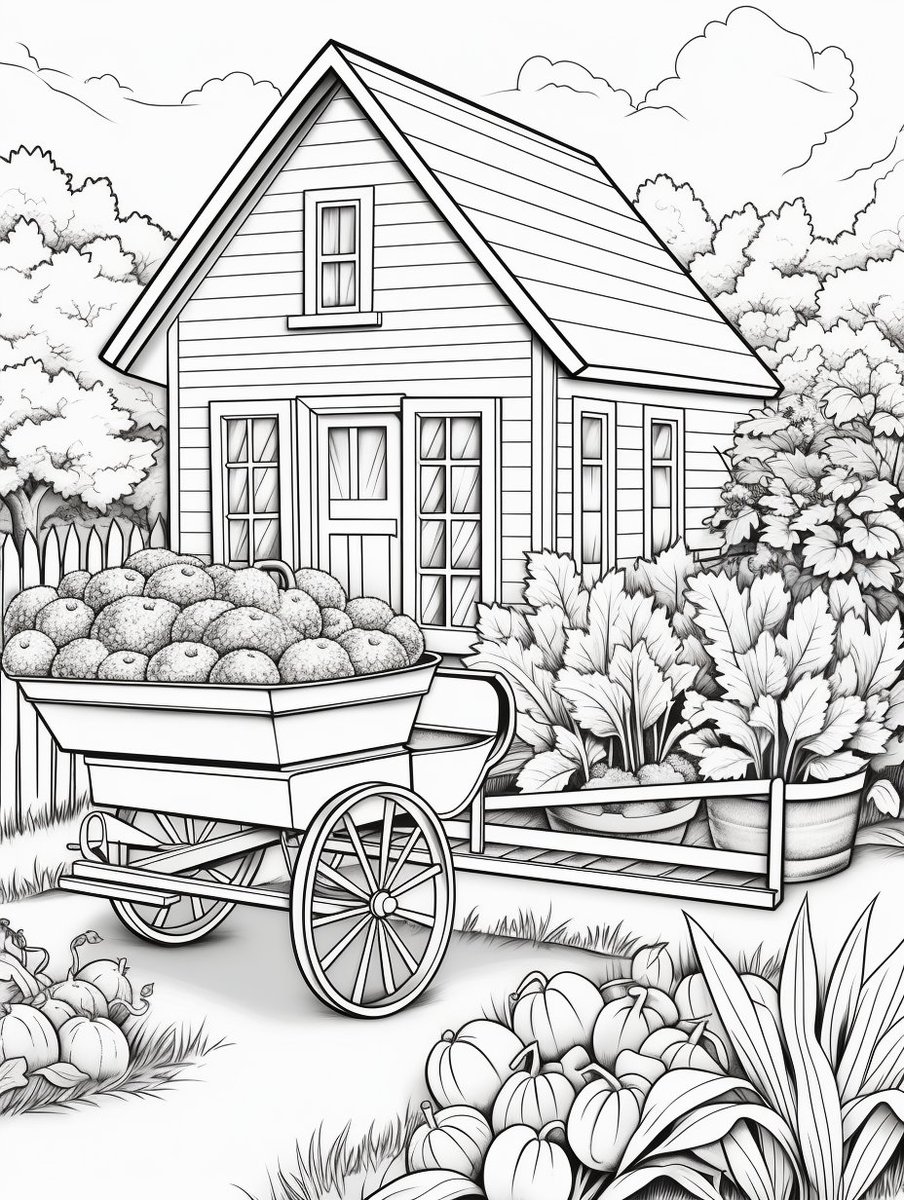
Step 1⃣: Create a black and white line drawing of your favorite scene. Here I've use an example of a country cottage.
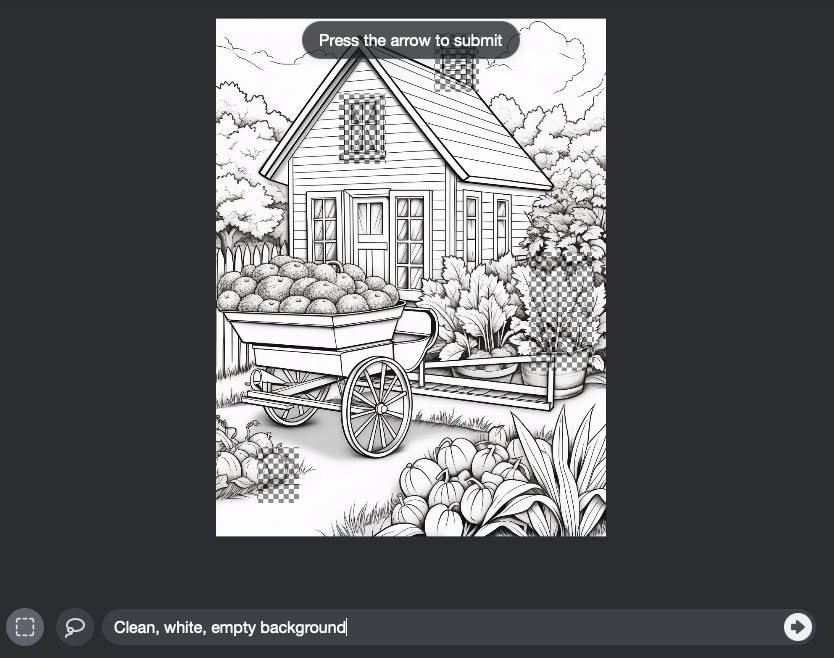
Step 2⃣: Upscale the image that you've selected and then use Vary (Region) to make some changes.
Step 3⃣:Select the regions you want to change using either the rectangle or lasso tool.
Then I use this prompt (thanks to @chaseleantj):
Clean, white, empty background
Step 4⃣: Click the arrow to re-run the generation.
This is the result:
Sometimes the objects will disappear completely while at other times, they will be modified. You will see them in the image set.
Here's another example where the chimney and one of the pumpkins on the bottom left have disappeared.
How many differences can you spot?
The answer is 4.
1⃣ Chimney
2⃣ Top floor window
3⃣ Pumpkin on bottom left
4⃣ Potted plant on the right
Tutorial - How to design logos using generative AI
Follow along this thread for my workflow, thinking process, and general tips for designing logos using either Midjourney or Stable Diffusion.
For logos in general, I would go for simplicity, minimalism and 2d designs rather than complexity.
Keep in mind the number of colors and color gradients especially when these logos need to be printed on different items like business cards, flyers, menus, tote bags, posters, etc.
You'll also need to note that the max size generated by Midjourney is 1024x1024 so you'll need to find a good upscale.
Square aspect ratios work best unless you have special requirements for different shapes or aspect ratios.
Negative prompts - in Midjourney, use the --no option.
--no fonts words text letters characters alphabet alphanumeric symbols
These are not 100% foolproof so sometimes you'll still need to do some post-processing if weird symbols get incorporated.
Start with a simple prompt and work your way up.
In general, the prompt structure would be:
[type of logo], [style], [subject], [color scheme], [background color], [negative keywords]
In the rest of this thread, I will show you some specific examples with the actual prompts I'm using.
Read on for more...
All right, folks! It's here. 🔥
If you want to learn how to generate high quality images that depict various emotions, get this now - for FREE. 👍🏼
All complete prompts included.
👉🏼https://t.co/5FDwI0Iy3k
Retweet and share. Thank you! 🙏🏼
Midjourney tip: How to use the stylize parameter
It is a very powerful parameter. But most people don't know how to use it.
Let me show you exactly how it works:
Inspired by the lyrics from Joni Mitchell's 'Both Sides Now' used in the movie Coda. That was my favorite movie of 2022.
"Rows and floes of angel hair And ice cream castles in the air And feather canyons everywhere I've looked at clouds that way"






![prompt_mastery's tweet photo. Tutorial - How to design logos using generative AI
Follow along this thread for my workflow, thinking process, and general tips for designing logos using either Midjourney or Stable Diffusion.
For logos in general, I would go for simplicity, minimalism and 2d designs rather than complexity.
Keep in mind the number of colors and color gradients especially when these logos need to be printed on different items like business cards, flyers, menus, tote bags, posters, etc.
You'll also need to note that the max size generated by Midjourney is 1024x1024 so you'll need to find a good upscale.
Square aspect ratios work best unless you have special requirements for different shapes or aspect ratios.
Negative prompts - in Midjourney, use the --no option.
--no fonts words text letters characters alphabet alphanumeric symbols
These are not 100% foolproof so sometimes you'll still need to do some post-processing if weird symbols get incorporated.
Start with a simple prompt and work your way up.
In general, the prompt structure would be:
[type of logo], [style], [subject], [color scheme], [background color], [negative keywords]
In the rest of this thread, I will show you some specific examples with the actual prompts I'm using.
Read on for more...](https://pbs.twimg.com/media/F35kNCAWUAAGelh.jpg)




![prompt_mastery's tweet photo. Try out this prompt:
Comic book page with multiple panels, [description]--ar 4:5 https://t.co/UOlStfXB2Q](https://pbs.twimg.com/media/F1IdQc9aEAAWPyi.jpg)


