I wrote this ~3 months ago, and since then,
1) Memory has been more or less fully integrated with the frontier models
2) Almost all features that made OpenClaw unique as a harness has been fully absorbed by the frontier models (e.g. schedules, loops, goals, memory, etc.)
3) New, vertical killing features and capabilities are being added every other week
--
All that being said, agentic engineering is still an incredibly high skill affair.
It is now obvious to me that there is a gulf of know-how and tacit knowledge between those that CAN remove humans-out-of-the-loop and actually produce a working product, and the rest of the world insisting that agents are still producing "slop".
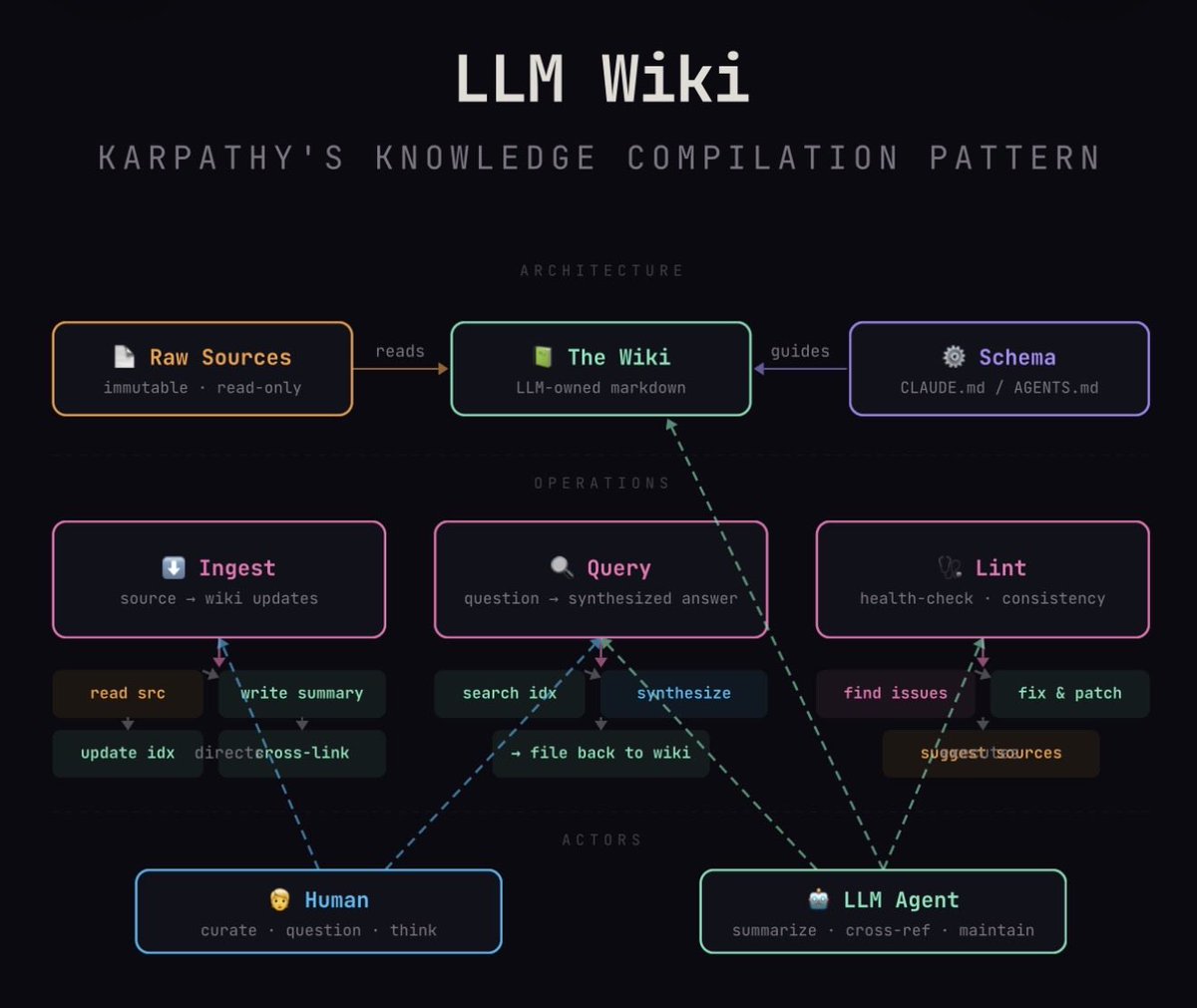
Karpathy’s “LLM Wiki” pattern: stop using LLMs as search engines over your docs. Use them as tireless knowledge engineers who compile, cross-reference, and maintain a living wiki. Humans curate and think.
Diagram generated by my Claude agent knowledge worker.
Chrome just became massively more agent-friendly 🔥 Your real, signed-in browser can now be natively accessible to any coding agent.
No extensions.
No headless browser.
No screenshots.
No separate logins.
Just one toggle to enable it.
Check this out: https://t.co/6ugwmOolnj
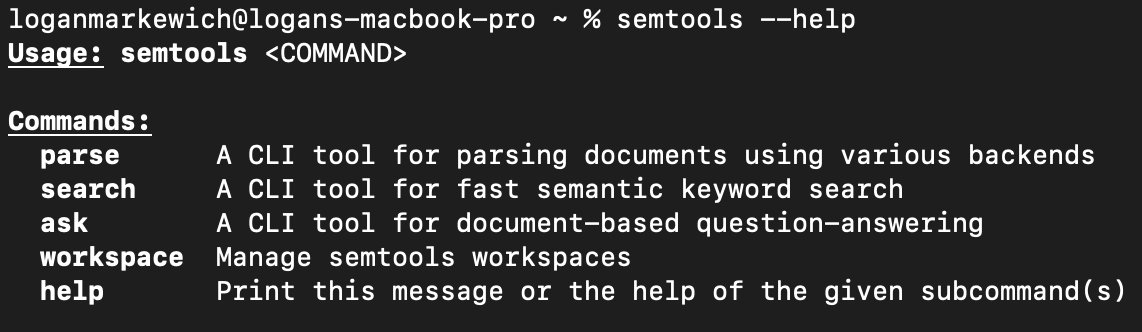
🔎 semtools v3.0.0 is out, and it's a great step forward for anyone using semantic search and document parsing from the command line.
For context: semtools is our Rust-based CLI that lets you parse documents (PDFs, DOCX, PPTX, and more) via LlamaParse, run fast local semantic search using multilingual embeddings, and ask questions over document collections using an AI agent — all from your terminal.
Here's what changed in v3.0.0:
🤝 Unified interface. All commands now live under a single semtools entry point — parse, search, ask, and workspace. Much more discoverable, much easier to document.
✅ --json output on every command. This was one of the most requested features. Structured JSON output means you can pipe semtools into jq, embed it in shell scripts, or use it as a tool inside a coding agent. This kind of composability is what makes CLI tools genuinely useful beyond interactive sessions.
🐜 Dramatically smaller binary. The storage layer was migrated to @qdrant_engine Edge — a lightweight, edge-optimized vector database — and the binary size dropped from multiple gigabytes to a few hundred megabytes. Same functionality, much lighter footprint, easier to install and distribute.
💻 --workspace CLI flag. You can now specify a workspace directly on the command line instead of relying on environment variables. A small change with a big improvement to day-to-day ergonomics.
you can instantly 10x your vibecoded frontends by just learning what different ui components are called
ofc opus is creating generic slop, the only words you know are menu and button.
Canada is live with 25 data layers 🇨🇦
seemed like a lost cause to me but maybe this will open people’s eyes
what i should add/remove/change?
australia, italy, spain, france and germany coming soon
find some https://t.co/aj84y53QyL eh
[1/n]
Super excited to introduce PaperBanana 🍌! (PKU x Google Cloud AI)
As AI researchers, we often spend way too much time crafting diagrams and plots instead of focusing on the ideas 🤯. To rescue us from this burden, we built an Agentic Framework to auto-generate NeurIPS-quality paper illustrations!
📄 Paper: https://t.co/2NbQeEhzMv
🌐 Page: https://t.co/05dKkjVs7f
Key Features:
🌟 Human-like Workflow: Retrieve 🔍 -> Plan 📝 -> Style 🎨 -> Render 🖼️ -> Critique 🔄. This ensures both academic fidelity and aesthetics.
🌟 Versatile: Supports both illustrative diagrams and statistical plots.
🌟 Polishing: Also effective for polishing existing human-drawn diagrams.
Here are some example diagrams and plots generated by our PaperBanana:
I'm Boris and I created Claude Code. I wanted to quickly share a few tips for using Claude Code, sourced directly from the Claude Code team. The way the team uses Claude is different than how I use it. Remember: there is no one right way to use Claude Code -- everyones' setup is different. You should experiment to see what works for you!
I made this product launch video over the weekend with just prompts
It's all vibe coded
https://t.co/V9i8Z6N8ow
There's something you should know, though:
Like everyone else, a few days ago my timeline started getting full of videos like this when Remotion launched their Claude skill, so I decided to give it a go
I was captivated by all the examples, so I started like everyone was saying: "just write a prompt"
I typed the prompt, and it created an extremely bland, untasteful, stock-looking video
10 prompts in and it was not getting better. It was very, very bland. But at least it was something, so I kept going at it
I ended up spending my entire weekend on this, 2-3 days of work. Only to realize my original reference videos that inspired me to get started were all fake
Everyone was outright lying about their results. They all claimed "I made this with just one prompt", but it was just bait, they didn't really use Remotion or code at all, it was just a normal, human-made motion video
Then you expand the X post and read the replies and they're all like "haha joke" in the comments, but their main post already got 1.5 million views and bamboozled everyone who didn't read further
And this is a problem: when a viral trend happens, these posts flood your timeline, and you only realize that they're all noise and bait (and that they haven't even used the tools they claim) when you click through the post and read its comments. But 90% of people (like me, initially) just see the post on their timeline while scrolling, and assume it's all real. You don't go in to check every single post you see: you just like it, or save it for later, and carry on with your day, thinking what you saw was the real thing, and that it's all outstanding results, and that motion designers are really done
And it's so anxiety inducing, because everyone is hyping their results, but most of it is just not true. I have stopped reading X lately because going in makes me so anxious, everyone is claiming extraordinary outlier results just for the views and clicks, and you feel like you're lagging behind and you're not good enough because you don't get those results
So for this video I decided to actually take the tech out for a spin, and see what results I could really get out of it
I used Remotion and Claude Code 4.5, but contrary to what everyone was claiming, this video was not "just a prompt". It was fully vibe coded, but it required much more than a prompt. It was multiple days worth of work
Here's what I learned:
- Making vibe coded videos with Remotion is ~10-20x slower than building app code. I've been wasting my Claude limits on this video
- Everything takes a lot of manual work and reprompting. You often need to go frame by frame correcting tiny things
- It makes very silly mistakes
- Even Opus 4.5 has very very limited knowledge of spatial / visual things. It doesn't understand well z-indexes, layers, compositions, proportions, temporal coherence, etc. Claude Code feels extremely dumb when creating code for Remotion videos, which surprised me a lot, beacuse I had been mind blown by how incredibly well it worked with my Ruby on Rails SaaS codebases
- You need to have some design knowledge to adjust things manually, you need to ask for exactly what you want, in the technical jargon it expects. You can't just say "make this more beautiful" or "animate this better" because it just creates slop
- Right now vibe coded videos are promising, but I think I could have done this video faster just by doing it manually in After Effects. It really took that much work
- If you have a creative idea for something you want to animate, it takes multiple hours of back and forth prompting to create just one or two seconds worth of **good** animation
- Tip: PARAMETERIZE everything! It tends to hardcode magic numbers everywhere in the code, so if you change something earlier in the video timeline, everything else breaks. You want to essentially be creating "key frames" with code by telling it to parameterize every frame where something important happens, and calculate the rest of the keyframes based off that. This comes in handy when you need, for example, to adjust keyframes to match the music
So in summary: vibe coded videos are promising, but right now it only works for very stock-looking videos unless you put in a ton of effort
Maybe actually useful for 1-2 second web animations though, I'll try that next
It will obviously get better, this feels like the quality of code generation in 2023-2024, you need to hold its hand and correct it at every step along the way. But even if video code generation was better, you would still need someone with motion design knowledge to at least set the creative direction, lay out the overall script and composition, etc. It's not completely hands-off unless you want slop
And a word on caution: especially here on X, there's 90% hype and 10% reality, nothing is what it seems. Do not believe what you see online, people are constantly baiting and then just laughing it off in the comments
Happy New Year 2026! 🚀
My OSS project has just kicked off the year by surpassing 1,030+ stars! ⭐️ Huge thanks to our amazing community for the support.
Our goal for 2026: 2,000, then 10,000 Stars! Let's build the best AV guide together.🤝
https://t.co/Lily1SieIw








![dwzhu128's tweet photo. [1/n]
Super excited to introduce PaperBanana 🍌! (PKU x Google Cloud AI)
As AI researchers, we often spend way too much time crafting diagrams and plots instead of focusing on the ideas 🤯. To rescue us from this burden, we built an Agentic Framework to auto-generate NeurIPS-quality paper illustrations!
📄 Paper: https://t.co/2NbQeEhzMv
🌐 Page: https://t.co/05dKkjVs7f
Key Features:
🌟 Human-like Workflow: Retrieve 🔍 -> Plan 📝 -> Style 🎨 -> Render 🖼️ -> Critique 🔄. This ensures both academic fidelity and aesthetics.
🌟 Versatile: Supports both illustrative diagrams and statistical plots.
🌟 Polishing: Also effective for polishing existing human-drawn diagrams.
Here are some example diagrams and plots generated by our PaperBanana:](https://pbs.twimg.com/media/HALQ9F8aQAAAIqk.jpg)





