SEOs of the world! Discover how Google Trends can help you create high quality content that people are interested in. 💪 → https://t.co/HBiH8b8J6q
In this video we discuss how to find trending topics, research (cont) https://t.co/1txGKa7O2K
Ecommerce SEO Tip: a report recently launched for stores to see when the 'Merchant listings' experience shows within Google Images.
Previously, the merchant listings filter would only show within Web Search, primarily being triggered for product grids and knowledge panels.
Based on data across several GSC accounts, data has then started to be recorded as of June 4th onwards within the Image search type filter.
This report is an extension of this experience, with the filter now applying to Image Search for situations where an image from your site ranks and has the product label overlay on the image.
The overlay is meant to signal that the product is able to be purchased from the site (with availability, pricing, brand etc.), being a helpful dataset for eCommerce sites to filter their Image Search data more effectively.
It is also important to take into consideration that within the Shopping > Merchant listings tab, the impression count within here included both Web Search and Image Search merchant listing impressions. So if you've noticed the counts not matching up – you now know why!
Optimizing for "near me" queries on Google.
For some sites, like the one pictured, variations with the term "near me" in them can be some of the highest traffic-generating and shouldn't be ignored.
When it comes to marketplace SEO, these terms are often especially important. For other industries, an argument could be make that they technically can't be directly optimized for and shouldn't be due to relevance.
In my experience of working with large marketplaces across various sectors, there are two strategies that can be employed to rank for these queries:
1. Have localized landing pages for cities/towns
2. Develop "near me" focused pages to broadly rank
While strategy 1 above would be considered the most sustainable in terms of usefulness, if you have the listing/classified content to support it, my preference is for whatever delivers results.
I've seen both approaches work for different industries. In some case, having the word "near me" or "near you" is even used in the content itself to directly optimize for the query itself. Again, I've seen this work well within a content strategy, and other times it not working well and coming across as spammy.
How the landing page is designed and the content a marketplace has access to, with the ability to make the content on each URL as unique/useful as possible – these are the factors that matter most and end up being whether you're able to rank highly or not.
The lesson: try not to enter SEO situations with a pre-conceived bias to what does/doesn't work. At the end of the day, our job is to help our clients rank and develop sustainable businesses. Many people say "don't optimize for near me queries" – but context is important to whether this is or isn't the right decision.
Latest in SEO: Google is now testing out a full-width rich card section at the top of search results for eCommerce queries.
This is the first time Google has brought this rich card treatment to the eCommerce segment, first starting to show in 2022 for celebrity names and since expanding to other query segments.
Interestingly, the top 8 organic product grid results are just the listings that would tend to appear lower down the page. This gives considerably more visibility to products featured here, likely having a noticeable impact on CTR.
The rich results section also features a top 5 list for popular stores by default, along with links to informational content or other category pages within the righthand column of the rich cards.
Optimising for merchant listing results continues to be an important part of eCommerce SEO in 2024 and beyond, with this desktop test further enforcing the benefits for online stores in maintaining a merchant listing strategy.
More examples and references to some of the history of this feature can be found here: https://t.co/Fa8QZp0yme
––––
✉️ Keep updated with the latest changes to Google's SERP features by following the @SERPalerts page and subscribing here: https://t.co/C30wqLF4Mp
A little quality of life upgrade in @ahrefs. A lot of the reports can now match regex.
This opens a lot of possibilities. For example here I can quickly get all of our pages for other languages matching the URL pattern, which in our case is a 2 letter language code.
As an SEO, it is of critical importance that you’re aware of where your data is coming from.
One common point of confusion that I come across is when there is a sudden spike in GSC impressions, and clicks don’t follow.
While there are various reasons for this, ranging from internal sitelinks, images in image packs, links in twitter carousels, among others. There is one that comes up regularly.
Images in knowledge panels. It’s a section of Search that is highly visible on desktop when gaining placement, with confusion around how impressions are triggered.
In the example shown, my site is suddenly ranking in the knowledge panel for “snippet” with an image from my site. This is completely normal, with the impact being a sudden spike in impressions.
The reason for this is that the image is appearing within Web Search (not Image Search), so the image itself is triggering an impression for the entire blog article URL in GSC that it is located on.
As mentioned, this is completely normal. I would not expect to receive clicks for this query, and that will not have a negative impact on SEO at any level. But it will skew CTR, and that is FINE.
If you’re experiencing an uptick in impressions, check the clues. Which device, location and query did it trigger for? What is the average position by device, and which feature does it point to?
––––
✉️ Keep updated with the latest changes to Google's SERP features by following the @SERPalerts page and subscribing here: https://t.co/C30wqLF4Mp
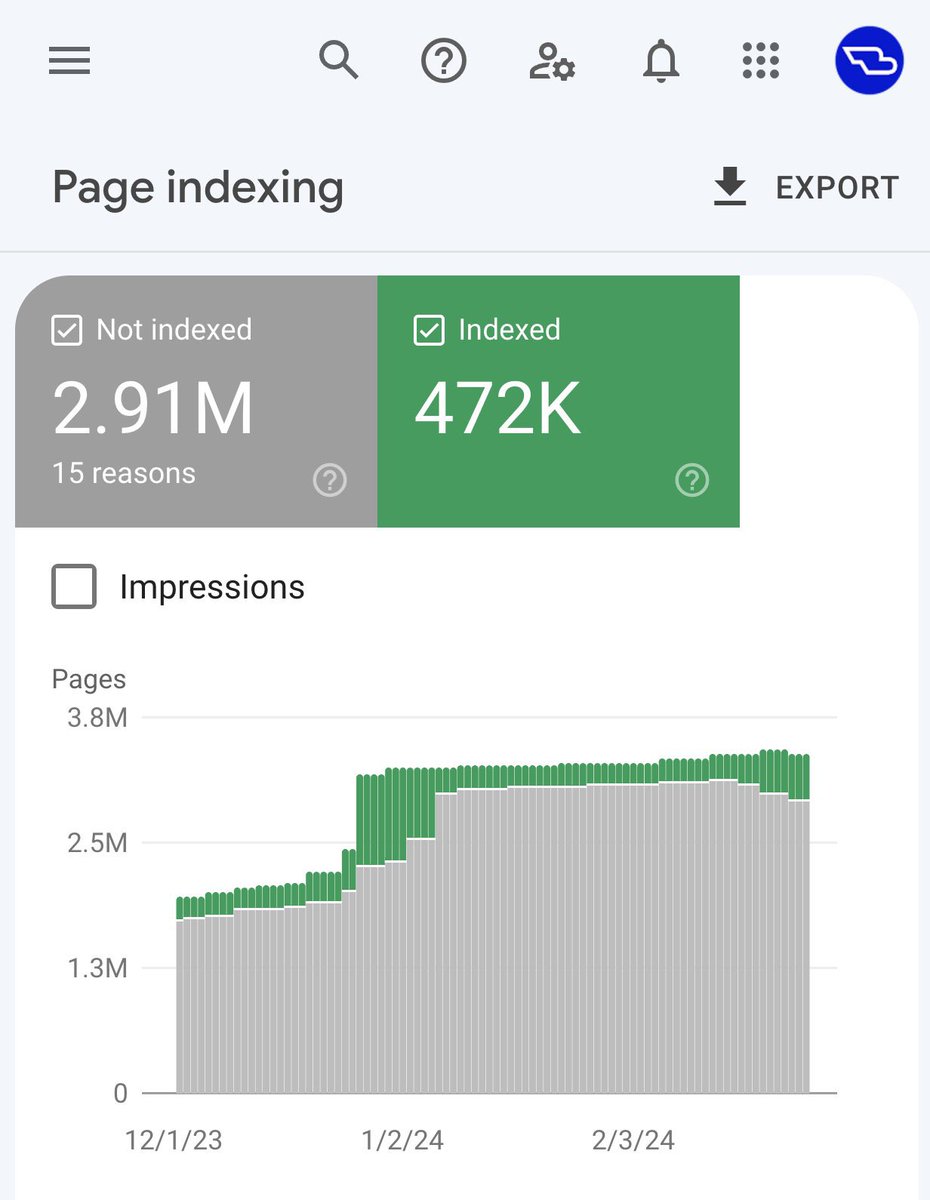
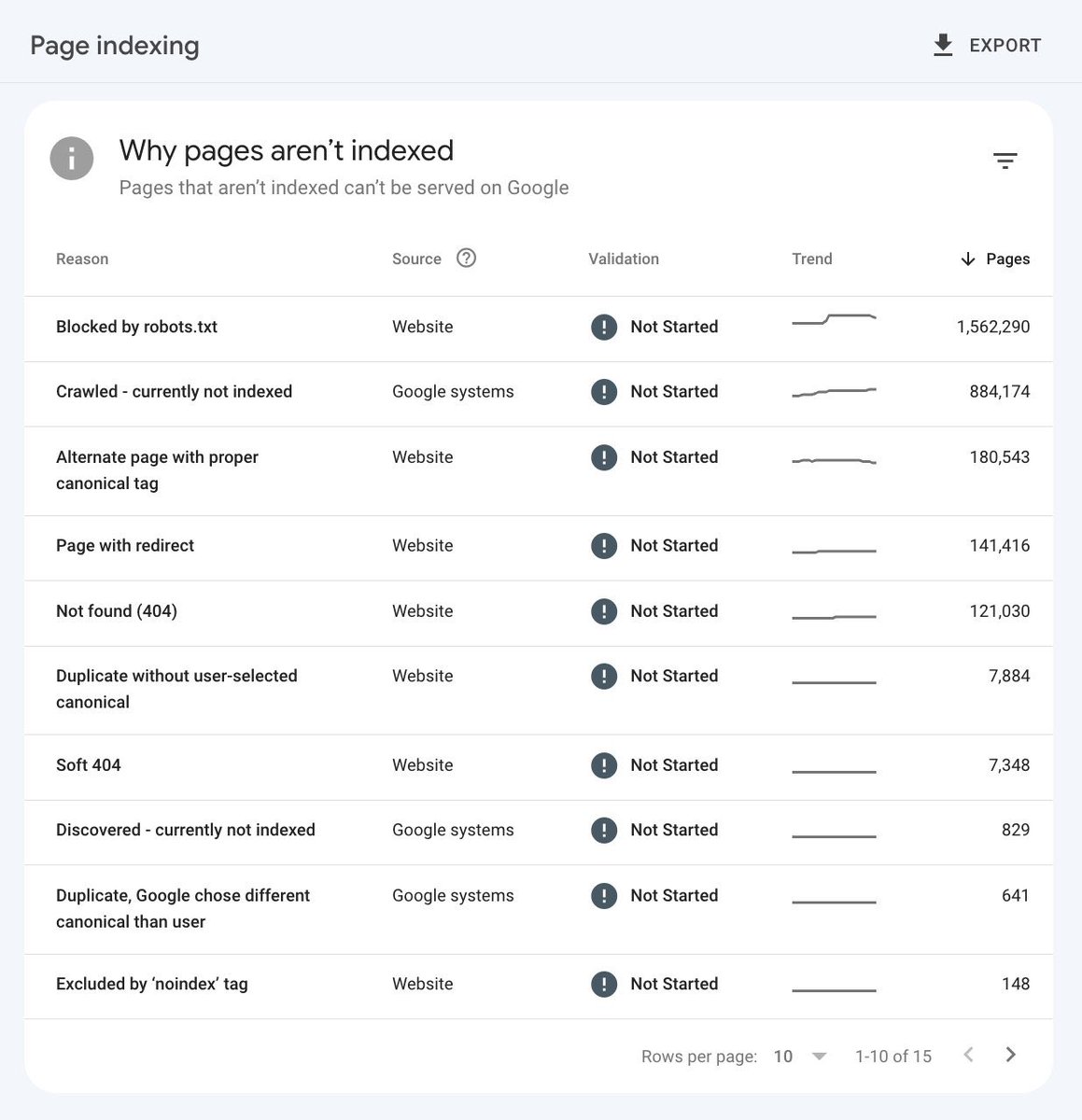
When working with large-scale sites, a question I'm often asked is: "Does our page indexing report look alright to you?"
My response to this is generally that it looks fine on the surface, but only further digging into the reasons for pages being excluded can this be determined.
What does "fine on the surface" mean? This comes down to my experience of working with many large sites (millions of URLs in some cases) across a lot of different industries.
What is "normal" for an eCommerce site can be quite different to a news publisher. As long as there aren't any major red flags, such as having millions of URLs being indexed or excluded when you know the site only has several thousand actual pages.
This needs to be said: there is no reality where you can get all of your pages shown as "indexed" and have no exclusions when dealing with large sites. It is also not possible to determine whether there are clear problems that need to be addressed just by looking at the overview.
What you can do is select each of the individual exclusions, and with knowledge of what each of them mean, investigate further into whether it is an actual issue that needs to be addressed or a non-issue.
Here is an example of each:
Non-issue: if you look into the sample of pages presented in the 'blocked by robots.txt' report (this tends to be enough of an indication) and you find it is parameters that are purposely being blocked, then you can ignore – this is the intended outcome of this exclusion.
Issue: when reviewing the 'page with redirect' exclusion you discover that internal links are pointing at URLs for a sub-section of the site that don't include '/' on the end of the URL. Because '/' is the default (without it there is a 301), it is creating an internal redirect that needs to be addressed.
What I often find is that some of the exclusions in the report can be related, with the 'page with redirect' URLs also being similar to the 'duplicate without user-selected canonical' in this instance, so you're able to essentially hit two birds with one stone by addressing it.
I find that the same way of thinking applies to both exclusions categorised by 'Website' or 'Google systems'. You can't just make sweeping conclusions by looking at the overall numbers – investigate the sampled pages and figure out what the broader issues are and whether time is justified based on existing priorities in fixing them.
Have you been following the new Google Trends Tutorials YouTube series? You should! 💡 https://t.co/EqudbuXPvI
In these videos you’ll learn how to use Google Trends to analyze patterns in Google searches, and use them to create interesting content online. Check it out… and stay tuned! 🤩
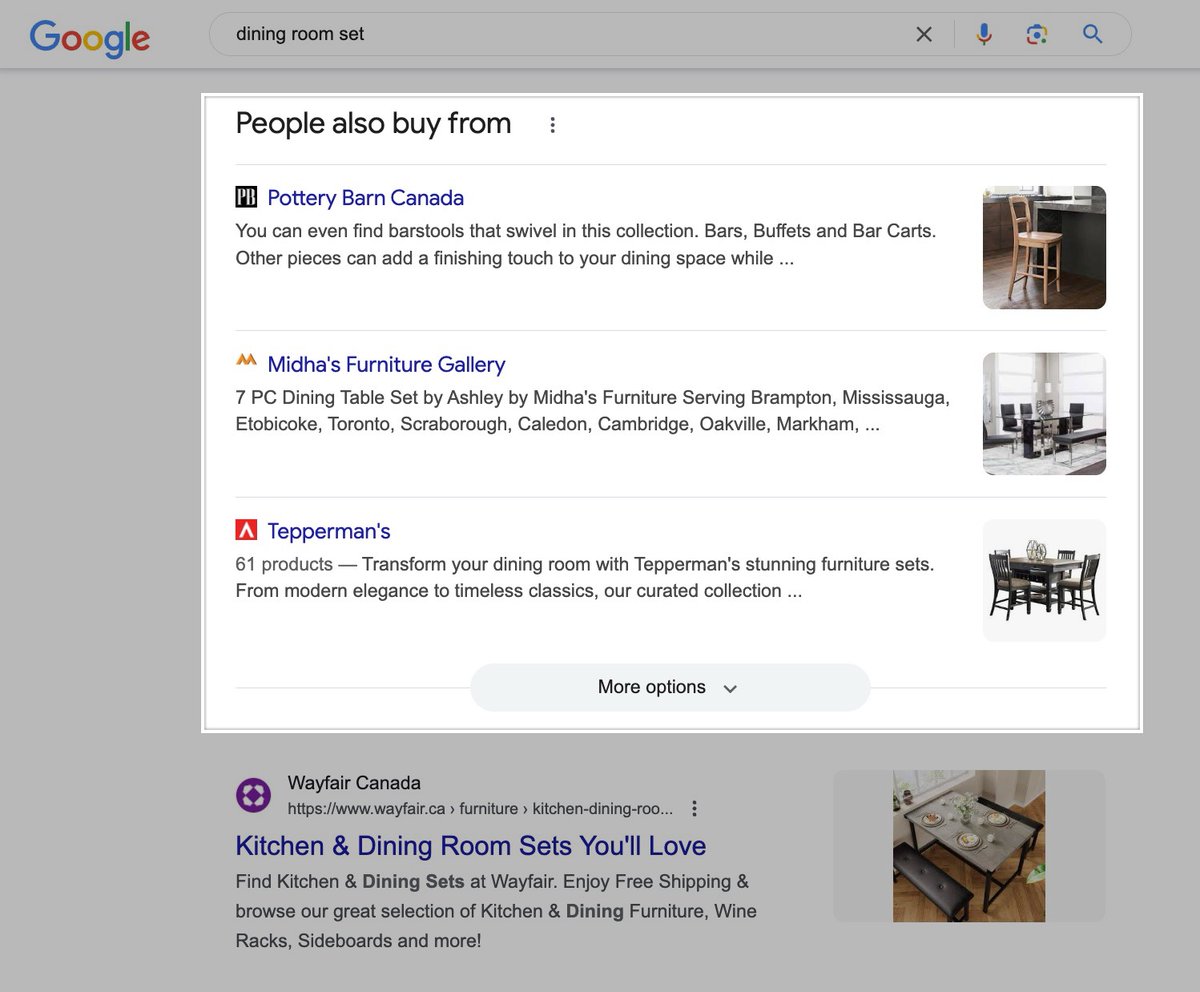
SERP Feature Update: Google has rapidly increased the prominence of the 'Explore Brands' feature. Also showing under a 'People also buy from' title, the feature has recently expanded more heavily outside of the US to Canada, Australia, & the UK. Can track this feature in Semrush.
SEO Tip: if you've noticed organic product grids showing more often for eCommerce queries in your region, you're not alone.
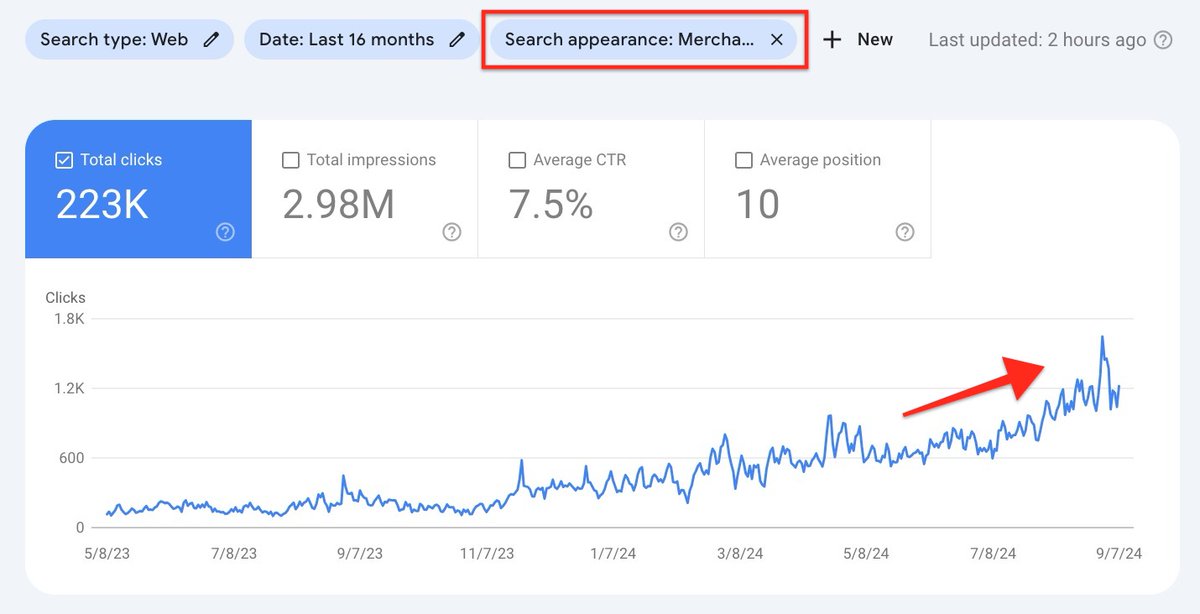
I've been noticing a steady change across eCommerce sites that I'm working with that have a strategy in place for product grids that their merchant listings traffic has jumped considerably in recent months.
When investigating the change, Google has certainly made some significant changes for the SERP feature within all regions in my dataset. Across mobile and desktop in the US, the UK, Australia and Germany, have all increased.
The biggest increases can be seen on mobile within the UK, desktop in Australia, along with mobile in Germany. The biggest change overall was for mobile in the UK, where the product grids SERP feature increased by 11 percentage points compared to April earlier this year.
For sites that have their merchant listings strategy in place, this is great news, because you'll now be receiving more traffic than you were previously without any changes required. For sites that don't have a strategy in place, this means you're likely losing out on clicks and sales to competitors.
If you're wanting to learn more about ranking within these features, I've created two guides which I would recommend reading:
1. Merchant Listings in Google Search Console: Popular Products, Product Knowledge Panels & Google Images - https://t.co/ytYKqZcAOs
2. Google Organic Product Grids: How Ranking Works - https://t.co/u6Arm0t7ru
Organic product grids are effectively a default feature across both mobile and desktop results right now across various regions. Many large eCommerce stores are missing out because they aren't paying attention to this major change to SERP features.
Google August 2024 core update is done - here is what we know
- Few saw full recoveries
- Some saw small recoveries
- Most saw nothing or even more hurt
Here are some of the facts, volatility charts and more from the SEO community on this update
https://t.co/ZNkPG0eaac
🗺️ Go places with Google Trends using advanced features! Watch the latest episode of Google Trends Tutorials on YouTube as @danielwaisberg and Omri Weisman help you stay trendy with comparison filters and special characters search and more! → https://t.co/lJCkcfoXSN