Innovator, Educator, Art Appreciator. Wannabe philosopher. Research Focus: Innovative Instructional Design to Engage in the Digital Era. EdD lifelong learner🤓
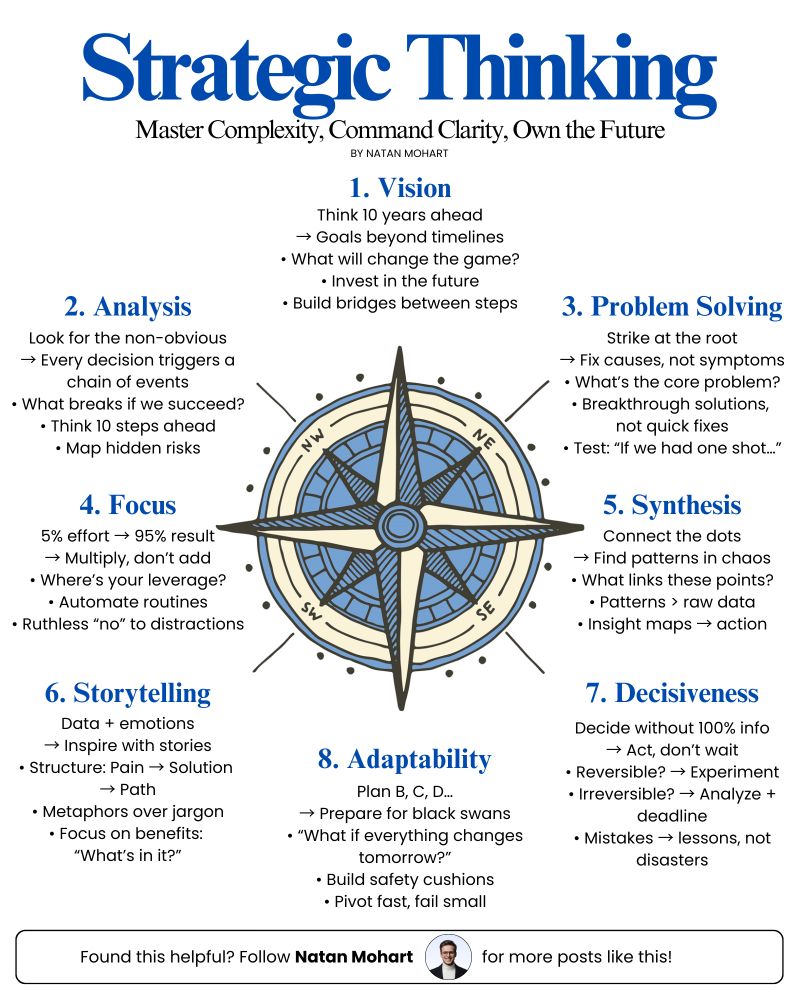
Strategy is not a fancy planning meeting.
It's turning purpose into progress.
And yes...
Most people make it
way too complicated.
They start with slides.
Because strategy is not about looking smart.
It is about helping people know
what matters next.
And when people know what matters,
progress gets a lot easier.
🎁 Want PDFs of my top infographics + growth tools?
👉 Go Here: https://t.co/QLV2I0XGXV
Please repost to help others out there! ♻️
BREAKING: Claude can now research like a Stanford PhD student.
Here are 6 insane Claude prompts that turn 40+ research papers into structured literature reviews, knowledge maps, and research gaps in minutes (Save this)
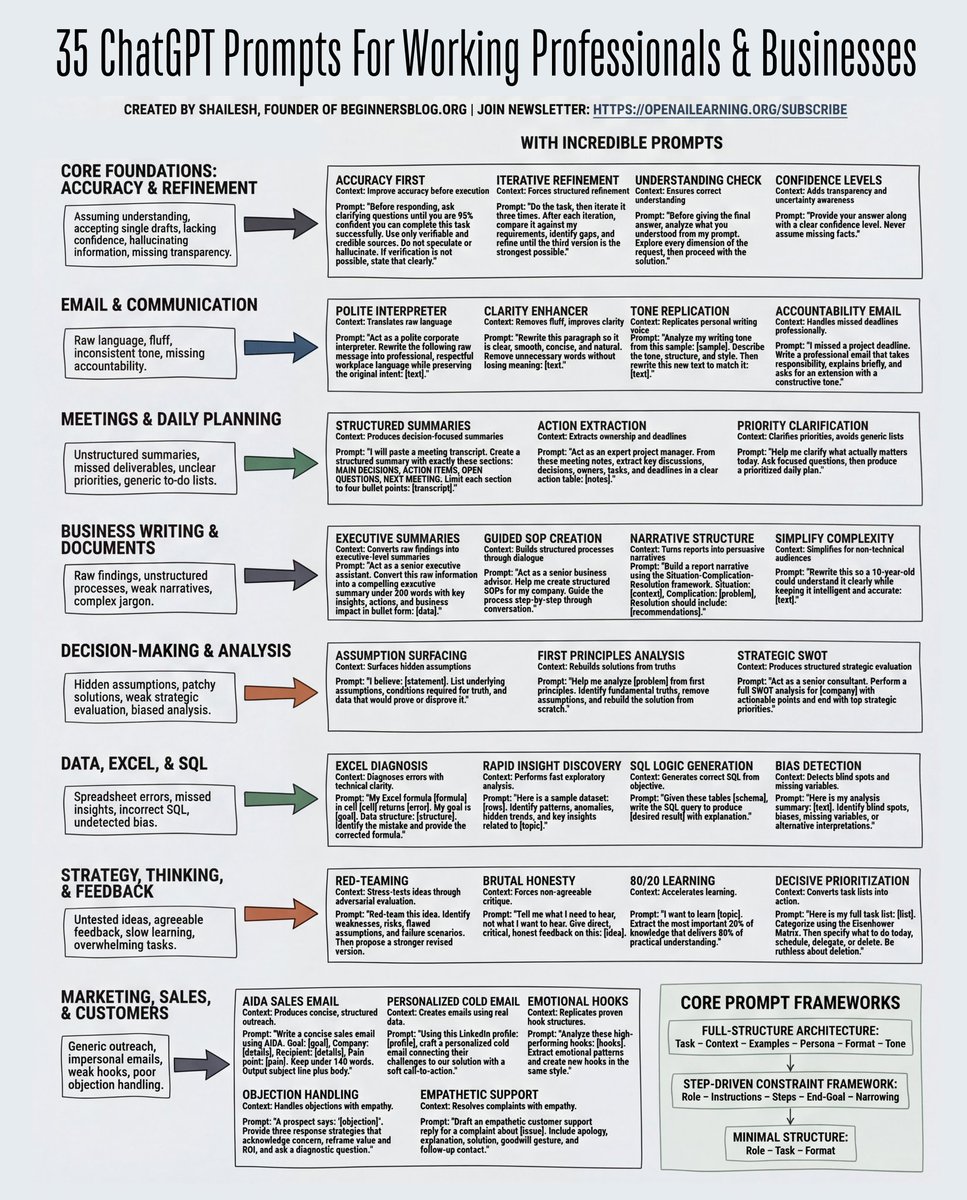
35 ChatGPT Prompts
1. Improve accuracy
Before asking for an answer, force the AI to understand the task properly.
Example: “Before responding, ask clarifying questions until you are confident you understand the task.” This prevents wrong or generic answers.
2. Write better emails
Turn rough or emotional messages into clear professional communication.
Example: “Rewrite this message in professional workplace language while keeping the original meaning.”
3. Summarize meetings
Instead of rereading long notes, ask AI to structure them.
Example: “Summarize this meeting into: decisions, action items, open questions, and next steps.”
4. Turn information into clear summaries
Useful when you have messy notes or research.
Example: “Turn this information into a short executive summary with key insights.”
5. Make better decisions
AI can help reveal assumptions behind ideas.
Example: “List the assumptions behind this idea and what data would prove or disprove it.”
6. Analyze data
You can debug Excel formulas, analyze datasets, or generate SQL queries.
Example: “My Excel formula returns this error. Identify the problem and give the corrected formula.”
7. Improve marketing and sales writing
AI can generate emails, hooks, and responses to objections.
Example: “Write a short sales email using the AIDA framework.”
I collected 35 useful prompts for professionals covering business, productivity, writing, analysis, and marketing.
Save this post so you can use them in your daily work.
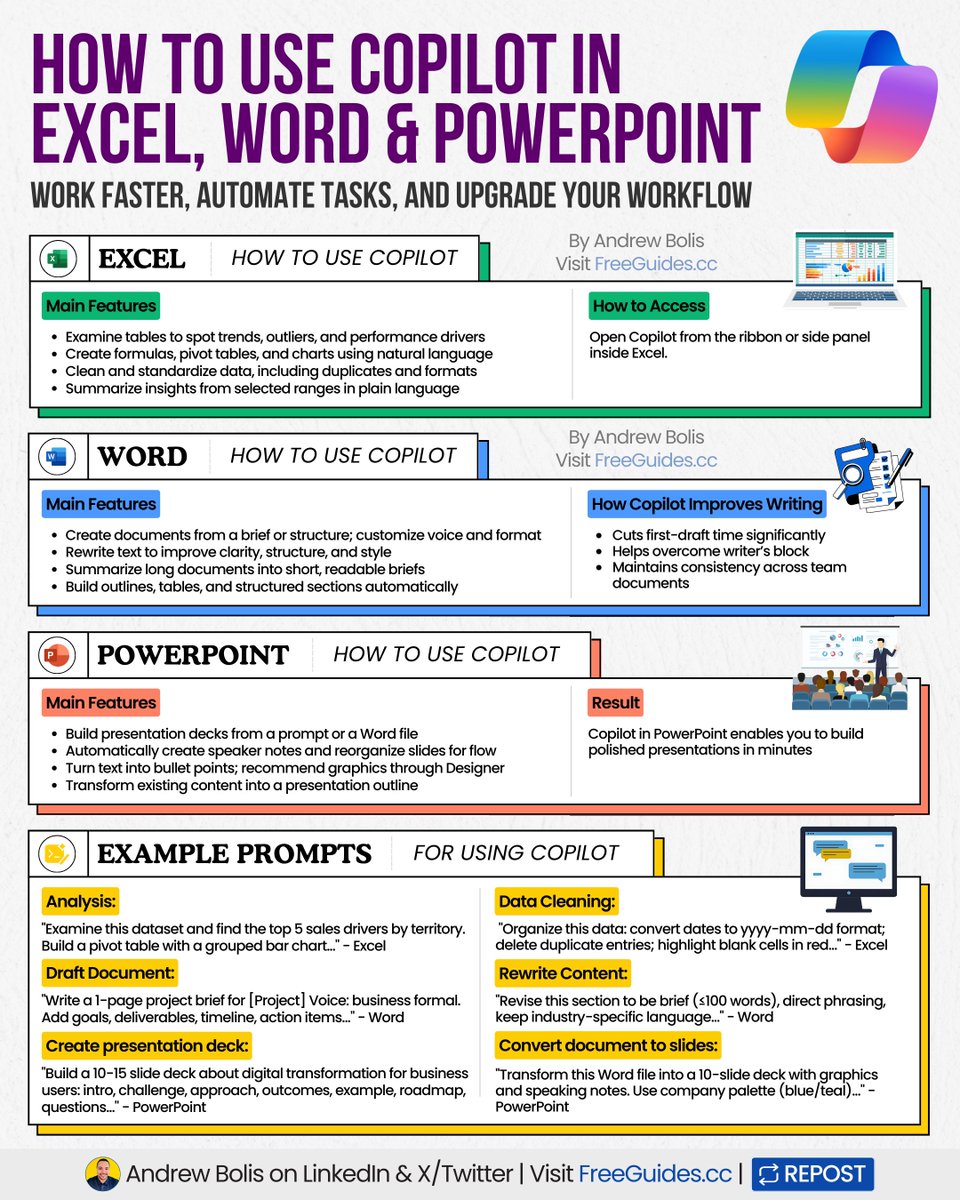
Microsoft Copilot can automate hours of work.
It’s a productivity partner built into your tools.
Here’s how to use it across your workflows.
[ 🔖 bookmark this post for later ]
Copilot handles different types of work:
▶ Automates data analysis in Excel
▶ Writes and edits documents in Word
▶ Builds full presentations in PowerPoint
Most people have Copilot access but don't know what it does (or how to use it).
Here's a quick guide on how Copilot saves you hours in each tool:
➡️ How to Use Copilot in Excel:
Main features:
▸ Spot trends and outliers in your data
▸ Build formulas and pivot tables from plain language
▸ Clean and organize messy datasets instantly
Example prompt: "Examine this dataset and find the top 5 sales drivers by territory. Build a pivot table with a grouped bar chart."
➡️ How to Use Copilot in Word:
Main features:
▸ Draft documents from a brief or outline
▸ Rewrite and polish content for clarity
▸ Turn long documents into short summaries
Example prompt: "Write a 1-page project brief for [Project] Voice: business formal. Add goals, deliverables, timeline, and action items."
➡️ How to Use Copilot in PowerPoint:
Main features:
▸ Build slide decks from prompts or Word files
▸ Generate speaker notes and design suggestions
▸ Turn text into structured presentations
Example prompt: "Build a 10-15 slide deck about digital transformation for business users: intro, challenge, approach, outcomes, example, roadmap, questions."
Master the workflows once, speed up every project.
📌 Learn 30 free AI tools in 30 days: https://t.co/7MJCwAPtaQ
👉 Follow me @AndrewBolis for more and 🔄 Repost this to help others learn AI