One of the biggest cybersecurity stories this year wasn’t about ransomware or a zero-day, it was about a Windows identifier that most people had never heard of until now.
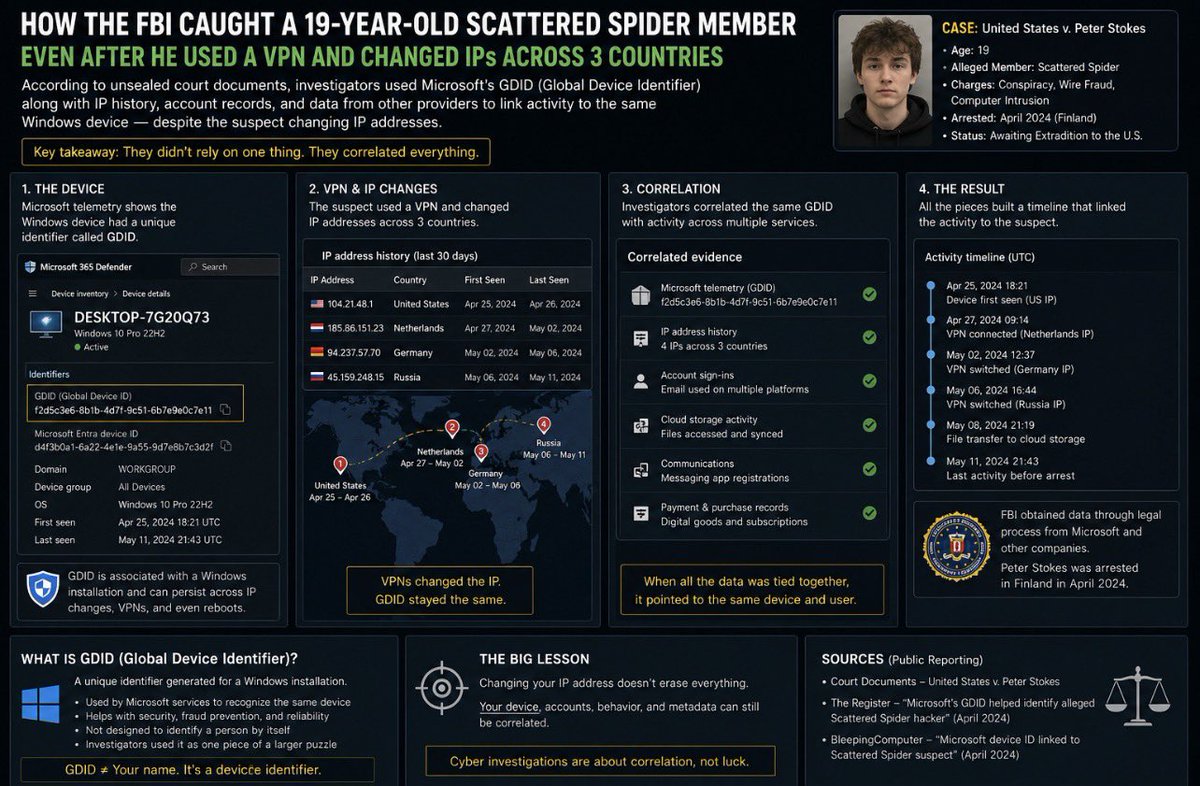
According to recently unsealed court documents, investigators alleged that Peter Stokes, a 19-year-old accused of being associated with Scattered Spider, used VPNs and changed IP addresses across multiple countries in an attempt to hide his identity. Yet investigators were still able to build a case that allegedly linked activity back to the same Windows device. The surprising part was that one of the data points reportedly involved Microsoft’s Global Device Identifier (GDID).
So, what exactly is GDID? Think of it as a unique identifier associated with a Windows installation. It isn’t your username, your IP address, or your serial number. By itself, it doesn’t tell investigators who you are. Instead, it helps Microsoft recognize the same Windows installation across its services for purposes such as security, fraud detection, and device reliability. Most Windows users have probably never heard of it.
Here’s where the investigation becomes interesting. A VPN can hide or change your public IP address, but it doesn’t change every artifact your device generates. According to the reporting, investigators didn’t rely on GDID alone. They reportedly combined Microsoft telemetry with IP address history, account sign-in records, timestamps, and information obtained from other companies through legal process. Individually, those pieces of evidence may not identify a suspect. Together, they can form a timeline that allegedly points to the same device over weeks or months.
The biggest lesson from this case is that modern cyber investigations are built on correlation, not a single mistake. Investigators don’t usually catch someone because of one log, one IP address, or one identifier. They correlate dozens of digital artifacts from different providers until the evidence tells one consistent story. That’s why understanding Windows internals, telemetry, cloud services, authentication logs, and digital forensics is becoming just as important as understanding offensive security. Sometimes the evidence that matters most isn’t the evidence you even knew existed.
How about your OWN private, secure network? Do you think it would cost a fortune?
It’s cheaper and easier than you think
https://t.co/ul0qha2GsH
@three_cube@_aircorridor@co11ateral
🎆 ICYMI: All done with the June (2606) @MSIntune UI extensions for all regions! 🎆
🆕 What's new docs: https://t.co/itXYxC33O9
🔜 In development docs: https://t.co/GO3DhhGel8
▶️ What's new blog: https://t.co/DZdgb6IJ3n
#MSIntune#AlwaysIntune#IntuneInspired
Here's step-by-step how to find insecure delegated permissions in your environment:
1. Download ADeleg
2. Open ADeleg
3. Click view -> index view by -> trustees
4. Click on each of these groups and check for "dangerous" permissions like WriteAllProperties
Groups:
Everyone, Authenticated Users, Domain Users, Domain Computers
What other permissions are "dangerous"? I share more details on that here...
https://t.co/nWXXYR2OFR
Instead of Netflix tonight, spend 1 hour on this.
Claude AI full course - learn how to build and automate real workflows.
Most people will scroll past it. Some people will actually use it.
And those are the ones who wake up tomorrow with a new skill.
Bookmark it.
Also, enrol in these top 13 FREE CERTIFICATION courses to upgrade:
1. Mastering Claude Code: From Setup to Real Projects
https://t.co/f5mFQS33KJ
2. AI Fundamentals with Claude
https://t.co/M5oyaDe5vf
3. Claude Code in Action
https://t.co/vdqnFPCbj1
4. Claude AI for Marketing
https://t.co/nP7YA0bTUN
5. Claude From Zero
https://t.co/jkzcFNpttO
6. Claude Code: Software Engineering with Generative AI Agents
https://t.co/nP77DcubI2
7. Claude Cowork for Automating Processes
https://t.co/1erwaNE4G4
8. Mastering Claude AI: Prompting, APIs, RAG, and MCP Specialisation
https://t.co/EmqCOEcv33
9. Intro to Claude AI
https://t.co/rrIuuULtvv
10. AI Automation with Claude
https://t.co/d8HPIJxlr3
11. AI Collaboration with Claude
https://t.co/tRgtklsslG
12. AI Fundamentals with Claude
https://t.co/M5oyaDe5vf
13. Building with the Claude API
https://t.co/gzH7C0VOiH
Follow @Mohiniuni for more such updates!
repo of the day
mukul975/Anthropic-Cybersecurity-Skills
817 structured cybersecurity skills for AI agents, mapped to MITRE ATT&CK, NIST CSF, D3FEND and more.
works with Claude Code, Cursor, Copilot, Codex, and Gemini CLI.
if you point agents at security work, this is a serious starting library.
https://t.co/rMvEinIAgf
Another day, another bad set of CIS recommendations
Here are the items you do not want to do in this list:
5.1.5.6 - Ensure maximum certificate lifetime for applications does not exceed 180 days
⚠️ This will silently break cert renewal for all of your SAML based SSO apps...
🗺️ 𝗥𝗕𝗔𝗖𝗠𝗮𝗽 - 𝗜𝗻𝘁𝗲𝗿𝗮𝗰𝘁𝗶𝘃𝗲 𝗺𝗮𝗽 𝗼𝗳 𝗠𝟯𝟲𝟱 𝗥𝗕𝗔𝗖 𝗿𝗼𝗹𝗲𝘀
Just came across this cool tool built by 𝗝𝗮𝗰𝗼𝗯 𝗦𝗵𝗲𝗿𝗶𝗱𝗮𝗻 (𝗦𝗲𝗻𝗶𝗼𝗿 𝗠𝗶𝗰𝗿𝗼𝘀𝗼𝗳𝘁 𝗣𝘂𝗿𝘃𝗶𝗲𝘄 𝗘𝗻𝗴𝗶𝗻𝗲𝗲𝗿) and sharing it with fellow defenders.
𝗥𝗕𝗔𝗖𝗠𝗮𝗽 𝗰𝗼𝘃𝗲𝗿𝘀 𝟵 𝘀𝗲𝗿𝘃𝗶𝗰𝗲𝘀 𝗮𝗻𝗱 𝟯𝟮𝟳 𝗿𝗼𝗹𝗲𝘀: Entra, Purview, Intune, Exchange, SharePoint, Defender XDR, Fabric, Power Platform, and Security Copilot.
For each role you get:
• Permissions and scope
• Use cases and when to assign it
• Prerequisites, best practices, and security considerations
• Service-specific gotchas and related roles
Tool's link:🫡
https://t.co/U7u3emEmsn
#Cybersecurity #RBACMap #RBAC
🛡️ 𝗠𝗶𝗰𝗿𝗼𝘀𝗼𝗳𝘁 𝗦𝗲𝗰𝘂𝗿𝗲 𝗦𝗰𝗼𝗿𝗲 𝘂𝗽𝗱𝗮𝘁𝗲:
New recommendation spotted — 𝙧𝙚𝙙𝙪𝙘𝙚 𝙪𝙣𝙣𝙚𝙘𝙚𝙨𝙨𝙖𝙧𝙮 𝙞𝙣𝙗𝙤𝙪𝙣𝙙 𝙞𝙣𝙩𝙚𝙧𝙣𝙚𝙩 𝙚𝙭𝙥𝙤𝙨𝙪𝙧𝙚 𝙤𝙣 𝙞𝙣𝙩𝙚𝙧𝙣𝙚𝙩-𝙛𝙖𝙘𝙞𝙣𝙜 𝙙𝙚𝙫𝙞𝙘𝙚𝙨.
So I decided to take it one step further 💡 Here’s a quick 𝗞𝗤𝗟 to report devices with the number of listening ports (sorted descending).
https://t.co/W1ZRMvYcin
Combine this with 𝗗𝗲𝘃𝗶𝗰𝗲𝗧𝘃𝗺𝗦𝗲𝗰𝘂𝗿𝗲𝗖𝗼𝗻𝗳𝗶𝗴𝘂𝗿𝗮𝘁𝗶𝗼𝗻𝗔𝘀𝘀𝗲𝘀𝘀𝗺𝗲𝗻𝘁𝗞𝗕 to align with Secure Score recommendations and spot high-exposure endpoints fast.⚡Defenders — time to close those inbound doors before attackers walk in 🫡
#Cybersecurity #MicrosoftDefender #KQL #ThreatHunting #SecureScore