Today we’re launching Command Line, a new technical blog about how and why we build.
Our first stories go behind the architecture, design decisions, and research shaping the next wave of developer tools.
Stay tuned for more next week at #MicrosoftBuild https://t.co/JKbHGpz130
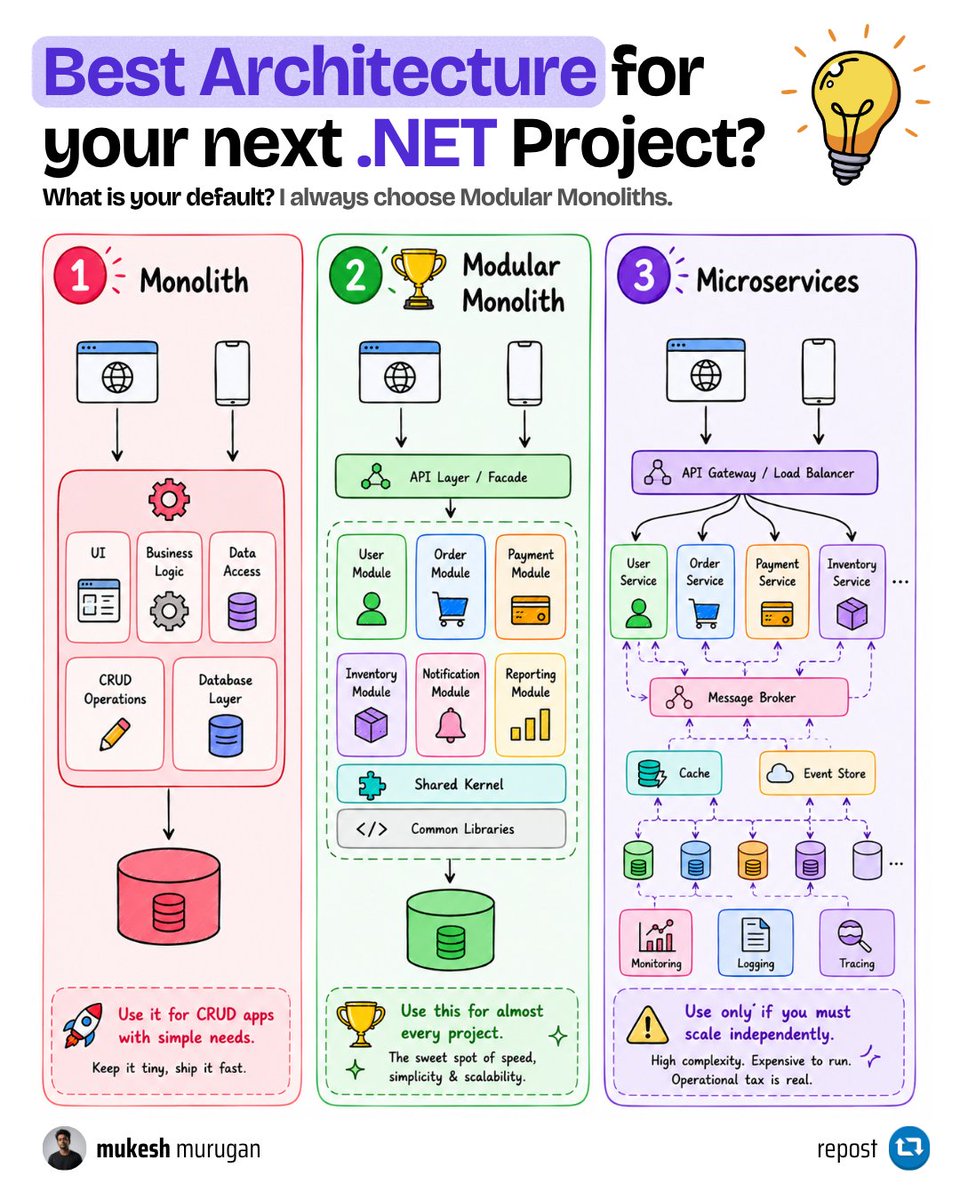
I've stopped reaching for microservices on new .NET projects.
Almost every time, a modular monolith gets me further, faster. This is how I weigh the three options before writing any code.
Start with the plain monolith. One project, one deployable, one database. The UI, the business logic, and the data access all live together. It is the fastest way to ship something real, and for a small app with simple CRUD it is genuinely the right call. Keep it tiny, ship it fast. The catch shows up later: as features pile on, everything starts touching everything. A change in the order code quietly breaks something in billing, because nothing ever stopped them from reaching into each other.
Then there are microservices. Every capability becomes its own service with its own database, its own deployment, talking to the others over the network through a gateway and a message broker. Add a cache, an event store, monitoring, logging, tracing, and now you are running a small platform. It scales beautifully when one part genuinely needs to scale on its own, or when you have many teams who each own a piece. But the operational tax is real. You trade simple method calls for network calls that can fail, and a single feature can now span five services and three databases.
The modular monolith sits right in the middle, and that is where I default. It is still one deployable and usually one database, so you skip all the distributed-system pain. But inside, the code is split into clear modules - user, order, payment, inventory - each with its own boundary, talking through defined entry points instead of reaching into each other's tables. You get the clean separation people actually want from microservices, without the network, the extra infrastructure, or the 2am incident call.
The part I like most: it keeps your options open. If one module truly outgrows the box and needs to scale on its own, you already have a clean seam to pull it out into its own service. You earn that split instead of guessing at it on day one.
It is not free. The boundaries only hold if you enforce them, and one shared database makes it tempting to join across modules and quietly undo the whole thing. It also will not give you independent scaling or independent deploys per module. If you truly need those, that is your signal to split.
Most teams I see jump to microservices for a scale problem they do not have yet, and pay for it every single day. Start modular. Split when the pain is real, not before.
When you've actually broken a module out into its own service, what forced it: real scaling limits, or team and org pressure?
Giving away the exact stack to run GTM inside Claude Code. Free.
Prompts give you generic output. These hooks fire real actions across your stack:
→ Claude finishes a task → Slack pinged
→ Claude enriches a lead → CRM updated
→ Claude writes a sequence → Instantly loaded
→ Claude generates content → Gmail catches it
No Zapier, copy-paste, or manual handoffs.
What's inside:
- 32 hooks across 8 categories
- 15 integrations (Apollo, Instantly, Gmail, Slack, your CRM, and more)
- 18 content prompts
- 5 role-based starter packs
Clone, plug in your API keys, run.
Reply "repo" and I'll DM it. Must be following.
AI coding agents can build quickly, but unstructured workflows can create fragile software.
In this handbook, Qudrat shows you how to build a software factory with Claude Code.
You'll create specialized agents, an orchestrator, hooks, and review workflows for safer production development.
https://t.co/EBUiXWbon6
Most .NET devs use Redis for caching and stop there.
It keeps data in memory (RAM) instead of on disk, so reads come back in well under a millisecond.
That speed is why it fits far more than one job. Here are ten worth knowing:
1. API response caching. Save the result of a slow database query in Redis. The next request reads it from memory instead of hitting the database again.
2. Session storage. Keep user login sessions in Redis so any server in your cluster can read them. No more getting logged out when the load balancer moves you to another server.
3. Rate limiting. Count how many requests an IP made in the last minute with one Redis counter. Block abuse before it ever reaches your API.
4. Real-time leaderboards. Redis sorted sets keep items ranked by score for you. Ask for the top 10 and it comes back instantly, even with millions of players.
5. Pub/Sub messaging. One service publishes a message and every service listening gets it at once. Great for live notifications without constantly checking the database for changes.
6. Distributed locks. When two servers might update the same record, Redis hands out a single lock so only one wins. That's how you stop them from overwriting each other.
7. Job queues. Push slow background work like sending emails into a Redis list. A separate worker picks it up and runs it, so the user isn't left waiting.
8. Real-time analytics. Redis Streams record a flood of events (clicks, page views) and let a dashboard read them as they happen.
9. Feature flags. Store on/off switches in Redis and flip a feature for everyone instantly, no redeploy needed.
10. AI chat memory. Store the recent context of a conversation so an LLM (the model behind a chatbot) remembers what was said earlier.
That's one tool doing ten jobs, and most teams only ever use the first one.
What do you actually run Redis for in production - just caching, or something further down this list?
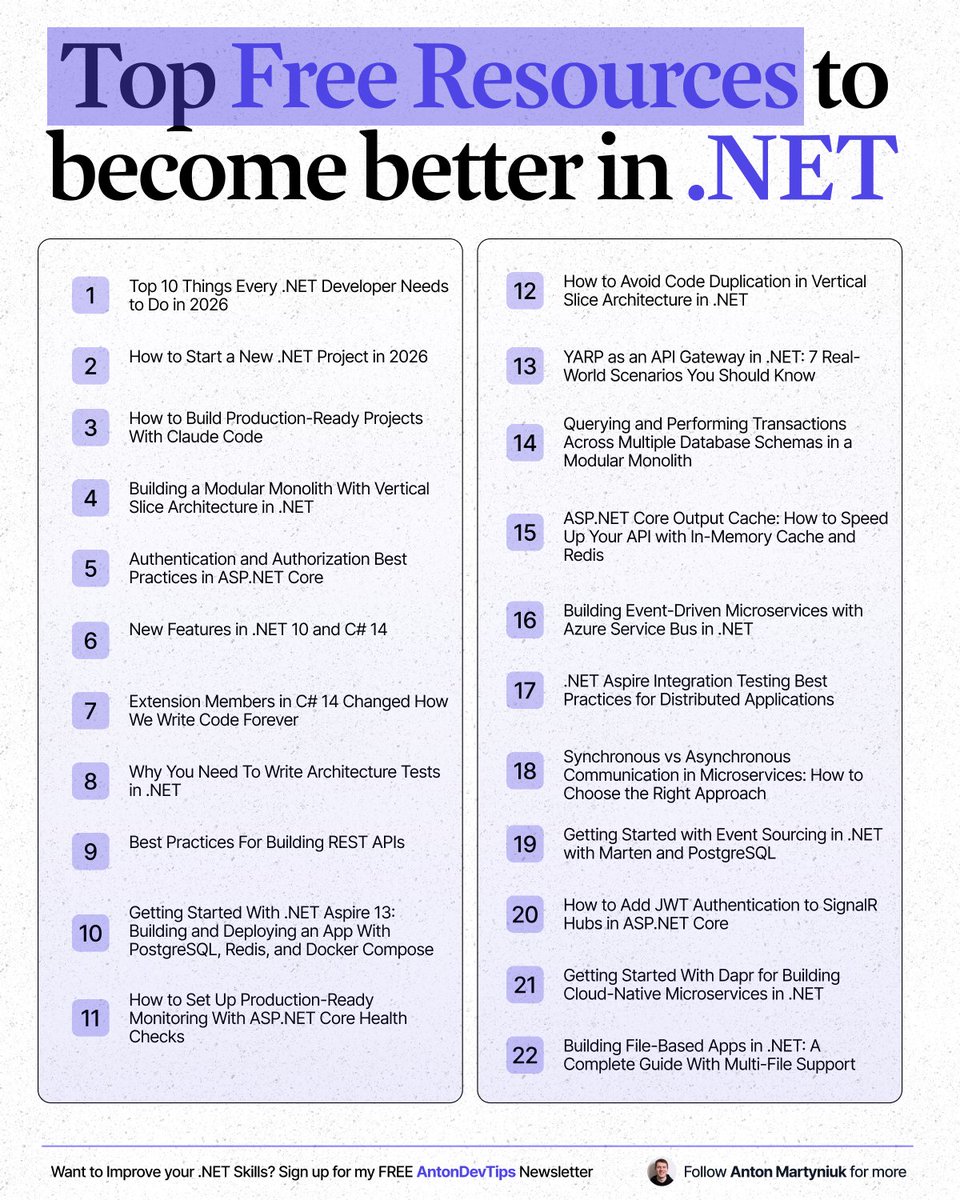
𝗧𝗼𝗽 𝗳𝗿𝗲𝗲 𝗿𝗲𝘀𝗼𝘂𝗿𝗰𝗲𝘀 𝘁𝗼 𝗯𝗲𝗰𝗼𝗺𝗲 𝗯𝗲𝘁𝘁𝗲𝗿 𝗶𝗻 .𝗡𝗘𝗧 👇
👉 Top 10 Things Every .NET Developer Needs to Do in 2026
↳ https://t.co/jpLalelEoc
👉 How to Start a New .NET Project in 2026
↳ https://t.co/hFK8CX2vYO
👉 How to Build Production-Ready Projects With Claude Code
↳ https://t.co/o1ai5UxOsK
👉 Building a Modular Monolith With Vertical Slice Architecture in .NET
↳ https://t.co/Ev9JNsYX2J
👉 Authentication and Authorization Best Practices in https://t.co/beasBK3BnP Core
↳ https://t.co/qnjnEqhINh
👉 New Features in .NET 10 and C# 14
↳ https://t.co/bI1zP2ZnRa
👉 Extension Members in C# 14 Changed How We Write Code Forever
↳ https://t.co/oWUxQKNshB
👉 Why You Need To Write Architecture Tests in .NET
↳ https://t.co/AKeCR4J0fx
👉 Best Practices For Building REST APIs
↳ https://t.co/xc9HqMwcO6
👉 Getting Started With .NET Aspire 13: Building and Deploying an App With PostgreSQL, Redis, and Docker Compose
↳ https://t.co/4WMs62fzkX
👉 How to Set Up Production-Ready Monitoring With https://t.co/beasBK3BnP Core Health Checks
↳ https://t.co/oUvunMLwiK
👉 How to Avoid Code Duplication in Vertical Slice Architecture in .NET
↳ https://t.co/FxEw1Bl5b2
👉 YARP as an API Gateway in .NET: 7 Real-World Scenarios You Should Know
↳ https://t.co/jd7E0GwX3J
👉 Querying and Performing Transactions Across Multiple Database Schemas in a Modular Monolith
↳ https://t.co/3R9Z4B3WeT
👉 https://t.co/beasBK3BnP Core Output Cache: How to Speed Up Your API with In-Memory Cache and Redis
↳ https://t.co/UcFTWbNTi1
👉 Building Event-Driven Microservices with Azure Service Bus in .NET
↳ https://t.co/7Kx7psb5iL
👉 .NET Aspire Integration Testing Best Practices for Distributed Applications
↳ https://t.co/UhOlMP8T5o
👉 Synchronous vs Asynchronous Communication in Microservices: How to Choose the Right Approach
↳ https://t.co/J9Hf3WUStR
👉 Getting Started with Event Sourcing in .NET with Marten and PostgreSQL
↳ https://t.co/ABB2KXNA00
👉 How to Add JWT Authentication to SignalR Hubs in https://t.co/beasBK3BnP Core
↳ https://t.co/4joelJ5Twz
👉 Getting Started With Dapr for Building Cloud-Native Microservices in .NET
↳ https://t.co/Yz0g6ptSQZ
👉 Building File-Based Apps in .NET: A Complete Guide With Multi-File Support
↳ https://t.co/bbK97ofz2d
——
♻️ Repost to help others find free .NET learning resources
➕ Follow me ( @AntonMartyniuk ) to improve your .NET and Architecture Skills
The biggest AI skill in 2026 won’t be prompt engineering.
It’ll be designing the system around the model.
This diagram perfectly shows the evolution:
🔹 Prompt Engineering
→ Better instructions
🔹 Context Engineering
→ Better information flow
🔹 Harness Engineering
→ Better autonomous systems
The shift is massive.
Old AI apps:
“Here’s my prompt.”
Modern AI systems:
• memory management
• retrieval pipelines
• tool orchestration
• verification loops
• retries & evaluators
• context compression
• multi-agent execution
In other words:
AI is moving from
📝 single prompts
to
⚙️ full-stack cognitive architectures.
One underrated insight here:
The context window is now the new CPU cache.
What stays inside it determines:
• accuracy
• latency
• cost
• reasoning quality
• hallucination rate
And Harness Engineering ties everything together:
Gather → Curate → Act → Verify → Retry
That’s how production-grade AI agents are actually built.
The future AI engineer won’t just “talk to models.”
They’ll architect intelligent systems around them. 🚀
Stop wasting hours trying to learn AI.
I have already done it for you.
With one list. Zero confusion. And no fluff.
📹 Videos:
1. LLM Introduction: https://t.co/LaZdiMZ9DR
2. LLMs from Scratch: https://t.co/0egvjTk6WJ
3. Agentic AI Overview (Stanford): https://t.co/ZMiX8zvkD2
4. Building and Evaluating Agents: https://t.co/1U6NiPGCnA
5. Building Effective Agents: https://t.co/BzSjqqwa16
6. Building Agents with MCP: https://t.co/YBlBFJQB8i
7. Building an Agent from Scratch: https://t.co/X65T8NSwAU
8. Philo Agents: https://t.co/eoc3rWcVoo
🗂️ Repos
1. GenAI Agents: https://t.co/WmleAGv2N7
2. Microsoft's AI Agents for Beginners: https://t.co/VZACPfXtJh
3. Prompt Engineering Guide: https://t.co/bYR2qddyui
4. Hands-On Large Language Models: https://t.co/LJYu8hAe7Y
5. AI Agents for Beginners: https://t.co/VZACPfXtJh
6. GenAI Agents: https://t.co/rp4JNSUGSy
7. Made with ML: https://t.co/ccmxen8faU
8. Hands-On AI Engineering: https://t.co/J6sQ2oZXuN
9. Awesome Generative AI Guide: https://t.co/3mmQI9HNvG
10. Designing Machine Learning Systems: https://t.co/Kxeywa37ai
11. Machine Learning for Beginners from Microsoft: https://t.co/zr9kZJsVYq
12. LLM Course: https://t.co/hHkSpVDvAH
🗺️ Guides
1. Google's Agent Whitepaper: https://t.co/nNf2owWXvi
2. Google's Agent Companion: https://t.co/6juFTnE9we
3. Building Effective Agents by Anthropic: https://t.co/1wElNyKmLF
4. Claude Code Best Agentic Coding practices: https://t.co/ydrbzZSEI4
5. OpenAI's Practical Guide to Building Agents: https://t.co/sFUdJ676ri
📚 Books:
1. Understanding Deep Learning: https://t.co/2pIGN8rOt3
2. Building an LLM from Scratch: https://t.co/zxcmNXUOTx
3. The LLM Engineering Handbook: https://t.co/vCScRvGEal
4. AI Agents: The Definitive Guide - Nicole Koenigstein: https://t.co/FrQPw3bH1M
5. Building Applications with AI Agents - Michael Albada: https://t.co/2a9z0SXTvH
6. AI Agents with MCP - Kyle Stratis: https://t.co/giXPpKPrTo
7. AI Engineering: https://t.co/ZEmTMCT127
📜 Papers
1. ReAct: https://t.co/SuTQUbT7iJ
2. Generative Agents: https://t.co/dmJRvdd9QY
3. Toolformer: https://t.co/hjrMLeCbA6
4. Chain-of-Thought Prompting: https://t.co/LizaUQTHiT
🧑🏫 Courses:
1. HuggingFace's Agent Course: https://t.co/eQ9eESDRzN
2. MCP with Anthropic: https://t.co/91kuLEzmrB
3. Building Vector Databases with Pinecone: https://t.co/LVZl6z2Y07
4. Vector Databases from Embeddings to Apps: https://t.co/pgT6RtKdsm
5. Agent Memory: https://t.co/zkQy6NwdLa
Follow @anujcodes_21 for more!!
👇 Comment “AI” for more resources
Repost for your network ♻️
Bookmark for future.
Rate limiting works differently once your API scales out.
Local counters split the limit across instances. Redis gives them one shared counter + time window.
I built a distributed rate limiter in .NET 10 using Redis.
Learn more: https://t.co/9Nk0uJqP1h
I built a working Minimal API with EF Core in 3 files.
You can do the same in 10 minutes.
No solution file.
No csproj.
No project setup.
Just three .cs files and the dotnet CLI.
This is file-based apps in .NET 11 Preview 3.
And it's a complete shift in how you can build internal tools and prototypes.
𝗧𝗵𝗲 𝟯-𝗳𝗶𝗹𝗲 𝘀𝘁𝗿𝘂𝗰𝘁𝘂𝗿𝗲
1. Order.cs
↳ Plain POCO with Id, OrderNumber, CustomerName, Amount, CreatedAt
2. OrdersDbContext.cs
↳ The EF Core DbContext with inline Fluent API mappings
3. main.cs
↳ DI setup, Minimal API endpoints, app[.]Run()
That's it: 3 files in a folder.
𝗧𝗵𝗲 𝗺𝗮𝗴𝗶𝗰 𝗶𝘀 𝗶𝗻 𝟰 𝗱𝗶𝗿𝗲𝗰𝘁𝗶𝘃𝗲𝘀 𝗮𝘁 𝘁𝗵𝗲 𝘁𝗼𝗽 𝗼𝗳 𝗺𝗮𝗶𝗻.𝗰𝘀
#:sdk Microsoft[.]NET[.]Sdk[.]Web
↳ Unlocks WebApplication and ASP .NET Core types
#:package [email protected]
↳ Pulls in the SQLite provider on first run
#:include Order.cs
↳ Brings the entity into the compilation
#:include OrdersDbContext.cs
↳ Brings the DbContext into the compilation
Four lines replace an entire csproj and sln.
Below the directives, it's standard ASP .NET Core code.
I can run it with a single command:
𝚍𝚘𝚝𝚗𝚎𝚝 𝚛𝚞𝚗 𝚖𝚊𝚒𝚗.𝚌𝚜
First run restores EF Core.
Every run after that is fast.
You now have a real web API with a real database.
✅ When file-based apps win
→ Internal tools without ceremony
→ Prototypes you can share as a single folder
→ Demos that work in a few minutes
→ Replacing Python scripts where you want strong typing
→ Onboarding new devs without csproj confusion
❌ When you should NOT use them
→ Multi-project solutions with shared libraries
→ Apps with custom MSBuild logic
→ NuGet package authoring
→ Production apps with full CI/CD and test projects
And when your script outgrows itself, one command converts it:
𝚍𝚘𝚝𝚗𝚎𝚝 𝚙𝚛𝚘𝚓𝚎𝚌𝚝 𝚌𝚘𝚗𝚟𝚎𝚛𝚝 𝚖𝚊𝚒𝚗.𝚌𝚜
You get a full csproj with all directives translated.
I've covered the complete workflow with all code samples in this week's newsletter issue.
📌 Read the full guide:
↳ https://t.co/oenvrHRypH
Inside you'll find:
✅ Full HTTP health-check tool walkthrough
✅ Complete Minimal API with all 4 endpoints
✅ Exact EF Core mappings, DI setup, and migration step
✅ The checklist for when to convert to a full project
Where would you try file-based apps first - scripts, prototypes, or internal tools?
——
𝗣.𝗦.: 𝗔𝘇𝘂𝗿𝗲 𝗖𝗼𝗽𝗶𝗹𝗼𝘁 𝗠𝗶𝗴𝗿𝗮𝘁𝗶𝗼𝗻 𝗔𝗴𝗲𝗻𝘁 𝗶𝘀 𝗛𝗲𝗿𝗲
Microsoft's Azure Copilot Migration Agent can turn complex migration data into clear answers. With natural language prompts, you can evaluate readiness, risk, ROI, and automate landing zone requirements to make confident decisions for you and your team.
Download the free playbook to get started: https://t.co/pPsd2dRg0P
——
♻️ Repost to help other .NET developers build faster
➕ Follow me ( @AntonMartyniuk ) to improve your .NET and Architecture Skills














![AntonMartyniuk's tweet photo. I built a working Minimal API with EF Core in 3 files.
You can do the same in 10 minutes.
No solution file.
No csproj.
No project setup.
Just three .cs files and the dotnet CLI.
This is file-based apps in .NET 11 Preview 3.
And it's a complete shift in how you can build internal tools and prototypes.
𝗧𝗵𝗲 𝟯-𝗳𝗶𝗹𝗲 𝘀𝘁𝗿𝘂𝗰𝘁𝘂𝗿𝗲
1. Order.cs
↳ Plain POCO with Id, OrderNumber, CustomerName, Amount, CreatedAt
2. OrdersDbContext.cs
↳ The EF Core DbContext with inline Fluent API mappings
3. main.cs
↳ DI setup, Minimal API endpoints, app[.]Run()
That's it: 3 files in a folder.
𝗧𝗵𝗲 𝗺𝗮𝗴𝗶𝗰 𝗶𝘀 𝗶𝗻 𝟰 𝗱𝗶𝗿𝗲𝗰𝘁𝗶𝘃𝗲𝘀 𝗮𝘁 𝘁𝗵𝗲 𝘁𝗼𝗽 𝗼𝗳 𝗺𝗮𝗶𝗻.𝗰𝘀
#:sdk Microsoft[.]NET[.]Sdk[.]Web
↳ Unlocks WebApplication and ASP .NET Core types
#:package Microsoft.EntityFrameworkCore.Sqlite@10.0.0
↳ Pulls in the SQLite provider on first run
#:include Order.cs
↳ Brings the entity into the compilation
#:include OrdersDbContext.cs
↳ Brings the DbContext into the compilation
Four lines replace an entire csproj and sln.
Below the directives, it's standard ASP .NET Core code.
I can run it with a single command:
𝚍𝚘𝚝𝚗𝚎𝚝 𝚛𝚞𝚗 𝚖𝚊𝚒𝚗.𝚌𝚜
First run restores EF Core.
Every run after that is fast.
You now have a real web API with a real database.
✅ When file-based apps win
→ Internal tools without ceremony
→ Prototypes you can share as a single folder
→ Demos that work in a few minutes
→ Replacing Python scripts where you want strong typing
→ Onboarding new devs without csproj confusion
❌ When you should NOT use them
→ Multi-project solutions with shared libraries
→ Apps with custom MSBuild logic
→ NuGet package authoring
→ Production apps with full CI/CD and test projects
And when your script outgrows itself, one command converts it:
𝚍𝚘𝚝𝚗𝚎𝚝 𝚙𝚛𝚘𝚓𝚎𝚌𝚝 𝚌𝚘𝚗𝚟𝚎𝚛𝚝 𝚖𝚊𝚒𝚗.𝚌𝚜
You get a full csproj with all directives translated.
I've covered the complete workflow with all code samples in this week's newsletter issue.
📌 Read the full guide:
↳ https://t.co/oenvrHRypH
Inside you'll find:
✅ Full HTTP health-check tool walkthrough
✅ Complete Minimal API with all 4 endpoints
✅ Exact EF Core mappings, DI setup, and migration step
✅ The checklist for when to convert to a full project
Where would you try file-based apps first - scripts, prototypes, or internal tools?
——
𝗣.𝗦.: 𝗔𝘇𝘂𝗿𝗲 𝗖𝗼𝗽𝗶𝗹𝗼𝘁 𝗠𝗶𝗴𝗿𝗮𝘁𝗶𝗼𝗻 𝗔𝗴𝗲𝗻𝘁 𝗶𝘀 𝗛𝗲𝗿𝗲
Microsoft's Azure Copilot Migration Agent can turn complex migration data into clear answers. With natural language prompts, you can evaluate readiness, risk, ROI, and automate landing zone requirements to make confident decisions for you and your team.
Download the free playbook to get started: https://t.co/pPsd2dRg0P
——
♻️ Repost to help other .NET developers build faster
➕ Follow me ( @AntonMartyniuk ) to improve your .NET and Architecture Skills](https://pbs.twimg.com/media/HJUrx5UXEAE62_4.jpg)


