The energy at the Science City was electric today! ⚡ We witnessed incredible precision and creativity as the junior teams showcased their AI-powered bots. A huge shoutout to the young minds who made this session a massive success!
Hey guys, my friend just launched a platform called @crolit_ai – it’s for finding internships, part-time, and full-time jobs. It’s already working but still in early build mode. If you’re looking for opportunities, check it out and share your feedback
🔗https://t.co/FV4m0xIfp2
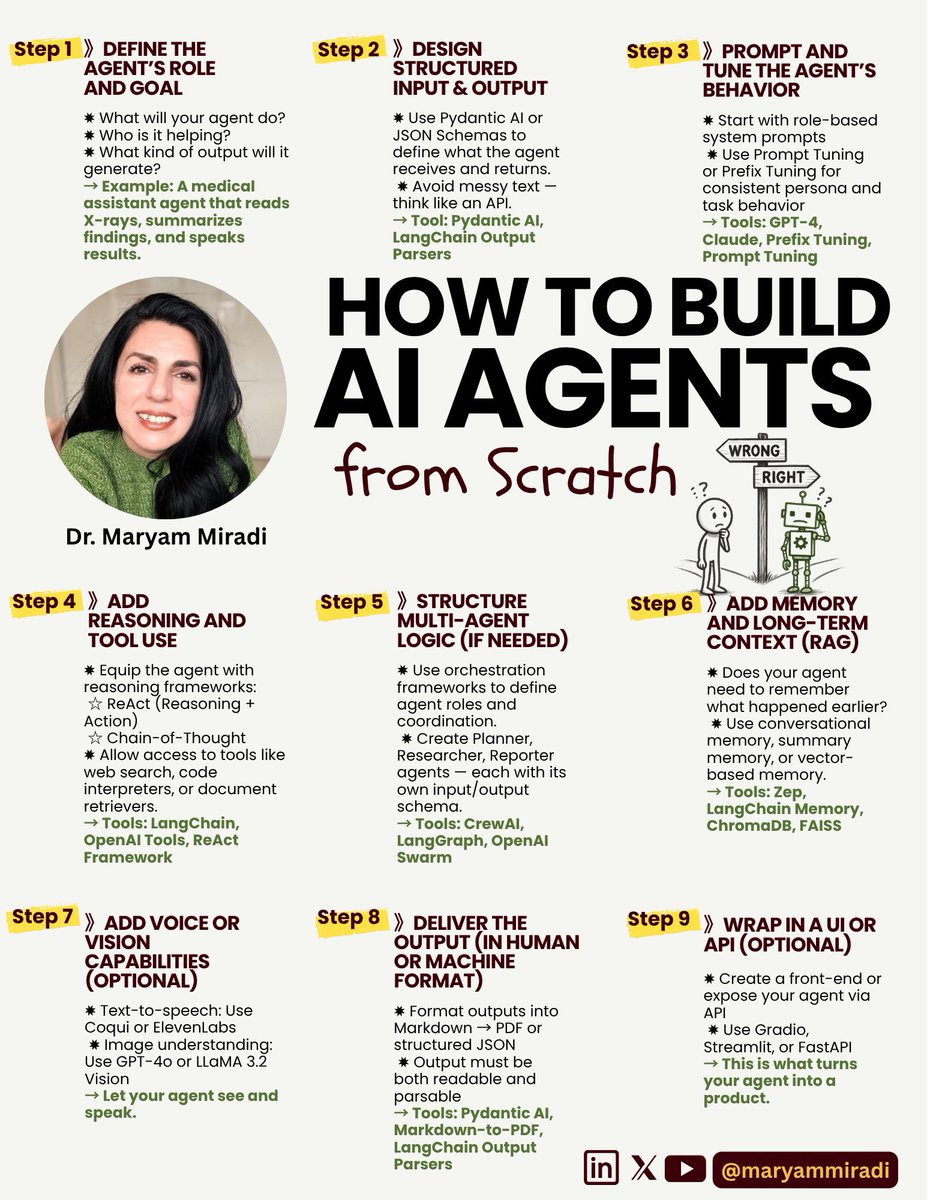
🛠️🧭 How to Build AI Agents from Scratch – Even If You’ve Never Done It Before.
𝗧𝗵𝗶𝘀 𝗶𝘀 𝟵 𝗦𝘁𝗲𝗽 𝗿𝗼𝗮𝗱𝗺𝗮𝗽 𝗳𝗿𝗼𝗺 𝗽𝗿𝗼𝗺𝗽𝘁 𝘁𝗼 𝗨𝗜.
》𝗦𝘁𝗲𝗽 𝟭: Define the Agent’s Role and Goal
✸ What will your agent do?
✸ Who is it helping?
✸ What kind of output will it generate?
→ Example: A medical assistant agent that reads X-rays, summarizes findings, and speaks results.
》𝗦𝘁𝗲𝗽 𝟮: Design Structured Input & Output
✸ Use Pydantic AI or JSON Schemas to define what the agent receives and returns.
✸ Avoid messy text — think like an API.
→ Tool: Pydantic AI, LangChain Output Parsers
》𝗦𝘁𝗲𝗽 𝟯: Prompt and Tune the Agent’s Behavior
✸ Start with role-based system prompts
✸ Use Prompt Tuning or Prefix Tuning for consistent persona and task behavior
→ Tools: GPT-4, Claude, Prefix Tuning, Prompt Tuning
》𝗦𝘁𝗲𝗽 𝟰: Add Reasoning and Tool Use
✸ Equip the agent with reasoning frameworks:
☆ ReAct (Reasoning + Action)
☆ Chain-of-Thought
✸ Allow access to tools like web search, code interpreters, or document retrievers.
→ Tools: LangChain, OpenAI Tools, ReAct Framework
》𝗦𝘁𝗲𝗽 𝟱: Structure Multi-Agent Logic (if needed)
✸ Use orchestration frameworks to define agent roles and coordination.
✸ Create Planner, Researcher, Reporter agents — each with its own input/output schema.
→ Tools: CrewAI, LangGraph, OpenAI Swarm
》𝗦𝘁𝗲𝗽 𝟲: Add Memory and Long-Term Context
✸ Does your agent need to remember what happened earlier?
✸ Use conversational memory, summary memory, or vector-based memory.
→ Tools: Zep, LangChain Memory, Chroma
》𝗦𝘁𝗲𝗽 𝟳: Add Voice or Vision Capabilities (Optional)
✸ Text-to-speech: Use Coqui or ElevenLabs
✸ Image understanding: Use GPT-4o or LLaMA 3.2 Vision
→ Let your agent see and speak.
》𝗦𝘁𝗲𝗽 𝟴: Deliver the Output (in Human or Machine Format)
✸ Format outputs into Markdown → PDF or structured JSON
✸ Output must be both readable and parsable
→ Tools: Pydantic AI, Markdown-to-PDF, LangChain Output Parsers
》𝗦𝘁𝗲𝗽 𝟵: Wrap in a UI or API (Optional)
✸ Create a front-end or expose your agent via API
✸ Use Gradio, Streamlit, or FastAPI
→ This is what turns your agent into a product.
≣≣≣≣≣≣≣≣≣≣≣≣≣≣≣≣≣≣≣≣≣≣≣≣≣≣
⫸ꆛ Want to build Real-World AI agents?
Join My 𝗛𝗮𝗻𝗱𝘀-𝗼𝗻 𝗔𝗜 𝗔𝗴𝗲𝗻𝘁 𝟰-𝗶𝗻-𝟭 𝗧𝗿𝗮𝗶𝗻𝗶𝗻𝗴 TODAY!
➠ Build Real-World AI Agents for Healthcare, Finance, Smart Cities
➠ Learn 4 Framework: LangGraph | PydanticAI | CrewAI | OpenAI Swarm
➠ Work with Text, Audio, Video and Tabular Data
👉𝗘𝗻𝗿𝗼𝗹𝗹 𝗡𝗢𝗪 (𝟰𝟱% 𝗱𝗶𝘀𝗰𝗼𝘂𝗻𝘁):
https://t.co/5i2v1fIrhJ
Seeking insights from the ML community! For those aiming to become an ML Engineer by 2025/26, what are the must-learn topics and foundational concepts? Your advice is invaluable.
#AI#MachineLearning
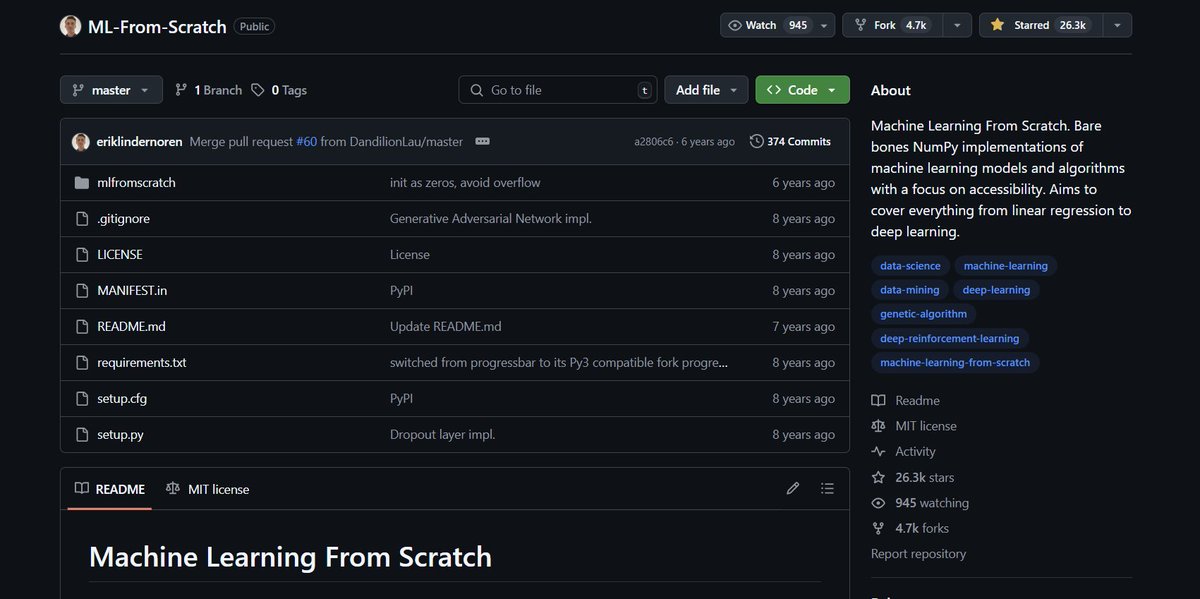
Just discovered an incredible open-source gem on GitHub:
"ML-From-Scratch" — Pure NumPy implementations of machine learning models from linear regression to deep learning. 🔥
Perfect if you want to truly understand how ML works under the hood.
🔗 https://t.co/fqp8KjUvSg
#Python #MachineLearning #DeepLearning #AI #OpenSource
Just discovered an incredible open-source gem on GitHub:
"ML-From-Scratch" — Pure NumPy implementations of machine learning models from linear regression to deep learning. 🔥
Perfect if you want to truly understand how ML works under the hood.
🔗 https://t.co/fqp8KjUvSg
#Python #MachineLearning #DeepLearning #AI #OpenSource
Just discovered an incredible open-source gem on GitHub:
"ML-From-Scratch" — Pure NumPy implementations of machine learning models from linear regression to deep learning. 🔥
Perfect if you want to truly understand how ML works under the hood.
🔗 https://t.co/fqp8KjUvSg
#Python #MachineLearning #DeepLearning #AI #OpenSource
Just started diving into Convolutional Neural Networks (CNNs)! 🚀 My mind's officially blown by how these networks power everything from image recognition to self-driving cars.
What's the coolest thing you've built or seen using CNNs? Share your favorite resources or tips for a beginner! 👇
#DeepLearning #MachineLearning #CNNs #AI
Have you ever thought how do we actually build up a neural network models to be able to process and handle the unique type of sequential data?
the answer lies in the below post:
A great lecture by Ava Amini!
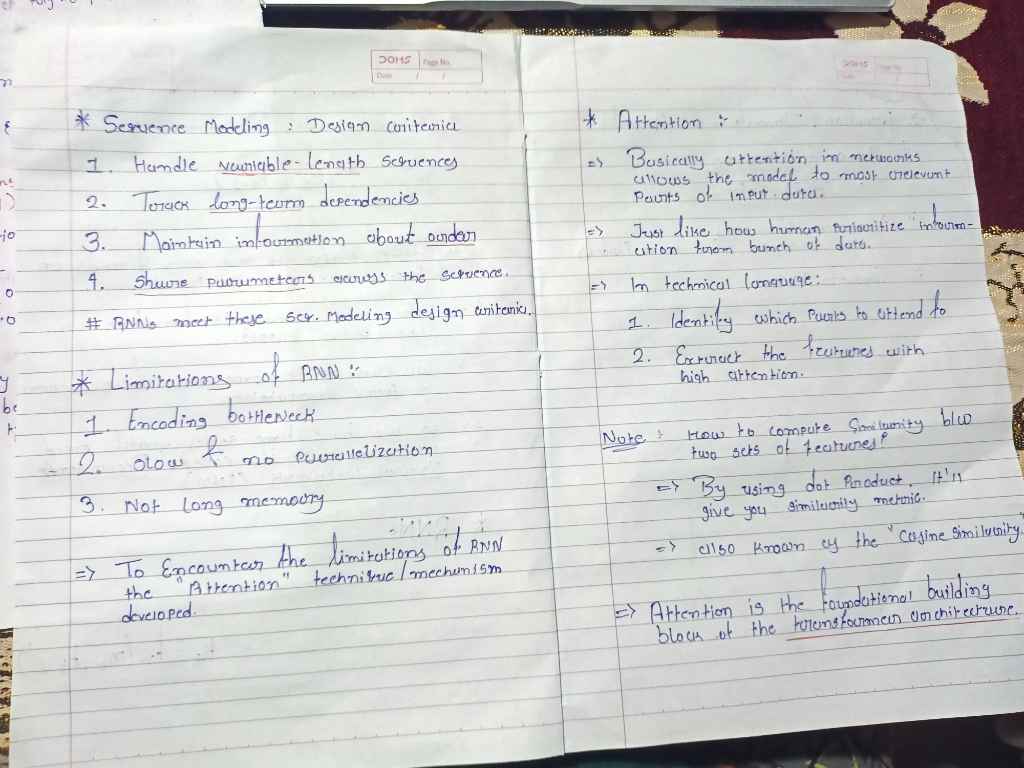
Just completed MIT’s 6.S191 session on RNNs, Transformers & Attention — and it really helped clarify how deep learning handles sequential data.
🔁 RNNs use recurrence to “remember” past inputs — powerful for sequence modeling, but limited with long-range memory & speed.
✨ Attention overcomes those limits by letting models focus on the most relevant info.
🚀 Transformers take it further with parallel processing — powering today’s LLMs.
💡 This lecture helped me understand not just the how, but the why behind the shift from RNNs to Transformers.
📎 Attaching my handwritten notes for anyone who wants a quick visual recap 👇
#DeepLearning #MIT6S191 #Transformers #RNN #AttentionMechanism #MachineLearning #AI #LLM
@mhamid65 Thanks for your quick responses and suggestions! I've managed to fix the issue. Your input was definitely helpful in guiding my debugging. Appreciate it!
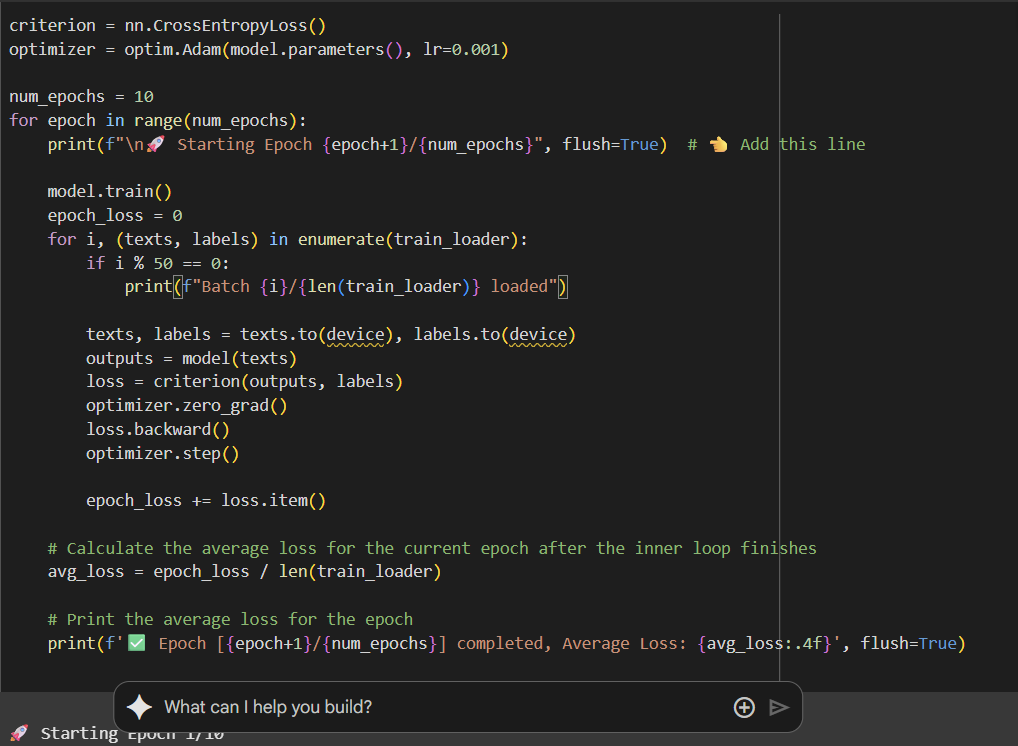
Need help with a weird PyTorch issue!
My training loop seems to be stuck in an infinite loop — I’m using CrossEntropyLoss, Adam, and moving everything to CUDA.
The line it hangs on is inside the training loop:
``` for texts, labels in train_loader:
...
```
It prints for the first epoch, but never moves to the next. Could it be DataLoader, GPU deadlock, or something else?
Appreciate any tips! 🙏
repo link : https://t.co/bA3jvUkO4t
#PyTorch #DeepLearning #MachineLearning #MLHelp
@Akin_Yemi99 Thank you much for your help! Your suggestion regarding the device definition was spot on. I've successfully resolved the issue. Really appreciate you taking the time to look at it!
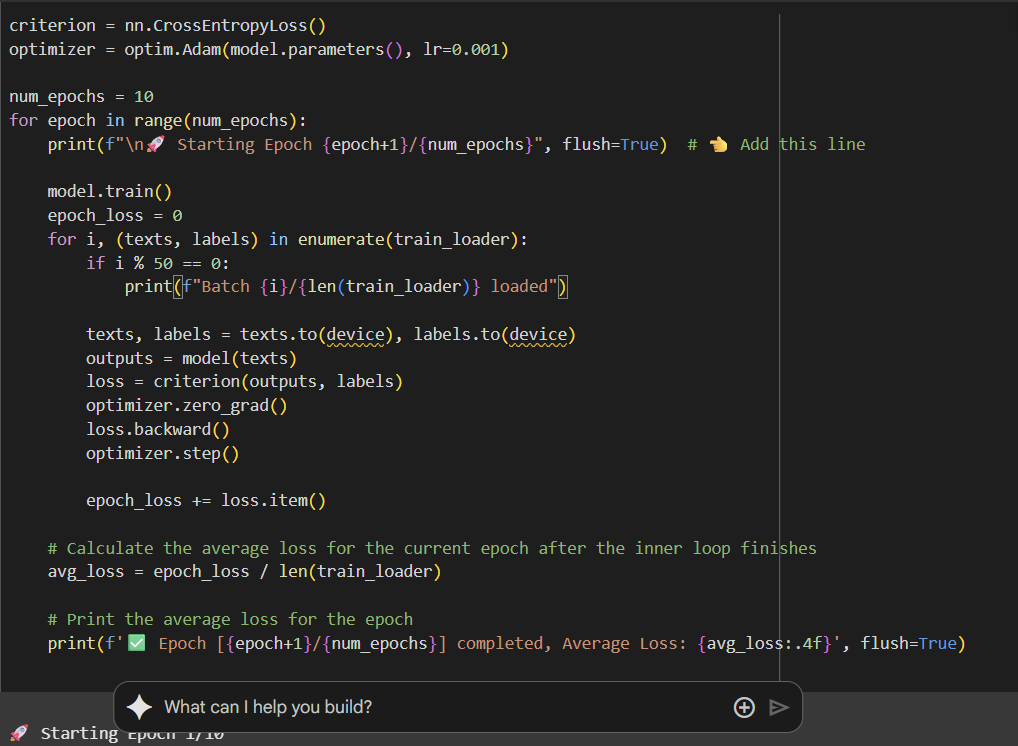
Need help with a weird PyTorch issue!
My training loop seems to be stuck in an infinite loop — I’m using CrossEntropyLoss, Adam, and moving everything to CUDA.
The line it hangs on is inside the training loop:
```
for texts, labels in train_loader:
...
```
It prints for the first epoch, but never moves to the next. Could it be DataLoader, GPU deadlock, or something else?
Appreciate any tips! 🙏
repo link :https://t.co/bA3jvUkO4t
#PyTorch #DeepLearning #MachineLearning #MLHelp