Someone wrote a headless browser that renders pages with zero Chromium in the stack.
It's 70MB. Chrome is 300MB+.
It's called Obscura, a headless browser rebuilt from scratch in Rust. And it runs your existing Puppeteer and Playwright scripts unchanged.
No Chromium. No Node.js. No dependencies. One binary. ↓
The numbers that matter:
Memory: 30MB vs Chrome's 200MB+
Binary size: 70MB vs 300MB+
Page load: 84ms on a JS + XHR + fetch page vs Chrome's ~800ms
Startup: instant vs ~2s
It runs real JavaScript through V8 and speaks the full Chrome DevTools Protocol, so it's a drop-in replacement. Point your Puppeteer connect() at ws://127.0.0.1:9222 and everything just works.
The part that's actually wild: native rendering with no Chromium underneath.
Screenshots, full-page captures, live screencasting, and PDF export all run on Obscura's own rendering engine written from scratch. Block, flex, grid, tables, transforms, SVG, canvas. No Chrome process anywhere in the stack.
Then there's stealth mode, which is where the scraping crowd will lose it:
Per-session fingerprint randomization (GPU, screen, canvas, audio, battery)
navigator.webdriver set to undefined, matching real Chrome
event.isTrusted = true on dispatched events
Native function masking so toString() returns [native code]
3,520 tracker domains blocked automatically
It also ships an MCP server, so you can wire it straight into Claude Desktop or Cursor and let an agent navigate, click, fill forms, screenshot, and pull page text as browser tools.
Install is one curl command. Docker image is ~57MB compressed on distroless, no shell, no package manager.
Apache 2.0. 22.1k stars. The maintainer says the open-source engine stays fully featured with no feature gating, ever.
If you're running scraping jobs or agent automation on headless Chrome right now, this is worth a weekend.
https://t.co/baddCjIMA1
A lot of people have asked, here's how I setup my auxiliary models in Hermes Agent. Gemini Flash saves a lot of dough, and astra gives me a second perspective when I run /review
GILA 😭 satu file CLAUDE.md bisa sampai tembus 200K+ stars.
Namanya Andrej Karpathy Skills, dan basically ini ngubah berbagai “rant” Karpathy soal kebiasaan coding pakai LLM jadi semacam system prompt yang bener-bener bisa dipakai. 🤯
Claude dipaksa buat:
🧠 Think before coding — jangan langsung ngebut bikin code
🧹 Prefer simplicity — pilih solusi yang simpel, bukan overengineering
🔪 Surgical changes — ubah seperlunya, jangan ngacak-ngacak codebase
🎯 Clear success criteria — harus tahu dulu definisi “berhasil” sebelum mulai
Dan yang paling gila…
Install-nya cuma butuh sekitar 10 detik. 💀
Jadi bukan framework ribet.
Bukan setup berjam-jam.
Cuma satu file yang ngasih Claude aturan main yang lebih disiplin.
Kalau lu sering pakai Claude buat coding, ini honestly worth checking out. 👀🔥
https://t.co/XhLEhbNZzq
hal yang LP-er dan trader lakukan terus-terusan adalah:
SOL → meme → SOL lagi, sama seperti lampu flip-flop
ini strategi gw maksimalin strategi evil panda + bonus stage dengan fitur limit order
kedua strategi itu manfaatin gerakan harga token meme yang di-flip-flop
ide simpelnya: maksimalin cuan pas token pullback, manfaatin turun-naiknya harga buat entry dan exit bertahap.
sebelum ngomongin range, gue jawab satu pertanyaan dulu: kenapa orang harus terus beli token ini?
tapi satu syaratnya: token meme-nya masih worth buat di-LP-in.
pilih token dengan kriteria:
→ market cap >$250K
→ volume 24h >$1M
→ global trading fee >30 SOL
→ top 10 holder <30%
→ dev holding 0%
→ sniper <15%
→ insider <30%
→ bundler <60%
→ mint authority disabled
→ freeze atau blacklist authority disabled
→ liquidity burned 100%
ingat, wallet bisa dipecah, metrik bisa berubah.
pilih pool dengan kriteria:
→ base fee sekitar 2% sampai 5%
→ bin step sekitar 80 sampai 200
→ rasio fee/TVL 24h tertinggi kalau bingung milih
FLIP: SOL → meme
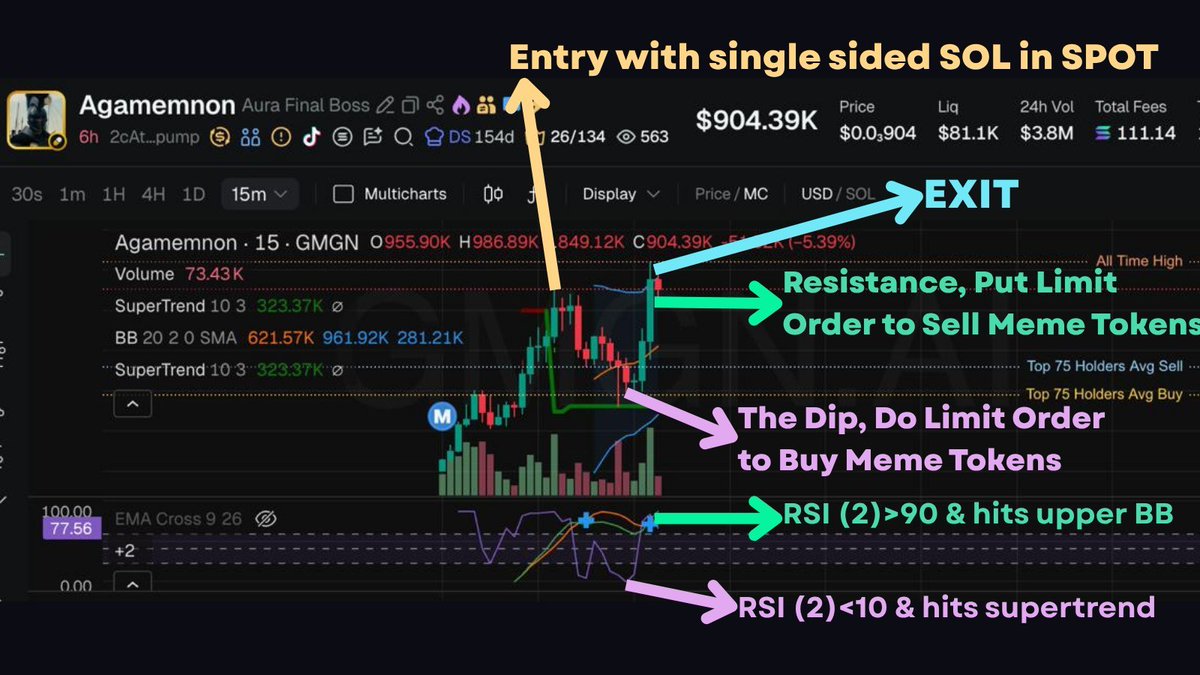
di fase ini pakai strategi evil panda sembari token menunggu dip dengan indikator berikut:
→ harga nyentuh Supertrend
→ RSI (2) di bawah 10
→ MACD bar merahnya mulai menipis
→ harga nyentuh lower Bollinger Band
begitu indikator di atas ketemu, pasang limit order untuk beli token meme di harga dip sembari menggunakan Ape-In untuk pakai strategi bonus stage.
kelebihan limit order:
harga swap lebih presisi dan dapat bonus dari fee pool
bonus stage bisa digunakan untuk farming fee bila harga token semakin jatuh.
FLOP: meme → SOL
Abis dapet token, inget tujuan awal untuk jual saat harga pull back bukan jadi bagholder.
di fase ini fokus untuk nyari area di mana peluang naik saat lagi rebounce jenuh alias overbought untuk exit
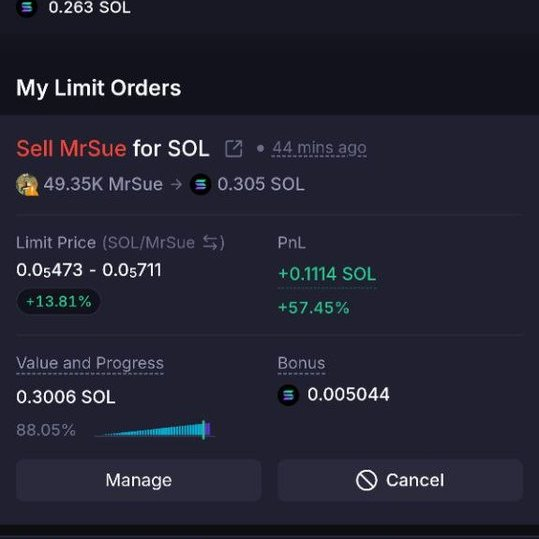
pasang limit order untuk jual meme token di harga saat sinyal exit berikut:
→ RSI (2) di atas 90 dan
→ plus harga nyentuh atau nembus upper Bollinger Band
atau
→ RSI (2) di atas 90 dan
→ Momentum MACD positif
→ harga udah masuk area resistance kuat
sebaiknya gunakan timeframe 5m untuk exit
harapannya saat harga naik lewat range, token gue balik jadi SOL nyicil.
singkatnya: harga pump → pullback → flip → bounce → flop → balik SOL.
kenapa nggak swap manual aja?
pengalaman gw 8 bulan ini, swap manual atau zap out pun sering kali bikin exit di harga yg ga presisi
kalau swap manual, lu bayar trade fee biar order lu ke-fill + slippage.
dengan DLMM limit order, lu dibayar fee pas order lu ke-fill di harga yang presisi.
fee dari limit order hanya ada pas harga bener-bener masuk dan lewat bin lu.
kalau harganya turun sebelum semua binnya terisi, lo ga dapat fee beda dengan posisi di pool dllm
bahaya terbesarnya: berhasil Flip, tapi nggak pernah Flop.
SOL berubah jadi token meme. harga token meme turun lagi, turun lagi, sampai jadi copium.
flip dan flop hanya bisa waktu di wave 1 aja pas volume masih kencang.
untuk tahu lebih detail gw sudah tulis cara gue milih narrative, pool, dan ngatur budget di artikel yang gue quote ini.
selamat mencoba!
#METBALI #METBALIStrategyContest
Screening yg gw pake sih sederhana:
1. Pake @gmgnai buat ngecek trending dan hot searches
2. Pake @dexscreener buat liat token yg lagi pump.
Di gmgn:
Screening biasanya lebih ke tf 5m dan 15m.
Yg gue cari;
Volume > 10k, atau kalo lagi seret >5k di tf 5m.
Kalo mau pasang lama, di tf 1h, min vol 100k, kalo lagi seret >50k
Dari jumlah tx, kalo bisa tx buy+sell > 100
Di dexscreener:
Gue selalu urutin dari % change di tf 5m, dan 1h, buat liat yg lg pump.
Untuk MCap, gue lebih suka > 100k mc, lebih besar lebih ok sih.
Dari segi chart:
> Yg lagi uptrend
> D tf 5m atau 15m, lagi tembus BB atas.
> Kalo gue mau fee deres, liat yg pump and dump nya cepet(tapi resiko lebih tinggi)
Indikator:
Ema 50,
Supertrend,
BB dan BB%
Entry:
>Saat candle ijo panjang nembus BB atas, dan kemudian turun, dan masuk ke dalam BB. Ini harus dlm keadaan uptrend
>Tarik fibo dari low paling bawah, ke high terbaru,
Max price di garis merah fibo atau jingga. Min price, samoe support atau seperlunya.
Pemilihan LP;
>Kalo chart nya yg pump dan dump cepet, atau gue ada feel ini token akan dump besar. Gue akan milih uni v4, fee tier min 5%, makin liar tuh chart, makin gue gedein fee tiernya. Bahkan ada yg nyampe fee tier 25%.
> Kalo chart gerak anteng, atau gak terlalu liar, fee tier >=3%, makin anteng makin kecil fee tier yg gue pilih.
>Kalo gak ada fee tiernya, tinggal create position sendiri.
>Sebelum colok ke LP, gue selalu urutin dari vol 24jam terbesar. Bukan dari tvl.
>Gue buka fee tier yg gue mau, liat ada gak tx org yg masuk situ. Kalo gak ada skip.
>Exit?
>Secukupnya.
>Kalo yakin, gue tungguin OOR atas.
Segitu dulu.
Salam pusing.
sambil enjoy the sunday, karena masih banyak yang nanya strat bsasic jadi barusan selesei nulis dikit tentang "The Trenches Playbook", materi ini gak beda sama yang udah ada di internet atau dari senior2 lain dan anggep aja buat bahan bacaan sampingan.
cuman bedanya aku kasih sedikit insight yang selama ini aku pelajarin, gak semua dan mendetail karean namanya knowledge pasti berkembang dan berubah jadi ya begitulah.
well inilah 23 halaman tentang trenching on solana (bisa all chain juga tinggal sesuaiin), feel free tho share, print dsb asal jangan diduidin ya!
https://t.co/izsvSxtpyT
this is f*cking gold
Andrej Karpathy joined Anthropic five weeks ago.
A friend on his team just showed me the exact LOOPS.md file he actually uses.
I dropped it into my setup. The very first response was different.
Not slightly different. Completely different.
Claude stopped giving generic answers and started working exactly the way I think.
You don't talk to the model anymore. You build the system that talks to the model for you.
Bookmark it before it gets lost in your feed.
Read it now, then check the article below.
You can build an AI second brain in 15 minutes.
No coding experience needed. no $1000 course
[Here is how you can do it in 5 mins:]
Step 1: Download Claude Desktop.
Step 2: Download Obsidian Desktop.
Step 3: Create a new vault and start dropping .MD files into it.
Step 4: Tell Claude Code to connect directly to your vault using Andrej Karpathy's prompt: https://t.co/2SJBZyjXDl
That is it.
Your entire knowledge base becomes searchable, connectable, and queryable by the most powerful AI model on earth.
Every note you have ever written.
Every idea you have ever captured.
Every resource you have ever saved.
Claude can now read all of it, find connections you missed, and surface insights from your own thinking that you forgot you had.
Most people are using Claude as a search engine.
The people building second brains with it are using it as an intelligence layer on top of everything they know.
The gap between those two use cases is the gap between asking Google a question and having a research partner who has read everything you have ever written.
Bookmark this.
Build it tonight.
Seeing a lot of people struggling to enable Telegram Rich Messages in Hermes @NousResearch
Here’s the fastest way to turn it on:
Tell your agent:
1️⃣ Update yourself
2️⃣ Enable rich messages in my config: rich_messages: true
3️⃣ Restart the gateway
4️⃣ Send a test message
Then test it with this prompt:
Let’s test now
Summarize this as a Telegram rich table with columns: Task, Owner, Status.
Give me a checklist for the deployment, using completed and incomplete task boxes.
Format this as:
- heading
- short summary
- table
- checklist
- collapsible details section for risks
## Supported useful formats
Use normal Markdown-style syntax:
## Sprint Status
| Item | Owner | Status |
|---|---|---|
| Driver App release | Alex | ✅ Done |
| Portal QA | Sam | In progress |
| Route optimizer | Luke | Blocked |
- [x] Review PR
- [ ] Run staging smoke test
- [ ] Send release note
<details>
<summary>Risks</summary>
- QA may slip if staging data is stale.
- Route optimizer dependency needs confirmation.
</details>
HERMES AGENT: 5 USEFUL COMMUNITY PLUGINS RIGHT NOW
Hermes already ships with strong core features — Skills, MCP, Memory, Curator, and a plugin system.
These extensions don’t replace anything in the core. They fill practical gaps.
Here are the ones worth installing:
1. hermes-plugins by 42-evey
Solid collection. Adds goal management, inter-agent communication, cost tracking, and easier model switching. Good for running Hermes autonomously.
2. web-search-plus
Much stronger web search than the default. Supports multiple providers, smart routing, quality scoring, and a proper research mode.
3. super-hermes by Cranot
Adds “Prisms” — structured analytical frameworks. Makes the agent noticeably better at deep analysis and catching its own blind spots.
4. Hermes Agent Self-Evolution (by Nous Research)
Official companion that automatically improves skills and prompts using DSPy + GEPA. Useful if you want the agent to get better over time with minimal manual work.
5. Advanced Memory Providers
When built-in memory isn’t enough for long projects, external providers give Hermes stronger long-term recall and context handling.
All of these work cleanly on top of Hermes v0.16.0 without conflicting with core systems.
Which plugins or extensions are you actually using with Hermes right now?
Github links 👇
this github repo contains 50 of the most essential MCP servers that give your AI agents superpowers.
> works with claude code, gemini, codex, cursor, and other MCP-compatible clients
> MIT licensed
> 5 categories, 50 MCP servers in total
whether you want your agent to browse the web, manage files, interact with apps, or automate workflows, you'll find the right MCP here.
link: https://t.co/yEvL2SGtBz
HERMES AGENT DASHBOARD JUST GOT A FULL CONTROL PLANE.
Before: you edited YAML files, ran CLI commands, and hoped nothing broke.
Now: everything lives in one clean UI.
→ MCP catalog — browse and install servers in one click
→ Webhooks — create, toggle and disable without restarting gateway
→ Shell hooks — connect any script as a lifecycle hook (with consent)
→ Device pairing — approve or revoke remote devices
→ System monitoring — CPU, memory, disk, uptime and backup status
The full control plane is finally here.
Just run `hermes update` and open the dashboard.
Kadangkala tubuh ini terasa berat untuk bangun dari nyenyaknya lelap atau asyiknya aktivitas. Berat untuk menyambut seruan muazin, mendatangi masjid, dan melaksanakan shalat.
Flagship will be rewarding $FYI to the Top Web3 Communities.
Trade trending tokens before the market with Alpha Agents.
Start here 👉 https://t.co/X8Q5kEXfQQ