🚨 @deel just acquired @Sastrify - their 14th acquisition!
Sven Lackinger & @mmessing built a strong SaaS visibility platform.
Congrats to @Bouazizalex , @shuooo , @DanWestgarth & the @deel team 🔥
Deel now at 40k+ customers, $1.4B revenue, and 14 acquisitions in just 7 years. Wild growth!
Most people configure their agents wrong.
They open VSCode. They edit config files manually. They use Cursor to modify their agent setup.
This yields worse results.
Here's what we learned building OpenClaw:
Let the agent configure itself.
The agent has the most context. It knows its own state, its memory files, its tools, its dictionaries. It understands what's connected and what breaks when you change something.
You don't.
So instead of fighting with YAML files, just ask the agent.
Iterate with it. Let it ask you questions. Let it challenge its own setup.
This sounds crazy. The fear is obvious: the agent will destroy itself.
It won't.
Smart models are far more capable than people think. They understand their own architecture better than you do. And if something does break, you still have Git. You still have Codex to read and alter old config files.
Recovery is trivial.
The only time you should touch config manually is when the gateway itself is broken. Everything else? Let the agent handle it.
This is the shift. Agents aren't just tools you configure. They're systems that configure themselves.
Stop editing your agent. Start talking to it.
Are you still manually editing agent configs?
Most people configure their agents wrong.
They open VSCode. They edit config files manually. They use Cursor to modify their agent setup.
This yields worse results.
Here's what we learned building OpenClaw:
Let the agent configure itself.
The agent has the most context. It knows its own state, its memory files, its tools, its dictionaries. It understands what's connected and what breaks when you change something.
You don't.
So instead of fighting with YAML files, just ask the agent.
Iterate with it. Let it ask you questions. Let it challenge its own setup.
This sounds crazy. The fear is obvious: the agent will destroy itself.
It won't.
Smart models are far more capable than people think. They understand their own architecture better than you do. And if something does break, you still have Git. You still have Codex to read and alter old config files.
Recovery is trivial.
The only time you should touch config manually is when the gateway itself is broken. Everything else? Let the agent handle it.
This is the shift. Agents aren't just tools you configure. They're systems that configure themselves.
Stop editing your agent. Start talking to it.
Are you still manually editing agent configs?
Ramp got 99.5% of their company using AI.
Non-engineers now commit thousands of PRs per month.
84% of the team uses coding agents weekly.
How? They flipped the default.
Most companies treat AI adoption like a pilot program. Select a few teams. Run controlled experiments. Measure ROI before expanding. Wait for perfection.
Ramp did the opposite. They made AI the default for everyone. Then they refined.
Here's what that actually means:
No token limits. No approval gates. No tiered access by role. Everyone gets the same tools from day one.
They built Glass (their internal Claude Code) and pre-connected 30+ tools. Salesforce, Snowflake, Gong, Slack, Notion. One SSO login and everything works. No setup guides. No IT tickets.
They made usage visible with internal leaderboards. Sessions run, skills used, apps shipped. Public rankings by team and individual. Healthy peer pressure did more than any training program.
They celebrated builders at all hands. From the CEO to first line operators. Show what you built. Make it contagious.
The result? Tools they shipped in January are already obsolete. Replaced by better versions from the same builders. Shelf life measured in weeks, not months.
This is the part most companies miss. AI adoption is not a plan. It is a culture shift.
You default everyone to using AI. You remove every constraint between your people and their first win. You make it visible who is building and who is not. You keep refining as the tools improve.
The companies debating their AI strategy will still be debating in six months.
The companies that default to AI and refine will be unrecognizable by then.
What's your default?
OpenClaw Tip #3: QMD (Query Markup Documents)
An on-device search engine for everything you need to remember.
QMD indexes your markdown notes, meeting transcripts, documentation, and knowledge bases. Search with keywords or natural language. All local, all private.
Under the hood: BM25 full-text search + vector semantic search + LLM re-ranking. Runs via node-llama-cpp with GGUF models.
Ideal for agentic flows. Your agent finally remembers.
OpenClaw Tip #3: QMD (Query Markup Documents)
An on-device search engine for everything you need to remember.
QMD indexes your markdown notes, meeting transcripts, documentation, and knowledge bases. Search with keywords or natural language. All local, all private.
Under the hood: BM25 full-text search + vector semantic search + LLM re-ranking. Runs via node-llama-cpp with GGUF models.
Ideal for agentic flows. Your agent finally remembers.
Your OpenClaw bill is about to jump from $20 to $500/month.
Starts today at 12pm PT.
Boris Cherny (Anthropic) just killed third-party tool coverage under Claude subscriptions. If you're running OpenClaw without prep, you'll get destroyed on your next invoice.
Here's how to avoid it:
1. Claim your free usage tokens:
Go to your Claude usage dashboard. They're giving free usage credits worth a month. Most people don't know this exists. Set usage toggles and limits to prevent OpenClaw from burning through tokens.
2. Switch to a different model:
You don't need Claude for everything. Try ChatGPT subscription, Fireworks Firepass (unlimited Kimi K2.5 Turbo), or run Gemma 4 locally. Chinese LLM Providers (e.g. MiniMax, Alibaba Cloud) also have coding plans which can be used in OpenClaw.
3. Reconfigure to Claude CLI:
If you want to stick with Claude:
openclaw models auth login --provider anthropic --method cli --set-default
This will leverage the Agents SDK / Claude CLI. It has drawbacks (latency and tool calling not fully supported). But it can be a fallback option.
You have until today noon PT.
What's your move? Are you switching or do you give local models a try?
I think the real moat in coding agents is not code generation.
It's permission handling.
Writing code is the easy part now.
The hard part starts when the agent wants to do something with consequences:
- run a risky command
- touch production
- modify infrastructure
- delete or overwrite something important
- chain actions without asking every 20 seconds
That's where the product gets tested.
Too many approval prompts and auto mode feels fake.
Too few and the agent feels reckless.
So the real challenge is not just making the model smarter.
It's building trustworthy autonomy.
That means:
- scoped permissions
- clear approval prompts
- sane defaults
- reversibility
- auditability
Auto mode is easy to demo.
Trustworthy auto mode is much harder to build.
And I suspect that's where the real moat will be.
Your CTO should have 10x'd their output in the last 6 months.
If they didn't, something's wrong.
AI coding agents changed the game. The best CTOs adapted immediately. They're shipping faster, building with smaller teams, solving problems that were impossible a year ago.
The ones who ignored it are falling behind.
This isn't about replacing engineers. It's about leverage. A great CTO multiplies their team's capacity by embracing new abstraction layers.
Standing still isn't neutral. It's falling behind.
Is your CTO adapting or resisting?
We run 5 specialized AI reviewers on every PR before a human looks at it.
Each reviewer has one job:
→ TypeScript Reviewer: type safety, modern patterns
→ Security Sentinel: OWASP checks, vulnerability scanning
→ Performance Oracle: complexity and bottleneck detection
→ Architecture Strategist: pattern compliance
→ Simplicity Reviewer: YAGNI enforcement (my favorite)
Why specialization matters:
One generalist AI reviewer tries to catch everything. It misses things.
Five specialists each have a narrow mandate. They don't compete for attention. The Security Sentinel doesn't waste tokens on code style. The Simplicity Reviewer ignores OWASP.
Deep focus beats broad scanning.
The result: human reviewers see PRs that already passed 5 quality gates.
They can stop hunting for type errors and start asking the questions AI can't answer:
• Does this actually solve the customer problem?
• Are we building the right thing?
• What are we not seeing?
That's compound engineering. Not replacing humans. Redirecting them to where judgment actually matters.
What's your biggest PR review bottleneck right now?
Karpathy said it in his latest podcast: he hasn't written a line of code since December.
That's not a bug. That's the future of engineering.
He's not coding anymore. He's steering agents. The work moved up a layer.
This matches exactly what we're seeing at Sastrify: Anthropic spending is exploding across our customer base. Engineers aren't writing less code. They're consuming more tokens.
The workflow changed.
What this means for your team:
→ Job descriptions need to evolve. "Senior Engineer" can't just mean "writes clean code." It means "directs AI agents effectively."
→ Tooling needs to shift. You need token budgets. Usage dashboards. Agent performance tracking.
→ Hiring criteria changes. The best engineers will be the ones who can architect solutions and guide agents to build them.
The engineers still writing every line by hand are falling behind. Not because they're bad. Because the abstraction layer moved.
Your move: Start tracking token consumption per engineer. Treat it like a productivity metric. Because that's what it became.
Are you measuring agent usage in your team yet?
I manage 6 active AI projects simultaneously.
Not with tabs. Not with different apps. With Telegram threads.
Here's my actual setup:
↳ 🏋️ Walter (fitness agent) — tracks workouts, plans next session
↳ 📱 Personal Brand — daily post drafts, analytics, Typefully scheduling
↳ 💹 Trading — paper trade signals, open positions, weekly review
↳ 🏗️ Done0 — product decisions, feature specs, customer research
↳ 🤖 Dev — code reviews, subagent spawns, deployment status
↳ 💬 Main — everything else
Each thread has full context. No history pollution between projects.
My fitness agent doesn't know about my trading positions.
My trading agent doesn't get distracted by LinkedIn drafts.
This is how I think about AI agents now:
Not one smart assistant. A team of specialists.
Each one focused. Each one in their lane.
Want to set this up in OpenClaw?
Send your agent this:
"Create a new Telegram thread for each of my active projects. Ask me what they are, name each thread, and from now on keep all conversations about that project inside its thread. Start by asking me: what are the 3-5 areas I want a dedicated thread for?"
One message. Your agent creates the threads, sets the context, and stays in its lane from that point on.
Context switching is the bottleneck. Threads fix it.
What would your first dedicated thread be?
I manage 6 active AI projects simultaneously.
Not with tabs. Not with different apps. With Telegram threads.
Here's my actual setup:
↳ 🏋️ Walter (fitness agent) — tracks workouts, plans next session
↳ 📱 Personal Brand — daily post drafts, analytics, Typefully scheduling
↳ 💹 Trading — paper trade signals, open positions, weekly review
↳ 🏗️ Done0 — product decisions, feature specs, customer research
↳ 🤖 Dev — code reviews, subagent spawns, deployment status
↳ 💬 Main — everything else
Each thread has full context. No history pollution between projects.
My fitness agent doesn't know about my trading positions.
My trading agent doesn't get distracted by LinkedIn drafts.
This is how I think about AI agents now:
Not one smart assistant. A team of specialists.
Each one focused. Each one in their lane.
Want to set this up in OpenClaw?
Send your agent this:
"Create a new Telegram thread for each of my active projects. Ask me what they are, name each thread, and from now on keep all conversations about that project inside its thread. Start by asking me: what are the 3-5 areas I want a dedicated thread for?"
One message. Your agent creates the threads, sets the context, and stays in its lane from that point on.
Context switching is the bottleneck. Threads fix it.
What would your first dedicated thread be?
This is what we built with Done0.
The result: ~40% ticket deflection from day one.
Your engineers spend their time on things that actually need a human brain.
That's not efficiency. That's a different category of work.
Most IT teams are solving the wrong problem.
They're trying to get faster at handling tickets.
The real question: why do so many tickets exist at all?
🧵 A thread:
The fix isn't a better ticketing tool.
It's an AI layer that:
— Lives in Teams/Slack/email
— Understands natural language
— Resolves the 40% that don't need humans
— Routes the rest with full context already filled in
No portal. No FAQ. No friction.
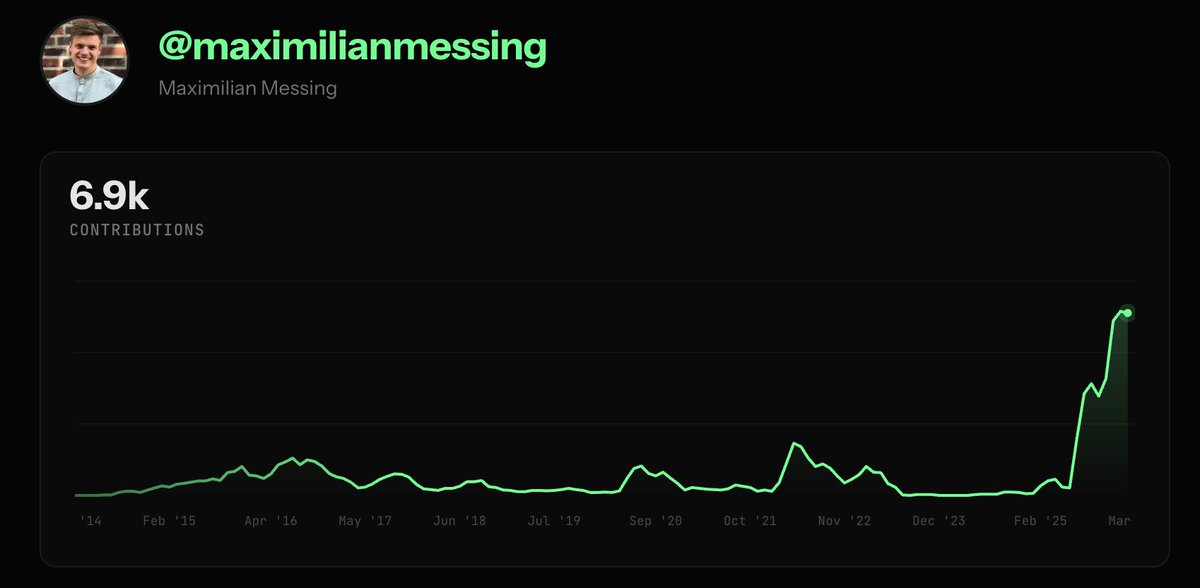
My GitHub contribution graph just went exponential. Here's what actually changed.
6,900 contributions. The chart tells the story better than I can.
For years, my graph looked like what you'd expect from a CTO: steady, moderate, a spike here and there. I was managing, reviewing, unblocking: doing what CTOs are "supposed" to do.
Then something shifted.
---
The old model: CTO as coordinator
I used to think my job was to stay above the code. Set architecture. Review PRs. Unblock engineers. The classic "I'm too senior to just ship things" trap.
The problem? You lose the feel of the codebase. You lose the instinct. And slowly, you lose the ability to make good technical decisions, because you're making them from a distance.
---
What changed: AI as a force multiplier for the hands-on CTO
The tools changed. And I went back in.
With AI coding assistants, I can move at a pace I haven't had since the early days of a company. Not "generate some boilerplate" fast. Actually ship features, explore architecture, prototype decisions fast enough to change them before they become commitments.
The contribution graph isn't vanity. It's a proxy for something real: how deeply I understand what we're building.
---
Why context is everything
Here's what most people miss about AI-assisted development: the output quality scales with how much context you bring.
An engineer using AI without deep product context gets decent code.
A CTO using AI with full context: the business constraints, the technical debt map, the user behavior patterns, the three failed approaches from 18 months ago — gets something different. You're not just generating code. You're encoding institutional knowledge into working software.
That's the multiplier. Not the AI. You.
---
The uncomfortable truth
If you're a CTO who hasn't seriously coded in over a year, you're not "focused on strategy." You're drifting.
I say this as someone who drifted. The correction feels uncomfortable at first — like you're doing work that's "below your level." Push through that. The level was wrong.
---
What I'd tell other CTOs
Pick one meaningful thing and build it yourself. Not a toy. Something that ships.
Use the AI tools. But bring everything you know to the prompt. Your context is the competitive advantage, not the tool.
The graph will follow.
---
What does your contribution graph look like? Curious who else is making this shift.
My GitHub contribution graph just went exponential. Here's what actually changed.
6,900 contributions. The chart tells the story better than I can.
For years, my graph looked like what you'd expect from a CTO: steady, moderate, a spike here and there. I was managing, reviewing, unblocking: doing what CTOs are "supposed" to do.
Then something shifted.
---
The old model: CTO as coordinator
I used to think my job was to stay above the code. Set architecture. Review PRs. Unblock engineers. The classic "I'm too senior to just ship things" trap.
The problem? You lose the feel of the codebase. You lose the instinct. And slowly, you lose the ability to make good technical decisions, because you're making them from a distance.
---
What changed: AI as a force multiplier for the hands-on CTO
The tools changed. And I went back in.
With AI coding assistants, I can move at a pace I haven't had since the early days of a company. Not "generate some boilerplate" fast. Actually ship features, explore architecture, prototype decisions fast enough to change them before they become commitments.
The contribution graph isn't vanity. It's a proxy for something real: how deeply I understand what we're building.
---
Why context is everything
Here's what most people miss about AI-assisted development: the output quality scales with how much context you bring.
An engineer using AI without deep product context gets decent code.
A CTO using AI with full context: the business constraints, the technical debt map, the user behavior patterns, the three failed approaches from 18 months ago — gets something different. You're not just generating code. You're encoding institutional knowledge into working software.
That's the multiplier. Not the AI. You.
---
The uncomfortable truth
If you're a CTO who hasn't seriously coded in over a year, you're not "focused on strategy." You're drifting.
I say this as someone who drifted. The correction feels uncomfortable at first — like you're doing work that's "below your level." Push through that. The level was wrong.
---
What I'd tell other CTOs
Pick one meaningful thing and build it yourself. Not a toy. Something that ships.
Use the AI tools. But bring everything you know to the prompt. Your context is the competitive advantage, not the tool.
The graph will follow.
---
What does your contribution graph look like? Curious who else is making this shift.
When AI writes most of your code, your tooling choices change completely.
We rebuilt our entire stack with one question:
"How fast can an AI agent get feedback on what it just wrote?"
The answers surprised us:
Drizzle over Prisma → No codegen step. Agents see types instantly.
Bun over Node → 10x faster test feedback loops. Agents iterate in seconds, not minutes.
oxlint over ESLint → 100x faster linting. Real-time quality checks.
Server Actions over REST → Simpler mental model. Co-located with the UI.
BetterAuth over Cognito → Same database. Full control. Easy to reason about.
The pattern: every decision optimizes for the tightest possible feedback loop.
Because an AI agent that waits 30 seconds for a build is an AI agent that hallucinates a fix instead of checking one.
Speed of feedback = quality of output.
This applies whether your developers are human, AI, or (increasingly) both.