هدية العيد الثانية
وداعاً لقيود الذكاء الاصطناعي ومخاوف الخصوصية🚀
تعرف على https://t.co/1jC4kBW5hD
البديل الأقوى والمفتوح المصدر لـ NotebookLM
✅ ارفع ملفاتك بلا حدود
✅ استضافة ذاتية
✅ يدعم أكثر من 100نموذج (ChatGPT, Claude, وغيرها)
جربها الآن وشاركني رأيك!👇
#فاضل_المبارك
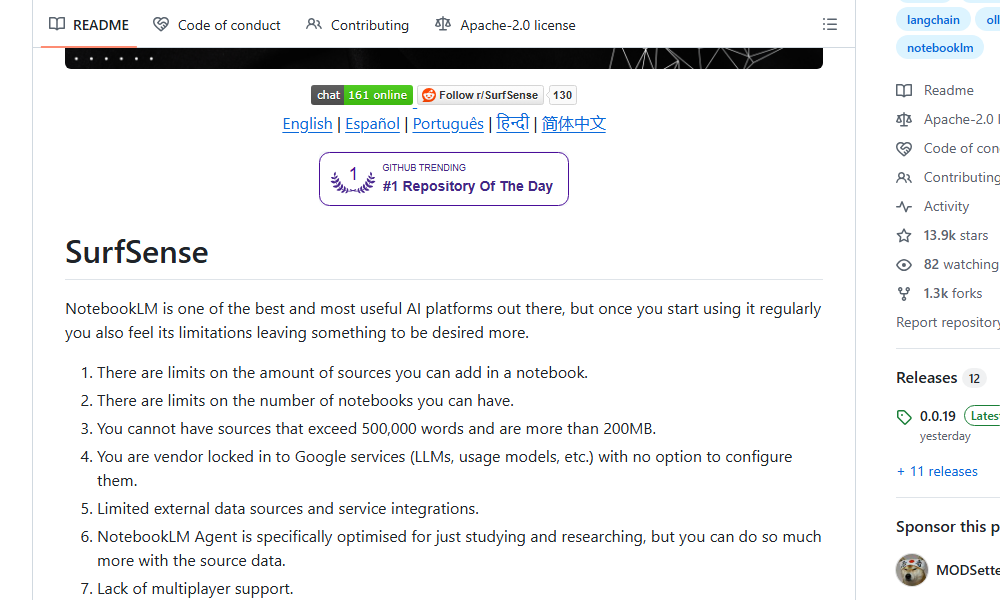
SurfSense exists because NotebookLM punishes you for actually using it. Hit the source limit, hit the notebook limit, hit the 500,000 word wall, and then remember you are locked into Google's choice of model and billing.
MODSetter/SurfSense is an open source alternative built for teams who kept bumping into those ceilings. Self-host it, pick your own LLM backend, and stop counting words before every upload.
The moment this helps is when your research project outgrows a single notebook and you cannot justify the vendor lock-in tax.
So I did a benchmark on Vision-capable LLMs vs. OCR for long-document (including charts, images, tables, etc.). Pretty interesting results : https://t.co/GE3iaOJJ5w
LLM Knowledge Bases
Something I'm finding very useful recently: using LLMs to build personal knowledge bases for various topics of research interest. In this way, a large fraction of my recent token throughput is going less into manipulating code, and more into manipulating knowledge (stored as markdown and images). The latest LLMs are quite good at it. So:
Data ingest:
I index source documents (articles, papers, repos, datasets, images, etc.) into a raw/ directory, then I use an LLM to incrementally "compile" a wiki, which is just a collection of .md files in a directory structure. The wiki includes summaries of all the data in raw/, backlinks, and then it categorizes data into concepts, writes articles for them, and links them all. To convert web articles into .md files I like to use the Obsidian Web Clipper extension, and then I also use a hotkey to download all the related images to local so that my LLM can easily reference them.
IDE:
I use Obsidian as the IDE "frontend" where I can view the raw data, the the compiled wiki, and the derived visualizations. Important to note that the LLM writes and maintains all of the data of the wiki, I rarely touch it directly. I've played with a few Obsidian plugins to render and view data in other ways (e.g. Marp for slides).
Q&A:
Where things get interesting is that once your wiki is big enough (e.g. mine on some recent research is ~100 articles and ~400K words), you can ask your LLM agent all kinds of complex questions against the wiki, and it will go off, research the answers, etc. I thought I had to reach for fancy RAG, but the LLM has been pretty good about auto-maintaining index files and brief summaries of all the documents and it reads all the important related data fairly easily at this ~small scale.
Output:
Instead of getting answers in text/terminal, I like to have it render markdown files for me, or slide shows (Marp format), or matplotlib images, all of which I then view again in Obsidian. You can imagine many other visual output formats depending on the query. Often, I end up "filing" the outputs back into the wiki to enhance it for further queries. So my own explorations and queries always "add up" in the knowledge base.
Linting:
I've run some LLM "health checks" over the wiki to e.g. find inconsistent data, impute missing data (with web searchers), find interesting connections for new article candidates, etc., to incrementally clean up the wiki and enhance its overall data integrity. The LLMs are quite good at suggesting further questions to ask and look into.
Extra tools:
I find myself developing additional tools to process the data, e.g. I vibe coded a small and naive search engine over the wiki, which I both use directly (in a web ui), but more often I want to hand it off to an LLM via CLI as a tool for larger queries.
Further explorations:
As the repo grows, the natural desire is to also think about synthetic data generation + finetuning to have your LLM "know" the data in its weights instead of just context windows.
TLDR: raw data from a given number of sources is collected, then compiled by an LLM into a .md wiki, then operated on by various CLIs by the LLM to do Q&A and to incrementally enhance the wiki, and all of it viewable in Obsidian. You rarely ever write or edit the wiki manually, it's the domain of the LLM. I think there is room here for an incredible new product instead of a hacky collection of scripts.
GitLab's founder was told he has bone cancer.
No trials would take him. Doctors signed off.
So he went founder mode on his own survival.
- Built his own treatments
- Used AI to analyze his own tumor data
- Open-sourced 25TB of his medical records for any researcher on earth
Relapse-free since 2025.
The system said he was out of options.
He made his own.
SurfSense
Connect any LLM to your internal knowledge sources and chat with it in real time alongside your team. OSS alternative to NotebookLM, Perplexity, and Glean
https://t.co/wEatEsuWQa
You can also generate videos from your knowledge.
SurfSense takes your data and turns it into visual content automatically.
Perfect for explaining ideas, sharing updates, or creating internal content without extra tools.
We didn’t change our workflow.
We changed how we access our data.
All my Notion docs, Drive files, Gmail, and PDFs now live in one connected system.
One prompt gives clear, source-backed answers instantly.
It can even focus on a single email or document and turn it into a structured report in seconds.
Here’s how SurfSense actually works:
We didn’t change our workflow.
We changed how we access knowledge.
All my Notion docs, Drive files, Gmail, and PDFs are connected in one place, and now a single prompt gives me accurate, source-backed answers.
It can even focus on a single email or document and turn it into a full report in seconds.
Here’s a simple step-by-step guide to using SurfSense:
What if you could ask one question and search every company document instantly?
Notion. Drive. Gmail. PDFs.
SurfSense turns all of it into a shared AI workspace your team can chat with.
Here’s how it works 👇
BREAKING: Remote teams are shaking right now
SurfSense just dropped the most powerful AI workspace of 2026.
It can now connect Notion, Drive, Gmail, and more, then search, summarize, and generate reports across all your internal data in seconds.
Here is the breakdown🧵:
AI just saved my team 100+ hours a month.
I connected Notion, Drive, Gmail, and PDFs into SurfSense, and now one prompt pulls cited answers from all of them.
It can even focus on one specific document and generate reports instantly.
Step-by-step tutorial on SurfSense:
SurfSense is an open-source alternative to NotebookLM that connects any LLM to your internal knowledge, supports real-time team chats, citations, and 100+ LLMs. Self-hostable with 25+ connectors, RBAC, and more. Contribute or learn more: … https://t.co/TauEtfJIJ8
🚨 BREAKING: Open-source NotebookLM killer just dropped. SurfSense connects ANY LLM to your internal knowledge base and adds real-time team collaboration that Google's version completely lacks. Teams are already ditching NotebookLM for this free alternative.