Iker Jiménez: hay 1.200 víctimas en un trastero de 2 metros cuadrados no me lo puedo creer
Óscar Puente: acabo de hacer un túnel transatlántico en 15 minutos con una cuadrilla de 20 albaceteños
Pedro Sánchez: me han agredido con un palo fascista
Rubén Gisbert:
🔴 Esa RABIA, ese ODIO, esa INDIGNACIÓN hacia quien ha dejado tirado a sus compatriotas durante una catástrofe sin precedentes en España, esas voces son las voces de millones de españoles
RETUITEA si esta es también tu voz hacia este malnacido engendro el del infierno
New year, new on-demand sessions to explore. 😎
Stream all things AI innovations, skill-building, and anything else from #MSIgnite that may be on your 2024 bucket list: https://t.co/PT1WI1Hs38
Stanford University is offers free online courses.
No fee or Application required.
Here're 10 FREE Stanford courses you don't want to miss in 2023:
[🔖 Bookmark for later]
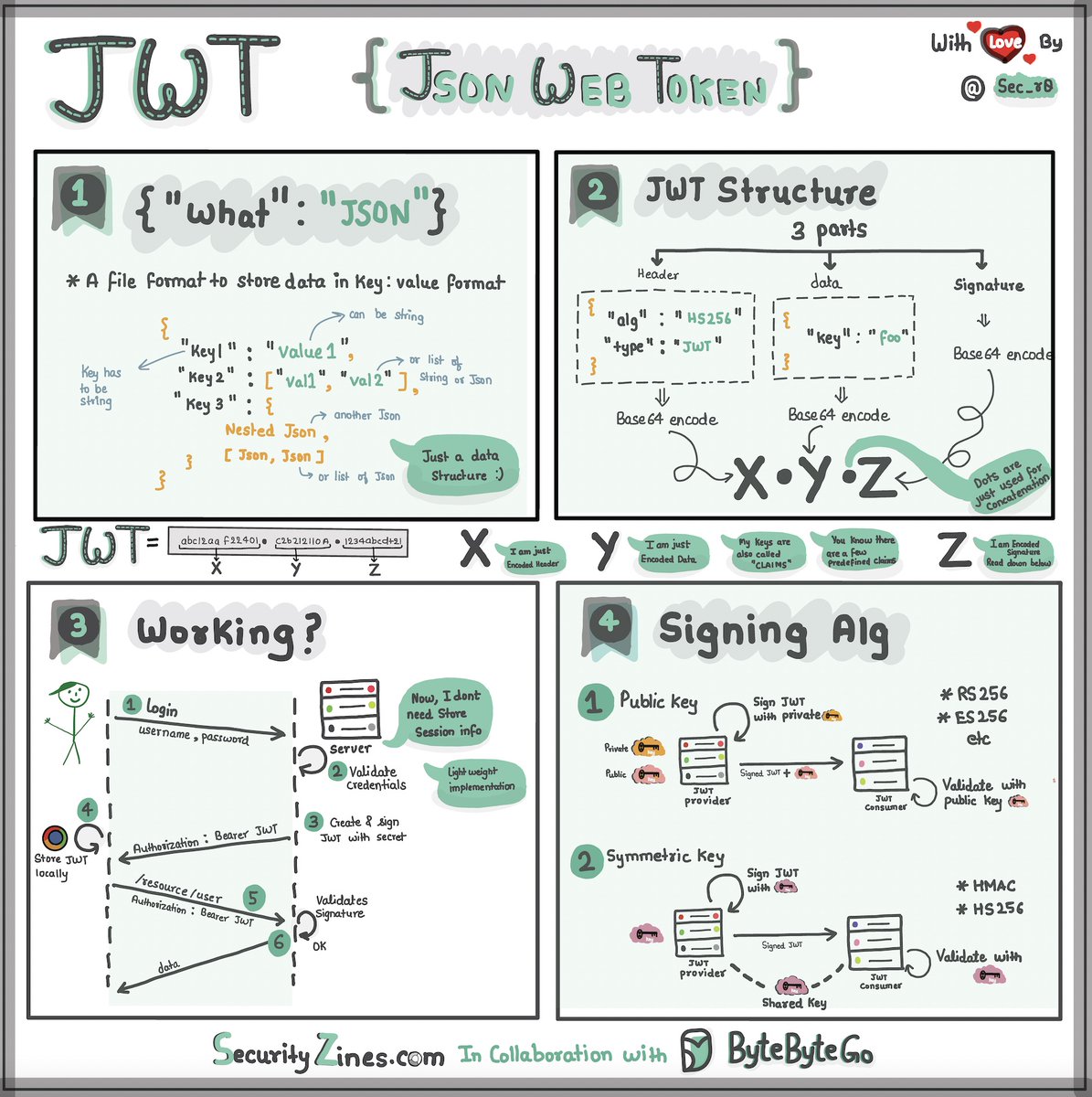
Explaining JSON Web Token (JWT) to a 10 year old Kid.
Imagine you have a special box called a JWT. Inside this box, there are three parts: a header, a payload, and a signature.
The header is like the label on the outside of the box. It tells us what type of box it is and how it's secured. It's usually written in a format called JSON, which is just a way to organize information using curly braces { } and colons : .
The payload is like the actual message or information you want to send. It could be your name, age, or any other data you want to share. It's also written in JSON format, so it's easy to understand and work with.
Now, the signature is what makes the JWT secure. It's like a special seal that only the sender knows how to create. The signature is created using a secret code, kind of like a password. This signature ensures that nobody can tamper with the contents of the JWT without the sender knowing about it.
When you want to send the JWT to a server, you put the header, payload, and signature inside the box. Then you send it over to the server. The server can easily read the header and payload to understand who you are and what you want to do.
Over to you: When should we use JWT for authentication? What are some other authentication methods?
–
Subscribe to our weekly newsletter to get a Free System Design PDF (158 pages): https://t.co/uc5M7CdXXC
Understand how Cosine similarity is used in LLMs
Language models need to know how similar texts or words are.
But how does it work?
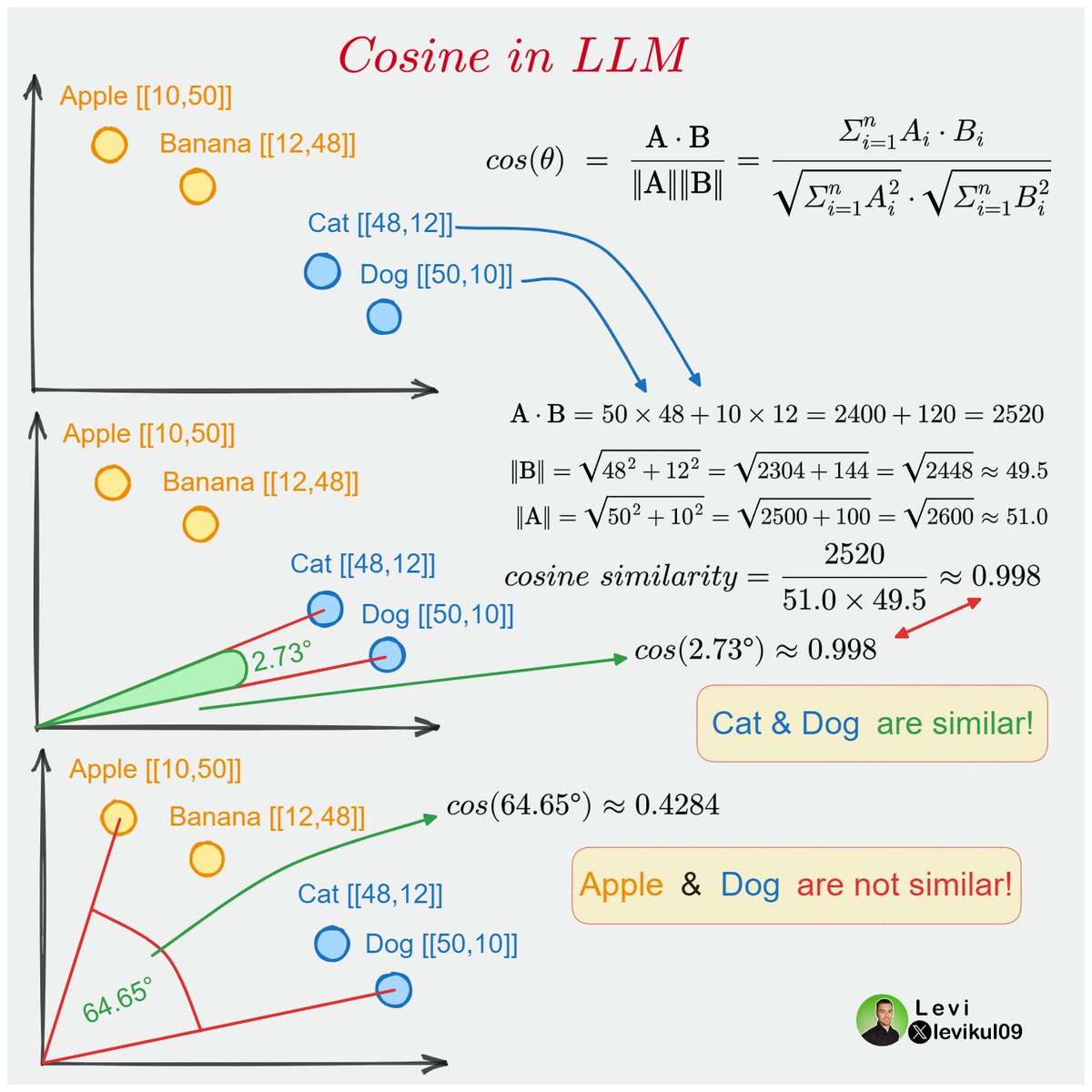
I will explain with the help of this single image 🔽
Models usually cannot work with textual data, so we need to convert words into numbers.
This is mostly done with word embeddings. These are vector (numerical) representations of text.
Note: The embeddings are usually huge, but for simplicity now I will use a vector that contains only X and Y coordinates for words.
We have four words in this example: Apple, Banana, Cat and Dog. All of them are converted into vectors and visualized.
As the name suggests Cosine similarity can tell how similar two vectors are.
The range for cosine is usually between 0 and 1.
0 means no similarity, while 1 means exact match.
To calculate Cosine similarity in the 2D space we can use the angle between the two points.
Or we can use the formula from linear algebra where a⋅b is the dot product of a and b, and ∥a∥ and ∥b∥ are the magnitudes respectively.
You can check the detailed calculation for Cat and Dog below.
As you can see from the calculation, since both Cat and Dog are animals, they are pretty similar.
But what about Apple and Dog? They are far from each other, and the angle is larger, so the Cosine similarity will be lower!
What about huge embeddings?
Look at the formula and think about it.
The best thing about Cosine similarity is that it is not restricted to 2D vectors. You can do the same calculation for embeddings that contain hundreds of elements.
Of course, we cannot visualize words the same way with bigger vectors, but the process is the same.
¿Buscas un trabajo REMOTO y con buen SUELDO?
Si sólo usas LinkedIn te estás perdiendo muchas oportunidades.
🧵 Te dejo las 5️⃣ mejores plataformas para conseguir trabajo en remoto.
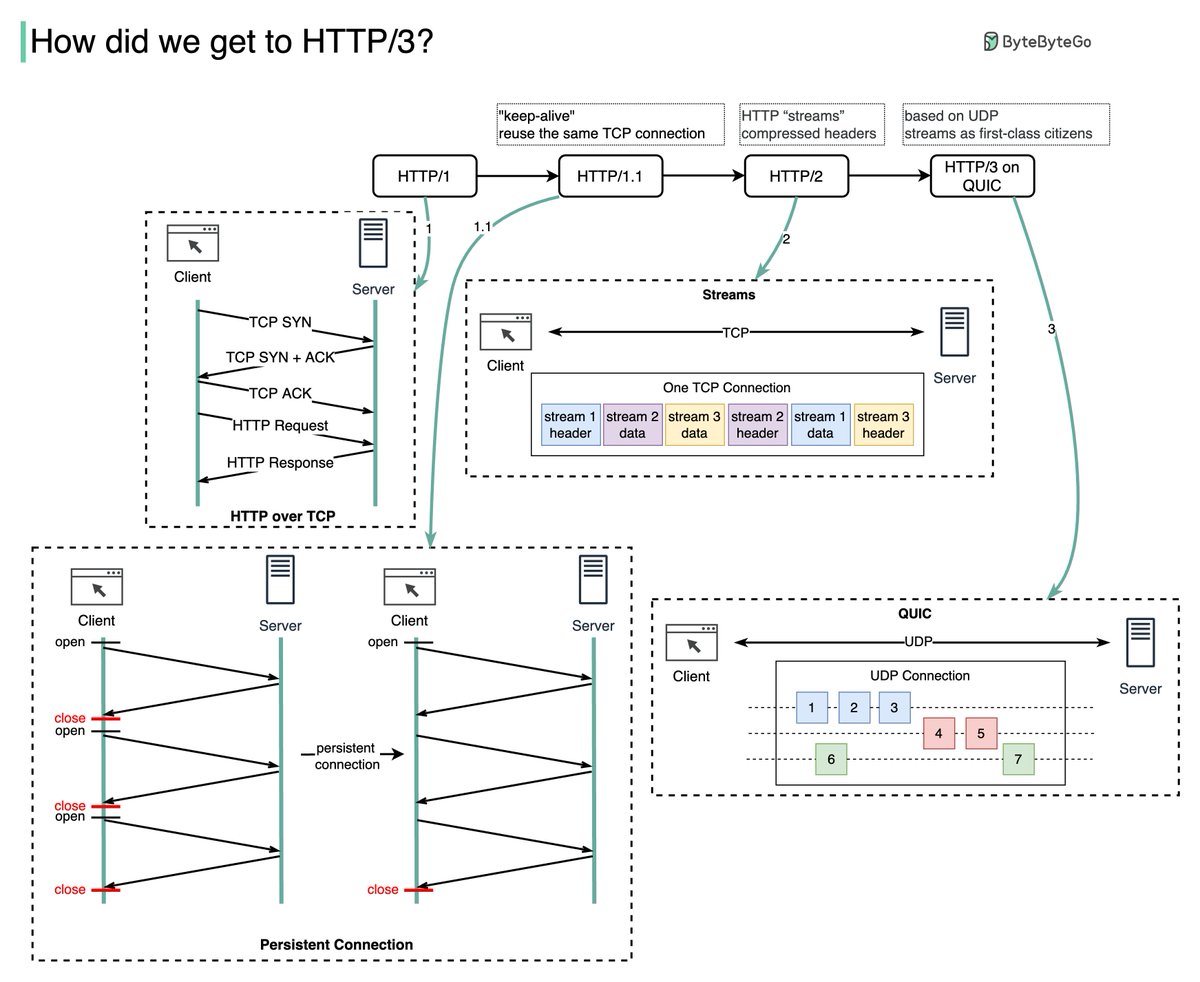
HTTP 1.0 -> HTTP 1.1 -> HTTP 2.0 -> HTTP 3.0 (QUIC).
What problem does each generation of HTTP solve?
The diagram below illustrates the key features.
🔹HTTP 1.0 was finalized and fully documented in 1996. Every request to the same server requires a separate TCP connection.
🔹HTTP 1.1 was published in 1997. A TCP connection can be left open for reuse (persistent connection), but it doesn’t solve the HOL (head-of-line) blocking issue.
HOL blocking - when the number of allowed parallel requests in the browser is used up, subsequent requests need to wait for the former ones to complete.
🔹HTTP 2.0 was published in 2015. It addresses HOL issue through request multiplexing, which eliminates HOL blocking at the application layer, but HOL still exists at the transport (TCP) layer.
As you can see in the diagram, HTTP 2.0 introduced the concept of HTTP “streams”: an abstraction that allows multiplexing different HTTP exchanges onto the same TCP connection. Each stream doesn’t need to be sent in order.
🔹HTTP 3.0 first draft was published in 2020. It is the proposed successor to HTTP 2.0. It uses QUIC instead of TCP for the underlying transport protocol, thus removing HOL blocking in the transport layer.
QUIC is based on UDP. It introduces streams as first-class citizens at the transport layer. QUIC streams share the same QUIC connection, so no additional handshakes and slow starts are required to create new ones, but QUIC streams are delivered independently such that in most cases packet loss affecting one stream doesn't affect others.
Question: When shall we upgrade to HTTP 3.0? Any pros & cons you can think of?
–
Subscribe to our weekly newsletter to get a Free System Design PDF (158 pages): https://t.co/uc5M7Cdq84
JPMorgan, Wells Fargo, and other major banks will use the new Federal Reserve's 'FedNow' instant payment system. Let's take a look at how it works.
Federal Reserve launched FedNow instant payment service on 20 Jul. It allows retail clients to send and receive money within seconds and it is available 24x7.
🔹 What does this mean?
1. Peer-to-peer payment services in the private sector like Venmo or PayPal act as intermediaries between banks, so we need to leverage payment schemes for clearing and Fed systems for settlement. However, FedNow can directly settle the transactions in central bank accounts. [1]
2. Fedwire, another real-time payments system, will still function in large-value or low-value payments. FedNow is not designed to replace Fedwire.
The diagram below shows a comparison between FedNow and ACH (Automated Clearing House), which is used in domestic low-value payments.
🔹 FedNow [2]
Step 0 - Bob wants to pay Alice $1000.
Step 1 - Bob initiates a payment transaction using FedNow.
Step 2 - The sender’s bank submits a payment message to FedNow.
Step 3 - The FedNow service validates the payment message.
Step 4 - The FedNow service sends the payment message to the receiver’s bank, where it is confirmed.
Step 5 - The receiver’s bank replies to FedNow, confirming that the payment is accepted.
Step 6 - The FedNow service debits and credits the designated accounts of the sender and receiver’s banks.
Step 7 - The FedNow service notifies the sender’s bank and receiver’s bank that the settlement is complete.
Step 8 - The banks debit and credit the bank accounts.
🔹 ACH
Step 1 - Bob receives authorization from Alice that he can deduct from Alice’s account.
Step 2 - The payment transaction is sent to the receiver’s bank.
Step 3 - The bank collects files in batches and sends them to the ACH operator.
Step 4 - The ACH operator sends the files to the sender’s bank.
Step 5 - The sender’s bank pulls funds from Alice’s account.
Step 6 - Withdrawn funds are sent to the ACH operator.
Step 7 - The ACH operator distributes funds to Bob’s bank.
Step 8 - Bob receives the fund.
Step 9 - The clearing instructions are sent to Fedwire.
Step 10 - Fedwire sends clearing broadcasts to banks for settlements.
Over to you: What types of instant payment systems does your country provide?
–
Subscribe to our weekly newsletter to get a Free System Design PDF (158 pages): https://t.co/4QcX8btpRd
Think you know how VPNs work? Think again! It's so complex.
Subscribe to our weekly newsletter to get a Free System Design PDF (158 pages): https://t.co/3QCfVgyEwT
Top architectural styles
In software development, architecture plays a crucial role in shaping the structure and behavior of software systems. It provides a blueprint for system design, detailing how components interact with each other to deliver specific functionality. They also offer solutions to common problems, saving time and effort and leading to more robust and maintainable systems.
However, with the vast array of architectural styles and patterns available, it can take time to discern which approach best suits a particular project or system. Aims to shed light on these concepts, helping you make informed decisions in your architectural endeavors.
To help you navigate the vast landscape of architectural styles and patterns, there is a cheat sheet that encapsulates all. This cheat sheet is a handy reference guide that you can use to quickly recall the main characteristics of each architectural style and pattern.
–
Subscribe to our weekly newsletter to get a Free System Design PDF (158 pages): https://t.co/4QcX8btXGL



![alexxubyte's tweet photo. JPMorgan, Wells Fargo, and other major banks will use the new Federal Reserve's 'FedNow' instant payment system. Let's take a look at how it works.
Federal Reserve launched FedNow instant payment service on 20 Jul. It allows retail clients to send and receive money within seconds and it is available 24x7.
🔹 What does this mean?
1. Peer-to-peer payment services in the private sector like Venmo or PayPal act as intermediaries between banks, so we need to leverage payment schemes for clearing and Fed systems for settlement. However, FedNow can directly settle the transactions in central bank accounts. [1]
2. Fedwire, another real-time payments system, will still function in large-value or low-value payments. FedNow is not designed to replace Fedwire.
The diagram below shows a comparison between FedNow and ACH (Automated Clearing House), which is used in domestic low-value payments.
🔹 FedNow [2]
Step 0 - Bob wants to pay Alice $1000.
Step 1 - Bob initiates a payment transaction using FedNow.
Step 2 - The sender’s bank submits a payment message to FedNow.
Step 3 - The FedNow service validates the payment message.
Step 4 - The FedNow service sends the payment message to the receiver’s bank, where it is confirmed.
Step 5 - The receiver’s bank replies to FedNow, confirming that the payment is accepted.
Step 6 - The FedNow service debits and credits the designated accounts of the sender and receiver’s banks.
Step 7 - The FedNow service notifies the sender’s bank and receiver’s bank that the settlement is complete.
Step 8 - The banks debit and credit the bank accounts.
🔹 ACH
Step 1 - Bob receives authorization from Alice that he can deduct from Alice’s account.
Step 2 - The payment transaction is sent to the receiver’s bank.
Step 3 - The bank collects files in batches and sends them to the ACH operator.
Step 4 - The ACH operator sends the files to the sender’s bank.
Step 5 - The sender’s bank pulls funds from Alice’s account.
Step 6 - Withdrawn funds are sent to the ACH operator.
Step 7 - The ACH operator distributes funds to Bob’s bank.
Step 8 - Bob receives the fund.
Step 9 - The clearing instructions are sent to Fedwire.
Step 10 - Fedwire sends clearing broadcasts to banks for settlements.
Over to you: What types of instant payment systems does your country provide?
–
Subscribe to our weekly newsletter to get a Free System Design PDF (158 pages): https://t.co/4QcX8btpRd](https://pbs.twimg.com/media/F1zxSP0WcAIWajh.jpg)





