Paying someone on another chain, or sending and receiving assets, means bridges, swaps, and pasted addresses. We built moopay at NEAR HACKATHON so you can just say who to pay and how much without having to route across different wallets or bridge/swap protocols.
How it works:
Type "send $20 to this (wallet address)" in the moopay chat, or tag @moopaybot on X. It picks the route, checks your spending rules, and sends. It can also split, schedule, stake, and send private claim links.
What NEAR does here:
moopay runs on major NEAR infrastructure that enables smooth cross-chain movement of money.
NEAR Intents (1Click) moves money across chains.
NEAR AI Cloud runs the chat in sealed enclaves.
OutLayer handles private sends (beta).
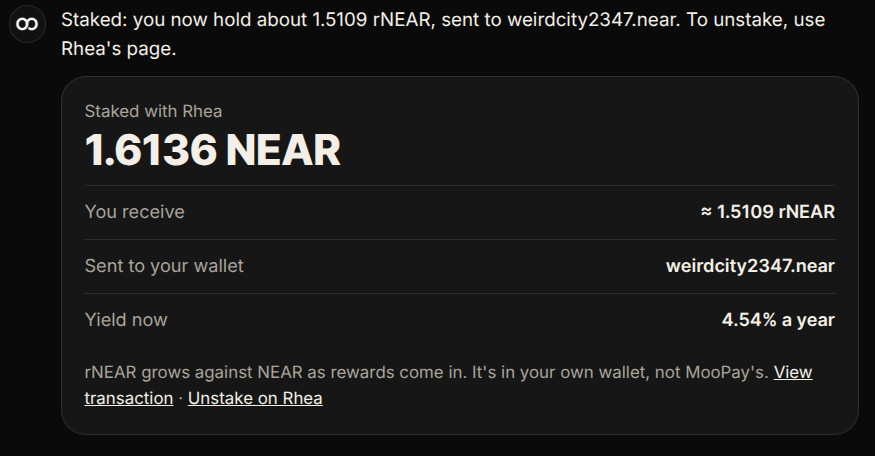
Rhea powers rNEAR staking.
Try it: https://t.co/80azL8o8Sj
Code: https://t.co/LZoltReaGI
Documentation/Guide: https://t.co/6YdqbPoqK8
What is the first thing you would want an agent to pay for? @NEARLegion@NearBuilders
Demo below. @NEARProtocol #NEARHackathon
SECURITY UPDATES 🔒
Here’s what we’ve built into MooPay so far.
1. Your fingerprint or face approves every payment
We integrated fingerprint, face and device PIN into moopay so your funds are protected both on the AI chat and on X. Verify all transactions with biometrics.
2. Turn it on or off, your call
Type /biometrics-web for this app or /biometrics-x for X.
Turning it off needs your fingerprint too, so no one else can switch it off for you. Unusual payments you are blocked. Wallets held in the secure enclave always require it.
3. Your keys are locked away
Wallet keys live in a secure enclave. They don’t sit on our server, so even we can’t access your wallet.
4. You approve exactly what you see
Your approval covers the exact recipient and amount on the card. Change either one and the payment is refused.
5. A recovery key that only you hold
You can make a backup key and keep it yourself. If MooPay is ever down, or you lose your passkey, you can still take your money out with any NEAR wallet. Anyone who gets that key can spend your funds, so keep it offline. MooPay never sees it.
Set it up in about a minute:
▫️Type /passkey and confirm with your fingerprint or face.
▫️Older wallet? Type /secure to move it into the enclave. Your address and money stay the same.
▫️Type /recoverykey and save the key somewhere safe.
More protection is on the way, and we’ll share it as it ships.
https://t.co/80azL8o8Sj
Your safety is paramount.
Turning on biometrics is simple.
Open https://t.co/fEnDAee8G1 on your phone,
type /passkey, and confirm with your fingerprint.
OR
type /biometricWeb
Protection is then on for both the app and X.
SECURITY UPDATES 🔒
Here’s what we’ve built into MooPay so far.
1. Your fingerprint or face approves every payment
We integrated fingerprint, face and device PIN into moopay so your funds are protected both on the AI chat and on X. Verify all transactions with biometrics.
2. Turn it on or off, your call
Type /biometrics-web for this app or /biometrics-x for X.
Turning it off needs your fingerprint too, so no one else can switch it off for you. Unusual payments you are blocked. Wallets held in the secure enclave always require it.
3. Your keys are locked away
Wallet keys live in a secure enclave. They don’t sit on our server, so even we can’t access your wallet.
4. You approve exactly what you see
Your approval covers the exact recipient and amount on the card. Change either one and the payment is refused.
5. A recovery key that only you hold
You can make a backup key and keep it yourself. If MooPay is ever down, or you lose your passkey, you can still take your money out with any NEAR wallet. Anyone who gets that key can spend your funds, so keep it offline. MooPay never sees it.
Set it up in about a minute:
▫️Type /passkey and confirm with your fingerprint or face.
▫️Older wallet? Type /secure to move it into the enclave. Your address and money stay the same.
▫️Type /recoverykey and save the key somewhere safe.
More protection is on the way, and we’ll share it as it ships.
https://t.co/80azL8o8Sj
Paying someone on another chain, or sending and receiving assets, means bridges, swaps, and pasted addresses. We built moopay at NEAR HACKATHON so you can just say who to pay and how much without having to route across different wallets or bridge/swap protocols.
How it works:
Type "send $20 to this (wallet address)" in the moopay chat, or tag @moopaybot on X. It picks the route, checks your spending rules, and sends. It can also split, schedule, stake, and send private claim links.
What NEAR does here:
moopay runs on major NEAR infrastructure that enables smooth cross-chain movement of money.
NEAR Intents (1Click) moves money across chains.
NEAR AI Cloud runs the chat in sealed enclaves.
OutLayer handles private sends (beta).
Rhea powers rNEAR staking.
Try it: https://t.co/80azL8o8Sj
Code: https://t.co/LZoltReaGI
Documentation/Guide: https://t.co/6YdqbPoqK8
What is the first thing you would want an agent to pay for? @NEARLegion@NearBuilders
Demo below. @NEARProtocol #NEARHackathon
Rent, a weekly payout, a monthly payment to a friend. Tell moopay once and it repeats. You approve the schedule with your fingerprint the first time, and the later runs go through on their own.
From silence to Signal 🧵
NEAR already has strong tools for private and cross-chain payments: Confidential Intents,
private shards, NEAR AI Cloud, and more. But you first have to learn how
they work. Which network can receiver get funds on? Which keys do you need? Which flow?
Now live!
tag @moopaybot.
Review. Confirm. It handles the routing.
No app to open. No wallet to connect.
Private by default. Cross-chain. Programmable.
#NEARHackathon#NEAR
Now live !
tag the bot.
it does the rest.
@moopaybot is the social layer for private money on NEAR.
No wallet.
No login.
Just tag it.
Private by default.
Cross-chain.
Programmable.
Chat is the interface.
@moopaybot#NEARHackathon#NEAR
An AI agent that can spend money is only as safe as whoever can talk to it. With no check that the owner is really there, every route into the agent is a route to the money:
A payment that matters has to be confirmed by something the attacker cannot copy from a distance: the owner's own device, unlocked by their own fingerprint, face or PIN.
What MooPay does
MooPay uses passkeys (WebAuthn). The private key lives in the owner's phone or computer, never leaves it, and signs only after the device checks a fingerprint, face or PIN. No password and no sign-up.
Asides biometrics, we have other necessary security protections and checks.
We got your back.