Vice President and Head of Product & Engineering for Microsoft Windows & Surface India | Ardent Movie Buff and Software Engineer at large | Opinions mine
⚡ Your terminal just got smarter.
First introduced at #MicrosoftBuild, Intelligent Terminal makes shell context available to your favorite agents directly from your Terminal to help debug errors, run multi-step tasks, and stay in your flow. https://t.co/aL0wVRXXp6
Playing around with some custom DirectX rendering inside Microsoft.UI.Reactor and ended up with some fun 360° samples. All 100% C# code in #WinUI. No XAML, no C++.
Great seeing all the recent Terminal releases getting flighted, especially Intelligent Terminal.
I’ve been loving this capability. I set up a lot of devices, and getting a new machine back to my ideal workflow state always takes time. One way I’ve been using Intelligent Terminal is to get bootstrapped fast.
Excited to see the latest update. More on it from the Terminal team here: https://t.co/3jOTRInGsd
We're making Windows widgets less distracting. We've disabled open on hover by default, turned off taskbar badging by default, open widgets rather than newsfeed on first launch, weather as the only default widget on lockscreen, limiting taskbar alerts.
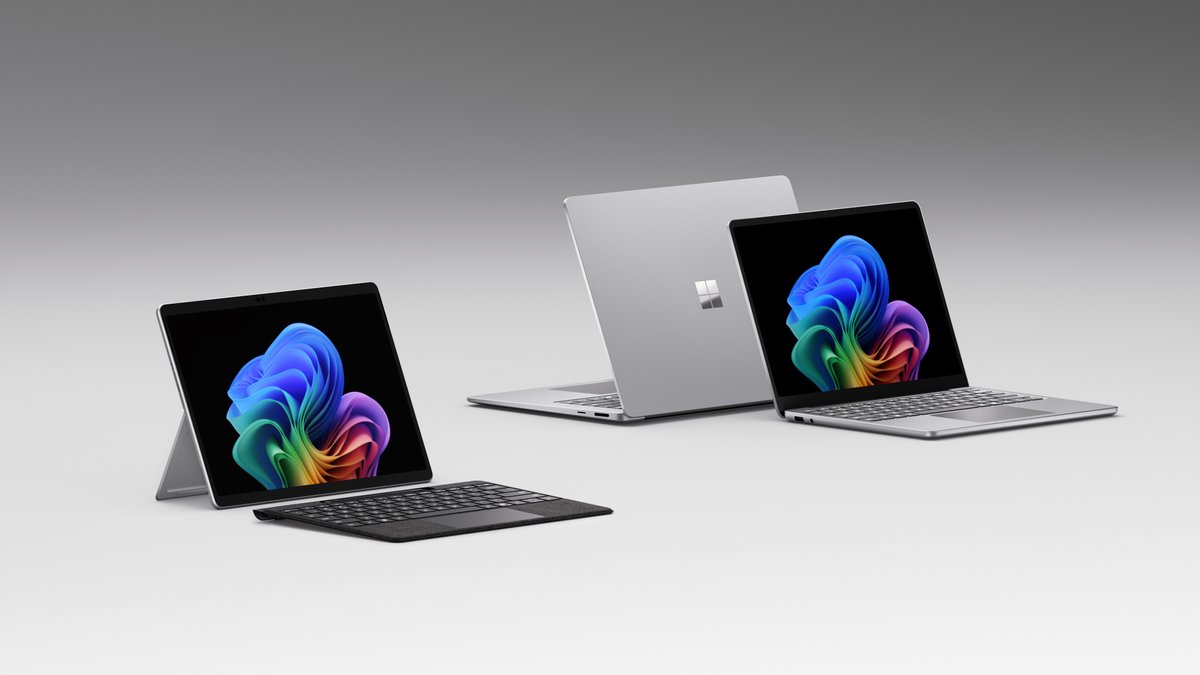
Today we're introducing the next Surface Pro and Surface Laptop. Powered by Snapdragon X2 processors, they're faster and more efficient, and both are available starting today 🚀.
These devices are the result of a relentless team that cares deeply about the details, from the haptic touchpad you feel the moment you touch it, to our new color for Surface Laptop, Jade. We can't wait to hear what you think! https://t.co/YYwzSZfiLh
Microsoft’s new AI-powered Terminal is not just Windows Terminal with a few extra tricks. It feels like a different tool entirely, built around guided commands, smarter context, and a workflow that helps you get things done faster.
It is a fresh take on the command line that could reshape how Windows developers and power users work.
Our Windows expert, Mauro, takes a look at it and shares his experience in our latest feature🔗https://t.co/ZA33LYQyBd
⚡ New developer experiences on Windows announced at #MSBuild
Coreutils for Windows, WSL containers, Intelligent Terminal, Windows Developer Configurations & more!
All designed to help developers build and ship faster on Windows.
Learn more: https://t.co/2HuSlw0DGu
We want people to choose XBOX because of great games and experiences. That also means giving you something that was made for XBOX.
Gears of War: E-Day and Clockwork Revolution will be XBOX console exclusives!
That’s a wrap on a big week for Windows and Surface.
Congrats again to the team on everything we got to share at //build. A lot of hard work came together this week to tell a story that is years in the making.
It was great to connect with Insiders at our SF meetup and hear what’s landing, what still needs work, and where we should keep pushing.
A few behind-the-scenes moments from the week.
See you in London soon, Insiders.
https://t.co/cVpdxbAB6X
Getting agents to understand WinUI is important, we recognize that they are trained so much better for other libraries out of the box. With this new set of skills we are optimizing for creating the best UX as efficiently as possible with a coding agent!
Fun stuff, working on C# & Rust programming model for WinUI... very experimental, trying to do the development in the open. Would love feedback.
C#: https://t.co/vMjb3soqQm
Rust: https://t.co/Vdb9XW1gXg
Reactor is a new experimental UI library for Rust targeting WinUI 3 to deliver native, efficient Windows experiences.
App::new().render(|_| text_block("Hello, Reactor world!").font_size(24.0))
No XAML needed.
https://t.co/XiVMIijU1K
Today we're announcing the new Surface Pro and Surface Laptop for Business, powered by Intel Core Ultra Series 3. The result of deep collaboration between hardware and software teams at every level. Proud of what this team has built 🚀. https://t.co/EkxfIUngAW