Group Product Manager on the #MicrosoftEDU team, building AI in EDU, Learning Accelerators, #MicrosoftTeams, Immersive Reader, #OneNote Class Notebooks
Copilot Projects are here! Organize your chats, files, and custom instructions in one place, so Copilot has the context it needs and you don't have to keep starting from scratch. In this step-by-step tutorial, I'll show you how it all works.
https://t.co/c1VG3zBbIH
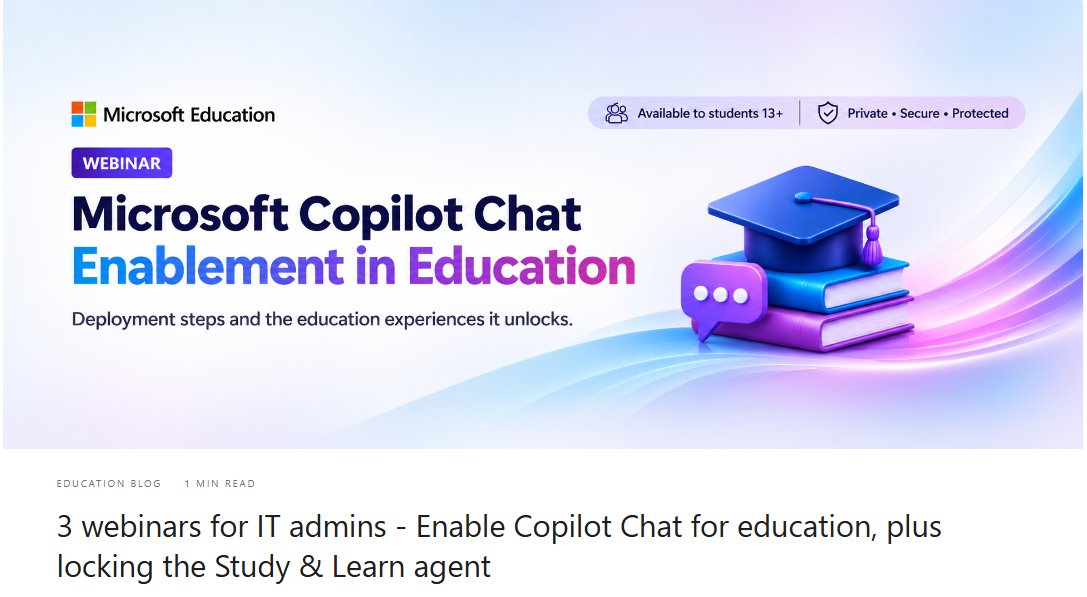
Microsoft Education is offering three live webinar opportunities for IT administrators who want to confidently deploy and manage Microsoft Copilot Chat in the education environment. Each session covers the same practical guidance, so you can select the date that best fits your schedule.
We’ll walk through Copilot Chat configuration from the tenant level to the end-user experience, including options for students ages 13+, CSV, SDS, and PowerShell uploads, agents and extensibility, and current licensing and security controls. You’ll leave with actionable guidance to help deploy, manage, and optimize Copilot Chat safely across your organization.
We’ll also share the new feature allowing IT Admins to lock Copilot Chat to ONLY use the Study & Learn agent. This has been the #1 request from K12 schools globally, and this feature is now fully rolled out. The webinar will also take a brief look at some Microsoft Education experiences including Teach in Copilot, the Study and Learn agent, Copilot Workspaces, and Learning Activities.
📅 December 9th, Wed @ 8am Pacific time: https://t.co/G84fScZNfc
📅 January 13th, Wed @ 8am Pacific time: https://t.co/LVU5g32DUz
📅 February 3rd, Wed @ 8am Pacific time: https://t.co/ugxeZTnLQe
More details at the blog: https://t.co/uWZrdd89EG
We've partnered with @Microsoft to bring Hermes Agent to the enterprise.
Hermes Enterprise now works inside Microsoft Teams, the Microsoft Store and Azure. In Teams, employees hand Hermes work like financial analysis, document drafts or inbox triage, and review the result in the same chat. Agent workloads run in isolated Azure Container Apps sandboxes.
When someone finds a good way to do a recurring task, Hermes saves it as a skill. With Collective Wisdom, they can share that skill with their team after review, so the next person starts out with the best approach anyone has found to accomplish that task. The skills then grow along with the company.
Companies with strict data residency or procurement rules can run Hermes Enterprise in their own Azure tenant. Our CTO Jeffrey Quesnelle presents how Hermes uses these sandboxes at Microsoft Ignite today, in session BRK448.
Thanks to @M12vc and the @Azure Container Apps team.
https://t.co/Du3BHHJ0YB
The #1 request from K12 schools we talk to is the ability to lock down Copilot Chat so students can ONLY use the Study and Learn agent to keep a focused coaching and learning experience at all times.
This ability is now available for all schools and IT Admins! Learn more in the recorded webinar below.
YouTube: https://t.co/5wOPZHqEYO
Introducing Autopilot in Microsoft 365 Copilot, your proactive AI teammate! Built on Microsoft IQ, it has its own identity, persistent memory, workspace and cloud PC.
Give it a name, a role and a goal. Delegate tasks, automate routines and let it collaborate directly with your colleagues in Teams and Outlook. It can prepare meeting briefings, draft replies, coordinate schedules and monitor important work while you're focused elsewhere. Autopilot learns your preferences over time and continues working even when your laptop is closed
Rolling out to eligible Frontier customers starting today 🚀
Blog: https://t.co/2yStcsYB4z
YouTube video: https://t.co/TILIukuycB
I can finally share what I’ve been working on at @Microsoft. I lead Today, the product you saw all over the Ignite conference this week.
Today is a new form factor for work. It’s not a chat box it’s a Feed. While you sleep, an AI agent works in the background on your email, your calendar, Teams and your documents. In the morning, the work is already prepared: replies drafted, conflicts spotted, the messages that matter pulled to the top, the documents waiting for your review.
You don’t have to prompt it. There’s nothing to configure. You open Today, check what it did, and in a few taps you send, accept or mark as done. Most of us start the day by digging through everything that came in overnight. With Today, you start by finishing work your agent did.
We think this is what AI at work should feel like: proactive, quiet and useful, without you having to ask.
Today lives in your existing apps starting with Outlook and Copilot meeting customers in the app they use the most.
I had so much fun building it with an incredible team: @JesseProvo, @donovanso, @telmen, @justinchando, Chris Parnin, Gideon Ojo, Alex Trzyna, Christopher Miller, Diana Slaba, Kirill Varshavskiy. Thank you for the craft, the late nights, and for caring about every detail.
And none of this would have happened without the incredible support of @sumit_c, @elbio_abib, @rroslansky, @clamanna, @jacobandreou and so many others across Microsoft. Thank you for believing in it.
This is just the beginning!
P.S. i made a little film to celebrate. It starts in 1997. Watch till the end.
Educators asked, we listened 👂 Now you can upload your own images for Flashcards in Microsoft 365. This is now rolled out globally and worked in:
✅ Teach in Copilot
✅ The Learning Activities web app in M365
✅ Teams Assignments when you attach Flashcards
Example demo below
A tutorial video showing the just-launched Unit Plans feature for the Teach module in Copilot. The new Unit Plan tool in Copilot Teach helps educators save time on curriculum planning while creating comprehensive, customizable teaching resources.
Whether you're planning a history unit, science lessons, or an entire sequence of classroom activities, Copilot Teach makes the process faster and easier.
https://t.co/Cf9EMYWP0z
@thatmattwade My understanding is the Workspace is the shared team context, not a shared Copilot chat transcript. We can work from the same files/context, but you don’t see my private Copilot conversations and I don’t see yours.
At @Microsoft Ignite, we’re sharing our next chapter, as Office and @MSFTCopilot evolve from a set of applications into a human-led, agentic system of work.
We’re making Word, Excel, PowerPoint, and Outlook more intelligent and introducing three new experiences: Today, Pages, and Workspaces. Together, they’re built for how work is changing.
You provide the context, guide the work, and own the result. AI moves the work forward without taking you out of the loop.
I can’t wait to see what you create.
Read more: https://t.co/ma8ttq1TET
#MSIgnite, #Microsoft365
Microsoft AI has launched MAI-Image-2.7, the new #1 in AA-Image-Editing v2.1 at one sixth the price of the four models behind it
MAI-Image-2.7 and MAI-Image-2.7-Flash both take new places on the Quality vs Price frontier in Image Editing and Text to Image, at $34.82 and $10.24 per 1k images.
Both perform best in Image Editing: MAI-Image-2.7 ranks #1 for Text or Symbol, Scene & Style and Enhancement & Restoration edits, and MAI-Image-2.7-Flash ranks #3 for Scene & Style edits.
Congratulations to @MicrosoftAI on the launch of MAI-Image-2.7 and MAI-Image-2.7-Flash!
See below for our detailed analysis of both models in Image Editing and Text to Image 🧵
It’s great to be at Microsoft Ignite, spending time with commercial customers and IT leaders.
Businesses run on @Windows. That’s a privilege and a responsibility. It’s why we’re building Windows to be the trusted foundation for work and moving faster than ever on security.
A few of the updates we shared today:
- The Windows endpoint security platform is now generally available.
- We announced Windows baseline protection, which gives IT a clear signal for every device in their fleet.
- Hybrid Intelligence makes your AI budget go further, using the best of local and cloud.
- Agent 365 governance now extends to the Windows endpoint.
- We’re building Windows to be the most secure platform for agents. OpenAI Codex has enabled MXC by default, and at Meta, MXC is running on tens of thousands of Windows devices.
- We introduced Direct Stream, the GPU-backed cloud streaming technology behind Windows 365.
- Windows Server 2028 is now in public preview with new capabilities and silicon as a part of your connected AI infrastructure.
Teams can now extend their AI strategy from device to cloud, on a foundation they can trust.
Read more in our blog: https://t.co/p8VpJxQqBj
Microsoft IQ helps organizations build, retain and continuously improve their own intelligence, bringing business context together so agents can put organizational know-how to work through shared plugins and playbooks. #MSIgnite
🆕 On Terminal-Bench 4.1, Copilot Fusion Max achieved a 71.2% resolution rate, 5.4 percentage points ahead of leading frontier models Opus 5.5 and Fable 5.2, while costing 88% less than Fable 5.2 and 57% less than Opus 5.5.
https://t.co/DFBXTqn6kF