🚨 Windows Users
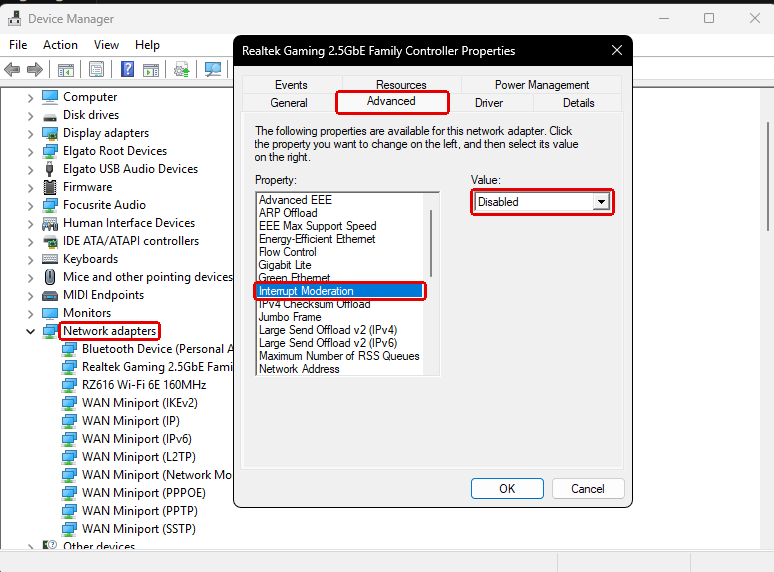
Your Ethernet adapter might be causing your packet loss
Heres how to check
1. Press Windows + R
2. Type devmgmt.msc and hit Enter
3. Open Network adapters, right click Ethernet, then 4. Properties
5. Open the Advanced tab, set Interrupt Moderation to Disabled
🚨Best NVIDIA Control Panel Settings
Issue:
Without these optimized settings, you may not be getting the best performance and responsiveness.
The good part:
Copy these settings into your NVIDIA Control Panel and apply them for a more optimized gaming experience.
🚨 NVIDIA Users
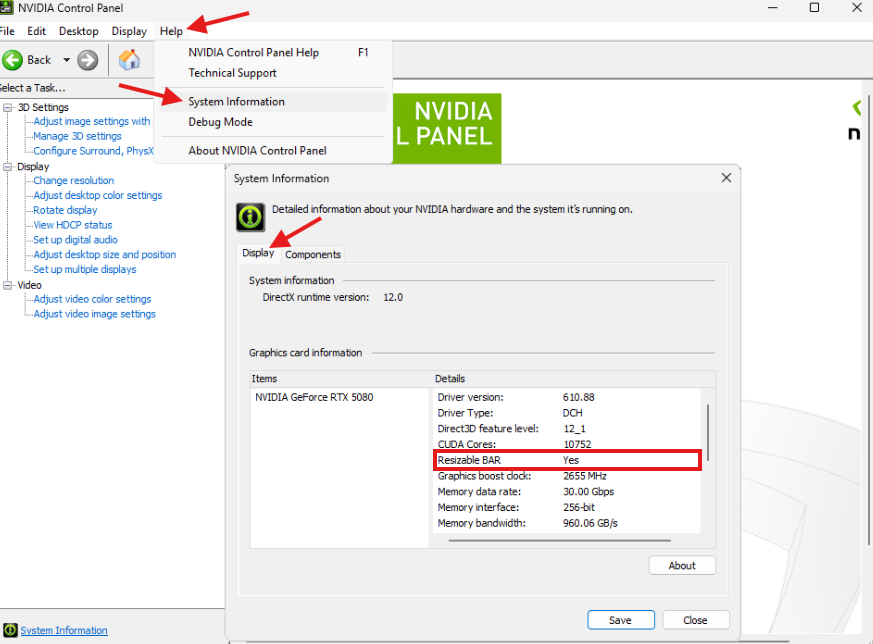
Your GPU might be losing FREE performance
Here’s how to check ⬇️
1. Open NVIDIA Control Panel
2. Go to Help → System Information
3. Find Resizable BAR
4. Make sure it says Yes
The SECRET PRO Settings they DON'T TELL YOU 🫵 part #23
🚨 BEST INTERNET SETTINGS LOWER LATENCY BETTER DOWNLOAD SPEEDS!
turn on notis, disc in replies, best tools best services