Nih, daging A5 buat lo pada.
Bear market $BTC ga lama lagi kelar.
Tahu dari mana? Teori 4-year cycle.
"Ah, basi bang teori itu"
Jangan remehin teori ini.
Dengan hit rate 100% dari 3 siklus terakhir, lebih tinggi dari win rate trading lo.
Berdasarkan teori itu, bear market berlangsung 365 hari.
Cycle top kita kemarin di Oktober 2025.
365 hari setelah itu? Oktober 2026.
Ya mungkin range-nya di September - November.
Sisa beberapa bulan doang. Yok, semangat!
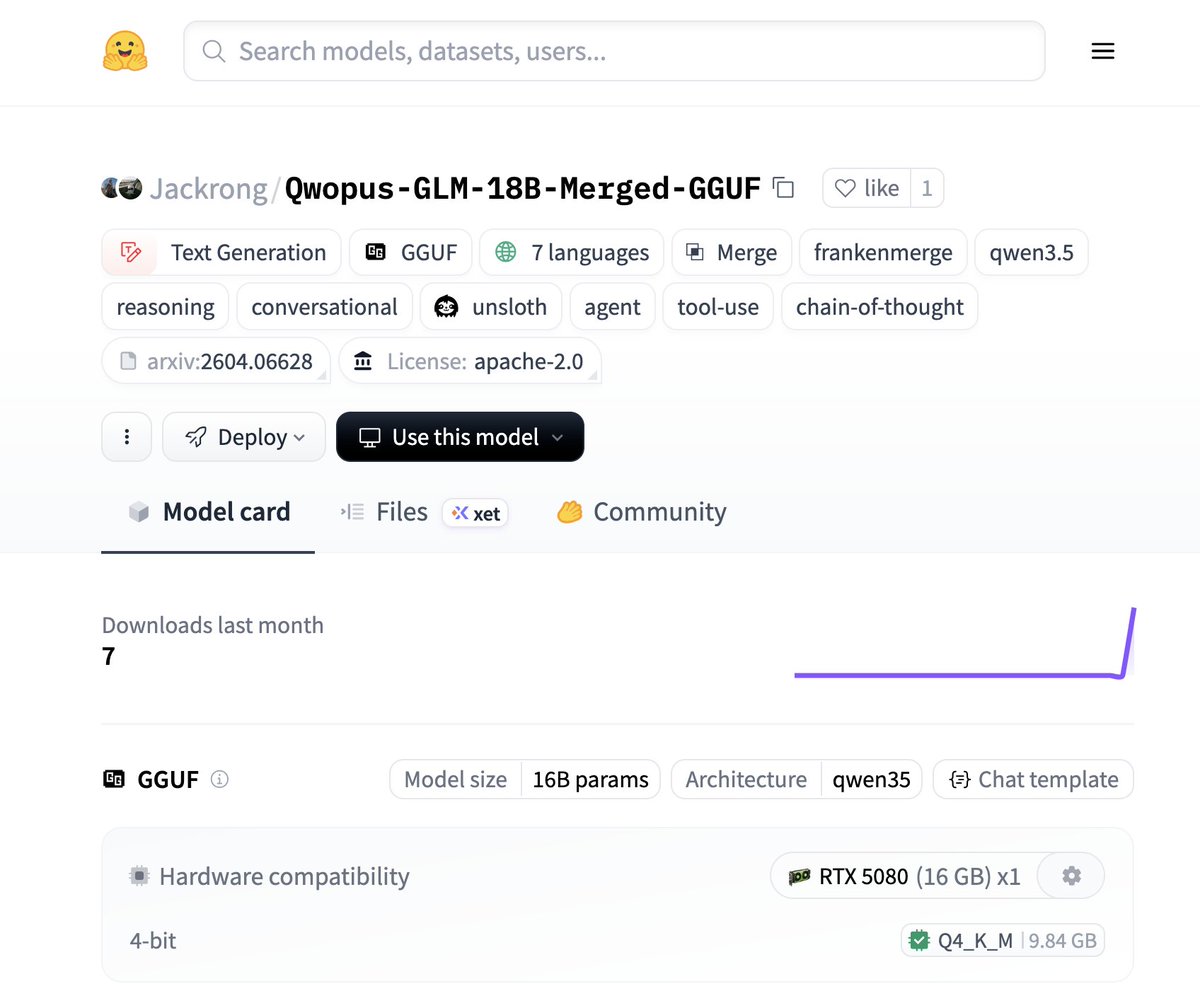
Okay this one is insane. A new 18B frankenstein model was just released on @huggingface — Beats the new Qwen3.6-35B-A3B on a 44-test suite despite requiring 12GB VRAM instead of 24GB 🤯
Runs on a SINGLE RTX 3060 (!)
🧠 Opus 4.6 & GLM-5.1 reasoning in one model
⚡️ 66+ tok/s stable on mid-range GPUs
🧪 Experimental, no additional training
🛠️ Perfect tool calling & agentic reasoning
📷 Fits on low hardware, any 12gb card
📚 GGUF size is 9.8GB (Q4_K_M)
Another gift from Jackrong, adding both qwopus and glm-distilled qwen together was not on my bingo card. Truly seems like the sweet spot between 9B and 27B models right now.
The ultimate model for 12-16GB VRAM owners?
https://t.co/kqDUizh1pf
Akhirnyaaaa ketemu prompt JSON yang bisa ngeclone foto 90% mirip.
lewat fitur Image Extractor, upload 1 foto referensi ke https://t.co/TdattElsQx, AI extract JSON dari foto itu. pose, lighting, outfit, background, semua jadi structured data.
JSON itu langsung jadi prompt. hasilnya keliatan di gambar 2 dan 3.
bukan edit. bukan filter. ini generate ulang dari nol pakai data yang di-extract dari foto pertama.
buat affiliate TikTok Shop ini game changer. 1 foto referensi bisa jadi 10 variasi konten dalam hitungan menit.
coba di https://t.co/TdattElsQx
Between all the unlimited prediction-market slop posts, this article is actually quite good.
You can copy-paste it into GPT and ask it to explain it like you’re five, then ask it to build a single-file script.
It won’t make you rich, but you’ll learn new things.
You're using Claude wrong.
Here's my (exact) setup before I even prompt:
Step 1. Download Claude and open Cowork
→ Go to Claude. com/ download.
→ Install the desktop app.
→ Click the Cowork tab at the top.
→ You need a Pro plan ($20/mo). Worth it.
→ Full guide here: https://t.co/g6oLzWSOuo
---
Step 2. Select the right model (don't skip this)
→ Click the model dropdown.
→ Select "Opus 4.6."
→ Turn on "Extended Thinking."
→ Never change these. Wrong model = bad output.
---
Step 3. Build your folder
→ Create one master folder on your computer.
→ Inside it, create 4 subfolders:
✦ ABOUT ME - who you are + how you write
✦ PROJECTS - one subfolder per live project
✦ TEMPLATES - your best work as structures
✦ OUTPUTS - where Claude saves finished files
→ Upload this folder. That's how it reads you.
---
Step 4. Create 3 context files inside ABOUT ME
→ These replace prompting. This is the setup.
→ Create them as .md files. Plain text, saved as .md
✦ about-me.md - what you do day-to-day.
✦ my-voice.md - tone, phrases you hate, 3 example
✦ my-rules.md - ask first, show a plan, get approval
OR
Simply download my .md files here: https://t.co/psB7XxAv8w
Subscribe for free. Open my welcome email.
Hit the automatic reply button inside.
---
Step 5. Set Global Instructions (once, forever)
Go to Settings → Cowork → Edit Global Instructions.
→ Paste: "I'm [Name], [Role]. Read my files before every task. Ask clarifying questions before executing. Show a plan before acting. Never delete without my approval."
→ You set this once. It runs every session.
→ Your prompts can now be 10 words long.
---
Before your next Cowork session, check these:
1. Am I in Cowork (not Chat)?
2. Is Opus 4.6 + Extended Thinking on?
3. Did I point it to my folder with context files?
Set these first. Then prompt.
Top 1% of Claude users do this. Now you can too.
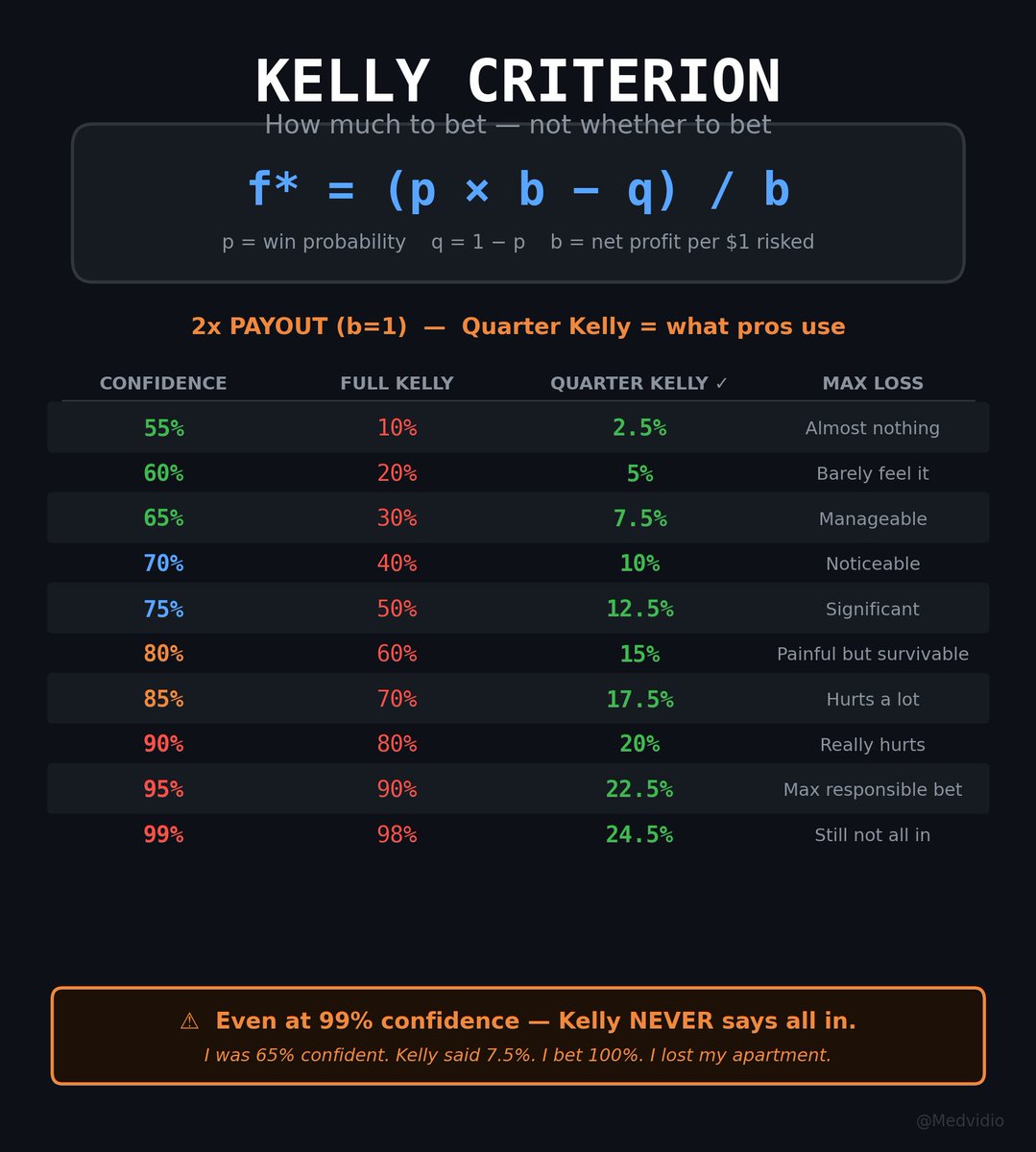
One formula. I wish someone had shown it to me before I went all in
The difference between me having an apartment and me sleeping on someone's couch
The formula is called the Kelly Criterion
f* = (p × b − q) / b
p - your confidence you'll win
q - your confidence you'll lose (1 − p)
b - how much you earn per dollar risked
It answers one question: how much to bet
Not "should I bet or not." But HOW MUCH. This is where everyone breaks
Here's how it works in practice:
➤60% confident, potential return 2x → bet 5%
➤70% confident, potential return 2x → bet 10%
➤80% confident, potential return 2x → bet 15%
➤90% confident, potential return 2x → bet 20%
Notice - even at 90% confidence and double the return the formula says:
less than half. Never all in. Never
Because Kelly doesn't just calculate how much you make when you're right
It calculates how much you lose when you're wrong. And how many attempts you need to recover
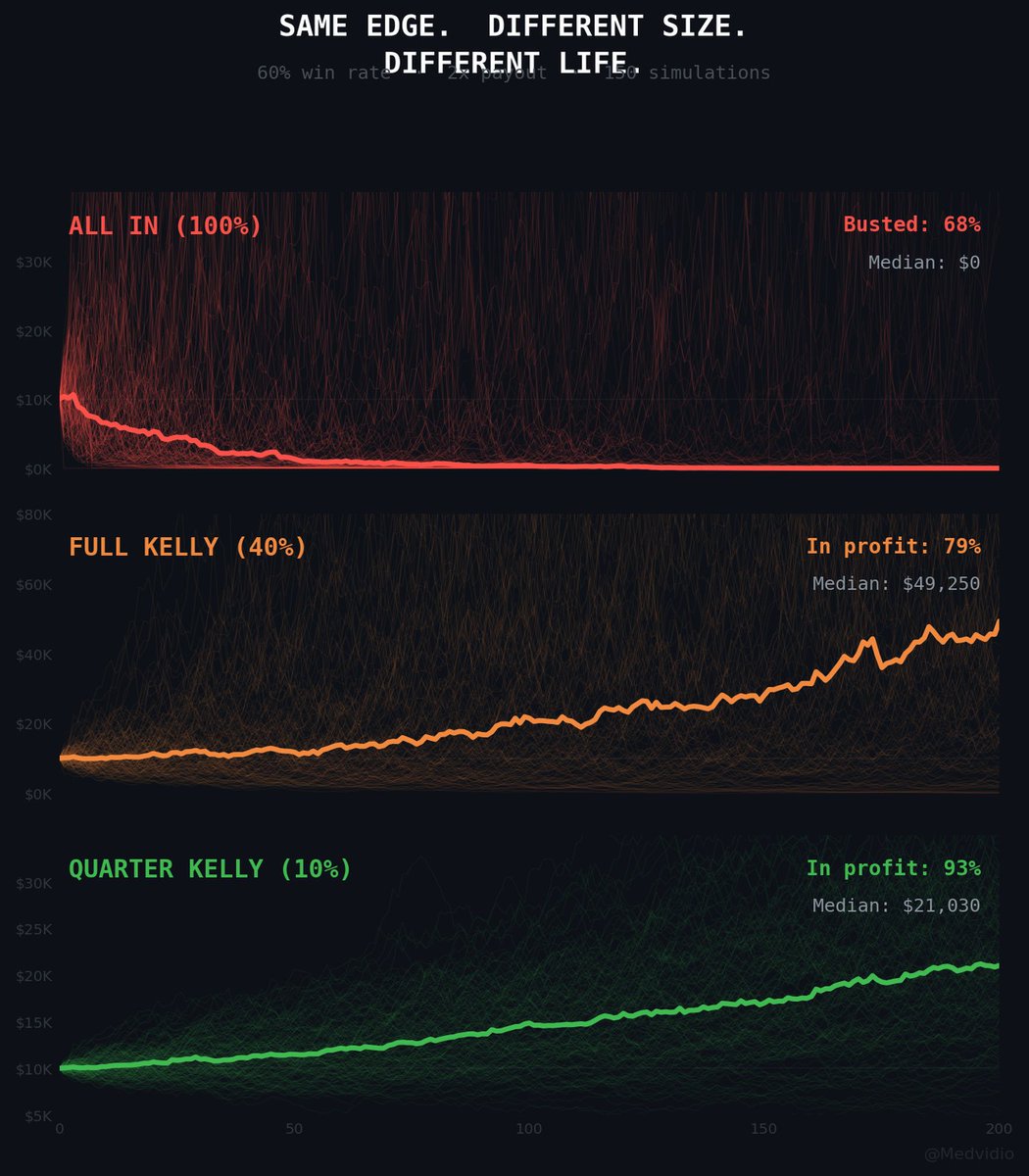
100% on one position = one mistake and you're at zero
12% on one position = you're wrong, 88% left, you keep playing
87% of Polymarket wallets are in the red, because they guess the outcome correctly - but bet too much on one position and one loss wipes out ten wins
Full story in the article below
🚨 BREAKING: Someone just made it possible for AI agents to control any desktop software.
CLI-Anything auto-generates command-line interfaces from any codebase. One command.
Works with Blender, GIMP, LibreOffice, OBS Studio. 1,298 tests. 100% pass rate. MIT license.
No APIs. No GUI automation. Just real software, agent-ready.
Link in comments 👇
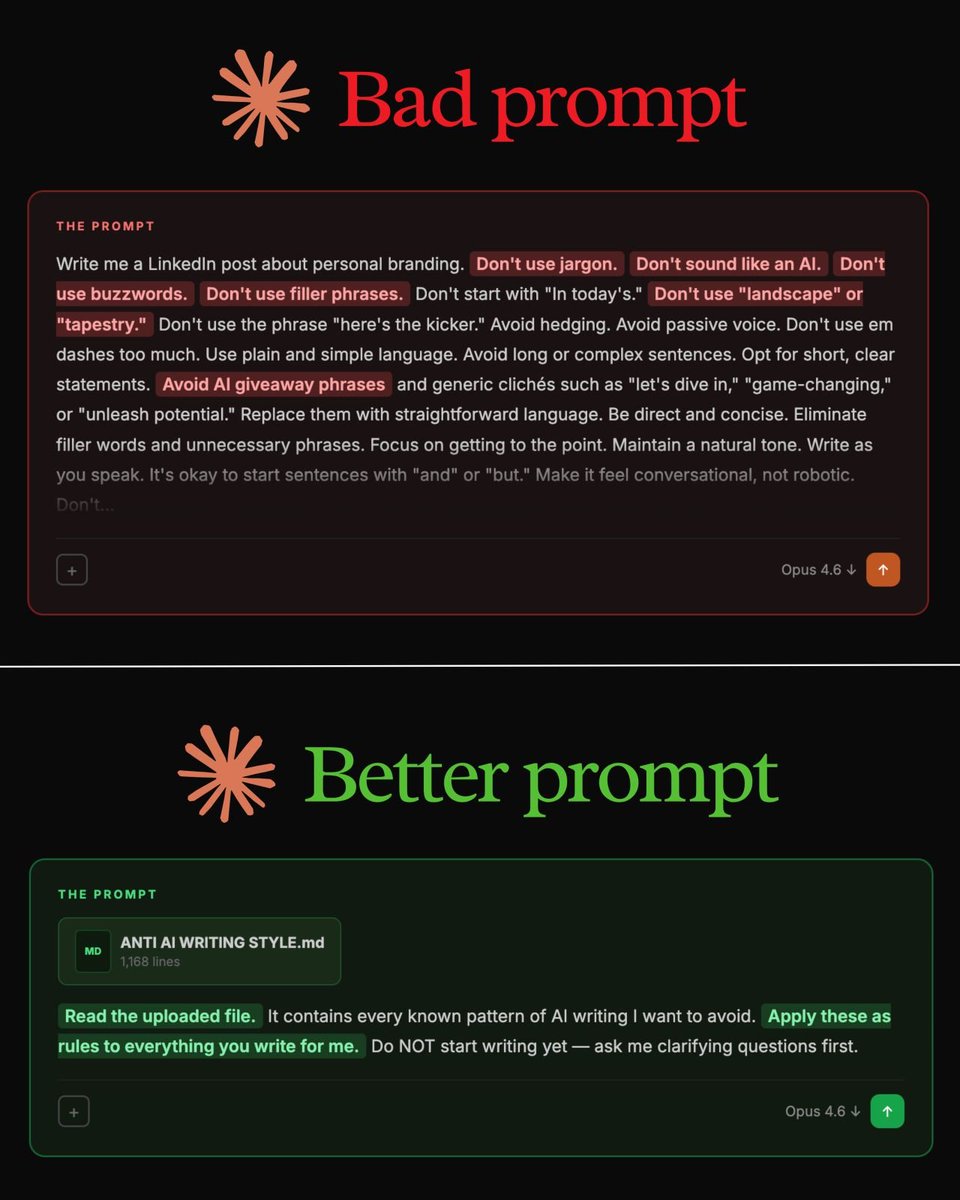
Stop writing 500-word prompts.
This 29-word prompt writes better than all of them:
"Read my anti-AI writing style file first. It contains every known pattern of AI writing I want to avoid. Apply these as rules to everything you write for me."
That's it.
But you need to set it up first. Here's how:
Step 1. Go to Wikipedia.
Step 2. Search "Signs of AI writing."
Step 3. Copy the entire page.
Step 4. Paste it into a Google Doc. Don't edit.
Step 5. Name it "anti-ai-writing."
Step 6. Download as .md format.
Step 7. This is your "what NOT to sound like" file.
Or skip all of that. To download the anti-AI guide:
Step 1. Go to https://t.co/psB7XxAv8w.
Step 2. Subscribe for free. Don't pay anything.
Step 3. Open my welcome email.
Step 4. Hit the automatic reply button inside.
Step 5. Download my .md files. Ready to upload.
Step 6. Upload it to Claude. Prompt:
"Read the uploaded file. It contains every known pattern of AI writing I want to avoid. Apply these as rules to everything you write for me. Do NOT start writing yet - ask me clarifying questions first."
✦ Here's why your prompts don't work (red flags):
"Don't use jargon."
"Don't sound like an AI."
"Don't use buzzwords or filler."
"Avoid passive voice."
"Be conversational, not robotic."
These are everywhere. LinkedIn posts. Emails.
They sound thorough. The output is still garbage.
Your prompt says "don't" 14 times. The model forgets half by sentence three. You're fighting the AI with a wall of "don'ts." It doesn't work at scale.
The fix is counterintuitive.
Stop telling the AI what to avoid.
Give it a file that shows what to avoid.
The model reads 1,168 lines of bad patterns, internalizes them, and writes clean.
500-word prompt → still robotic.
Small prompt + 1 file → reads as a human wrote it.
1. To get access, go to https://t.co/psB7XxAv8w.
2. The Claude guide at https://t.co/jw2qdIbLxJ.
3. The Claude cowork guide at https://t.co/uWTpOI3oyE.
this is going viral on chinese social media right now.
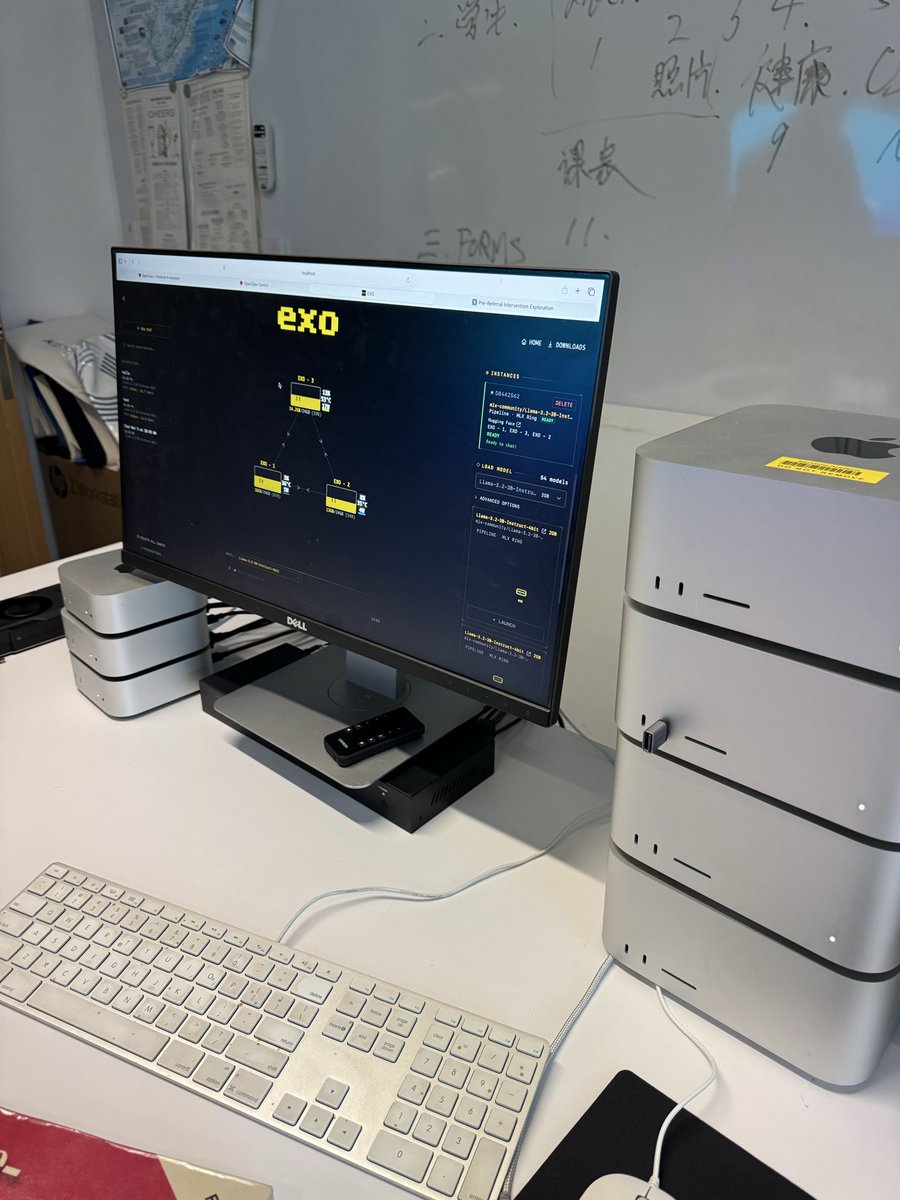
exo is being used by a school in china to deploy private ai agents locally.
they repurposed m1 ultra macs from their film lab, clustered them together with @exolabs, and ingested their entire school corpus including curriculums, reports, handbooks and class schedules.
with this, each student and teacher has a personalised ai agent that is free and private, grounded to real school data.





![rubenhassid's tweet photo. You're using Claude wrong.
Here's my (exact) setup before I even prompt:
Step 1. Download Claude and open Cowork
→ Go to Claude. com/ download.
→ Install the desktop app.
→ Click the Cowork tab at the top.
→ You need a Pro plan ($20/mo). Worth it.
→ Full guide here: https://t.co/g6oLzWSOuo
---
Step 2. Select the right model (don't skip this)
→ Click the model dropdown.
→ Select "Opus 4.6."
→ Turn on "Extended Thinking."
→ Never change these. Wrong model = bad output.
---
Step 3. Build your folder
→ Create one master folder on your computer.
→ Inside it, create 4 subfolders:
✦ ABOUT ME - who you are + how you write
✦ PROJECTS - one subfolder per live project
✦ TEMPLATES - your best work as structures
✦ OUTPUTS - where Claude saves finished files
→ Upload this folder. That's how it reads you.
---
Step 4. Create 3 context files inside ABOUT ME
→ These replace prompting. This is the setup.
→ Create them as .md files. Plain text, saved as .md
✦ about-me.md - what you do day-to-day.
✦ my-voice.md - tone, phrases you hate, 3 example
✦ my-rules.md - ask first, show a plan, get approval
OR
Simply download my .md files here: https://t.co/psB7XxAv8w
Subscribe for free. Open my welcome email.
Hit the automatic reply button inside.
---
Step 5. Set Global Instructions (once, forever)
Go to Settings → Cowork → Edit Global Instructions.
→ Paste: "I'm [Name], [Role]. Read my files before every task. Ask clarifying questions before executing. Show a plan before acting. Never delete without my approval."
→ You set this once. It runs every session.
→ Your prompts can now be 10 words long.
---
Before your next Cowork session, check these:
1. Am I in Cowork (not Chat)?
2. Is Opus 4.6 + Extended Thinking on?
3. Did I point it to my folder with context files?
Set these first. Then prompt.
Top 1% of Claude users do this. Now you can too.](https://pbs.twimg.com/media/HDD_MiBaYAAFFIh.jpg)