Noden — one native macOS app for SSH, SFTP and RDP.
• Several live sessions in a grid
• Dual-pane SFTP, drag & drop
• Smooth remote Windows (FreeRDP + Metal)
• AI that proposes, you approve
Free tier · Pro $10/yr
https://t.co/GMxlUgayRX
Noden draws remote Windows through Metal: each FreeRDP frame goes into a persistent texture on a CAMetalLayer, scaled on the GPU.
The first version built a new CGImage every frame and waited on Core Animation. Metal fixed the stutter.
Write-up: https://t.co/qTaSITk4g0
@JSifalda Good setup for patchy links. For the times you do want a real shell on the road: run the agents inside tmux and connect with mosh instead of plain ssh. mosh survives network switches and sleep, and tmux keeps everything running if you drop off entirely.
Noden's vault now fills logins in your browser too: Chrome, Firefox and Safari.
The extension finds the matching entry; one click fills it. Copy keeps the password out of the browser, since Noden puts it on the clipboard itself. It asks before saving a new login.
Noden is a native macOS app for SSH, SFTP, RDP and serial consoles, with sessions side by side in one window.
What it isn't, yet: no VNC, no iOS, no Windows or Linux build. Need one client on every platform? Termius or Tempest fit better.
Free tier: 5 connections, RDP included.
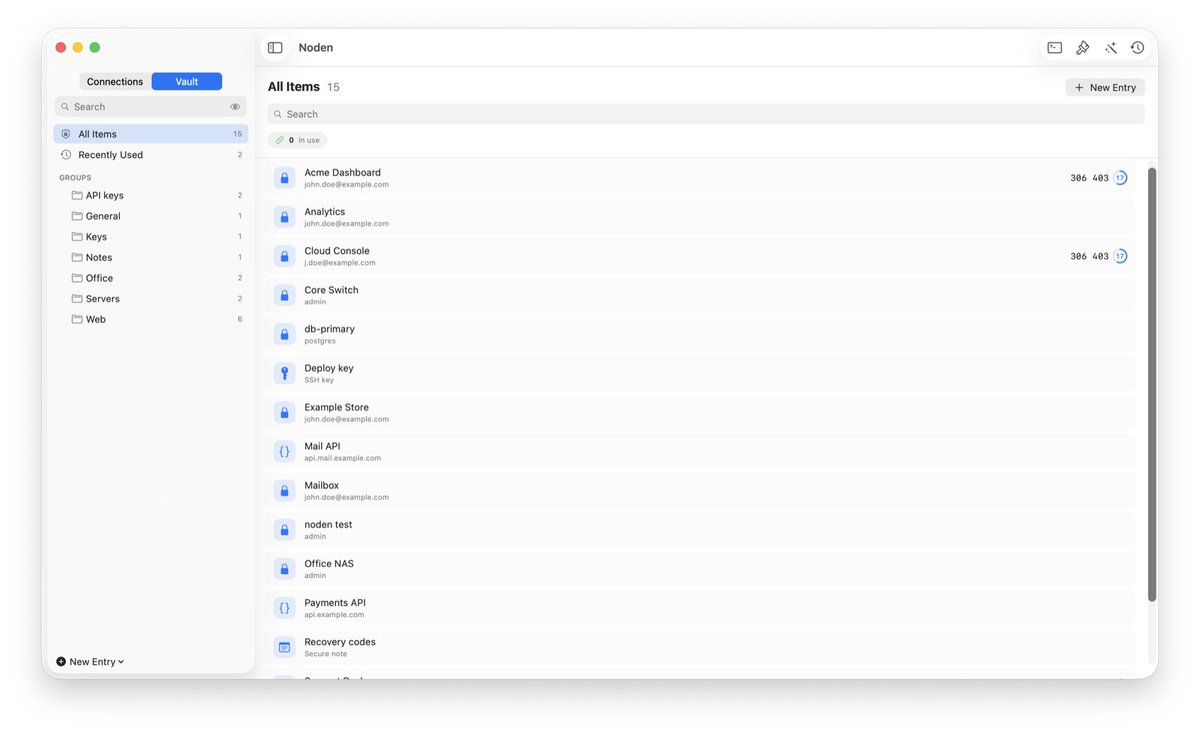
Noden's Vault keeps logins, API keys, SSH keys and notes next to your sessions, behind Touch ID.
Type an entry straight into the terminal after sudo su: it never lands in your command history. Copied secrets wipe from the clipboard after 30 seconds.
Free: 20 entries.
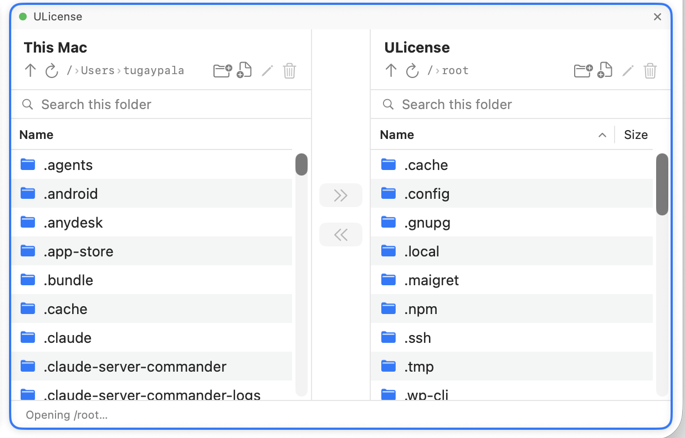
Noden's Files view is a dual-pane file manager: your Mac on the left, the server on the right. Drag to transfer either way, with a queue and progress. Open a remote file in your local editor and it syncs back when you save.
Free: 5 connections.
Noden isn't only SSH and RDP: serial console connections live in the same sidebar, for routers, switches and embedded boards. Group them, or filter the list by SSH / RDP / Serial.
Free tier: 5 connections.
Noden's grid view puts several live sessions in one window: terminals and an RDP desktop, side by side. Each tab shows a small latency readout, so you can tell which server is lagging before you type into it.
Free: 5 connections, RDP included.
Noden's RDP sessions sit in a tab next to your SSH terminals, but you can pop one out into its own window or take it full screen with the green button. The remote desktop scales with the window.
RDP is included in the free tier.
Noden's vault isn't only for SSH passwords: it also holds SSH keys, API tokens and secure notes, in groups.
It lives in your Mac's Keychain behind Touch ID, never on our servers. Link connections to an entry, rotate the password once, and they all pick it up.
Free: 20 entries.
Noden's SFTP panel is dual-pane: your Mac on one side, the server on the other. Drag and drop to transfer in either direction. You can also pop the file browser out into its own window and keep it next to a terminal.
Broadcast input in Noden: open a grid of SSH sessions, press ⇧⌘B, and what you type goes to every open session at once. Useful for the same check across a fleet (uptime, df -h, a service status). Off by default, and an orange badge shows when it's on.
Noden's local terminal (⌘T) is not a sandboxed stand-in shell. It SSHes to your own Mac over loopback, so you get your real PATH, Homebrew and dotfiles.
The catch: Remote Login has to be switched on once. Noden takes you to that setting and continues when it's on.
Editing a config on a server with your own Mac editor: open the file from Noden's SFTP panel, edit, save. Noden syncs the change back to the server on save, so there is no download, edit, re-upload loop.
Free tier covers 5 connections.
Noden 1.4.5: sidebar groups now nest. Company > data centre > VLAN, as deep as you need. Right-click a group > New Subgroup, or type a path like HQ/DC1/VLAN10 in a connection's Group field. Drag to reorder; the order is saved. Existing groups stay put.
Same command on four servers? Open them in Noden's grid, switch on broadcast input, and keystrokes from one terminal go to every open SSH session.
Off by default, so nothing fans out by accident. Each pane still shows its own output, so you can see which host disagreed.
sudo su, paste the root password, and now it sits in your clipboard (and any clipboard manager that saw it).
Noden's vault types it into the terminal instead, behind Touch ID. It never enters command history; anything you copy clears in 30s.
https://t.co/GMxlUgayRX
@shriekdj@komal_uk01 For SFTP at least, the file managers already do it: Ctrl+L in Dolphin or GNOME Files and type sftp://user@host, and the remote folder opens like a local one. FileZilla if you want a dedicated two-pane window.
A shell launched from a Mac App Store app lives in its sandbox. Not the environment you work in.
Noden's ⌘T goes around it: SSH to 127.0.0.1, served by macOS's own sshd. Your real PATH, Homebrew and dotfiles. Nothing leaves the Mac.
The catch: Remote Login has to be on once.
@kukalajet One catch on the Mac side: macOS doesn't serve RDP. You'd host with the built-in Screen Sharing (VNC) or a third-party host app.
If most of the work is terminal, SSH + mosh + tmux from the iPad is lighter and survives network switches.