.@exhi12 showcased this combat animation featuring Trigger from Zenless Zone Zero created using Blender.
More ZZZ-inspired artwork: https://t.co/xwv9OGEfBZ
This animation by @Pomares3D for the October pose cycle challenge was super creative. It's always fun seeing how everyone approaches each pose differently and this was a really unique one!
November pose cycle details linked below:
https://t.co/uKCk1qEhzA
I animated a runcycle with klukai from GFL2,
definitly should practice those more!, but i had a lot of fun, and ended up adding abit more to it, mostly to toy around with layers. full cycle at the end.
닐로툰 쉐이더의 기본적인 세팅에 대한 글_
기본적으로 닐로툰과 다른 툰쉐이더의 차이점은
닐로툰 볼륨이라는 고유 포스트 프로세싱의 유무에 있어요.
포스트프로세싱이란건 모든 쉐이더에 사용할 수 있고
와루도 내부에서도 직접 설정이 가능한
모델 때깔을 높여주는 후처리 보정효과고,
닐로툰 볼륨 또한 마찬가지로 세부요소가 좀 더 있는
포스트 프로세싱이에요.
하지만 두 기능의 가장 큰 차이점은
포스트프로세싱은 배경과 아바타 전체에 적용이 되고,
닐로툰 볼륨은 배경에 영향을 주지 않은 채
아바타에만 적용이 가능하며,
아바타 내에서도 적용이 될 범위를
골라서 지정할수가 있어요.
그렇기 때문에 제 기준에서의 닐로툰 세팅 과정을
간단하게 나타내보면,
1. 기본적으로 아바타가 이뻐도
배경이 밋밋하면 허전해지기 때문에
포스트프로세싱을 통해 최대한 배경이 이뻐보일 수 있도록
배경을 기준으로 포스트프로세싱을 조정��요
2. 이렇게 조정하게 되면, 아바타는 텍스쳐가 날아갈정도로
눈부시게 밝아지는 경우가 많은데,
닐로툰 볼륨을 조정해서 아바타만 강제로 어둡게 눌러줘요.
(+닐로툰2D림라이트라던지 각종 효과를 추가)
두 과정을 거치고 포스트프로세싱과 닐로툰볼륨을
둘 다 적용하면 적절히 밸런스를 찾게돼요.
포스트프로세싱과 닐로툰볼륨
이 두 기능의 조합을 여러가지 만들어보고,
맘에 드는 조합들을 와루도 내에서 프리셋으로 만들어서
사용해요.
와루도 구버젼에서는 두 기능의 에셋을 하나씩밖에 추가하지 못했기 때문에 프리셋 적용이 상당히 까다로웠었지만,
최근 버젼은 여러개를 사용할 수 있게 바뀐 상태기 때문에
에셋을 여러개 추가하고 서로 온오프만 하는식으로
여러 닐로툰&포스트프로세싱 프리셋을 만드는 과정이
많이 간단해졌어요.
추가로, ��스트프로세싱의 경우는 투명배경, 배경이 없을때는 적용이 되지 않고,
닐로툰볼륨만 적용이 된다는 차이점도 있기 때문에
아바타가 많이 어두워져 보이게 되는데요,
그렇기 때문에
투명배경일때의 프리셋은 포스트프로세싱을 제외한
닐로툰볼륨만으로 조정해서 맞춰줘야 해요.
Here is how to create good looking anime-styled skin in Substance Painter - quickly 🚅
No brush strokes/painting required, all generator based!
This one is for the lazy artist :D
Works also for other materials like clothes.
#Vtuberart#3DCG
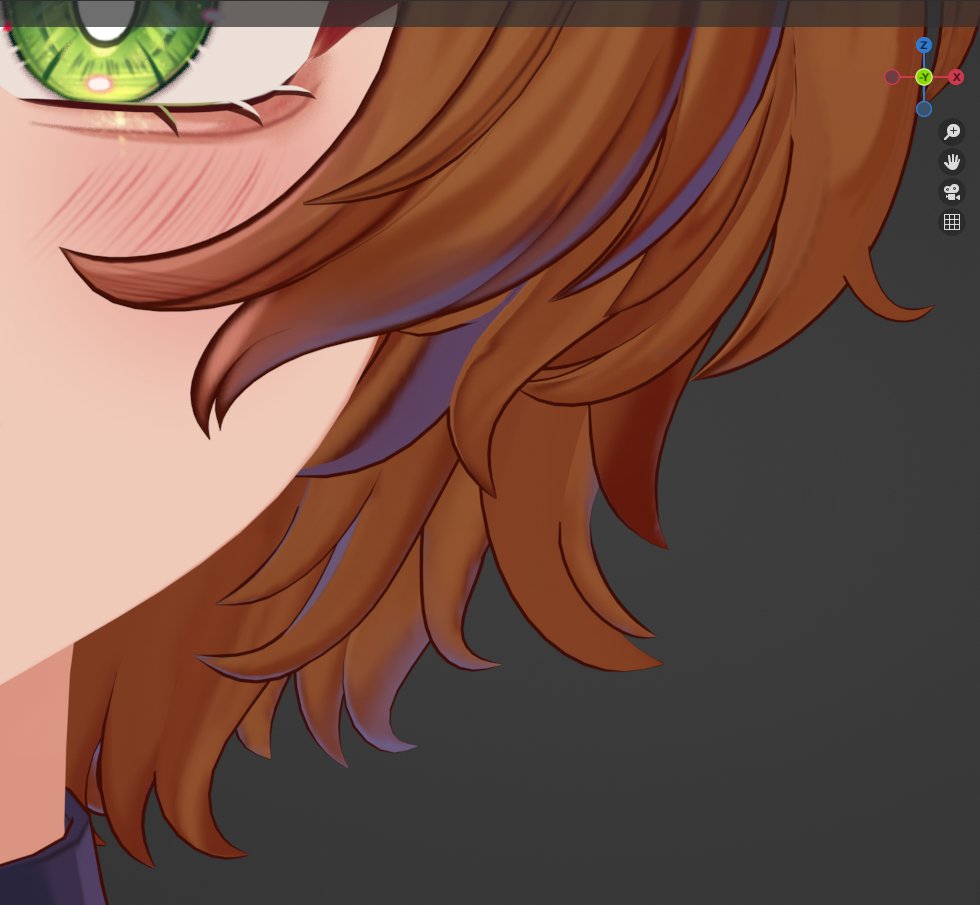
hair so smoof #b3d
I promised you guys an in-depth tutorial, but decided to give you the project file for free, a free version of my hair shader & a walkthrough video with additional tips instead :)
shader/project file: https://t.co/XL7O3Rgq8K
walkthrough: https://t.co/VOGYu5pH9m
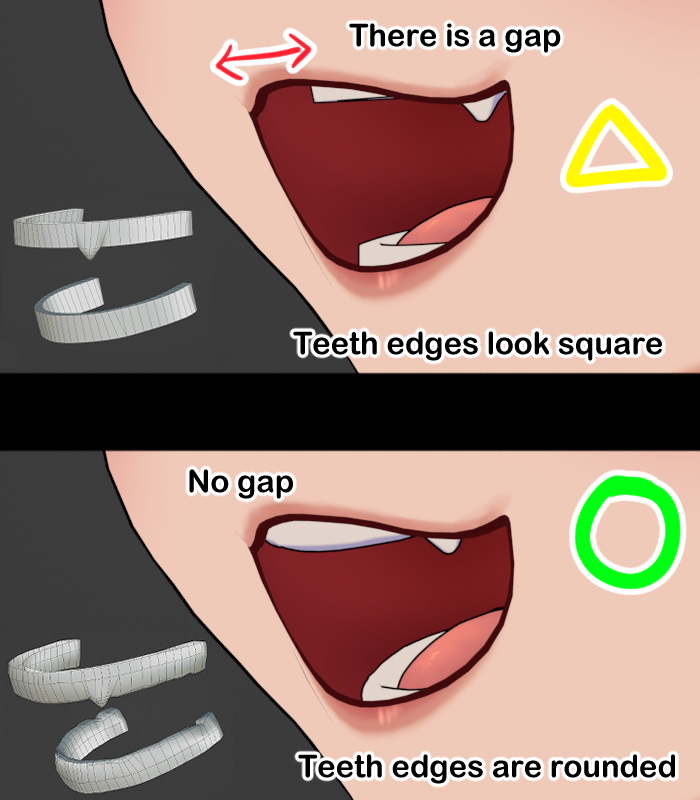
It's very common to see flat teeth modeled in anime models, which can lead to flat and unnatural looking teeth especially from 3/4 views!
Consider:
1. Adding topology support for rounder edges/molar
2. Angle the teeth downwards on the neutral face and vowel shapekeys