GeoLibre v1.3.0 is here!
GeoLibre is a free and open-source, lightweight, cloud-native GIS platform for visualizing, exploring, and analyzing geospatial data. One application that runs everywhere: in your web browser, as a native desktop app, on your phone, and inside a Jupyter notebook. No account, no server, no cost. Everything runs locally and your data stays private.
This release packs in 50+ pull requests of new capabilities. A few highlights:
- GIS in your pocket. A native Android build with offline tile caching and download-a-region support, so you can take your maps into the field with no signal.
- AI, built in. A natural-language GIS assistant that turns plain-English requests into real geoprocessing, plus an AI segmentation toolbox powered by SamGeo and SAM 3 for extracting features from imagery.
- Automate everything with Python. A full scripting API and an in-app Python Console, with new helpers for local rasters, choropleths, marker clusters, split-map comparisons, legends, and colorbars.
- Map together, live. Real-time multi-user collaboration so you can open a project and edit the map with others at the same time.
- Tell stories with maps. A scroll-driven story map builder and presenter that exports interactive narrative maps to standalone HTML.
- A much bigger analysis toolbox. Reproject, explode, and aggregate tools, IDW and kriging interpolation, zonal statistics, a raster calculator, a Spatial Statistics toolbox, and network analysis with isochrones, service areas, and OD cost matrices, plus batch runs and model/pipeline chaining.
- Smarter raster and SQL. Single-band pseudocolor classification, RGB band combinations, a no-backend client-side raster fallback, Apache Sedona as a SQL Workspace engine, and transparent S3, GCS, and Azure URL support in queries.
- More ways to add, view, and share. New Shapefile and GeoPackage export, glTF/GLB 3D model layers, multi-provider batch and reverse geocoding, collapsible layer groups, and a macOS Homebrew cask.
Try the live demo: https://t.co/hOVekblXMc
Star it on GitHub: https://t.co/VXq8c1o2Nd
Docs and roadmap: https://t.co/7VA2AQoCUc
Release notes: https://t.co/0OJXwBhZsh
#GIS #OpenSource #Geospatial #MapLibre #WebGIS #Android #GeoLibre
GeoLibre Desktop v0.7.0 is out.
This release adds a big round of data loading, identify, editing, settings, and processing improvements:
- GPX layers from URL or local file, with waypoints, tracks, and routes loaded as separate selectable layers
- Delimited text layers from URL or local file using longitude and latitude fields
- WFS layer support in the Add Data dialog
- WMS GetFeatureInfo identify support
- Inline attribute table editing
- Wider, scrollable attribute tables and identify popups
- Plugin state persistence in project files
- Whitebox toolbox backed by a managed Python sidecar (700+ geoprocessing tools)
GitHub: https://t.co/VXq8c1o2Nd
Website: https://t.co/7VA2AQoCUc
Live demo: https://t.co/Cq5Mg3ojNQ
#geospatial #opensource
GeoLibre v0.5.0 is out! This update significantly expands data format support, making it easier to work with a wide range of geospatial datasets in a lightweight, modern GIS environment.
Newly supported formats and services include: GeoJSON, Shapefile, GeoPackage, GeoParquet, KML/KMZ, FlatGeobuf, PMTiles MBTiles, GeoTIFF, Zarr, LiDAR point clouds, Gaussian Splatting, and ArcGIS services.
GeoLibre is a lightweight, cloud-native GIS built with MapLibre and Tauri. It runs directly in the browser and is also available as a standalone cross-platform desktop application at only ~30 MB.
GitHub: https://t.co/VXq8c1oACL
Website: https://t.co/7VA2AQpaJK
Live demo: https://t.co/Cq5Mg3oRDo
Feedback, ideas, and contributions are welcome.
#geospatial #opensource #maplibre
I'm excited to introduce GeoLibre, a lightweight, cloud-native desktop GIS built with MapLibre GL JS and Tauri.
GeoLibre is designed for modern geospatial workflows, combining the flexibility of web technologies with the performance of a native desktop application. The current prototype includes a MapLibre-powered map workspace, local vector data import, project persistence, and built-in plugins for basemaps, layer control, swipe, street view, lidar, GeoAgent, and GeoEditor integrations.
GeoLibre can run directly in a web browser or as a standalone cross-platform desktop application (<30 MB).
GitHub: https://t.co/VXq8c1o2Nd
Website: https://t.co/7VA2AQoCUc
Live demo: https://t.co/Cq5Mg3ojNQ
Feedback, ideas, and contributions are welcome.
#GeoLibre #GIS #Geospatial #MapLibre #OpenSource #CloudNative
New in QField 4.2
Wizard mode turns tabbed forms into a step-by-step survey: next/previous buttons, hard constraints, guidance widgets.
Friendlier UX. Toggle on in QGIS, no extra config.
Demo 👇
Funded by HOTOSM 💚
Last night's #QField partner event was 🔥
Great turnout, great questions ... and we got a sneak peek at upcoming 3D features
Let's just say... the field is about to look very different. 👀
Excel is difficult to learn, but not anymore!
Introducing "The Ultimate Excel ebook "PDF.
You will get:
• 74+ pages cheatsheet
• Save 100+ hours on research
And for 48 hrs, it's 100% FREE!
To get it, just:
1. Like & Retweet
2. Reply "SEND"
3. Follow
@setu_ai_expert
[MUST]
Bookmarks also and [ you will recieve directly in your DM within 72 Hours ]
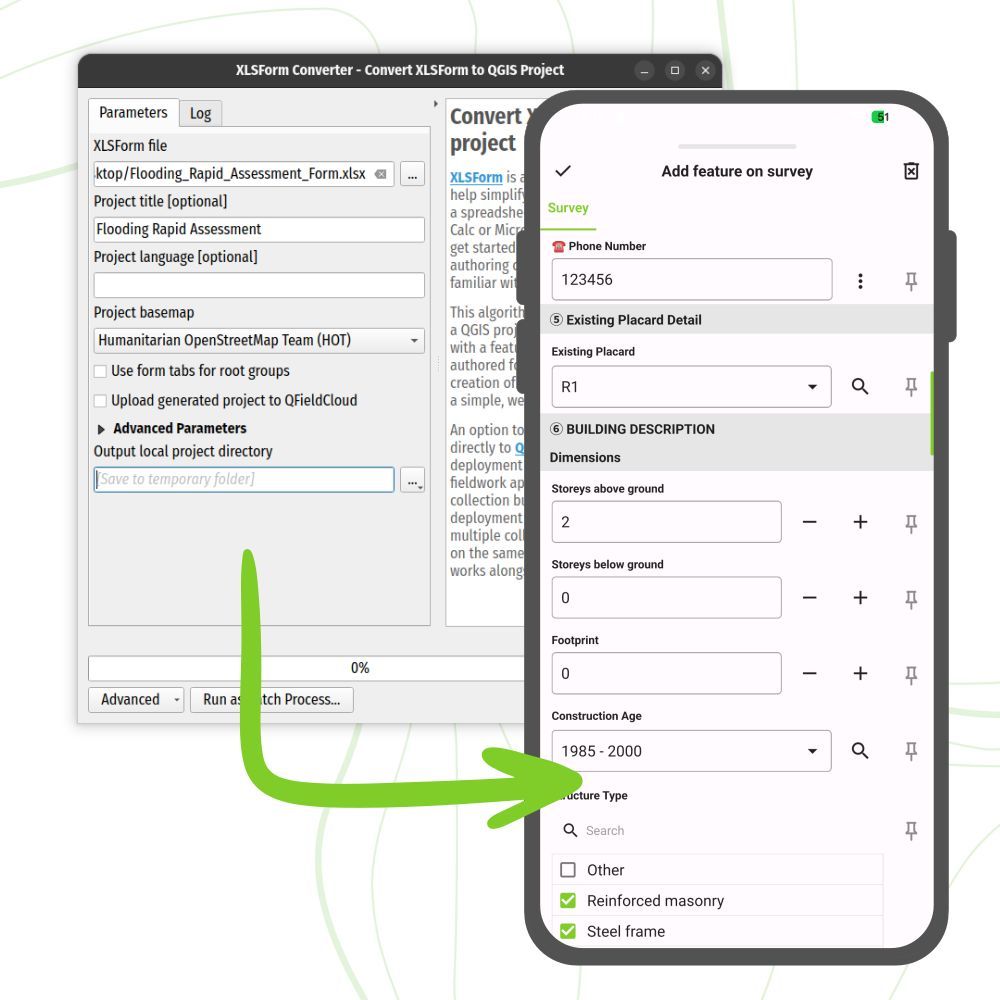
QField Advent Calendar - Day 11
📋 XLSForm Converter Plugin
This plugin converts XLSForm survey files (.xls, .xlsx, .ods) into fully formed QGIS projects ready to use in QField.
The plugin can even auto-upload to QFieldCloud via QFieldSync. Field-ready projects in minutes!
🔒 Granular Layer Permissions
With the QFieldSync plugin you can set up a granular set of permissions that covers all aspects of digitizing or editing for a given vector layer.
These permissions can be set as rules or through data-defined properties.
Dear Data Analyst/Scientist.
Read these books and you'll be miles ahead in your Data journey.
To get it:
1. Follow me @Tech5353 (so I can DM you)
2. Like and Retweet
3. Reply with "Data"





![setu_ai_expert's tweet photo. Excel is difficult to learn, but not anymore!
Introducing "The Ultimate Excel ebook "PDF.
You will get:
• 74+ pages cheatsheet
• Save 100+ hours on research
And for 48 hrs, it's 100% FREE!
To get it, just:
1. Like & Retweet
2. Reply "SEND"
3. Follow
@setu_ai_expert
[MUST]
Bookmarks also and [ you will recieve directly in your DM within 72 Hours ]](https://pbs.twimg.com/media/G9tSsM8asAI3hX0.jpg)