I've been using these features using our internal builds for a while, and they have changed how I deal with pull requests. Check it out! https://t.co/kGkkcG9Xc6
Ctrl + . quietly becomes one of the most-used Visual Studio shortcuts once it clicks ⚡ Watch more with Jason Bock from VSLive! Las Vegas: https://t.co/6yYZ2110Ua
PSA: Every coding task doesn’t require Opus 4.8 or GPT-5.5 and you probably don’t need a 1M context window, and the default reasoning effort is just fine.
AI‑driven dev is shifting fast 🤖⚡
Dig into agent SDKs, session management, agent‑first UIs (Copilot, Google’s anti‑gravity), and how VS Code’s Agents window, worktrees, sub‑sessions + tunnels keep multi‑repo cloud/local workflows sane.
Listen 👂 https://t.co/MrkqlXr4MW
So, you use agents. Now what?
@joshspicer_ and I walk through how the @code team evolved our engineering system and processes to take on collapsed delivery lifecycles and increasing issue/PR counts that come from successful adoption of AI.
https://t.co/EeTxpEQPR3
“Did anyone actually ask developers if they wanted to stop coding?” 🤔 Mads Kristensen cuts through a lot of the AI hype in this VSLive! Las Vegas keynote: https://t.co/P0wM2EfwEg
Introducing Microsoft Scout, the first autopilot agent from Microsoft - 57 days after starting my new job, we are launching Microsoft Scout to our Frontier customers. Big day for the team and for @openclaw#MicrosoftBuild https://t.co/ZGl47ADnCg
Still right-clicking → Add New Item? 👀
Shift + F2 lets you create files and folders instantly in Visual Studio.
Mads shares this and a bunch of other underrated workflow tricks in this VSLive! Las Vegas session.
Watch the full video:: https://t.co/nhjvbzDrr9
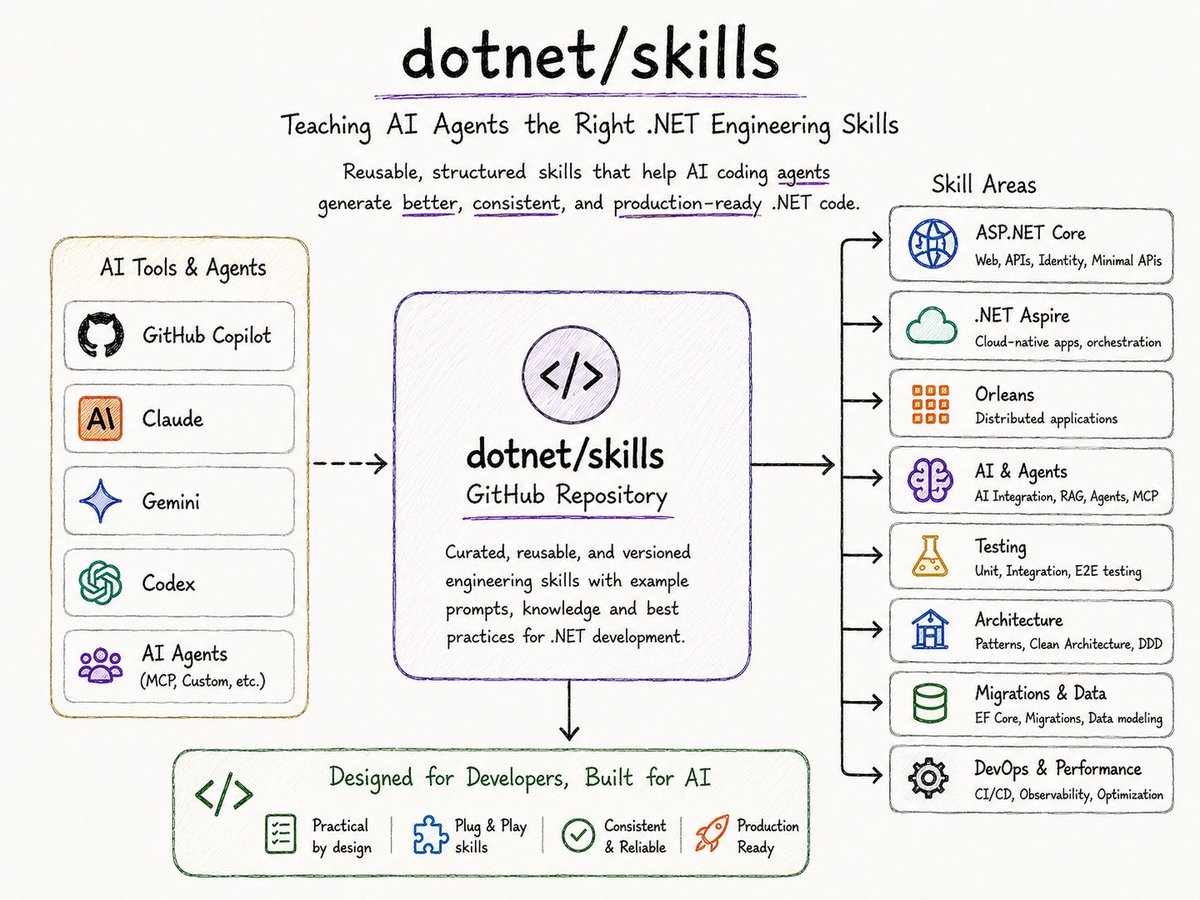
🚨 Microsoft just open-sourced something every .NET developer using AI tools should pay attention to.
The dotnet/skills repo went public on GitHub. It's a curated set of reusable engineering skills that AI coding agents (Copilot, Claude, Gemini, Codex) can load on demand to write better, more consistent .NET code.
I've been running my own skills setup for months. Custom CLAUDEmd files, project-specific commands, repeatable workflows for writing, reviewing, and refactoring code. It works really well. But it's mine. Nobody else on the team gets to use it.
That's what changes now.
𝗪𝗵𝗮𝘁'𝘀 𝗮𝗰𝘁𝘂𝗮𝗹𝗹𝘆 𝗶𝗻 𝗶𝘁:
• Skills for aspnetcore, Aspire, Orleans
• AI + Agents patterns
• Testing, Architecture, Migrations
• Works with any agentic AI tool, not just Copilot
𝗪𝗵𝘆 𝘁𝗵𝗶𝘀 𝗺𝗮𝘁𝘁𝗲𝗿𝘀:
Most AI prompts in .NET projects get written from scratch every single time. Same context, same examples, same patterns. Typed into the chat over and over.
Skills flip that. The knowledge lives in the repo, the agent loads what it needs, and your code stays consistent across the team. No more "perfect prompt" trials.
This is the same approach that has been quietly winning in the Claude Code and Cursor communities. Microsoft is now making it native to the .NET ecosystem.
If you ship .NET code with AI in the loop, this becomes the foundation you build on top of.
Repo linked in the comments.
VS Code uses 'utility models' for tasks like generating a chat title or a commit message.
This model is now configurable with the chat.utilityModel and chat.utilitySmallModel settings :)
Until recently I was using VS Code instead of VS for .NET development because VS Code worked better with coding agents. But recently I discovered that agents in VS 2026 can use the attached debugger to inspect in-memory state, which is game-changing! Back to full VS for me. 😁
Today I learned that Visual Studio supports multi-cursor editing. This was about the only time I switched to VS Code to edit code. Apparently this has been around for a while?