System Design Interview Question:
A celebrity with 50M followers posts a tweet.
Within seconds:
• Millions open the app
• Millions refresh feeds
• Millions request the same content
What fails first?
A) Database
B) Cache
C) API Servers
D) Message Queue
And how would you prevent it?
Explain your architecture 👇
A web-based System Design Simulator, where you drag & drop architecture components and actually simulate traffic, failures, latency, and scaling in real time
Best way to learn concepts.
Link in next post post
After working with Kubernetes in production, these are the 7 errors our team see again and again :
Save for later✅
Here is the reason why you'll get this and how to fix ➡️
Distributed systems interviews: they rarely want trivia. They want to see if you’ve been paged.
1. Consistency tradeoffs: strong vs eventual, read-your-writes, quorum math (R+W>N), and what breaks during a partition
2. Idempotency: retries without double-charging, idempotency keys, dedupe windows, at-least-once vs exactly-once (and why “exactly once” is usually scoped)
3. Time: clocks drift, timeouts vs retries, exponential backoff + jitter, and why deadlines beat fixed timeouts in request chains
4. Failure modes: retry storms, thundering herd, backpressure, circuit breakers, bulkheads, and load shedding
5. Data correctness: distributed transactions vs sagas, outbox pattern, ordering guarantees, and how you reconcile after partial failure
One Kubernetes interview question I keep getting asked:
"Walk me through what happens when a request travels from the Internet to a Pod."
Most candidates answer:
User → ALB → Ingress → Service → Pod
But that's just the beginning.
The follow-up questions are where things get interesting:
• Who actually decides which Pod gets the request?
• What does kube-proxy do?
• How do iptables/IPVS work?
• What role does the CNI plugin play?
• If kube-proxy crashes, does traffic stop?
My biggest learning:
- A Kubernetes Service is not a load balancer by itself.
- kube-proxy programs iptables/IPVS rules on the nodes, and those rules are what actually route traffic to healthy Pods.
Even more interesting:
- If kube-proxy crashes, existing traffic usually keeps working because the networking rules already exist in the kernel.
- What breaks is the ability to update those rules when Pods or Services change.
Sometimes the simplest interview questions expose the deepest gaps in our Kubernetes knowledge.
@arpit_bhayani@KatiMichel@arpit_bhayani I've spent most of my career working with Java, but I'm now looking to learn and move into Go development. Do you have any advice on what I should focus on, common pitfalls to avoid, or how to gain practical experience ??
Senior DevOps interview question:
Your application works perfectly with:
1 pod
5 pods
even 20 pods
But completely breaks after HPA scales to 50...
CPU is normal.
No crashes.
What’s the first thing you suspect?
You call yourself a Senior DevOps engineer?
Then explain this without touching CPU or scaling.
30% of requests jumped from 200 ms → 6 s.
Zero 5xx errors.
Dashboards looked clean.
Only the external API path was slow.
This is where most engineers get exposed.
Pods on newly launched nodes were slow, while existing ones were fine. Istio showed bimodal latency — some requests normal, others stuck at 4–6 seconds. ss -s revealed hundreds of TCP connections sitting in RTO, waiting to retransmit.
That’s your first signal: this is not application latency. This is transport-level pain.
Then came the real clue.
Cilium eBPF metrics started screaming — CT_EVICTIONS and DROP_FRAG_NEEDED spikes on new nodes.
Translation: your packets are getting fragmented or dropped.
Root cause?
MTU mismatch.
Old nodes: ~8900 (jumbo frames)
New nodes: 1500
Now add VXLAN overhead (~50 bytes), and suddenly your packets don’t fit.
They fragment.
They retransmit.
Latency explodes — silently.
No errors.
No CPU spike.
No autoscaling trigger.
Because your system wasn’t failing.
It was degrading in the network layer — the one most engineers ignore.
This is the difference:
Juniors debug pods.
Seniors debug packet flow.
They trace:
ALB → network → CNI → service mesh → application
Because real outages don’t scream.
They whisper in layers you don’t monitor.
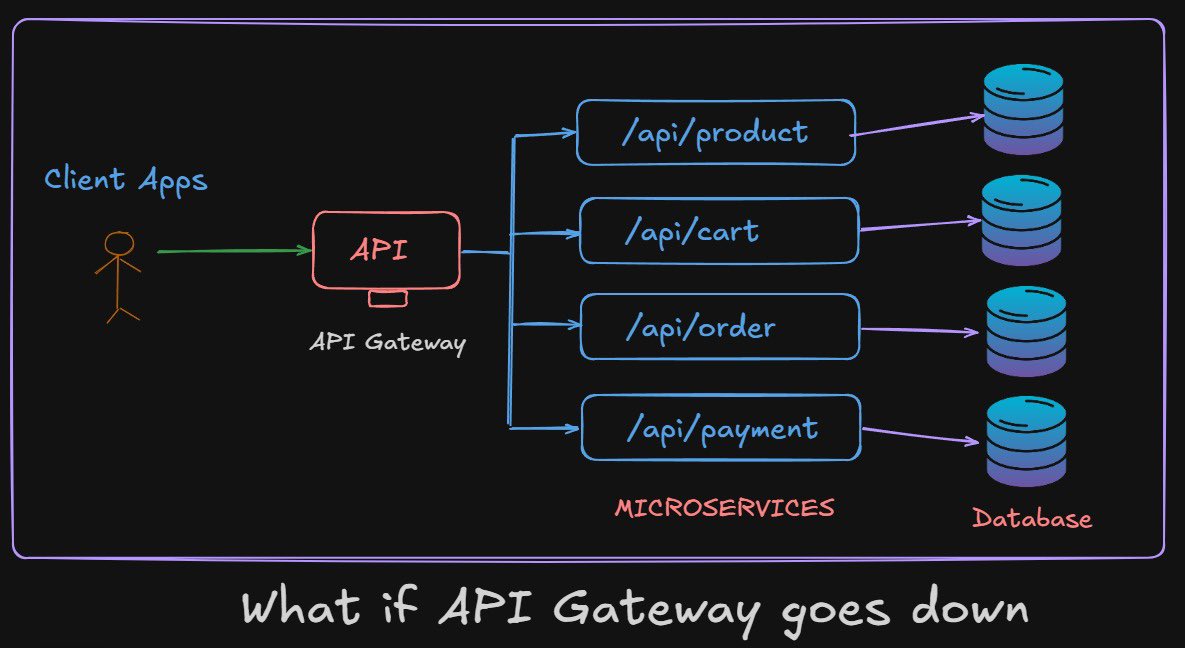
What happens If API Gateway goes down ?
If API gateway is your single entry point and it goes down, your entire system can appear offline even when all downstream services are perfectly healthy. This is why treating the gateway as just a routing layer is a mistake; in reality, it becomes one of the most critical components in your architecture. The moment it fails, authentication, rate limiting, routing, logging, and even basic request forwarding stop working, effectively cutting users off from your platform.
API Gateway failure is more dangerous than a single microservice failing because microservices are usually isolated, but the gateway is a centralized control point. It sits in front of everything. So even a small misconfiguration, deployment bug, or scaling issue can cause a full system outage. This is why production systems never rely on a single gateway instance.
So how do real systems handle this?
The first layer of protection is redundancy. Instead of one API Gateway, you deploy multiple instances behind a load balancer. If one instance crashes, traffic is automatically routed to healthy ones. But here is the catch, what if the load balancer itself fails? That is why systems often use DNS-based failover or multiple regional load balancers to avoid a single point of failure at the entry layer.
Next comes geographic distribution. Large-scale systems deploy API Gateways across multiple regions. Traffic is routed using geo-DNS or Anycast routing, so even if an entire region goes down, users are automatically redirected to the nearest healthy region. This is how systems achieve high availability across continents.
Another important concept is graceful degradation. If the API Gateway is partially failing or overloaded, instead of completely rejecting traffic, it can fall back to limited functionality. For example, serving cached responses, disabling non-critical APIs, or routing only high-priority requests. This ensures the system does not completely collapse under stress.
Caching also plays a surprisingly powerful role here. Many API Gateways cache frequent responses. If downstream services become unreachable, cached responses can still be served temporarily, buying time for recovery. This is especially useful for read-heavy systems like content platforms.
Now consider rate limiting and circuit breaking at the gateway level. If downstream services are failing, the gateway can stop forwarding excessive traffic to prevent cascading failures. This isolates problems and protects the rest of the system.
So If you design it properly with multiple gateway instances, load balancing, regional failover, and fallback mechanisms, users might not even notice the failure. The system continues to operate because there is no single point of failure.
It’s a common sense to ask Why not bypass the API Gateway and let clients directly call services?
Because that removes a central control layer for authentication, monitoring, rate limiting, and routing. It increases complexity on the client side and weakens system security. Instead of removing the gateway, we make it highly available and fault tolerant.
Real-world systems like Netflix, Amazon, and Google treat API Gateways as distributed systems themselves. They are scaled horizontally, replicated across regions, monitored aggressively, and designed to fail gracefully.
The key takeaway is simple. The API Gateway is not just a router, it is a critical infrastructure component. If it goes down and you did not design for failure, your entire system goes down with it. If you design it correctly, failure becomes just another recoverable event.
Happy designing ❤️
Two candidates were interviewing for a Sr. Engineer role @ Uber and were given these requirements...for their system design problem...
Requirements:
– The system must have low latency
– It must handle sudden traffic spikes during peak events
– It must enforce strict per-user rate limits
Same question.
Very different interviews.
Hence, Very Different Results.
Candidate 1:
– For low latency, I will add Redis as a cache
– For spikes, I will put Kafka in front of the system
– For rate limiting, I will use a Redis-based token bucket
On paper, it sounds fine.
But this is exactly where many Senior and Staff engineers fail.
They treat requirements like keywords.
They hear “low latency” and respond “Redis”.
They hear “spikes” and respond “Kafka”.
They hear “rate limiting” and respond “token bucket”.
There is no thinking in between.
Candidate 2:
“Before I walk through a design, I want to clarify a few things.”
– When you say low latency, what are we targeting for p95 and p99?
– What is the read-to-write ratio and approximate QPS at peak?
– Are we rate-limiting per user, per IP, per API key, or a combination?
– How strict is the rate limit? Do we drop requests or degrade gracefully?
Only after that, they start.
First, they sketch a simple, single region baseline.
Then they check it against the numbers.
Next, they layer in complexity only where it is needed.
When they reach rate limiting, they do not just say “Redis token bucket”.
They think out loud.
– Local in process rate limiting is simple, but not safe for distributed systems.
– A central Redis based limiter works, but what about race conditions and clock skew?
– If we add per user, per IP, and per API key limits, how does that affect storage and cost?
– What happens when Redis is down, do we fail open or fail closed?
Candidate 1 threw tools at the problem.
Candidate 2 modeled the problem, quantified it, then selected tools.
A few weeks later, Candidate 2 got the offer.
Candidate 1 kept wondering what went wrong.
In 2025, with AI becoming mainstream, you cannot stand out by naming components.
Any decent AI can say “use Redis, Kafka, and a token bucket”.
Senior and Staff level signal is not tool recall.
It is structured reasoning.
If your system design answers sound like a list of technologies, you are competing with a search engine.
If your system design answers sound like careful thinking under constraints, you are competing at a Senior and Staff level.
This is what you must do at the Cluster level to secure your Kubernetes cluster
RBAC (Access Control)
- Avoid cluster-admin usage (limit it strictly)
- Create roles per team/service (least privilege)
- Use RoleBindings instead of ClusterRoleBindings when possible
- Regularly audit permissions (kubectl auth can-i)
- Remove unused roles and bindings
Authentication (Who can access the cluster)
- Use OIDC integration (SSO)
- Enforce MFA for all users
- Avoid static kubeconfig sharing
- Use short-lived tokens (no long-term creds)
API Server Security
- Restrict API access (private endpoint preferred)
- Enable audit logs
- Disable anonymous access
- Use strong authentication/authorization modes
etcd Security (Cluster data)
- Enable encryption at rest
- Restrict access to etcd (control plane only)
- Backup etcd regularly
- Secure backups (encrypted + access control)
Network Policies (Pod-to-Pod traffic)
- Deny all traffic by default
- Allow only required communication paths
- Isolate namespaces
- Control east-west traffic inside the cluster
Admission Control (Policy Enforcement)
- Use OPA / Kyverno for policies
- Enforce security standards (no privileged pods, etc.)
- Validate configs before deployment
- Block risky workloads at admission time
Secrets Management
- Use Kubernetes Secrets (not ConfigMaps)
- Encrypt secrets at rest (KMS integration)
- Restrict access via RBAC
- Avoid mounting secrets unnecessarily
Workload Isolation
- Use namespaces per environment/team
- Apply ResourceQuotas
- Apply LimitRanges
- Prevent noisy neighbor issues
Logging & Monitoring
- Enable audit logs
- Collect control plane logs
- Monitor API usage patterns
- Alert on abnormal behavior
Cluster Upgrades & Patching
- Keep Kubernetes version up to date
- Upgrade control plane and nodes regularly
- Verify addon compatibility (CNI, CoreDNS, etc.)
- Test upgrades before production rollout