Junior .NET devs keep asking me what skills to focus on.
I analyzed 100+ Senior .NET job posts to find out.
These are the skills that show up again and again, the ones employers expect senior .NET developers to master:
𝗖#
The core of .NET roles; fluency in modern features and writing clean, efficient code is baseline.
𝗥𝗘𝗦𝗧 𝗔𝗣𝗜𝘀
The main integration style; secure, scalable endpoints with clear documentation matter.
𝗚𝗿𝗮𝗽𝗵𝗤𝗟
Adoption keeps growing; well-designed schemas and resolvers improve efficiency.
𝗔𝘇𝘂𝗿𝗲
The top cloud for .NET; deployment, monitoring, and scaling apps are in demand.
𝗔𝗪𝗦
Hybrid setups are common; knowledge of core services shows flexibility.
𝗣𝗼𝘀𝘁𝗴𝗿𝗲𝗦𝗤𝗟
Popular for new projects; SQL fluency, indexing, and tuning skills are needed.
𝗦𝗤𝗟 𝗦𝗲𝗿𝘃𝗲𝗿
Entrenched in enterprise; stored procedures and optimization remain essential.
𝗖𝗼𝘀𝗺𝗼𝘀 𝗗𝗕
Central to Azure apps; modeling and querying NoSQL data is common.
𝗚𝗿𝗮𝗳𝗮𝗻𝗮
Dashboards must be actionable; metrics tied to outcomes matter most.
𝗢𝗽𝗲𝗻𝗧𝗲𝗹𝗲𝗺𝗲𝘁𝗿𝘆
Now the tracing standard; consistent instrumentation across services is expected.
𝗔𝗽𝗽 𝗜𝗻𝘀𝗶𝗴𝗵𝘁𝘀
Native Azure monitoring; instrumentation and analysis skills are critical.
𝗔𝘇𝘂𝗿𝗲 𝗗𝗲𝘃𝗢𝗽𝘀
Central in enterprise; pipelines, repos, and releases are core.
𝗚𝗶𝘁𝗛𝘂𝗯 𝗔𝗰𝘁𝗶𝗼𝗻𝘀
Rapid adoption in modern teams; CI/CD automation experience is valued.
𝗧𝗲𝗿𝗿𝗮𝗳𝗼𝗿𝗺
Infrastructure as Code is table stakes; reproducible infra is expected.
𝗗𝗼𝗰𝗸𝗲𝗿
Baseline for backend devs; containerized apps ensure consistent deployments.
𝗞𝘂𝗯𝗲𝗿𝗻𝗲𝘁𝗲𝘀
The orchestration standard; deployments and rollbacks show maturity.
𝗛𝗲𝗹𝗺
Default for Kubernetes apps; managing deployments with charts is common.
𝗝𝗪𝗧
Token-based auth is everywhere; APIs must implement JWT correctly.
𝗢𝗔𝘂𝘁𝗵 𝟮.𝟬
The standard for delegated access; integrating identity providers is critical.
𝗧𝗟𝗦
Encryption is non-negotiable; enforcing protocols and certificate renewal is required.
𝗞𝗮𝗳𝗸𝗮
Event streaming is mainstream; designing and consuming pipelines shows readiness.
𝗥𝗮𝗯𝗯𝗶𝘁𝗠𝗤
Common in .NET stacks; exchanges, routing, and retries highlight reliability.
𝗦𝗲𝗿𝘃𝗶𝗰𝗲 𝗕𝘂𝘀
Core in Azure; decoupling services with queues and topics builds resilience.
𝗠𝗶𝗰𝗿𝗼𝘀𝗲𝗿𝘃𝗶𝗰𝗲𝘀
Among the top requested skills; services that scale independently are essential.
𝗘𝘃𝗲𝗻𝘁 𝗗𝗿𝗶𝘃𝗲𝗻
Modern systems rely on events; resilient, eventually consistent designs matter.
𝗥𝗲𝗮𝗰𝘁
The leading frontend framework; full-stack .NET developers who use React are in demand.
𝗔𝗻𝗴𝘂𝗹𝗮𝗿
Common in enterprise; adaptability across frameworks shows seniority.
𝗝𝗮𝘃𝗮𝗦𝗰𝗿𝗶𝗽𝘁
The foundation of the web; strong fundamentals prove you can work beyond frameworks.
Want a clear path to get started?
Grab my Free .NET Backend Developer Roadmap 👇
https://t.co/Ed7r4wghUc
10 Secret features in EF Core that Senior developers use, but middles and juniors don't know.
What are they? 👇
1️⃣ Shadow Properties
EF Core lets you define properties that exist only in the database, not in your classes. Perfect for storing extra data like audit information without cluttering your entities.
2️⃣ Query Tags
Easily add comments or tags to your SQL queries generated by EF Core. Helps quickly identify slow queries by adding context directly into your SQL logs.
3️⃣ Compiled Queries
Precompile frequently used queries to improve query performance. Reduces the overhead of query parsing each time it's executed.
4️⃣ DbContext Pooling
Reuse instances of your DbContext instead of creating new ones each time. Improves application performance and reduces memory usage significantly.
5️⃣ Value Converters
Automatically convert property values between your database and your .NET application. Useful for handling custom data types, enums, and Value Objects.
6️⃣ Temporal Tables
Automatically track history and changes to your data directly in the database. Great for auditing, rollback, and historical data analysis.
7️⃣ Database Seeding
Easily populate your database with new UseSeeding, UseAsyncSeeding methods in EF Core 9.
8️⃣ Split Queries for Includes
Improve query performance by splitting complex queries into multiple simpler queries. Prevents slow queries caused by complex JOIN operations.
9️⃣ Raw SQL Queries
Execute plain SQL queries directly from your EF Core context. Ideal when you need performance-optimized queries or database-specific features.
🔟 Create Database Migrations for Multiple Databases
Easily manage migrations and schema updates across different database providers. Ideal for applications supporting multiple database providers like SQL Server, PostgreSQL, and MySQL.
Did you know about these secret EF Core features? Which surprised you the most? 👇
📌 Want to get better in EF Core? Download my EF Core 2025 Roadmap with high-quality resources for every topic:
↳ https://t.co/23kNCAD9g3
—
♻️ Repost to help your network
➕ Follow me ( @AntonMartyniuk ) for more
¡Truco para liberar espacio de tu disco duro!
Si eres programador y usas npm, ejecuta esto:
npx npkill
Eliminarás las carpetas node_modules de los proyectos que quieras y verás cuánto tiempo hace que no lo usas:
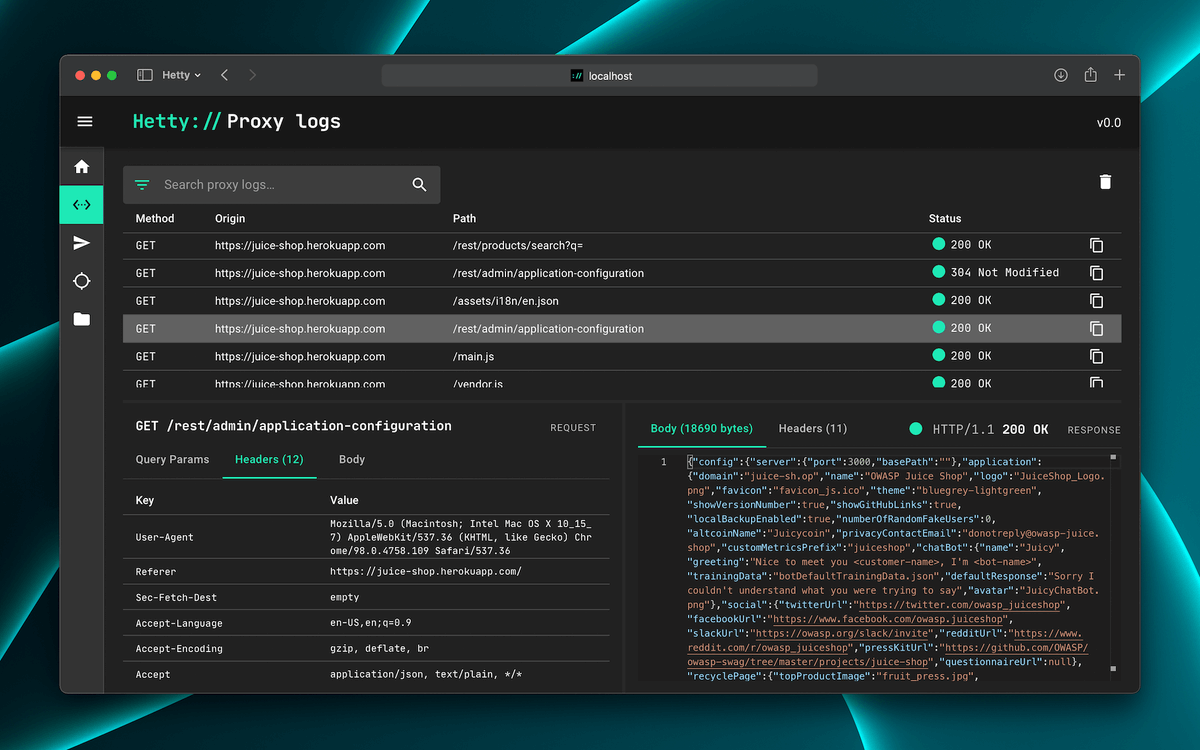
Brutal herramienta de ciberseguridad de código abierto.
Ideal para Infosec y Bug Bounty:
✓ Cliente HTTP para editar/repetir peticiones
✓ Proxy MITM con logs y búsqueda
✓ Intercepta y revisa respuestas
✓ Con interfaz web
→ https://t.co/J1ql5vGaVz
API gratuita para extraer toda la info de una IP.
Sin registro ni límites de ningún tipo.
Funciona en Python, JavaScript, Java, PHP, Go...
Ejemplo de uso: https://t.co/sua7bH0NlQ
I used to dread code reviews.
Slow feedback. Stale PRs. Bugs that made it to production anyway.
I’ve been using CodeRabbit, an AI code reviewer that works both in your IDE and on pull requests.
The IDE review is free (with some rate limits), and it’s been surprisingly useful even when I’m working solo.
Here’s what it does:
- Reviews your code as you write it in VS Code (also works in Cursor and Windsurf)
- Spots issues and suggests fixes inline
- You can fix them with one click or pass them straight to your AI tool with full context
If you’re on a team, this really shines once you open a PR:
- CodeRabbit gives a full, context-aware review
- Flags bugs, anti-patterns, and risky changes
- Leaves structured comments like a real reviewer would
- Helps your team review faster, with fewer surprises post-merge
It supports GitHub, GitLab, Azure DevOps, and Bitbucket.
If you want to try it, the IDE extension is free: https://t.co/VIZDsYvSLE
Huge thank you to @coderabbitai for collaborating with me on this post.
𝗖𝗹𝗲𝗮𝗻 𝘂𝗽 𝘆𝗼𝘂𝗿 𝗰𝗼𝗱𝗲 𝘄𝗶𝘁𝗵 𝗴𝘂𝗮𝗿𝗱 𝗰𝗹𝗮𝘂𝘀𝗲𝘀
What's the simplest way to add a guard clause for null values?
.NET 6 introduced an ArgumentNullException.ThrowIfNull guard clause.
.NET 7 added ArgumentException.ThrowIfNullOrEmpty.
And in .NET 8?
We have even more guard clauses:
- ArgumentException.ThrowIfNullOrWhiteSpace
- ArgumentException.ThrowIfNullOrEmpty (for collections)
- ThrowIfZero, ThrowIfNegative, ThrowIfGreaterThan
I find guard clauses useful when I have to use them.
But they are never my first choice.
Here's what I would do instead: https://t.co/bFYokwIy8F
What do you think about these additions to .NET?
---
Do you want to simplify your development process? Grab my free Clean Architecture template here: https://t.co/oxPOG7rmLY
5 EF Core features you need to know 🦄🔥
1. Query spitting
- Splits JOINs into multiple queries
- Could improve query performance
- Measure performance for regressions
2. Bulk updates
- Uses ExecuteUpdate to update many entities
- Directly goes to DB, isn't part of a unit of work
- Create a transaction to ensure consistency
3. Raw SQL queries
- Load entities from DB using raw SQL
- Allows you to use SQL features
- SQL SELECT ... FOR UPDATE
4. Bulk deletes
- Uses ExecuteUpdate to delete many entities
- Directly goes to DB, isn't part of the unit of work
- Create a transaction to ensure consistency
5. Ignoring query filters
- Query filter allows you to automatically filter LINQ queries
- Ignoring the query filter can be useful sometimes
- Use this feature with caution
𝗕𝗼𝗻𝘂𝘀 - Here are five more EF features you should know: https://t.co/iSPMPPr5kA
What is your favorite EF Core feature?
---
Do you want to simplify your development process? Grab my free Clean Architecture template here: https://t.co/8nLTz5cnip
.NET Async guidance from David Fowler ⬇
Lots of great guidance on how to use Async properly using bad and good examples.
Bookmark it.
https://t.co/o6CdX1kXJ6
#dotnet
The easiest way to send HTTP requests in .NET is using an HttpClient.
But there's an even simpler alternative.
The problem with HttpClient?
If used incorrectly, you could run into port exhaustion and DNS issues.
You also need to take care of serialization and deserialization manually.
Thankfully, there's an excellent library that solves this called Refit.
It's an automatic, type-safe REST API client for .NET.
However, even Refit relies on the HttpClient to send requests.
So knowing the right way to use it is a must.
Here's everything you need to know: https://t.co/boPtsVWn97
---
Simplify your development process with my free Clean Architecture template. Download it here: https://t.co/Sx0zziRFE0
This skill will make you valuable in any team. 👇
Diagnosing and solving performance bottlenecks in your system.
I always strived to make my application as fast as possible.
So, performance problems are some of my favorite things to work on.
In microservices systems, this problem becomes even more prominent.
Why is this the case?
Finding the performance bottleneck is much harder in distributed systems.
Luckily, you can track the flow of requests through your entire system with tracing and OpenTelemetry instrumentation.
I wrote a step-by-step guide for configuring distributed tracing, and I'm confident you can apply this in your applications.
Here's how to get started with tracing in .NET: https://t.co/X5FYQ7WUoe
Are you integrating OpenTelemetry into your applications?
---
Simplify your development process with my free Clean Architecture template. Download it here: https://t.co/H6HTTNfSUR