🚨 Ongoing supply chain attack on Composer packages! We just found multiple laravel-lang/* packages compromised on Packagist (lang, http-statuses, attributes). Payload runs at autoload time. At least 50 package versions were compromised.
If you installed a compromised version, the malware already executed. Pin to a clean COMMIT (not version) and rotate secrets immediately.
If your lockfile already had an older commit from before today, you are safe. But you should not update at the moment.
So here's my latest set up
Every site I have is a profile on Termius like
> hoodmaps .com
I click it and immediately I'm in my server and I get dropped in a tmux session that's always tied to the corresponding site I wanna log in to
To make this work I have this startup snippet in each site's Termius profile:
> cd /srv/http/hoodmaps.com && tm
(so /srv/http is where my sites are and then hoodmaps .com is the example site here, and "&& tm" is the important part here)
Then in my ~/.bashrc file I added this (written by Claude Code) which defines the "tm" function, again all it does it just put me in the right tmux session based on the folder I'm in
The result is I can switch without interruption from my laptop to phone in Termius with auto reconnecting sessions and usually I just have Claude Code open in each session to work
Before I had to mess around with 1) not having smooth switching from laptop to phone, I'd have to use Claude Code's /resume for it, annoying, 2) having multiple sessions for same sites, gets messy and confusing fast, now it FORCES me into one session per site, this just works so well, I'm so fast, and each of my sites is just an open tab in Termius, I've never worked so structured and clean!
Here is the code, maybe it helps somebody:
# tmux session per folder. `tm` (no args) attaches to / creates a session
# named after the current dir's basename. `tm name` overrides the name.
# Works whether already inside tmux (uses switch-client) or outside it.
tm() {
command -v tmux >/dev/null 2>&1 || { echo "tmux not installed"; return 1; }
local name="${1:-$(basename "$PWD")}"
# tmux session names can't contain '.' or ':' — replace with '-'
name="${name//./-}"
name="${name//:/-}"
if [ -n "$TMUX" ]; then
tmux has-session -t "$name" 2>/dev/null || tmux new-session -d -s "$name" -c "$PWD"
tmux switch-client -t "$name"
else
tmux attach -t "$name" 2>/dev/null || tmux new -s "$name" -c "$PWD"
fi
}
# Auto-attach on interactive login: picks a session named after wherever
# you land. Plain `ssh server` lands in $HOME → session "root". Use
# `ssh server -t "cd /srv/sm.levels.io && bash -l"` to land in a site
# folder → session "sm-levels-io". Skips inside tmux and non-interactive
# shells so scp/rsync/scripted ssh keep working.
if command -v tmux >/dev/null 2>&1 && [ -z "$TMUX" ] && [[ $- == *i* ]]; then
tm
fi
I was almost 100% Laravel before building Vask's websocket layer on Cloudflare.
And now I'm using Cloudflare Workers & Durable Objects every day, but just found out that I really love Analytics Engine too 📈
Coming from Laravel, "add analytics" usually meant: pick a TSDB, setup a service class, create a queued job, pay through the nose, repeat in staging. But AE is none of that.
You just write events from inside the Worker or DO. That's the whole setup 😍
Every broadcast on Vask writes an AE event from the Worker or DO that handled it. The shape varies by event type, but we capture the vask team, app name, channel type (private/public/presence), channel name, fan-out count, and bytes. No collector, no queue.
That same event log then drives two completely different things: What users see in their dashboards, and what we use internally to track usage 📊
Still figuring out whether we shaped the index/blobs right for our query pattern (we mostly roll up by team, then app) 🤔 If anyone on the AE team has a take, would love to hear it.
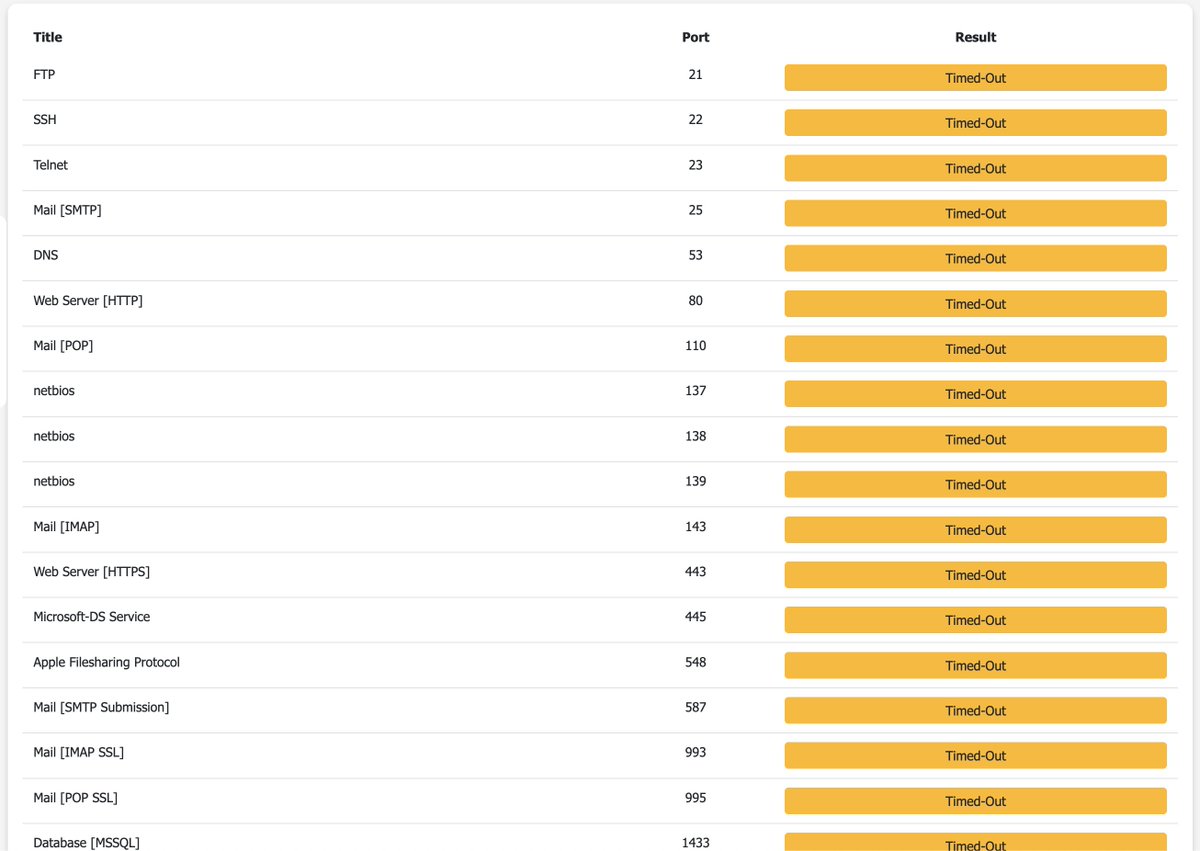
New fun thing I did to secure my VPS even further
I installed @Cloudflare Tunnel, many of you recommended me this
I already had 443 inbound firewall limited to Cloudflare's IP range, but this is even better
Cloudflare Tunnel is outbound, which means it connects from your server to Cloudflare, and keeps the connection active, then if someone opens your site, Cloudflare sends you the package via the tunnel and your server responds
Then you can block ALL inbound traffic on your firewall (in my case the Hetzner firewall in the dashboard), so now NOBODY can ever access my server, only Cloudflare and Tailscale (which is my own subnet which just my server and my laptop on it)
You can just ask AI to set it up on the server etc., very easy
@PovilasKorop Wish him the best of health
My son 7yr old builds in Minecraft like a grown ass architect
Said how can you not know how to build a nether portal, are you not a grown up
@sourabhbgp True that
They are already the best option for gov and military, not that much user base yet
They are already getting boosted directly or indirectly, seems more like PR stunt to get to a scale which is required by gov
Nevertheless don't give private info to AIs
From exclusive partner to a supply chain risk in a day, anthropic would not have been there to begin with.
Openly saying OpenAi is now partner but Anthropic is out.
Sounds great for anthropic to build public interest and mass adoption.
I don't think Anthropic would be out at all
You are loving it canceling open ai and jumping to anthropic, tomorrow they will say oh we are back (maybe won't say at all, did they say they are in before?)
But that's just my thoughts (:
Woke up and saw @realUpScrolled trending 🚀
That feeling hits different. Proud to be the developer behind the Upscrolled website. started on Fiverr and now people are talking about it.
Thanks @issamhijazi for the @fiverr review.
Build at @PehamLtd
congrats to the @PostgreSQL contributors 🐘
◆ asynchronous I/O
◆ UUIDv7
◆ virtual generated columns
◆ temporal constraints
◆ oauth authentication
◆ improved text search
◆ parallel streaming in replication
◆ new wire protocol (first new protocol version since 2003)
Career tip.
Wanna get more senior with Laravel?
Master one feature:
QUEUES.
Almost all serious projects need them.
Think about Forge, Cloud, or Nightwatch.
- Server provisioning
- Deployments
- Email alerts
- Custom reports
- ...
^ Those are all queued jobs.
So, you need to learn not only how to dispatch the job, but how to control the process:
- Job failures, retries, timeouts, back-offs
- Job batching/chaining and long-running jobs
- Job priorities and multiple queues
- Tools like Redis, Supervisor and Laravel Horizon


![levelsio's tweet photo. So here's my latest set up
Every site I have is a profile on Termius like
> hoodmaps .com
I click it and immediately I'm in my server and I get dropped in a tmux session that's always tied to the corresponding site I wanna log in to
To make this work I have this startup snippet in each site's Termius profile:
> cd /srv/http/hoodmaps.com && tm
(so /srv/http is where my sites are and then hoodmaps .com is the example site here, and "&& tm" is the important part here)
Then in my ~/.bashrc file I added this (written by Claude Code) which defines the "tm" function, again all it does it just put me in the right tmux session based on the folder I'm in
The result is I can switch without interruption from my laptop to phone in Termius with auto reconnecting sessions and usually I just have Claude Code open in each session to work
Before I had to mess around with 1) not having smooth switching from laptop to phone, I'd have to use Claude Code's /resume for it, annoying, 2) having multiple sessions for same sites, gets messy and confusing fast, now it FORCES me into one session per site, this just works so well, I'm so fast, and each of my sites is just an open tab in Termius, I've never worked so structured and clean!
Here is the code, maybe it helps somebody:
# tmux session per folder. `tm` (no args) attaches to / creates a session
# named after the current dir's basename. `tm name` overrides the name.
# Works whether already inside tmux (uses switch-client) or outside it.
tm() {
command -v tmux >/dev/null 2>&1 || { echo "tmux not installed"; return 1; }
local name="${1:-$(basename "$PWD")}"
# tmux session names can't contain '.' or ':' — replace with '-'
name="${name//./-}"
name="${name//:/-}"
if [ -n "$TMUX" ]; then
tmux has-session -t "$name" 2>/dev/null || tmux new-session -d -s "$name" -c "$PWD"
tmux switch-client -t "$name"
else
tmux attach -t "$name" 2>/dev/null || tmux new -s "$name" -c "$PWD"
fi
}
# Auto-attach on interactive login: picks a session named after wherever
# you land. Plain `ssh server` lands in $HOME → session "root". Use
# `ssh server -t "cd /srv/sm.levels.io && bash -l"` to land in a site
# folder → session "sm-levels-io". Skips inside tmux and non-interactive
# shells so scp/rsync/scripted ssh keep working.
if command -v tmux >/dev/null 2>&1 && [ -z "$TMUX" ] && [[ $- == *i* ]]; then
tm
fi](https://pbs.twimg.com/media/HI890TCWcAA7UVI.jpg)