Take Control of Your Inventory With the Right Software 📦
Poor inventory visibility can tie up cash in excess stock, lead to missed sales, delay order fulfillment, and make purchasing decisions harder.
From retail to manufacturing, we’ve rounded up 10 inventory management solutions to help businesses track stock, automate orders, and manage supplies more effectively.
📊 Find the tools that can cut costs and simplify daily operations.
Explore the full list 👉 https://t.co/pZ1qDmqOxa
#Planfix #InventoryManagement #BusinessAutomation #StockManagement #BusinessTools
Add Images to Dashboards
A process diagram, office floor plan, or team reference can now sit right alongside your work data in Planfix. Add an "Image" block to your dashboard, then choose a JPG or PNG file up to 10 MB.
Give the block a title, pick a color, and adjust its fields. Choose how the image fits: "Fit" keeps the whole image visible, "Fill" covers the block but may crop the edges, and "Actual Size" displays the image as-is. You can preview the result before saving.
Now your team can keep the org chart, customer communication guidelines, or new-hire instructions close at hand. You can even add your company logo to the dashboard.
#Planfix #Dashboards #Usability
🔔 Never Miss What Matters With the Right Reminder App
From personal to-do lists to team deadlines, different tasks need different reminders.
We tested 10 popular apps to see how they handle recurring alerts, team notifications, and daily tasks - including where free plans fall short.
📈 Discover which features actually matter and avoid paying for what you don’t need.
See our top picks 👉 https://t.co/NFTX3mLJB0
#Planfix #ReminderApps #TaskManagement #Productivity #BusinessTools
New Search Options in Planfix
You can now choose where to search upfront, whether you’re looking for tasks, projects, or help articles. Your four most recently selected sections are right there, and you can find the rest in the menu.
Planfix also saves your search queries. Click the star to show only your favorites in the results. And you can browse files as thumbnail cards, making it easier to find the image you need.
#Planfix #Search #Usability
Customize Task Cards Right on the Map
You can now control what appears in a task card when you view tasks in the "Map" filter. Open filter settings, pick a card in the left column, and choose the fields you want. Turn on the operations panel there too, and you can work on a task without leaving the map view.
Keep the map uncluttered – show only the status, due date or assignees, for example – so planning routes and getting a quick overview of on-site work is faster and clearer 🗺️
#Planfix #Map #Update
Planfix App 0.74 for iOS and Android Is Here
Planner updates:
– Schedule hourly is now available in the app, too. Set it up in the web app, then plan tasks for specific times from your phone.
Working with tasks:
– The Files field is easier to use. When you create or edit a task, you can see where to add a file and what’s already attached.
– On iOS, save files from Planfix straight to your phone. Open them in another app or send them to a coworker.
We also made a bunch of improvements to keep the app running reliably.
Update the app and give the new features a try.
iOS: https://t.co/TBLpsvF2xK
Android: https://t.co/83m3fqkHu1
#Planfix #mobile_app
🤖 Telegram Bot Auto-Tasks
You can now turn on two handy options in your Planfix Telegram bot settings. One kicks in when the bot is added to a group chat, and the other runs when someone taps the "Start" button.
Both are off by default – leave them off and nothing changes. Turn on the group option if clients create their own work chats: when the bot joins it will open a task containing the chat history and add the new person as a contact in Planfix. For people in the group it looks like a normal conversation – no extra service messages – and your team can still use bot commands right in the chat.
Enable the task-on-start option when you want to record every visitor to the bot. Even if someone immediately leaves, you’ll see them in Planfix and can follow up. If your bot gets lots of casual visitors, keep that option off – a task will only appear when the visitor actually sends a message.
#Planfix #Telegram #Integrations
🔎 Search Tasks, Contacts, and Projects by Multiple Numbers at Once
You can now paste multiple values into the quick filter for the "Number" column. Just separate numbers with a comma and the list will show only the matching tasks, contacts, or projects.
This is handy when you already have a list of numbers – say a teammate dropped a set of tasks in chat or you want to pull projects from a report. Copy the list, paste it into the filter, and you won’t have to open each item individually.
If a number doesn’t exist or you don’t have access to it, it simply won’t appear in the results.
#Planfix #Updates #Filters #Tasks
🏢 Find the Right Org Chart Software for Your Business
Not sure which tool can keep up as your team grows?
We've compared 11 org chart tools, covering their key features, pricing, and limitations to help you find the best fit for your team.
📈 Save research time, compare your options, and choose with confidence.
Explore the full comparison 👉 https://t.co/CWte3LKo8O
#OrgChart #HRTech #TeamManagement #BusinessTools #OrganizationalStructure
Comment Search in Planfix 🔍
You can now filter comments by author and date. Those filters work both inside an employee’s card and in the main comments section.
Combine the filters with words in the search box and with your usual task conditions to home in on the message you need. For example, if a colleague wrote about a contract last week, pick their name, choose “last week,” and add “contract” to the search field – you’ll get straight to that comment without scrolling through the whole feed.
Your search settings stick around while you open found tasks and switch between incoming and outgoing messages, so you won’t have to reapply filters every time.
#Planfix #Comments #Search
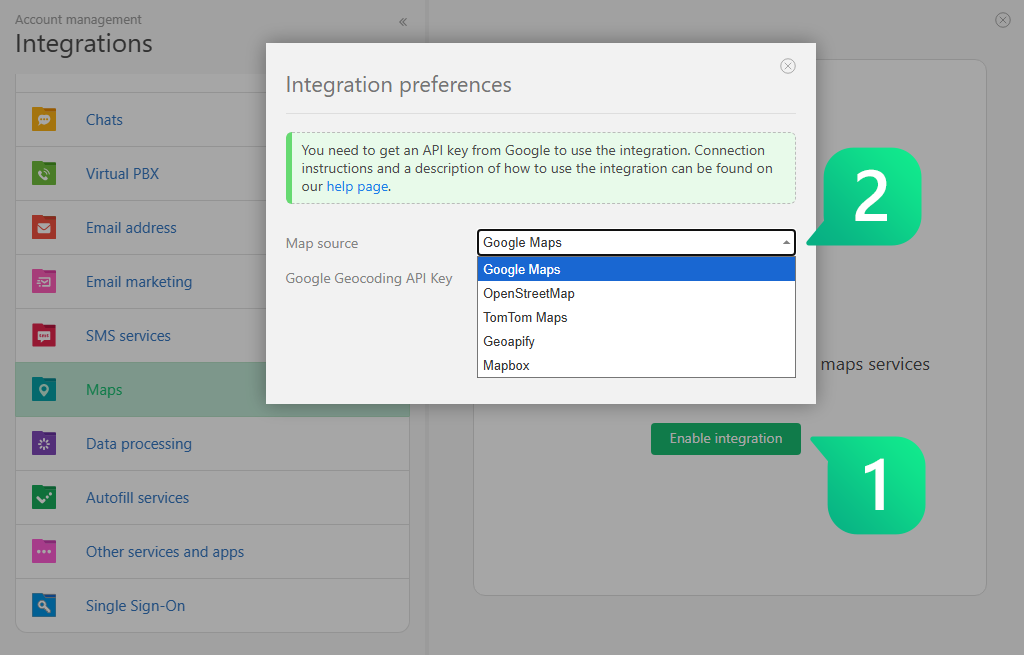
Planfix now supports maps from TomTom, Mapbox, and Geoapify.
To turn them on, open the Integrations section and paste your TomTom API key. Once you do, the new maps will automatically appear in any fields that store location info.
This is a big win for your field teams – couriers, service engineers, anyone who needs to find a customer on the go. No matter where the client is, it’s easier to see them on a familiar map 📍
#Planfix #TomTom #Maps
Planfix ranks among the top 5% on SourceForge 🏆
We've earned the Fall 2026 Leader award in Project Management Software, based on real user reviews.
This recognition highlights our position among more than 100,000 software products listed on the platform.
💙 Thank you for your trust and feedback. Your support helps us keep improving.
Share your experience 👉 https://t.co/B4z8vUJ659
#Planfix #SourceForge #Fall2026 #ProjectManagement #BusinessAutomation
A new version of the Planfix app for iOS and Android is here – 0.73 📱
Planners:
— Planner widgets: you can now check key metrics right from your phone.
— New Full calendar list type.
Working with tasks:
— On vacation status for employees, so you can immediately see when a reply is unlikely.
— Create a new project directly from the project selection field in a task: tap the plus icon, and the new project will be added to the task automatically.
— Attached files in comment feeds now look cleaner: a single file is shown with a preview, while multiple files appear as a list.
Notifications and interface:
— Account names in push notifications, so you can immediately see which account a message came from. This can be enabled in settings.
— Redesigned confirmation dialogs: they now slide up from the bottom and can be dismissed with a swipe.
We also made a number of smaller improvements to make the app more stable. Update the app and check out the new features.
iOS: https://t.co/TBLpsvF2xK
Android: https://t.co/83m3fqkHu1
#Planfix #MobileApp
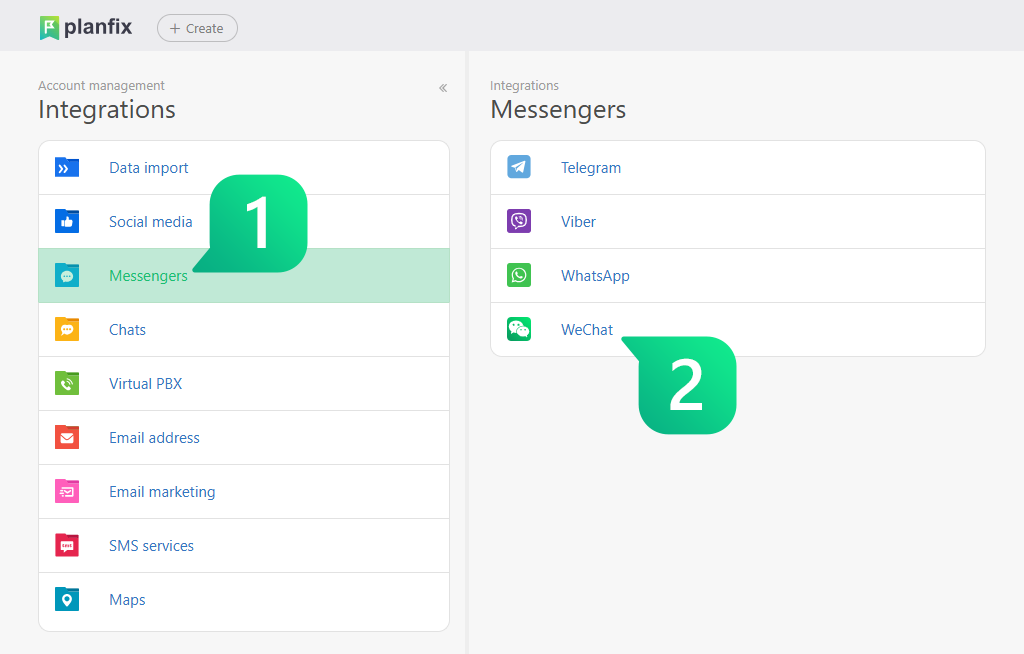
📝 WeChat Integration in Planfix
Incoming WeChat messages can now create tasks or comments in Planfix automatically, and your replies from Planfix go back to the user in WeChat. If your team handles customer communication through WeChat, you can now keep conversations and work in one place without switching apps.
When you set it up, keep a few WeChat rules in mind: you can’t start a chat from Planfix – the customer has to message first – and you need to reply within 48 hours. Also, images arrive as files, while other documents come through as links.
#Planfix #Integration #WeChat
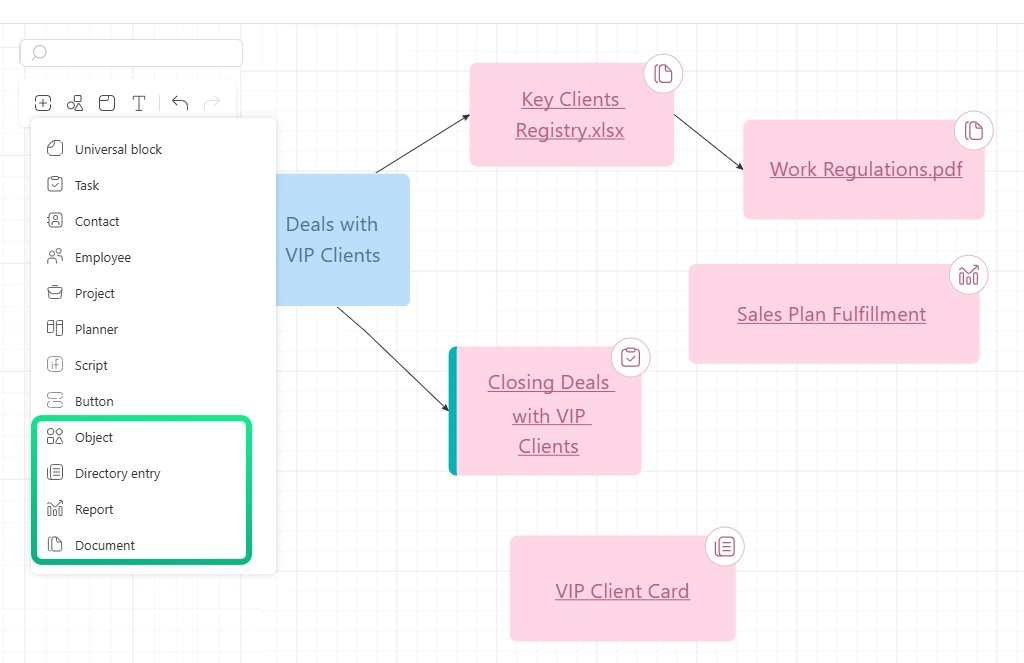
More Object Types on the Whiteboard 🧩
In Planfix, you can now add individual directory entries, reports, and document files to the whiteboard. Just click the plus button on the toolbar, select the item you need, and it will appear on the diagram.
This makes it easier to keep the entire process in one place. You can place related data and working materials right next to tasks without jumping between different sections of the system.
Permissions still apply: if a colleague doesn’t have permission to open a specific document or report, they’ll see it on the diagram but won’t be able to access its contents.
#Planfix #Whiteboard #Object
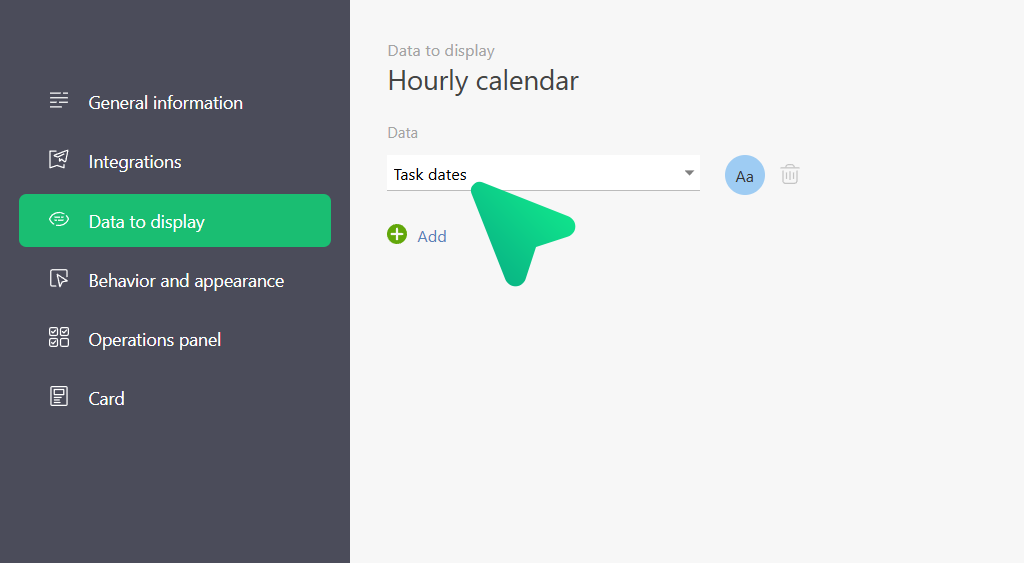
📅 Tasks in the Hourly Calendar
We added a new "Task dates" option in calendar settings. Turn it on in the "Data to display" section, and events with a start and due date will appear right in the hourly grid.
Want to create a task for a specific time slot? Click an empty cell or drag to select a range. Dragging or stretching a task in the calendar updates its start and end times automatically.
We also fixed duplicate event tiles, resolved issues with saving colors, and got reminders working reliably. Edits and deleted entries now show up in the calendar immediately.
#Planfix #Calendar #Tasks
Our CEO Michael Goshka shares a new @ForbesBizCncl article about how AI is changing the role of middle managers.
Routine work like assigning tasks, setting priorities, and checking progress can now be automated. This gives managers more time to solve complex problems, improve processes, and support their teams.
The article looks at what this shift means for growing companies.
🔗 Read the article:
https://t.co/trWDw8wbuW
#BusinessGrowth #BusinessAutomation #CRM
We have summarized crucial Planfix updates of August and September 2026.
Read what's new on the platform in our blog: https://t.co/l0FsdnQqUp
#Planfix#Updates