Dash is now an MCP framework. And Dash Enterprise 6.3 supports deploying, managing, and logging in to these MCP apps from your AI chat client.
MCP is a way to build a "connector" to your AI chat. Build custom connectors to serve internal data, context, semantic layers, and more for all of your users who would rather work out of a chat client than a web browser.
Here are 5 examples of MCP apps that you can build with Dash: https://t.co/htfoPQXnXR
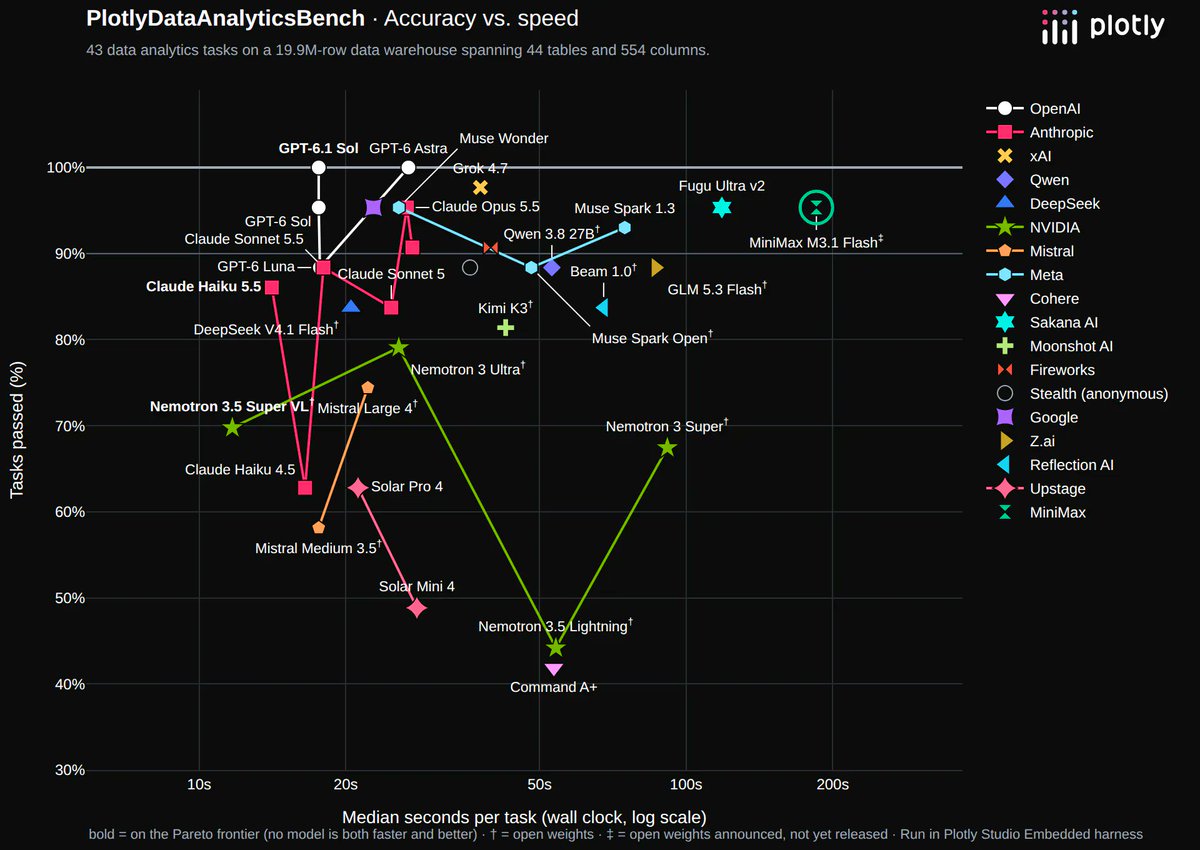
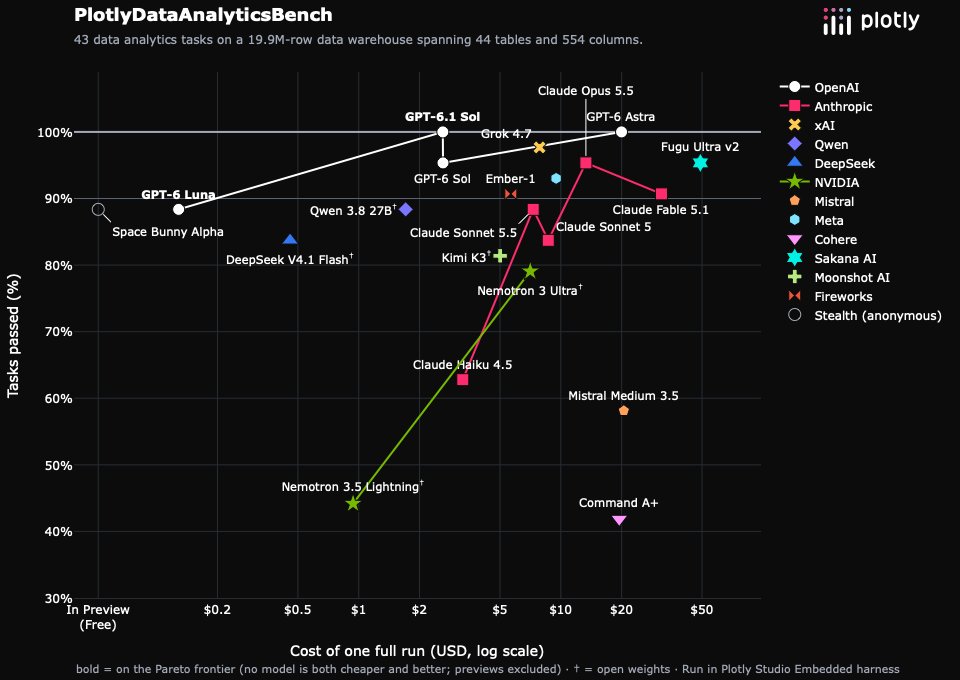
Trying out MiniMax M3.1 for data analytics today. Best Chinese model so far, ties Opus 5.5 & Argon at 1/3rd the price. However, it uses a loooot of tokens which makes it the slowest model we've tested so far: 3 min to answer each question vs 30s. https://t.co/AhyvQPdAzN
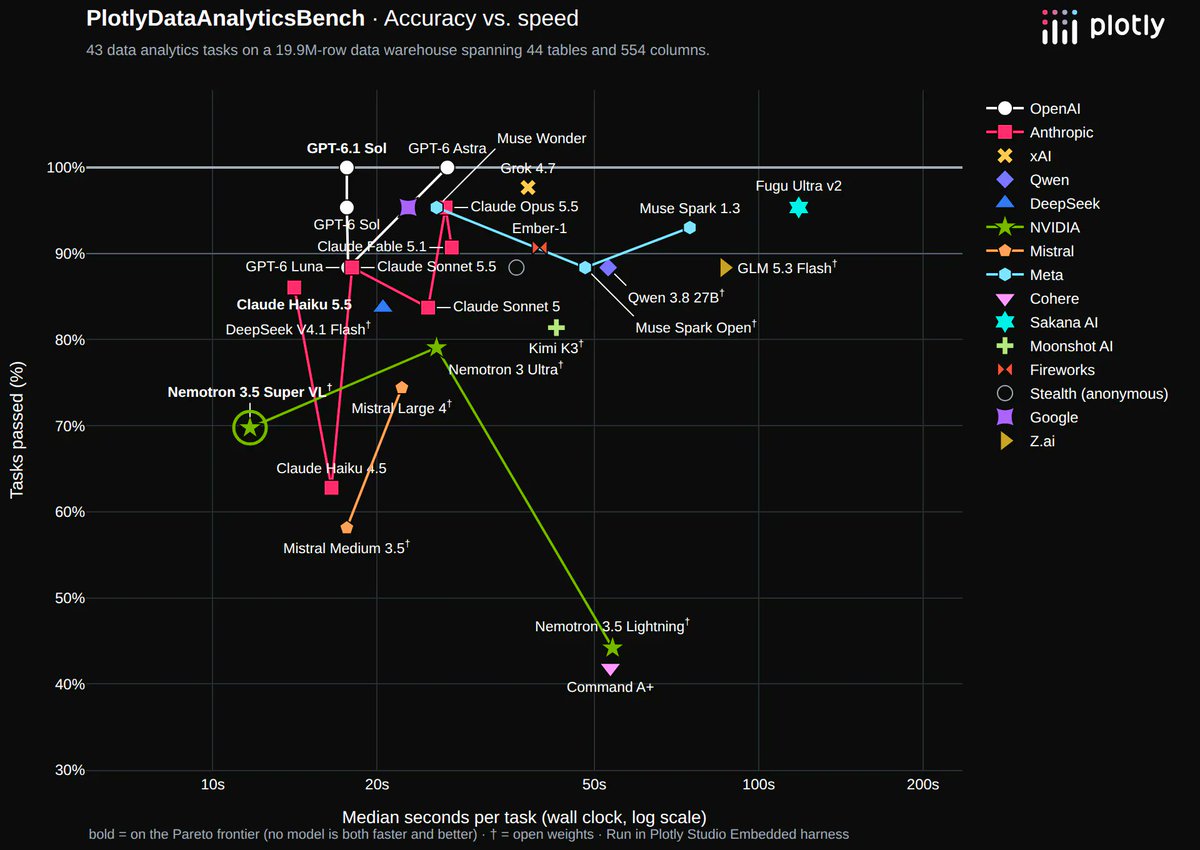
@NVIDIAAI .@NVIDIAAI 's Nemotron 3.5 Super VL model is the fastest model we've tested yet 🤯
Full benchmark results for data analytics: https://t.co/FNC723DPDu
Yes, so psyched to see this! A bunch of our customers would really prefer to run US models on-prem given the choice.
Ran it through our data analytics benchmark and it's tied for the best open-weight score we’ve measured and the best yet from a US lab: https://t.co/nRLF8t0OCe
Introducing DataAnalyticsBench
Our benchmark to track AI's progress in data analytics.
Most benchmarks are built for software engineering or have become benchmaxxxed.
DataAnalyticsBench is purpose built for data analytics, with trick questions, messy data, and a massive schema. Built in collaboration with researchers at @Mila_Quebec
Read the full breakdown here: https://t.co/MS7LdAzLiO
Exciting webinar this Thursday! Presented by a member of our operations team and the product manager behind Plotly Studio, Megan Dyer and Matthew Brown show off their tips and tricks for making real-world internal apps with Plotly. Register here: https://t.co/KaCHUhhccp
At Plotly, 10% of our workforce have become part-time tool builders for their immediate teams. They know the data and the workflows better than anyone else, and have been building great apps and dashboards that serve their immediate needs.
It’s happening at Plotly and it’s happening across our customers. Tool builders are emerging in all areas of a company, and many don’t have formal software experience.
They key to using AI within an organization is to use code-backed tools + frameworks (AI’s killer app are coding agents) and having a secure, governed place to manage the apps. This is Dash Enterprise.
The Plotly Cloud Connector for Claude is now available!
Let your agents cook by giving them access to your Plotly Cloud account to deploy and manage apps, view logs and diagnose issues, and manage settings.
Under the hood, the Claude Connectors are just MCP endpoints that have been verified by Anthropic and added to their catalog. You can get the same functionality in _any_ AI agent by adding our MCP endpoint to your session: https://t.co/NcLU3XkYfm
Read more in our blog: https://t.co/4IkDEwH8cx
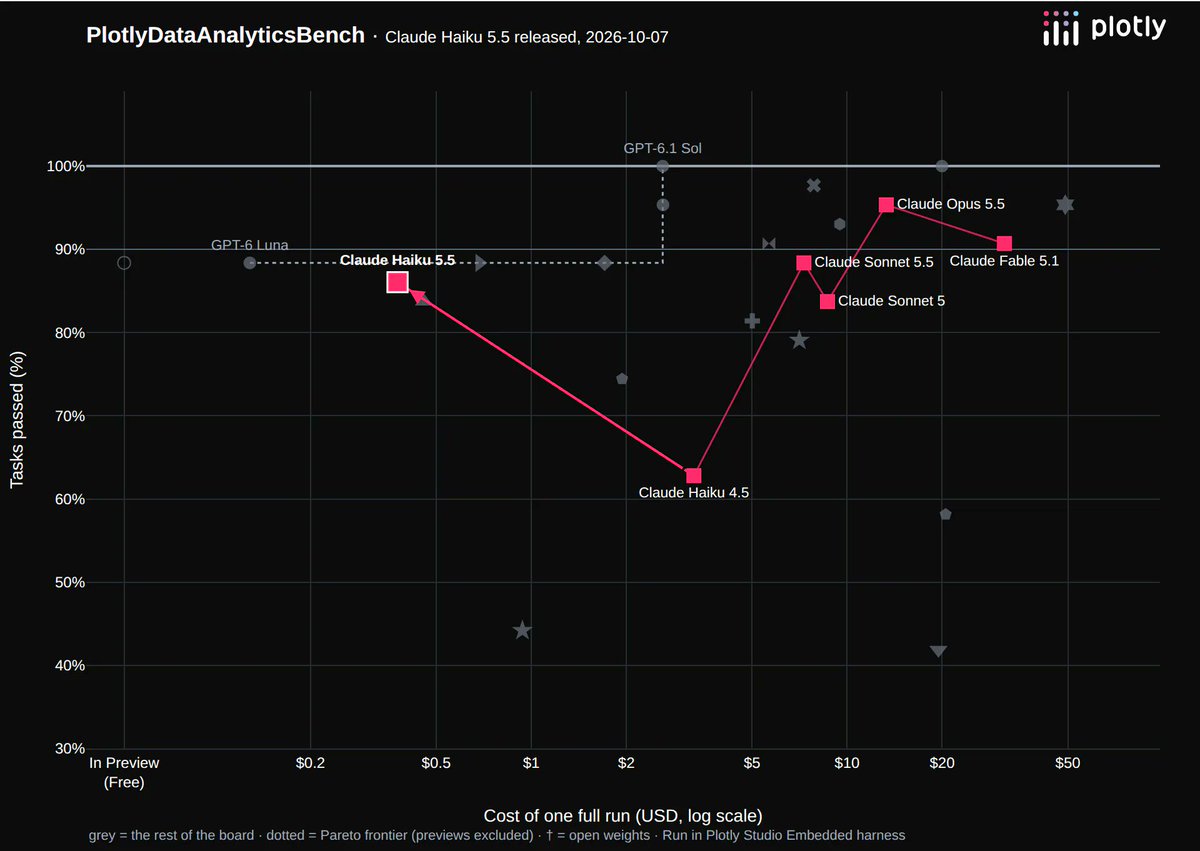
DataAnalyticsBench has been updated with Claude Haiku 5.5!
This is a very good model for data analytics in Plotly Studio, and the fastest model yet to pass the exam. It passes all of the well-defined data analytics tasks correctly, and only falls short in more in-depth searches through the data warehouse.
Read the full breakdown here: https://t.co/lV2bO9G54C
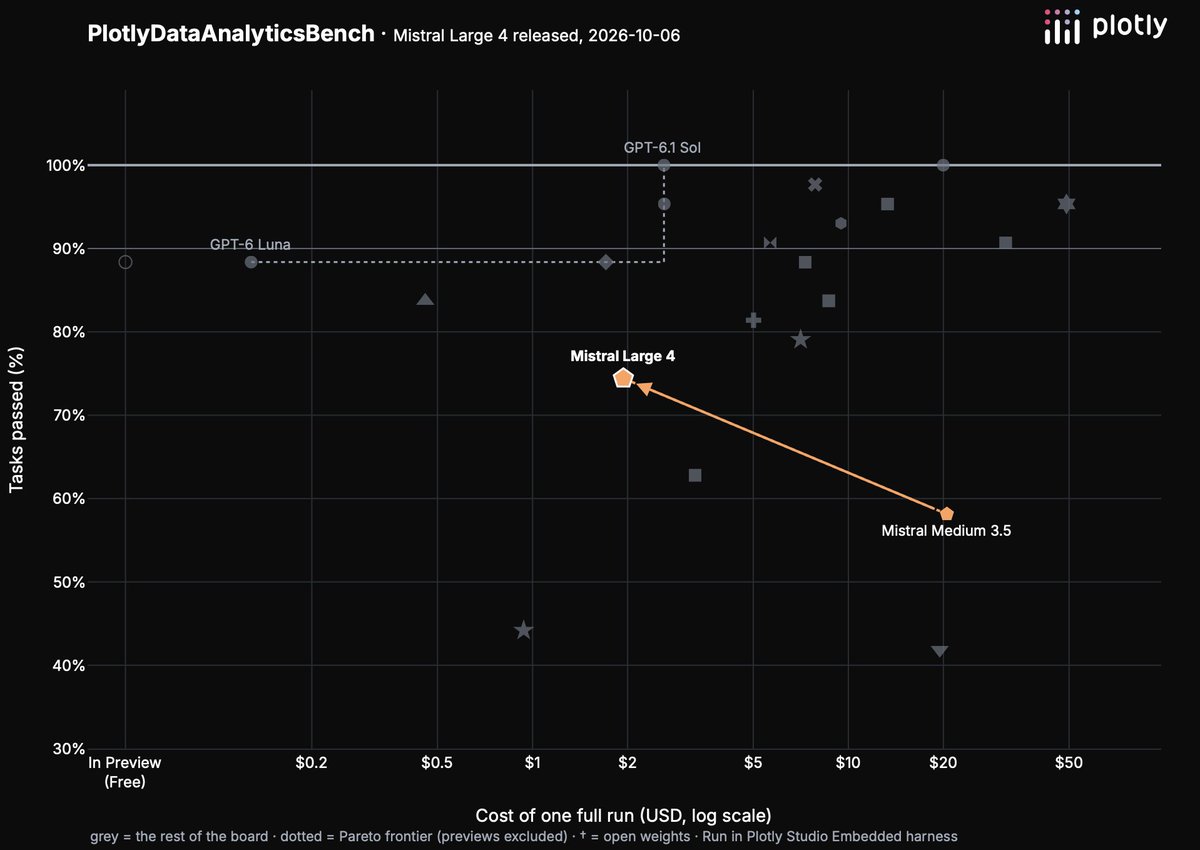
@MistralAI Large 4, Le Chonk, looks like a great model for data analytics.
We just ran it through our benchmark. It's 10x cheaper ($20 to $2) and improves its grade by two letters. At this rate, it'll ace the exam next year.
Full write-up: https://t.co/FEJdjffdiG
GPT-6.1 Sol is the second model to get a 100% on our data analytics benchmark. The first was Astra 3 weeks ago.
GPT-6.1 Sol finishes the exam about 53% faster and does it at 10% of the cost.
This is a very solid model for data analytics and visualization.
Plotly.js 4.0 is out! 🥳
New trace type, many more customization options, lots of bug fixes, and a few low-key, strictly-better changes to the defaults. See the full release notes and examples here: https://t.co/kdm1iR5LZg.
easy peasy lemon squeezy 🍋
Want a data-querying, chart-making chatbot on top of your Dash app?
1. Define a `get_data()` function that returns some dataframes. You can literally connect to _anything_ with Python, so this data can come from anywhere.
2. Publish your app to Plotly Cloud: `$ plotly app publish`
3. Flip on the chatbot switch in your app settings
That's it!
We love this solution because it's super easy but it also gives you full control over data access. You can restrict access to certain tables or columns, or just clean things up in the data between the data warehouse and your end users.
Join our launch event next week: https://t.co/Ec6BnnubuD
It's launch day! Introducing Plotly Studio Embedded 🥳
Plotly Studio Embedded brings agentic analytics directly into your Dash app. It enables the viewers of your application to ask questions about data and generate charts, tables, maps and reports with AI.
There's a few things that make this product really unique:
1. Configuration as code: Data access is managed in code in advance, so end users don't need to fuss around with connectors or credentials themselves.
2. Data is front-and-center: Most AI chat experiences show you a wall of text. That's not what we think data analytics should feel like. Plotly Studio Embedded is designed to show you the queries, graphs, and tables every step of the way.
3. Secure: Rather than engineering an agent that can do anything (including escape sandboxes), we engineered this agent to only perform data analytics and visualization tasks. There's no arbitrary code execution, no network access, no filesystem access.
4. Embedded: The AI experiences co-exists alongside predefined views. So end users can have the best of both worlds and so that you can save on token$ by placing the common charts and tables in the Dash app itself.
Read more: https://t.co/DUKKxNy78C
Join the launch event: https://t.co/Ec6BnnubuD
Fascinating staff research by Robert Claus and Matthew Brown measuring the cost savings in time & tokens by building on Dash vs Full-Stack for data apps, internal tools, and reports.
Using the right framework saves you far more $$ than any model or harness.
Read the research here: https://t.co/uFk1BRSdGm
Watch the discussion: https://t.co/cVbsS2wmi0
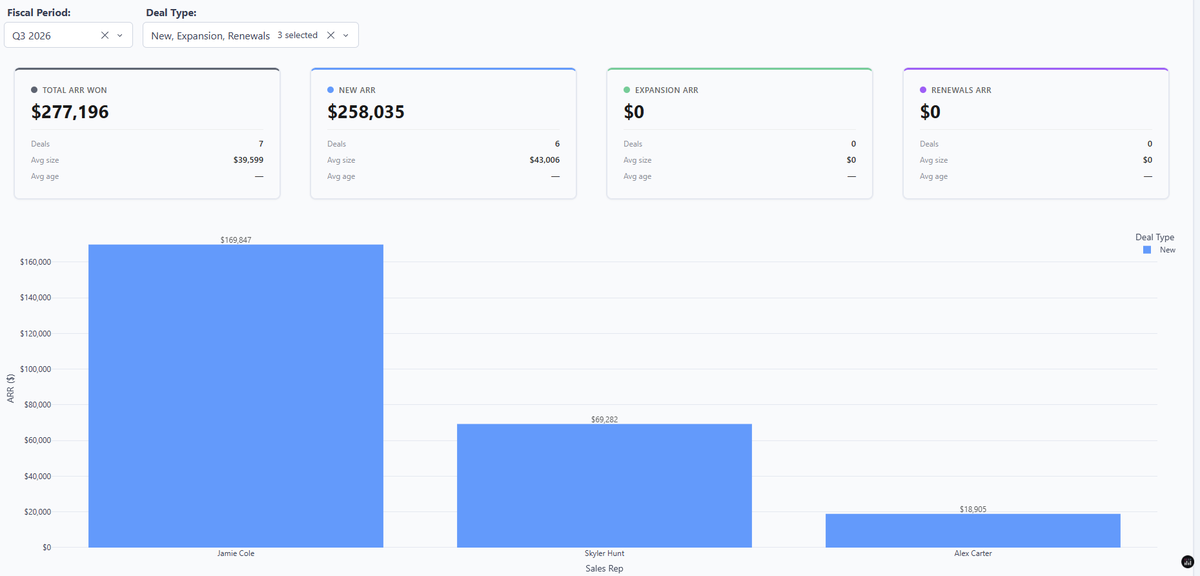
Our Sr. Sales Ops Admin, Megan, built a real-time dashboard connected directly to her live Salesforce data source.
Check out her dashboard, replicated using mock/dummy data: https://t.co/Rof8DN1SSq
Get started with Plotly Studio: https://t.co/w1OgWBE5Km
Ever wonder what's actually inside Google Maps? Turns out you can build a surprisingly capable version yourself, in a single Python file.
We just published a breakdown of Dash Navigation, a working maps + turn-by-turn routing app built entirely on open data:
- OpenStreetMap for street geometry, speed limits, and road names
- Custom-rendered map tiles (Leaflet) instead of a commercial tile server
- Auto-generated turn-by-turn directions from raw intersection geometry
The whole thing runs with one command, downloads its own map data on first launch, and deploys as easily as any other Dash app, using Plotly Cloud.
The code is open source, and the app is running live if you want to point it at your own city.
Read the full article: https://t.co/O2wU56GxDQ
GitHub: https://t.co/uQRhR4W0ic
App: https://t.co/iNUTqOCDRI