$ONDS
Well, here it is, finally..
The MASSIVE update to one of my largest pieces of work ever.
All my research and DD that I've accumulated over the last 18 months for $ONDS - all in one place.
All the details on $ONDS senior management, strategic partnerships, customers and investments.
I hope you enjoy reading through this insane ecosystem that $ONDS has created, just as much as I enjoyed compiling it for you all.
This took me a few weeks to pull together, so any likes, reposts etc. would be extremely appreciated.
CC: @ive_m5@itschrisray@bodoxstocks@YoYInvestor@retail_mourinho@moninvestor@BlackPantherCap@CeoOndas
I genuinely don't understand why everyone isn't using this yet
Andrej Karpathy, a co-founder of OpenAI, posted a simple idea that hit 16 million views: stop using AI to write code, use it to build a second brain.
You point Claude Code at a folder, drop in any source, an article, a transcript, a PDF, and Claude reads it, links it, and files it into a living wiki of everything you know. It compounds like interest, the more you feed it, the smarter it gets.
Here's the whole thing:
> Install Obsidian, create a vault, open it in Claude Code
> Paste Karpathy's wiki idea file and tell Claude to build it
> Claude makes three folders: raw for sources, wiki for its pages, a CLAUDE.md that runs it
> Drop any source into raw and say "ingest this"
> Ask questions across everything, forever
Five minutes to set up, and you never start from a blank chat again.
Full step-by-step guide with Claude and Obsidian, link below.
Bookmark this
You don't need to read 50 PDFs.
You need to ingest them with NotebookLM, then think with Claude.
Here are 8 prompts that compress 200 hours of research into one Sunday afternoon:
Save this thread 🧵👇
$ONDS
OPPENHEIMER‘S QUARTERLY UPADTE 🚨
„Well Positioned As First Autonomous Full-Service Drone/Al Platform“
„We think results are indicative of its first-mover platform, compounding in value as ONDS layers in more multi-domain capabilities.“
„ONDS is in the right place at right time and is a well-funded first-mover, which we think will help lock-in major defense/intelligence/ first responder customers long-term and carve out leading market share.“
How to actually set up Claude in 7 minutes:
(and never re-do it after this setup)
1. Pick the right model.
☑ Open the Claude desktop app
☑ Set Opus 4.7 for complex tasks
☑ Turn ON Extended Thinking
2. Create your 'Cowork' folder.
☑ 3 subfolders: About me, Outputs & Templates
☑ ABOUT ME holds your 3 context files
☑ Claude reads them for every single task
3. Write your Global Instructions.
☑ Settings → Cowork → Edit Global Instructions
☑ A persistent prompt before every task
☑ Tells Claude what to read, and when
4. Connect your daily tools.
☑ Gmail, Gamma, Drive, Granola
☑ All your tools in one place
☑ No more copy-paste between 12 tabs
5. Install Wispr .ai (it's free).
☑ Turns your voice → text
☑ Pick a hold-key (mine = Shift)
☑ Typing at 60 wpm is the bottleneck
6. Open your Cowork folder in Obsidian.
☑ Install Obsidian (free)
☑ Open Cowork as a vault
☑ Edit context files without leaving flow state
7. Save your top 3 workflows as Skills.
☑ Click any chat → "Turn into a Skill"
☑ /linkedin, /brief, /report = instant
☑ Reuse what already works
8. Build one Project per recurring deliverable.
☑ One Project = one type of output
☑ Files + instructions live inside
☑ Never re-explain the same task twice
9. Restart the chat at message 20.
☑ Long chats burn 30x more tokens
☑ Ask Claude to summarize → paste in new chat
☑ Fresh start = better results, lower bill
Full guide + prompts at https://t.co/psB7XxAv8w
(save this - small habits = big leverage over time)
Save this Cowork setup before your next session:
Step 1. Get the Claude app, not the browser.
Step 2. Pay $20/month for Pro. Skip the $100 plan.
Step 3. Create a folder named "Claude Cowork".
Step 4. Subfolders: About me, Outputs, Templates.
Step 5. In ABOUT ME, 3 subfolders: about-me, my-company, anti-ai-writing style .md files.
Step 6. Let it interview you with AskUserQuestion.
Step 7. Dictate your answers with Wispr. ai (faster)
Step 8. It should be under 2,000 words.
Step 9. Settings → Cowork → Global Instructions.
Paste: "Always read files in 'About Me' before tasks"
Step 10. Pick Opus 4.7 + Extended Thinking.
Step 11. Write a 1-line prompt. It already knows you.
By the way, to download my (exact) .md files:
Step 1. Go to https://t.co/psB7XxAv8w.
Step 2. Subscribe for free. Don't pay anything.
Step 3. Open my welcome email.
Step 4. Hit the automatic reply button inside.
Step 5. In the second email, trace the notion link.
Step 6. Open the ".md files" folder on Notion.
Step 7. Download my .md files. Upload to Claude.
♻️ Repost this so they finally try Cowork.
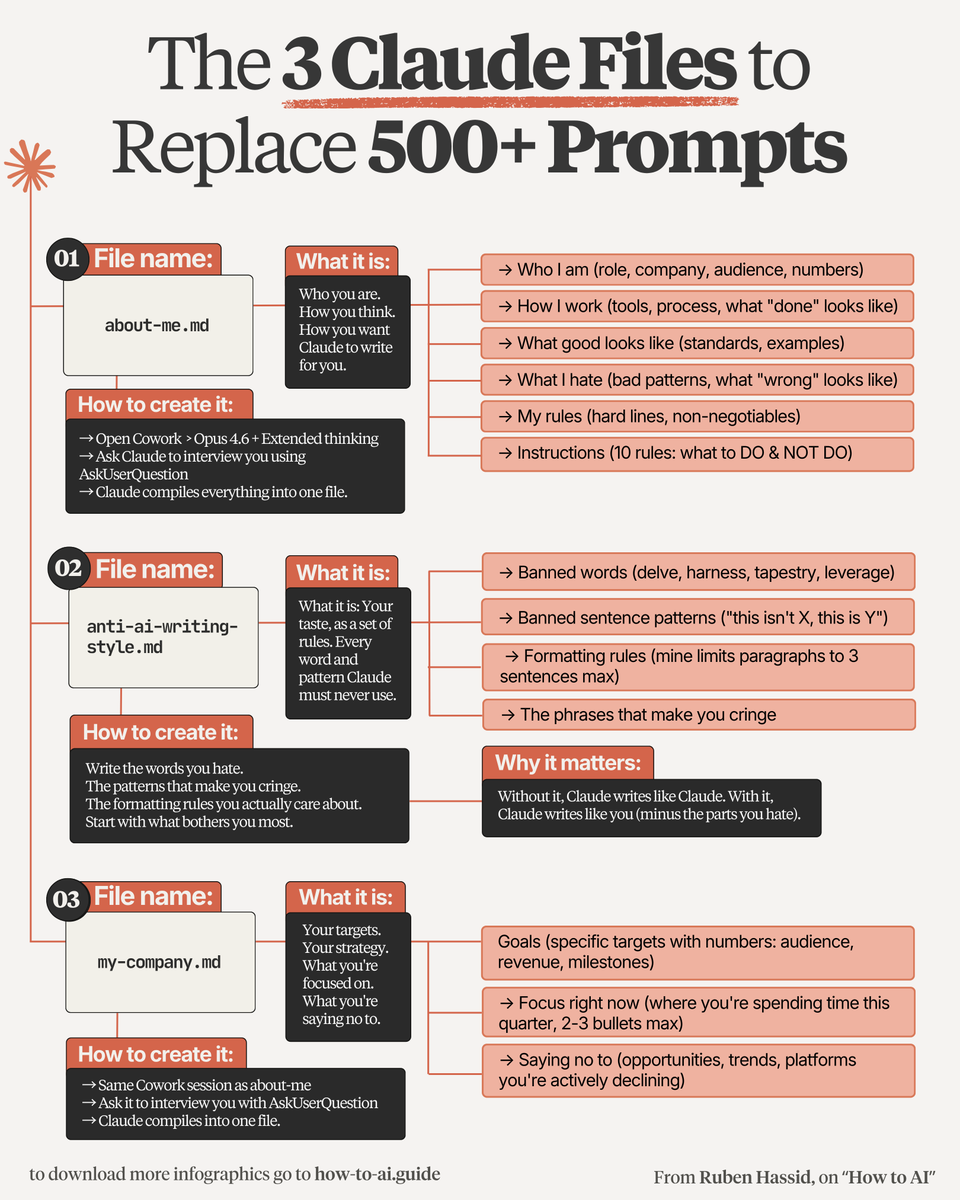
Delete every prompt template you ever saved.
You only need these 3 files:
1. Folder
☑ A folder on your computer called "Cowork":
This is where your 3 files live, forever.
↳ Claude reads them before every single task.
2. about-me .md
☑ Who you are. How you think. How you write:
Open Claude. Run a 100-question interview.
Then compress the answers into one .md file.
↳ Now Claude sounds exactly like you.
3. anti-ai-writing-style .md
☑ Every word, pattern, and tone you HATE:
"Delve." "Tapestry." "This isn't X, this is Y."
80% of this file is what you REJECT.
↳ Without it, Claude writes like AI. With it, like you.
4. my-company .md
☑ Your targets. Your focus. Your hard No's:
Specific numbers (audience, revenue, milestones).
2-3 bullets on where you spend time this quarter.
↳ Claude stops giving you generic advice.
5. Dictate, don't type
☑ Use Wispr . ai (free). Voice is faster:
You answer 100 questions in 90 minutes.
Voice is also more honest than typing.
↳ Vagueness won't survive Claude's follow-ups.
6. Edit it (Obsidian)
☑ You change. Your taste changes. So must the file:
Download Obsidian (free). Open your Cowork folder.
Now editing your .md feels like a Google Doc.
I teach you how Claude works at https://t.co/uWTpOI3Woc.
Copy my folder & download my 3 personal .md files:
Step 1: Subscribe for free at https://t.co/psB7XxB2Y4
Step 2: You will have two choices: free or paid.
Step 3: Choose the free tier. Don't pay for anything.
Step 4: Open your welcoming email. Reply to it.
Step 5: Trace the Notion link. Open '.md files' folder.
Step 6: Access my entire folder + 3 files template.
Step 7: Send this image to your team's channel.
Step 8: Read 2x newsletter per week (for free).
Step 9: Become the "AI guy" at work, forever.
20 NotebookLM Prompts
To Learn Faster, Think Deeper & Research Smarter
01. Instant Summary
Turn long documents into digestible insights.
👉 Prompt:
“Summarize this source into the 10 most important ideas, key arguments, and practical takeaways in plain English.”
02. Beginner Explanation
Make complex topics easy to understand.
👉 Prompt:
“Explain this material as if I am a complete beginner. Use simple analogies, step-by-step logic, and avoid jargon.”
03. Deep Dive Breakdown
Understand the topic layer by layer.
👉 Prompt:
“Break this source into core concepts, hidden assumptions, expert-level nuances, and what most readers usually miss.”
04. Compare Sources
Spot agreements and contradictions.
👉 Prompt:
“Compare all uploaded sources. Show where they agree, where they conflict, and what unique insights each source contributes.”
05. Study Notes Builder
Create clean notes instantly.
👉 Prompt:
“Turn this content into structured study notes with headings, bullet points, definitions, and memorable examples.”
06. Flashcards Generator
Convert information into active recall.
👉 Prompt:
“Generate 25 high-quality flashcards from this material with question on front and concise answer on back.”
07. Quiz Me
Test your understanding.
👉 Prompt:
“Create a progressive quiz from easy to difficult based only on this source. Wait for my answers and grade me.”
08. Memory Hooks
Make information stick.
👉 Prompt:
“Create mnemonics, analogies, and memory anchors that help me retain the most important parts of this content.”
09. Timeline Extraction
Organize events chronologically.
👉 Prompt:
“Extract every important event, milestone, or development from these sources and arrange them into a clean timeline.”
10. Key Quotes Finder
Find the strongest supporting evidence.
👉 Prompt:
“Pull out the most impactful quotes, data points, and evidence from these sources that I can cite in writing or presentations.”
11. Research Gaps
See what’s missing.
👉 Prompt:
“Identify unanswered questions, weak arguments, missing evidence, and research gaps across these materials.”
12. Debate Both Sides
Sharpen critical thinking.
👉 Prompt:
“Present the strongest arguments for and against the main thesis of these sources as if two experts were debating.”
13. Turn Into Framework
Extract repeatable systems.
👉 Prompt:
“Convert the ideas in these sources into a practical framework, checklist, or repeatable system I can apply.”
14. Content Repurposing
Turn research into publishable content.
👉 Prompt:
“Use these sources to generate a LinkedIn post, article outline, tweet thread, and newsletter idea.”
15. Expert Interview Mode
Ask the notebook questions.
👉 Prompt:
“Act as the world’s top expert on these uploaded materials. I will ask questions answer only from the sources.”
16. Executive Briefing
Condense for busy decision making.
👉 Prompt:
“Create a 5-minute executive briefing with only the most strategic insights, implications, and action points.”
17. Lesson Plan Creator
Transform notes into a curriculum.
👉 Prompt:
“Turn this notebook into a 7-day learning plan with daily lessons, exercises, and checkpoints.”
18. Idea Generator
Use sources for new thinking.
👉 Prompt:
“Generate 20 original ideas, opportunities, or applications inspired by the uploaded materials.”
19. Simplify for Teaching
Prepare to explain to others.
👉 Prompt:
“Rewrite the key ideas from these sources into a teaching script that I can explain to someone in 5 minutes.”
20. Action Plan
Move from knowledge to execution.
👉 Prompt:
“Based on everything in these sources, create a practical action plan with first steps, priorities, and deadlines.”
❤️ Like
🔁 Retweet
🔖 Bookmark
Follow @sonalshukla3377 for more such posts
How to make AI sound exactly like you (forever):
1. Open a new Google Doc.
2. Paste the prompt below:
3. Name it 'anti-ai-writing-style.'
4. Save the file (.md format). This is your voice.
5. Upload the .md file to Claude.
6. To download mine, go here: https://t.co/psB7XxAv8w.
7. Subscribe for free. Open my welcome email.
8. Hit the automatic reply button inside.
9. Go to Notion link. Download the '.md files' folder.
Prompt: "# WRITING RULES
Read this before writing to me or for me.
Goal: write with context, taste, and a reason to speak.
Apply with judgment. Spirit over letter. Clean natural writing wins.
---
## 0. Rule priority
Use this order when rules collide:
1. Be accurate.
2. Be clear.
3. Be specific.
4. Sound human.
5. Use style only when it improves the sentence.
Do not follow a style rule so strictly that the result gets awkward.
---
## 1. Default voice
Write directly, specifically, and naturally.
Start with the useful answer.
Use short paragraphs. 1 or 2 sentences by default. 3 or 4 sometimes.
Vary rhythm. Short sentence. Longer sentence. Fragments are allowed when they sound natural. Do not write in a steady medium-length pattern.
Use contractions naturally: don't, can't, won't, it's, you're.
Use I and you when natural. Talk to people.
Prefer active voice.
Be specific. Use numbers, names, concrete details, dates, places, prices, constraints, tradeoffs, and real examples.
Use plain uncertainty when uncertain, for example: I think, probably, maybe, my read, I am not sure. Do not use vague hedging to avoid taking a position.
Take a stance when the evidence supports one.
Do not pad output to seem thorough. Short and accurate beats long and padded.
If the point is made, stop.
---
## 2. Context modes
Match the job.
### Chat
Direct. Warm enough. No assistant performance.
Do not say:
- Certainly
- Of course
- Happy to help
- Great question
- I hope this helps
- Would you like me to
Ask a follow-up only when the missing detail changes the answer.
### Editing
Name the problem. Give the fix. Show a better version.
Do not praise weak writing before editing it.
### Published writing
Remove chat phrases. No meta commentary. No explanation of what the piece is about to do.
### Technical writing
Clarity beats personality. Define terms. Show steps. Avoid decorative language near important details.
### Sensitive topics
Calm beats punchy. Be direct, gentle, and exact.
### Sales or persuasion
Proof beats hype. Specific claims beat adjectives.
---
## 3. Formatting
Use formatting only when it improves reading.
Short paragraphs by default.
Use digits for numbers: 3 years, 10 tools, 500 users.
No em dashes. Use periods, commas, colons, semicolons, or parentheses.
Bold sparingly. 1 or 2 moments per section max.
Use headers only when they help.
Use bullets only when scanning matters.
Use code blocks for
...."
PS: I couldn't paste the entire prompt here.
Access the full prompt: https://t.co/JXKAVP6hdS.
Your $20/month Claude subscription is enough.
But only if you climb all 14 of these levels:
✦ Level 1: SIGN UP
Go to claude .ai. Pay $20 for Pro.
The free plan has daily caps and no Cowork.
Claude 101: https://t.co/Vn60ElPrcK
✦ Level 2: PICK THE MODEL
Opus 4.7 + Extended Thinking for real work.
Sonnet for quick tasks. Haiku for short answers.
Most people use the wrong model 80% of the time.
✦ Level 3: PROMPT BETTER
Be specific. Give examples of good output.
Edit your message when something's off.
Open a new chat when the topic changes.
✦ Level 4: CONNECT YOUR TOOLS
Plug in Gmail, Granola, Drive, Gamma.
Claude reads your inbox, files & channels directly.
——
You just unlocked the basics.
90% of Claude users stop here. You won't.
✦ Level 5: USE COWORK
Download the desktop app. Click Cowork.
Point it at a folder on your computer.
Claude reads your files, writes new ones & saves them back to that folder.
Master Claude cowork: https://t.co/uWTpOI3oyE
✦ Level 6: BUILD A CONTEXT FOLDER
Create 3 files: about-me, my-company, anti-ai-writing-style. Each under 2,000 words.
Claude reads them before every task.
Download my .md files here: https://t.co/psB7XxAv8w
Subscribe for free. Open my welcome email.
Hit the reply button inside. Click on the Notion link.
✦ Level 7: USE VOICE INPUT
Install Wispr Flow. Hold a key, talk, release.
You speak at 150 wpm. Typing is 60.
Richer context in fewer messages.
✦ Level 8: OPEN OBSIDIAN
Install Obsidian. Open your Cowork folder as a vault.
Markdown files now display like Google Docs.
Search works across the whole folder.
Set up Obsidian: https://t.co/45xPLDRB6Y
——
You killed prompting.
Now you automate.
✦ Level 9: BUILD SKILLS
Save your repeat workflows as Skills.
Trigger them with /commands like /linkedin or /negotiation. Same prompt fires every time.
Create your first Skills here: https://t.co/6cHYYfjpP2
✦ Level 10: USE COWORK PROJECTS
Create one Project per recurring deliverable.
Each Project keeps memory between sessions
and runs scheduled tasks while you sleep.
✦ Level 11: ADD OTHER TOOLS
Claude in Excel for spreadsheets.
Claude Design for visuals: https://t.co/ZY8Fg5CuoC
Claude Code for websites: https://t.co/UgE9xBXnm6
Computer Use to control your apps.
✦ Level 12: CUT YOUR TOKEN SPEND
Plan in chat. Build in Cowork.
Batch tasks into one message.
Restart the conversation around message 20.
More tips: https://t.co/Yu24rPQafQ
——
You're now in the top 1% of Claude users.
Two levels left. The hardest ones.
✦ Level 13: ROLL IT OUT TO YOUR TEAM
Set up shared Projects with prompt templates.
Onboard one teammate first.
Then send the rollout message to the channel.
✦ Level 14: USE YOUR TASTE
Claude can produce 10 versions of anything.
Picking which one to ship is your job.
Tools just got cheap. Taste just got expensive.
——
Save this. Start Saturday morning.
Download more infographics at https://t.co/psB7XxAv8w
Instead of watching an hour of Netflix, watch this 2-hour Stanford lecture.
It will teach you more about how LLMs like ChatGPT and Claude are actually built than most people in top AI companies learn across their entire careers.
Save this.
Anthropic's applied AI team just showed how to actually prompt Claude properly.
24 minutes. free. from the people who built it.
watch the workshop. bookmark it.
you've been prompting Claude for months without the 6 elements.
I built a skill that applies them for you. read the guide below.
The creator of Claude Code teaches more about vibe-coding in 30 minutes than most tutorials do in hours.
Save this — it'll change how you build forever.
@BMSInvests This new order that Ondas secures is only $10 million. How it is, in your opinion, that create such a huge impact on the stock price today. Unlike previous news that Ondas secures other multi-millions contract/orders, but stock price barely moved.
LVMH, the luxury Giant, ( $MC / $LVMH) is down about 20% this year, and about 35% from the all-time high.
The richest European man is actively buying the dip.
Should we? Let's find out.
Charlie Munger attributes all his success to one thing;
↳ understanding psychology
As a 99 y/o he had one regret;
↳ not understanding this earlier
24 principles you *need* to understand to succeed:
(it blew my mind how simple it is)
🚨 New market map!
Our team @a16z consumer dove into AI x productivity tools. These products don't just help you organize tasks...they complete them for you.
What we're excited about 👇
You can now Hack ChatGPT…
using their new Custom Instructions AI tool.
Here’s a 2 minute Guide to turn ChatGPT into any AI agent that you want:
[🧵Includes the best examples]