People think learning Claude takes days. It doesn't.
I wrote 17 free guides that teach it in hours:
Claude 101: https://t.co/QQDmzBAoH5
Claude Code: https://t.co/o782qegoKu
Claude Skills: https://t.co/RgQUCNMqzQ
Claude Connectors: https://t.co/cSPMBUNmRG
Claude for Excel: https://t.co/ZgmUFXd0Iw
How to Prompt: https://t.co/Sw2tg2PMMc
Claude Certificates: https://t.co/LyV7fegv4c
Claude for your team: https://t.co/NakViTGCAL
Stop Prompting Claude: https://t.co/45xPLDRB6Y
AI Slides (PPT in 2026): https://t.co/OY7cHDTV7l
Claude Design: https://t.co/FhlRSlH0aD
Set up Claude Cowork: https://t.co/4jygw4M1RO
Claude to sound like you: https://t.co/LyV7fegv4c
Stop writing like AI: https://t.co/JXKAVP6hdS
Claude as your computer: https://t.co/tQDrcs8drQ
Claude Cowork + Project: https://t.co/xU97EpdrEe
Stop hitting Claude limits: https://t.co/Yu24rPQafQ
___
1. Save this list for later (three dots, top right).
2. Share it with a friend by ♻️ reposting this image.
3. Subscribe to my free newsletter: https://t.co/psB7XxAv8w.
Anthropic just dropped a 31-page prompting guide.
Here's everything you actually need (in 10 rules):
1. You write "review this contract" and pray.
Fix: Name every output. "Review this contract. Flag risks per clause. Rate severity 1-5. Return as a table."
2: You say "summarize this" on a 40-page report.
Fix: 4.7 sizes the answer to the input. Cap it: "5 bullets. Each under 15 words. Start each with an action verb."
3: You write "don't use jargon. don't be salesy."
Fix: Negative instructions don't stick.
Flip them: "Write in plain English a 16-year-old could read aloud."
4: You type "can you help me with the email?"
Fix: Each verb ships something. For example: "Go to Gmail. Find [contact]. Write the send-ready reply. Under 90 words. Tone: confident, casual."
5: You wait for Claude to web search on its own.
Fix: Claude opus 4.7 calls fewer tools than 4.6.
Force it: "Use web search aggressively. Verify every claim with at least 2 sources."
6: You miss the warm tone from old Claude.
Fix: Claude opus 4.7 is direct. Almost zero emojis. Paste 2-3 sentences in the voice you want.
Tell Claude to match the rhythm.
7: You ask for "a landing page" & get bare minimum.
Fix: Drop this one line on every creative task
→ "Go beyond the basics."
It's from Anthropic's own doc.
8: You forget Claude 4.7 doesn't reason by default.
Fix: They call it "adaptive thinking."
Add this at the end: "Think before answering (maximum reasoning)." Free upgrade. Every time.
9: You rewrite the same prompt 14 times a week.
Fix: A skill is a command with instructions pre-built.
Write the same prompt twice? Make it a skill.
10: You assume Claude knows what you meant.
Fix: Old Claude 4.6 guessed.
New Claude 4.7 does exactly what you typed.
Spell it out. Output. Order. Length. Tone. Format.
If you don't say it, you don't get it.
To go even further & download my .md files directly:
Step 1. Go to https://t.co/psB7XxB2Y4.
Step 2. Subscribe for free. Don't pay anything.
Step 3. Open my welcome email (most skip this).
Step 4. Hit the automatic reply button inside.
Step 5. Download my .md files from my Notion.
Bonus. Enjoy my best copy-paste prompts, too.
The first update for First Steps with Linux is now out.
I went back through the book, cleaned up rough sections, improved explanations, fixed grammar issues, and added more visual polish throughout.
The structure hasn’t changed much, but a lot of sections were cleaned up to make the reading experience smoother overall.
Both the PDF and EPUB versions have been updated.
Paperback version coming soon.
🐧📕
Get your copy:
https://t.co/gPoaPe38pj
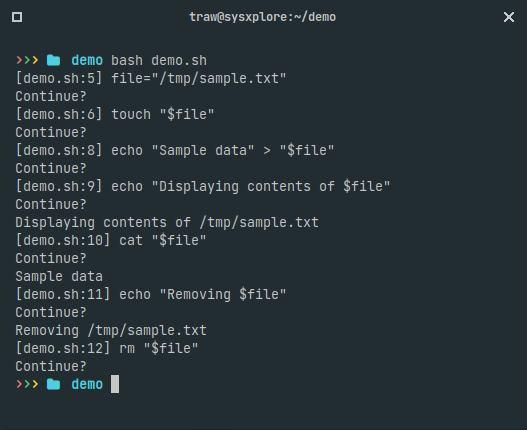
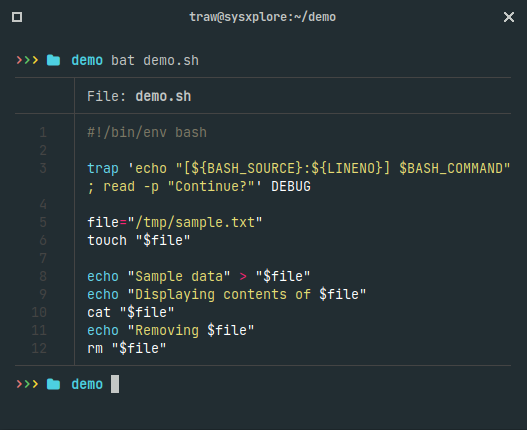
Quick Bash Scripting Tip 🐧
You can use the DEBUG trap to step through a bash script line by line, giving you the chance to review each line before it executes, perfect for debugging!
Here's how it works:
The trap command with DEBUG triggers right before each line executes, pausing to let you decide if you want to proceed. Think of it as an interactive "step-through" for your bash script.
Unlike sh -x, which prints each line without stopping, this method gives you control to confirm each command before it runs.
The DEBUG trap isn’t a real signal but rather a special feature (pseudo-signal) that triggers before every line in the script, making it handy for understanding script behavior line by line.
You can also explore similar pseudo-signals like EXIT, which runs commands right before the script ends; RETURN, which triggers upon returning from a function or after a script is sourced (using source or .); and ERR, which handles commands that return a non-zero exit code when set -e is active.
Quick Linux tip:
Got log files compressed as .gz? You don’t need to extract them to read or search through the content.
Use the 'z' tools directly:
• zcat - view the file
• zless - scroll through it
• zgrep - search inside it
• zegrep - search with extended regex
• zfgrep - search for fixed strings
• zcmp/zdiff - compare files
These commands let you inspect compressed logs without unpacking them first, perfect for quick troubleshooting sessions.
Quick Bash Scripting Tip 🐧
You can use the DEBUG trap to step through a bash script line by line, giving you the chance to review each line before it executes, perfect for debugging!
Here's how it works:
The trap command with DEBUG triggers right before each line executes, pausing to let you decide if you want to proceed. Think of it as an interactive "step-through" for your bash script.
Unlike sh -x, which prints each line without stopping, this method gives you control to confirm each command before it runs.
The DEBUG trap isn’t a real signal but rather a special feature (pseudo-signal) that triggers before every line in the script, making it handy for understanding script behavior line by line.
You can also explore similar pseudo-signals like EXIT, which runs commands right before the script ends; RETURN, which triggers upon returning from a function or after a script is sourced (using source or .); and ERR, which handles commands that return a non-zero exit code when set -e is active.
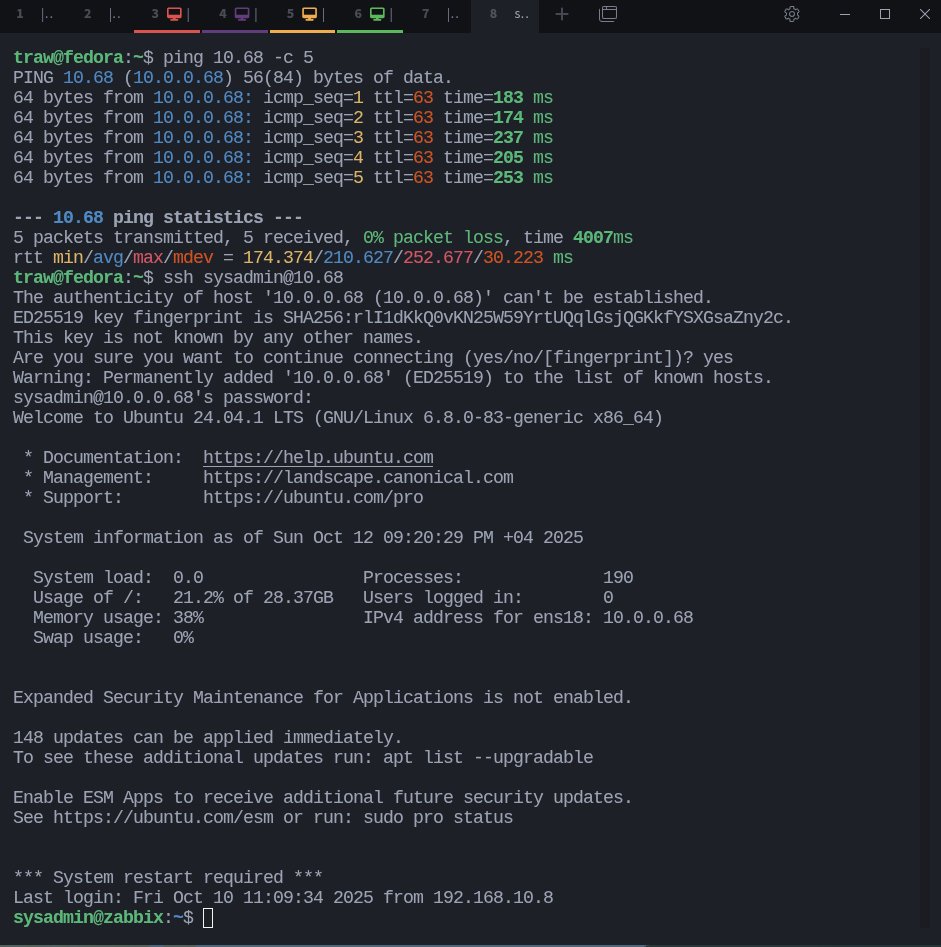
Did you know you can actually drop zeros in an IP address and it still works.
For example:
10.20.0.2 → 10.20.2
10.0.0.68 → 10.68
Both reach the same host.
It’s one of those neat little IP quirks I use in labs , saves me a few keystrokes every time 😅
If you're wondering how I get those colorized ping outputs — I use grc (Generic Colourizer).
It works with so many tools straight out of the box (df, lsblk, free, ps and more).
You can quickly install it with your package manager, for example:
$ sudo dnf install grc
Add these lines to your ~/.bashrc file if you use Bash:
GRC_ALIASES=true
[[ -s "/etc/profile.d/grc.sh" ]] && source /etc/profile.d/grc.sh
Then reload your shell:
$ source ~/.bashrc
For Zsh, add this to your ~/.zshrc:
[[ -s "/etc/grc.zsh" ]] && source /etc/grc.zsh
Then reload:
$ source ~/.zshrc
For other shells, you'll have to look up their manuals.
PYTHON is difficult to learn, but not anymore!
Introducing "The Ultimate Python ebook "PDF.
You will get:
• 74+ pages cheatsheet
• Save 100+ hours on research
And for 48 hrs, it's 100% FREE!
To get it, just:
1. Like & Retweet
2. Reply "Send"
3. Follow me [MUST]
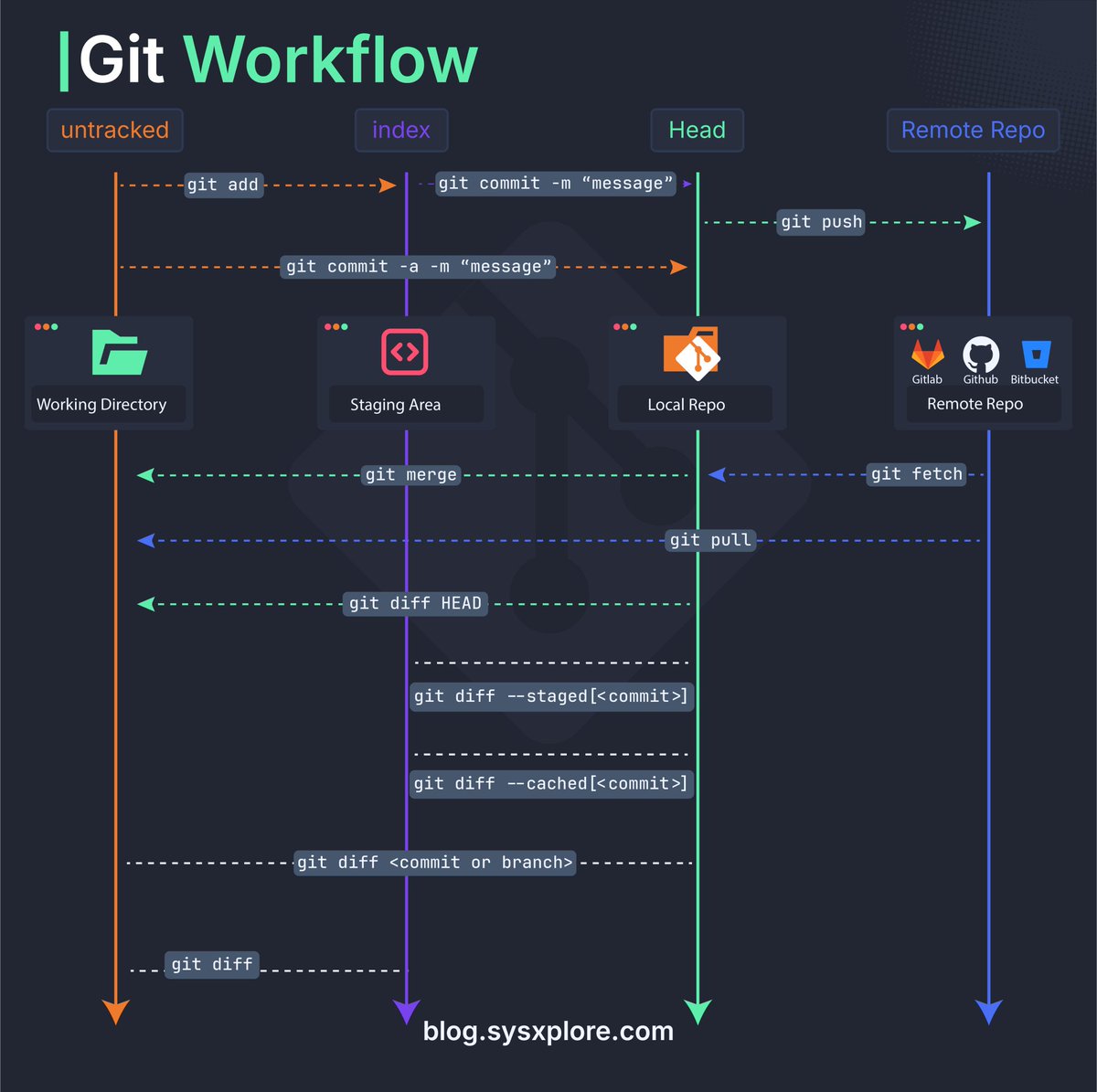
Linux process management = knowing what’s running, controlling it, and keeping the system healthy.
👉 Everything is a process.
👉 Each has a PID, parent, and signals.
👉 You can view, prioritize, pause, or kill them.
👉 Understanding this = mastering system behavior.
@sysxplore
The *full* Python Documentary will be released this Thursday (Aug 28) at 10am PDT / 19:00 CET. More at https://t.co/ifkBoVOkxX Don't miss the online release party / chat! @TECHDOCU
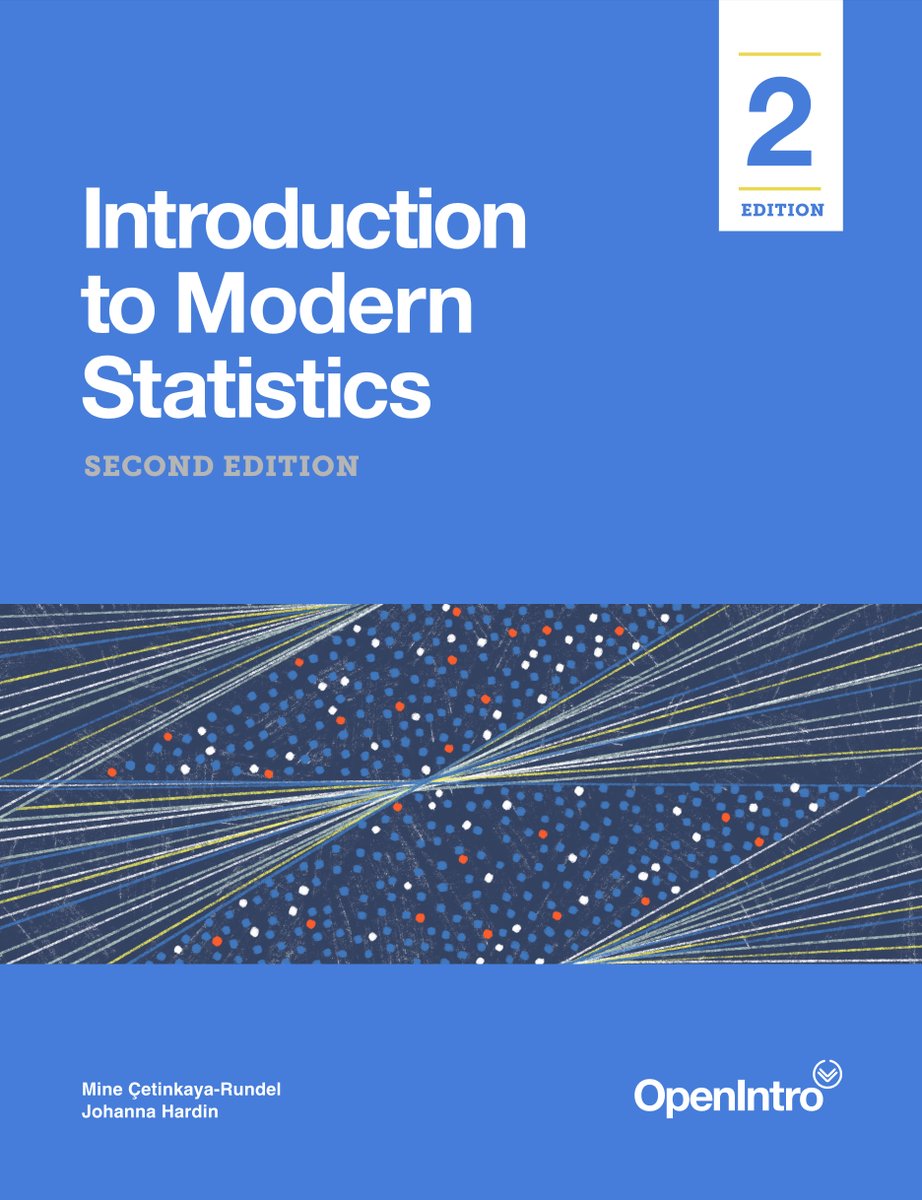
Data Science depends on Statistics.
Introducing "Introduction to Modern #Statistics "PDF.
You will get:
• 510+ pages
• Save 100+ hours on research
And for 72hrs, it's 100% FREE!
To get it, just:
• Like and retweet
• Comment " data "
• DM me in the message for the link
More languages, more insights!
A few interesting takeaways:
* Java and Kotlin are quick! Possible explanation: Google is heavily invested in performance here.
* Js is really fast as far as interpreted / jit languages go.
* Python is quite slow without things like PyPy.









![rubenhassid's tweet photo. Anthropic just dropped a 31-page prompting guide.
Here's everything you actually need (in 10 rules):
1. You write "review this contract" and pray.
Fix: Name every output. "Review this contract. Flag risks per clause. Rate severity 1-5. Return as a table."
2: You say "summarize this" on a 40-page report.
Fix: 4.7 sizes the answer to the input. Cap it: "5 bullets. Each under 15 words. Start each with an action verb."
3: You write "don't use jargon. don't be salesy."
Fix: Negative instructions don't stick.
Flip them: "Write in plain English a 16-year-old could read aloud."
4: You type "can you help me with the email?"
Fix: Each verb ships something. For example: "Go to Gmail. Find [contact]. Write the send-ready reply. Under 90 words. Tone: confident, casual."
5: You wait for Claude to web search on its own.
Fix: Claude opus 4.7 calls fewer tools than 4.6.
Force it: "Use web search aggressively. Verify every claim with at least 2 sources."
6: You miss the warm tone from old Claude.
Fix: Claude opus 4.7 is direct. Almost zero emojis. Paste 2-3 sentences in the voice you want.
Tell Claude to match the rhythm.
7: You ask for "a landing page" & get bare minimum.
Fix: Drop this one line on every creative task
→ "Go beyond the basics."
It's from Anthropic's own doc.
8: You forget Claude 4.7 doesn't reason by default.
Fix: They call it "adaptive thinking."
Add this at the end: "Think before answering (maximum reasoning)." Free upgrade. Every time.
9: You rewrite the same prompt 14 times a week.
Fix: A skill is a command with instructions pre-built.
Write the same prompt twice? Make it a skill.
10: You assume Claude knows what you meant.
Fix: Old Claude 4.6 guessed.
New Claude 4.7 does exactly what you typed.
Spell it out. Output. Order. Length. Tone. Format.
If you don't say it, you don't get it.
To go even further & download my .md files directly:
Step 1. Go to https://t.co/psB7XxB2Y4.
Step 2. Subscribe for free. Don't pay anything.
Step 3. Open my welcome email (most skip this).
Step 4. Hit the automatic reply button inside.
Step 5. Download my .md files from my Notion.
Bonus. Enjoy my best copy-paste prompts, too.](https://pbs.twimg.com/media/HI_cEF9aAAA3A4K.jpg)



![sysxplore's tweet photo. If you're wondering how I get those colorized ping outputs — I use grc (Generic Colourizer).
It works with so many tools straight out of the box (df, lsblk, free, ps and more).
You can quickly install it with your package manager, for example:
$ sudo dnf install grc
Add these lines to your ~/.bashrc file if you use Bash:
GRC_ALIASES=true
[[ -s "/etc/profile.d/grc.sh" ]] && source /etc/profile.d/grc.sh
Then reload your shell:
$ source ~/.bashrc
For Zsh, add this to your ~/.zshrc:
[[ -s "/etc/grc.zsh" ]] && source /etc/grc.zsh
Then reload:
$ source ~/.zshrc
For other shells, you'll have to look up their manuals.](https://pbs.twimg.com/media/G3FFttPWgAAxrPp.jpg)
![KhusbooT14835's tweet photo. PYTHON is difficult to learn, but not anymore!
Introducing "The Ultimate Python ebook "PDF.
You will get:
• 74+ pages cheatsheet
• Save 100+ hours on research
And for 48 hrs, it's 100% FREE!
To get it, just:
1. Like & Retweet
2. Reply "Send"
3. Follow me [MUST] https://t.co/76grIgnptJ](https://pbs.twimg.com/media/G3Bu1ADXsAA9TIA.jpg)