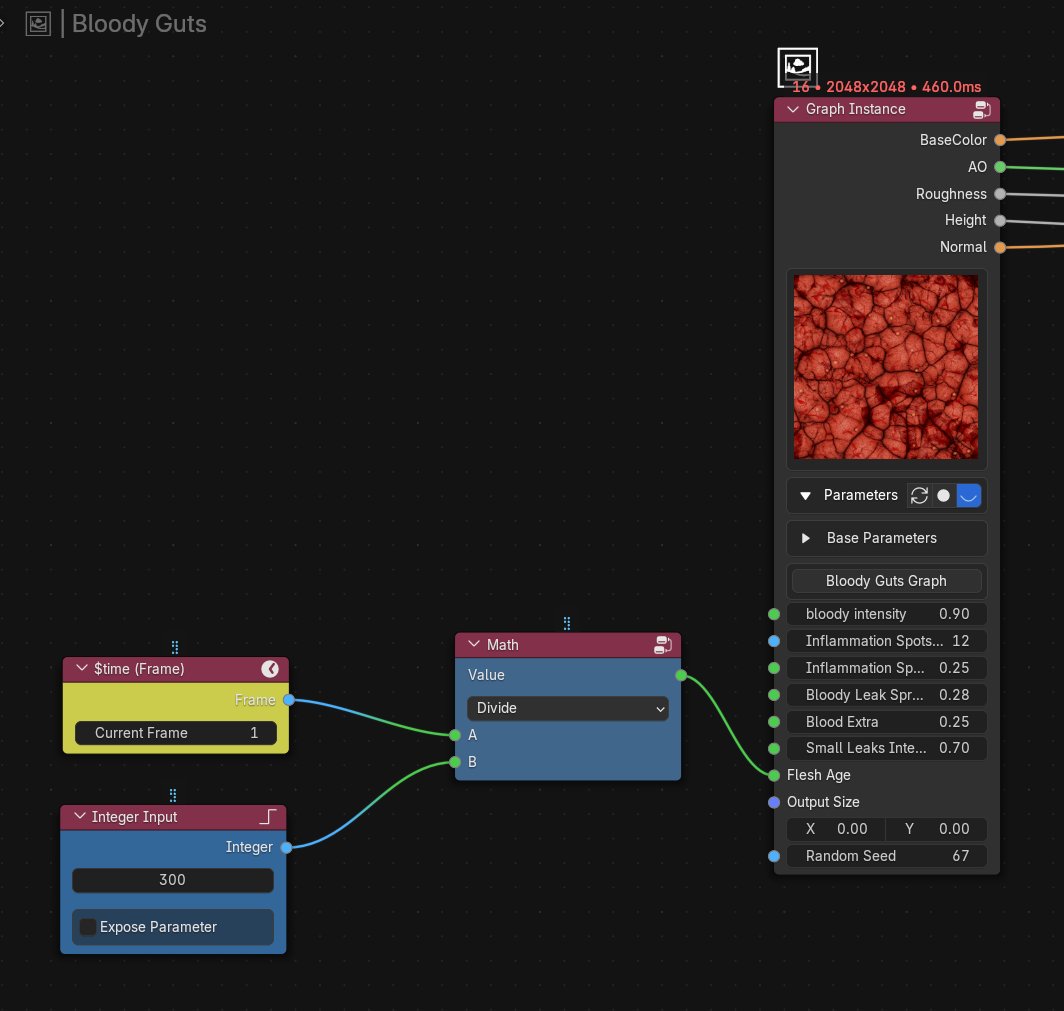
just implemented damage decals from @Johnny_Nodes 's YouTube video using WonderTexture.
Link to the original video in the comments.
This was originally made with Substance Designer, but WonderTexture can do (almost)everything Substance Designer does🤪
#b3d#blender#BlenderAddon
New updates for WonderTexture Addon [WIP]:
- Custom gizmos on certain nodes can now be edited directly within the Nodegraph.
- Node previews now scale up or down along with the node’s width.
- 2D previews are now almost real-time (for OpenGL backends) — even at 8K
We have two (for now) special nodes: ‘remove background’ and ‘depth estimation’. These are AI-powered nodes within WonderTexture..
😼
#b3d#blender#blendercommunity
Pixel Composer graphs in WonderTexture addon. It is basically the same as the Pixel Processor in Substance Designer. Most of the nodes in WonderTexture are actually built with it. GLSL scripting, while loops, and sequence nodes are also supported.
#b3d#blender
Working on the WonderTexture addon [WIP]. Trying to build a proper Substance Designer alternative right inside Blender.
Graph Instancing with exposed parameters. (Plus custom UI gizmo handlers for “position” type inputs!) 🧐
#b3d#blender#substancedesigner
Working on the WonderTexture addon [WIP]. Trying to build a proper Substance Designer alternative right inside Blender.
Graph Instancing with exposed parameters. (Plus custom UI gizmo handlers for “position” type inputs!) 🧐
#b3d#blender#substancedesigner
I can say that my WonderTexture blender addon is now quite close to the level I was aiming for. It’s basically a Substance Designer alternative built right inside Blender.
#blender#b3d
People keep reposting my hand animation, it's flattering. Also a bit frustrating when they get millions of views (often no credit) and if I search for my own video on YouTube I struggle to find it. Anyway here's how you make topomation: #blender#b3D https://t.co/f7EPbcBfr7
The CUDA programming guide https://t.co/bPnP473Va6 is worth studying, even if you're not programming in CUDA. A lot of this knowledge is transferable to DX12/Vulkan compute shaders, especially the GPU architecture/best practices/performance guidelines parts.
Have you ever wondered how your computer keeps track of where everything is in memory, especially when programs are constantly changing what they need? This is where Page Flushing comes into play.
Page flushing is a critical operation in memory management that ensures the Translation Lookaside Buffer (TLB) remains consistent with the current state of memory mappings. When a process modifies its page tables or the operating system reassigns physical memory, the TLB must be updated to reflect these changes. This is where page flushing comes into play.
The process of page flushing involves invalidating or removing entries from the TLB that are no longer valid or needed. This operation can be triggered by various events such as context switches between processes, changes to page table entries, updates to memory protection settings, or transitions between user and kernel mode.
At the hardware level, the CPU provides special instructions to invalidate TLB entries. For instance, on x86 architectures, the invlpg instruction is used for invalidating individual page entries, while reloading the CR3 register triggers a full TLB flush. The TLB hardware typically maintains a valid bit for each entry, which is cleared during a flush operation, effectively marking the entry as invalid.
Page flushes can be selective, targeting specific entries, or full, invalidating all entries in the TLB. While selective flushes are more efficient, full flushes are sometimes necessary, especially during major events like context switches. However, frequent full flushes can significantly impact system performance, as subsequent memory accesses may result in TLB misses, requiring time-consuming page table walks.
Page Unpin
Think of your computer's memory like a busy airport where planes (data) need to land and take off. Sometimes, a plane needs to stay parked for a while. Page Unpinning is like allowing that plane to move again.
Page unpinning is the process of releasing a page that was previously locked or "pinned" in physical memory. Pinning a page ensures that it remains in physical memory and cannot be paged out to disk or relocated. This is often necessary for operations that require direct physical memory access, such as DMA transfers or when handling critical kernel data structures.
The pinning mechanism typically involves incrementing a reference count in the page's metadata. The operating system maintains a data structure, often implemented as a bitmap, to keep track of pinned pages. When a page needs to be unpinned, the reference count is decremented. If the count reaches zero, the page becomes eligible for normal memory management operations, including paging out or relocation.
Unpinning a page may require interaction with the Memory Management Unit (MMU). In some cases, TLB entries for the unpinned page may need to be invalidated to ensure that future accesses to the page go through the full address translation process. This is particularly important if the page might be relocated or paged out soon after unpinning.
The kernel implementation of page unpinning often involves atomic operations to ensure thread-safety in multi-processor environments. After unpinning, if the system is under memory pressure, the kernel may trigger the page-out daemon to free up physical memory by moving less frequently used pages to disk.
Large Pages
Large pages, also known as huge pages or superpages, are memory pages that are significantly larger than the standard page size (typically 4KB). Common large page sizes include 2MB and 1GB. The primary purpose of large pages is to improve TLB efficiency and reduce the overhead of virtual-to-physical address translation.
By using large pages, fewer TLB entries are needed to cover the same amount of memory. This results in reduced TLB misses and fewer page table walks, which can significantly improve performance for applications with large memory footprints or those that frequently access memory across a wide range of addresses.
Implementing large page support requires changes at both the hardware and software levels. The MMU must support multiple page sizes, which is typically indicated by features like the Page Size Extension (PSE) bit in control registers on x86 architectures. The operating system must also be capable of allocating contiguous physical memory for large pages and provide APIs for applications to request them.
The use of large pages involves a trade-off between improved TLB hit rates and potential memory wastage due to internal fragmentation. While large pages can dramatically improve performance for some applications, they also reduce the granularity of memory protection and may lead to inefficient memory utilization if not carefully managed.
Page Frame Number (PFN)
The Page Frame Number (PFN) is a fundamental concept in memory management, representing the index of a physical page in memory. It serves as a unique identifier for each page of physical memory and is crucial for the translation between virtual and physical addresses.
In a typical memory management system, a physical address is composed of two parts: the Page Frame Number and the page offset. The PFN is shifted left by the page size (usually 12 bits for 4KB pages) and combined with the offset to form the complete physical address. This structure allows for efficient address translation and memory access.
Page table entries (PTEs) store the PFN of the mapped physical page. When the MMU performs a page table walk, it retrieves the PFN from the PTE and combines it with the page offset to construct the full physical address. Similarly, TLB entries store the mapping between Virtual Page Numbers (VPNs) and PFNs, allowing for rapid address translation on TLB hits.
The operating system maintains a PFN database or bitmap to track the state of each physical page. This data structure is crucial for memory allocation, freeing, and swapping decisions. It allows the OS to quickly determine which pages are free, in use, or candidates for paging out to disk.
Address Space Identifier (ASID)
Have you ever wondered how your computer manages to switch between different programs without getting confused? This is where the Address Space Identifier (ASID) plays a crucial role.
The Address Space Identifier (ASID) is a mechanism used to optimize TLB management in multi-tasking environments. It addresses the problem of TLB flushing during context switches, which can be a significant performance bottleneck in systems with frequent task switching.
An ASID is a unique tag associated with each process's address space. The TLB hardware is extended to include an ASID field in each entry, and the CPU maintains a current ASID register. When memory access occurs, the TLB checks for a matching virtual address and ensures that the ASID of the entry matches the current ASID in the CPU register.
During a context switch, instead of flushing the entire TLB, the operating system updates the CPU's current ASID register to match that of the incoming process. TLB entries with non-matching ASIDs are effectively ignored by the hardware, acting as if they're not present in the TLB. This allows entries from different processes to coexist in the TLB without causing address space conflicts.
The use of ASIDs significantly reduces the need for TLB flushes on context switches, improving overall system performance, especially in environments with frequent task switching or virtualization.
However, ASIDs are typically limited in size (often 8 or 16 bits), which means they can be exhausted in long-running systems. When this happens, the OS must perform a full TLB flush and reset its ASID allocation scheme.
Below, I've attached a code snapshot that provides a basic implementation of the memory management features discussed, illustrating how these concepts are applied in practice.
That's it for Today!