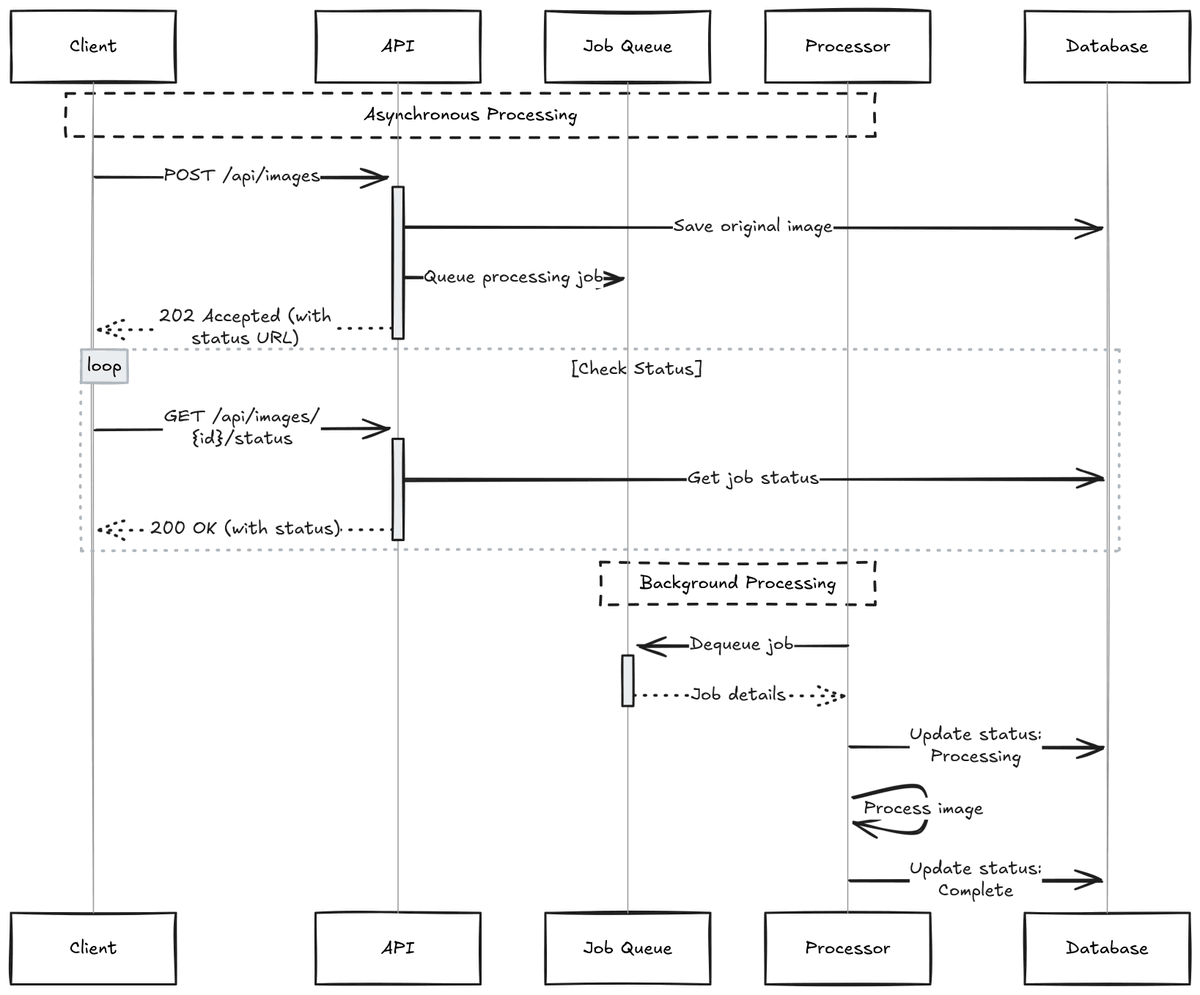
If you're dealing with a long-running API request, consider splitting the work into two parts:
1) Accept the request and return quickly
2) Do the heavy work in the background
Here's how you can build async APIs: https://t.co/SGhDko5XFL
Dive into the nuts and bolts of implementing the Saga pattern in C#. Manage distributed transactions effectively and ensure data consistency! #DEVCommunity#dotNET
https://t.co/KUqMOYiMup
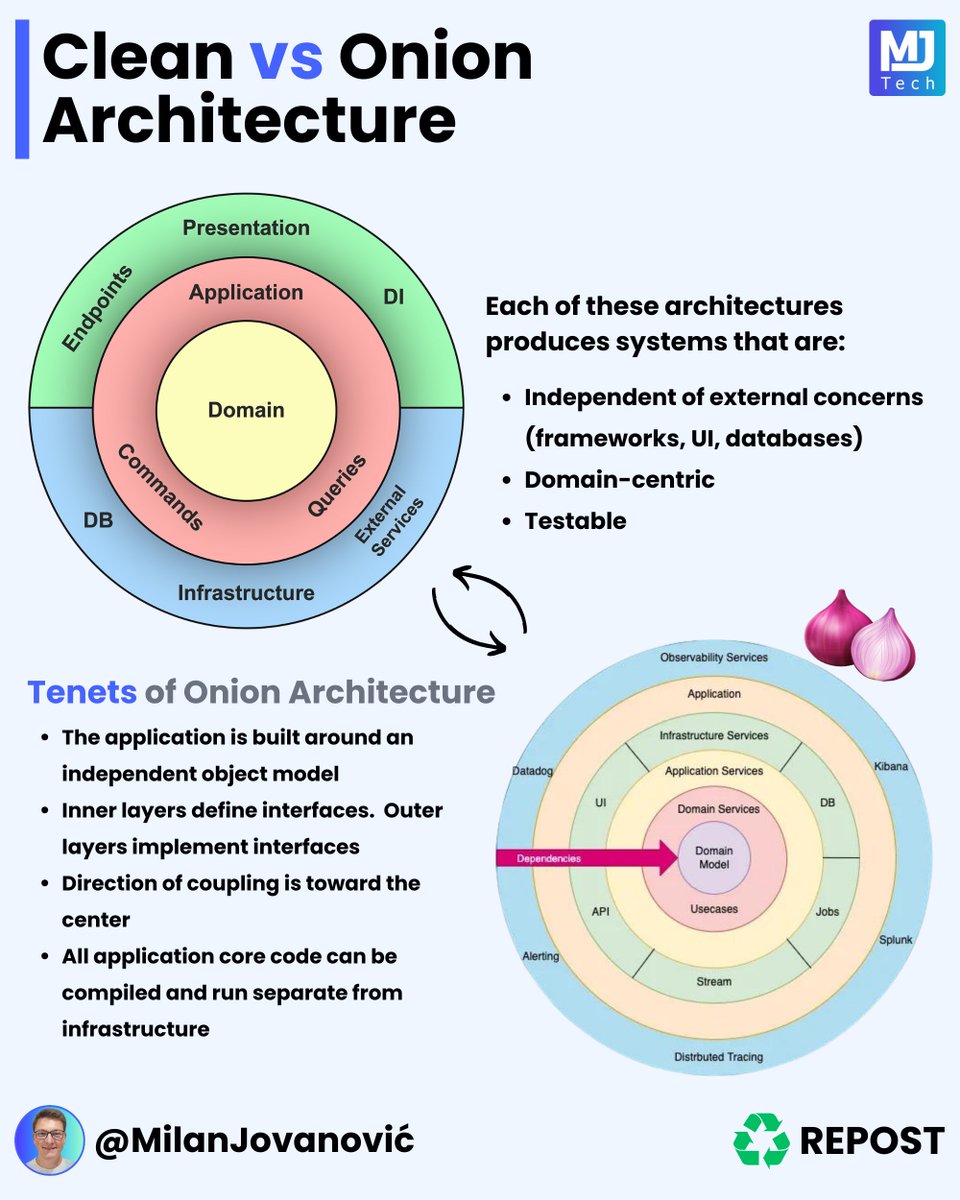
Onion architecture vs. Clean architecture
What is the difference between these approaches?
One of them makes you cry!
(okay, jokes aside)
Both architectures revolve around the same idea:
- The direction of dependencies is toward the center
- The core contains the domain entities and business rules
- The core should be independent of any external concerns
The main idea here is controlling coupling.
Our domain entities and business rules are at the center of the system.
They don't depend on anything, which is valuable because it makes them stable.
Things around the Domain can change, which shouldn't affect the domain or business rules.
Remember, coupling is the degree of interdependence between our modules and components.
Both Clean and Onion architecture strive to achieve the same goals.
- We have the Domain in both
- Clean architecture has use cases
- Onion architecture has domain and application services
- On the very edges, we have infrastructure concerns
So what's the difference?
Any differences fade when it's time to implement this architecture in a project.
Another architectural driver you should consider is cohesion.
Cohesion refers to the degree to which the elements within a module belong together and work together to achieve a single, well-defined purpose.
This is the main driver behind Vertical Slice Architecture.
If you want to learn more about VSA, start here: https://t.co/sstFwkBt2q
Big O Notation 101: The Secret to Writing Efficient Algorithms
From simple array operations to complex sorting algorithms, understanding the Big O Notation is critical for building high-performance software solutions.
1 - O(1)
This is the constant time notation. The runtime remains steady regardless of input size. For example, accessing an element in an array by index and inserting/deleting an element in a hash table.
2 - O(n)
Linear time notation. The runtime grows in direct proportion to the input size. For example, finding the max or min element in an unsorted array.
3 - O(log n)
Logarithmic time notation. The runtime increases slowly as the input grows. For example, a binary search on a sorted array and operations on balanced binary search trees.
4 - O(n^2)
Quadratic time notation. The runtime grows exponentially with input size. For example, simple sorting algorithms like bubble sort, insertion sort, and selection sort.
5 - O(n^3)
Cubic time notation. The runtime escalates rapidly as the input size increases. For example, multiplying two dense matrices using the naive algorithm.
6 - O(n logn)
Linearithmic time notation. This is a blend of linear and logarithmic growth. For example, efficient sorting algorithms like merge sort, quick sort, and heap sort
7 - O(2^n)
Exponential time notation. The runtime doubles with each new input element. For example, recursive algorithms solve problems by dividing them into multiple subproblems.
8 - O(n!)
Factorial time notation. Runtime skyrockets with input size. For example, permutation-generation problems.
9 - O(sqrt(n))
Square root time notation. Runtime increases relative to the input’s square root. For example, searching within a range such as the Sieve of Eratosthenes for finding all primes up to n.
Over to you: What else will you add to better understand the Big O Notation?
We created a video on this topic. Watch it on YouTube: https://t.co/abwgJ9ZFGD
How to deploy a .NET App as a container?
No Dockerfile needed. Here's how:
𝗦𝘁𝗲𝗽 𝟭: 𝗕𝘂𝗶𝗹𝗱 𝘁𝗵𝗲 𝗗𝗼𝗰𝗸𝗲𝗿 𝗜𝗺𝗮𝗴𝗲
This is the easiest part thanks to the native container support in .NET 8.
Just run the standard 𝗱𝗼𝘁𝗻𝗲𝘁 𝗽𝘂𝗯𝗹𝗶𝘀𝗵 command with the 𝗣𝘂𝗯𝗹𝗶𝘀𝗵𝗖𝗼𝗻𝘁𝗮𝗶𝗻𝗲𝗿 target and the image tag.
Your new Docker image will be ready in a few seconds. No Dockerfile needed.
𝗦𝘁𝗲𝗽 𝟮: 𝗣𝘂𝘀𝗵 𝘆𝗼𝘂𝗿 𝗶𝗺𝗮𝗴𝗲 𝘁𝗼 𝗮 𝗗𝗼𝗰𝗸𝗲𝗿 𝗿𝗲𝗴𝗶𝘀𝘁𝗿𝘆
A Docker registry is the repository where you can store and share your images.
If using Azure Container Registry, just login and then run same 𝗱𝗼𝘁𝗻𝗲𝘁 𝗽𝘂𝗯𝗹𝗶𝘀𝗵 command with the 𝗖𝗼𝗻𝘁𝗮𝗶𝗻𝗲𝗿𝗥𝗲𝗴𝗶𝘀𝘁𝗿𝘆 argument.
In fact, you can do steps 1 and 2 in one line and, after that, your image will be ready to deploy from your ACR.
𝗦𝘁𝗲𝗽 𝟯: 𝗣𝘂𝗹𝗹 𝘆𝗼𝘂𝗿 𝗶𝗺𝗮𝗴𝗲 𝗶𝗻𝘁𝗼 𝘆𝗼𝘂𝗿 𝗽𝗿𝗼𝗱𝘂𝗰𝘁𝗶𝗼𝗻 𝗯𝗼𝘅
Get into your production box, install Docker, and get access to your ACR via the 𝗱𝗼𝗰𝗸𝗲𝗿 𝗹𝗼𝗴𝗶𝗻 command.
Then, run the 𝗱𝗼𝗰𝗸𝗲𝗿 𝗽𝘂𝗹𝗹 command to get the ready-to-run image to the production box in seconds.
𝗦𝘁𝗲𝗽 𝟰: 𝗥𝘂𝗻 𝘆𝗼𝘂𝗿 𝗮𝗽𝗽 𝗶𝗻 𝗽𝗿𝗼𝗱 𝗮𝘀 𝗮 𝗰𝗼𝗻𝘁𝗮𝗶𝗻𝗲𝗿
Use the 𝗱𝗼𝗰𝗸𝗲𝗿 𝗿𝘂𝗻 command to start running your .NET app as a docker container.
That's it!
𝗥𝗲𝘀𝘂𝗹𝘁
Your .NET app is up and running in Prod and you did not have to install anything there other than Docker. Plus, no Dockerfile!
For an in-depth tutorial, with plenty of code snippets and screenshots, check here 👇
https://t.co/s5fJNzUWKi
Did you ever run into the Cache Stampede problem?
A cache stampede happens when concurrent requests encounter a cache miss and try to fetch the data from the source.
This can overload your application and negate the benefits of caching.
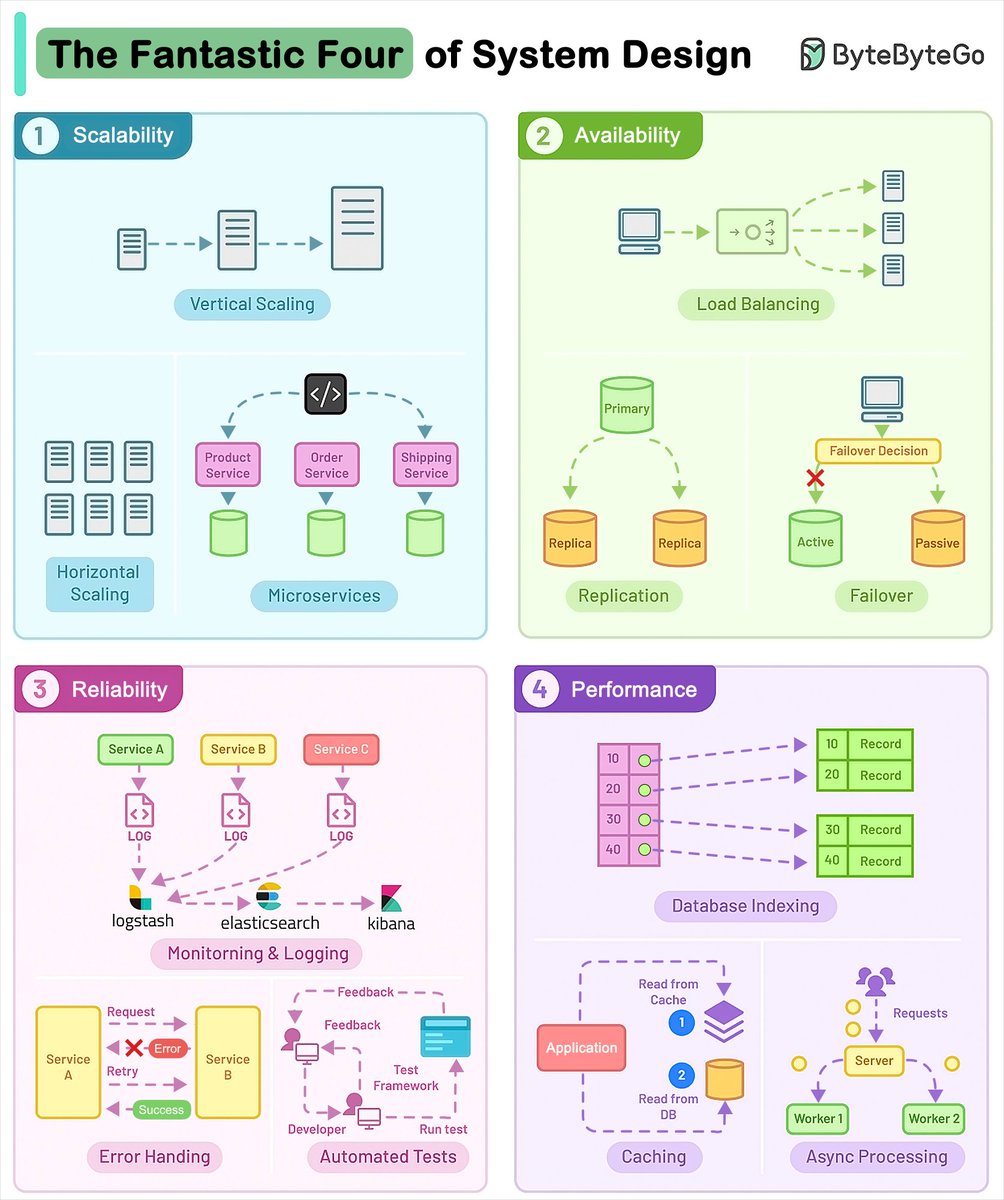
Who are the Fantastic Four of System Design?
Scalability, Availability, Reliability, and Performance.
They are the most critical components to crafting successful software systems.
Let’s look at each of them with implementation techniques:
1 - Scalability
Scalability ensures that your application can handle more load without compromising performance.
2 - Availability
Availability makes sure that your application is always ready to serve the users and downtime is minimal.
3 - Reliability
Reliability is about building software that consistently delivers correct results.
4 - Performance
Performance is the ability of a system to carry out its tasks at an expected rate under peak load using available resources.
Over to you: What are the other pillars of system design and strategies you’ve come across?
–
Subscribe to our weekly newsletter to get a Free System Design PDF (158 pages): https://t.co/FIzCeaWsZV
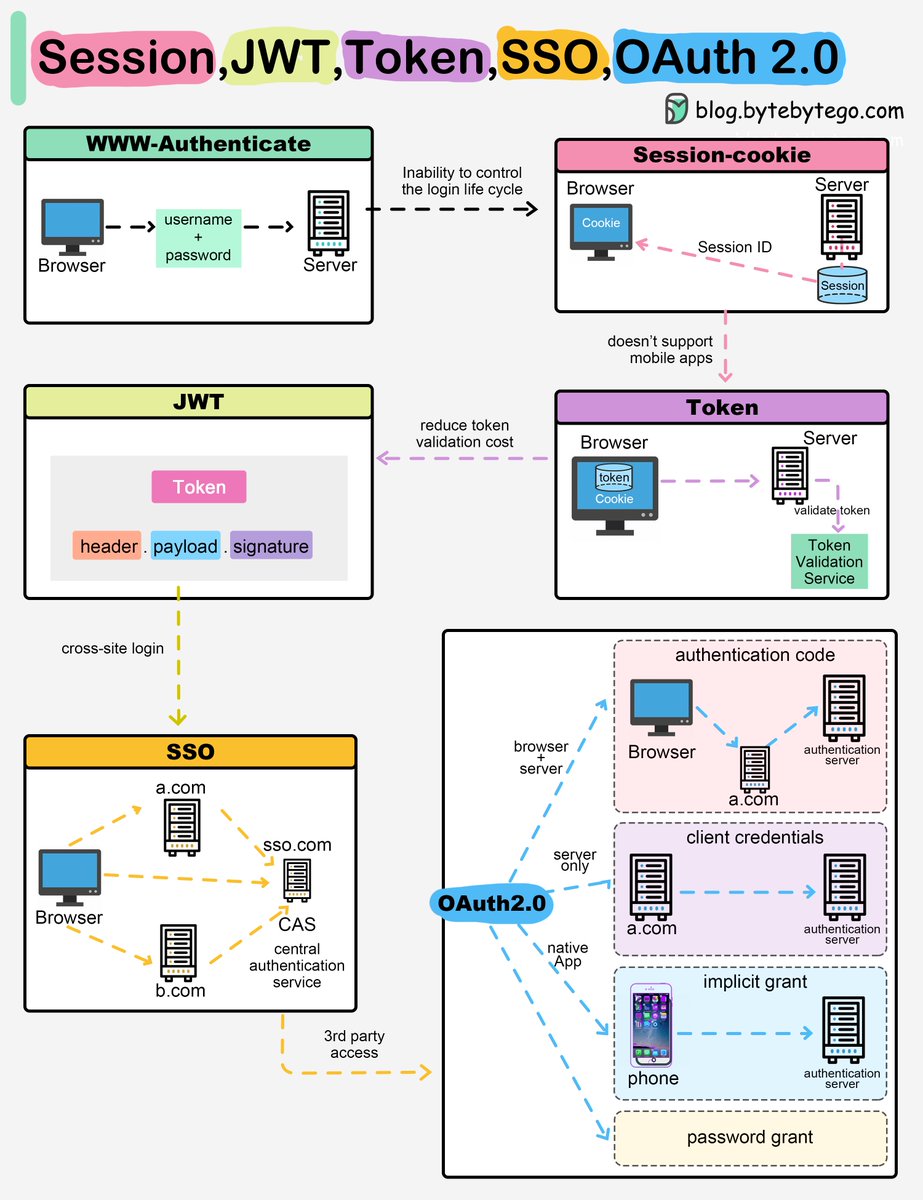
Session, Cookie, JWT, Token, SSO, and OAuth 2.0 Explained in One Diagram
When you login to a website, your identity needs to be managed. Here is how different solutions work:
- Session - The server stores your identity and gives the browser a session ID cookie. This allows the server to track login state. But cookies don't work well across devices.
- Token - Your identity is encoded into a token sent to the browser. The browser sends this token on future requests for authentication. No server session storage is required. But tokens need encryption/decryption.
- JWT - JSON Web Tokens standardize identity tokens using digital signatures for trust. The signature is contained in the token so no server session is needed.
- SSO - Single Sign On uses a central authentication service. This allows a single login to work across multiple sites.
- OAuth2 - Allows limited access to your data on one site by another site, without giving away passwords.
- QR Code - Encodes a random token into a QR code for mobile login. Scanning the code logs you in without typing a password.
Over to you: QR code logins are gaining popularity. Do you know how it works?
–
Subscribe to our weekly newsletter to get a Free System Design PDF (158 pages): https://t.co/FIzCeaWsZV
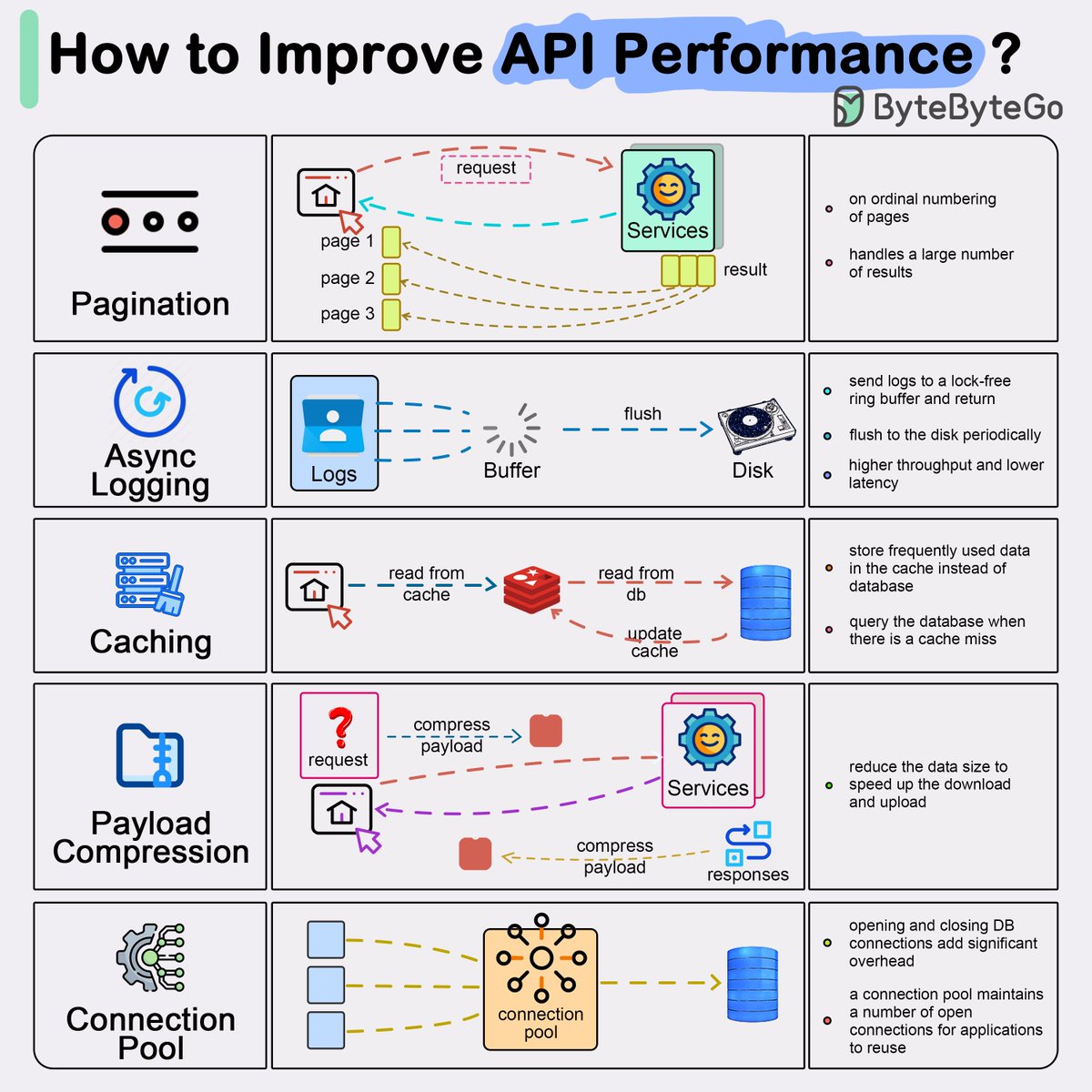
Top 5 common ways to improve API performance.
Result Pagination:
This method is used to optimize large result sets by streaming them back to the client, enhancing service responsiveness and user experience.
Asynchronous Logging:
This approach involves sending logs to a lock-free buffer and returning immediately, rather than dealing with the disk on every call. Logs are periodically flushed to the disk, significantly reducing I/O overhead.
Data Caching:
Frequently accessed data can be stored in a cache to speed up retrieval. Clients check the cache before querying the database, with data storage solutions like Redis offering faster access due to in-memory storage.
Payload Compression:
To reduce data transmission time, requests and responses can be compressed (e.g., using gzip), making the upload and download processes quicker.
Connection Pooling:
This technique involves using a pool of open connections to manage database interaction, which reduces the overhead associated with opening and closing connections each time data needs to be loaded. The pool manages the lifecycle of connections for efficient resource use.
Over to you: What other ways do you use to improve API performance?
–
Subscribe to our weekly newsletter to get a Free System Design PDF (158 pages): https://t.co/FIzCeaWsZV
5 books I can't recommend enough:
1. Clean Architecture (Martin)
2. Building Microservices (Newman)
3. Unit Testing Principles, Practices, and Patterns (Khorikov)
4. Domain Driven Design (Evans)
5. Head First Design Patterns (Freeman & Robson)
My favorite: Building Microservices, for how well it explains all aspects of moving to a microservices-based architecture.
What should I read next?
10 months ago, I created a System Design repo on Github, and I'm excited to share that it recently reached over 15,000 stars.
Thanks to everyone who has starred or forked this repository!
The repository contains a collection of resources to study:
- System Design concepts and building blocks
- Most common tradeoffs
- Around 50 interview problems categorized by difficulty level
- Books/channels to learn more about System Design
I recently made it more structured, added new articles and updated some of the existing articles.
My goal with this repo is to curate the best resources to learn System Design and prepare for interviews.
If you find it valuable, consider giving it a star.
Check it out here: https://t.co/pkVpi6L03n
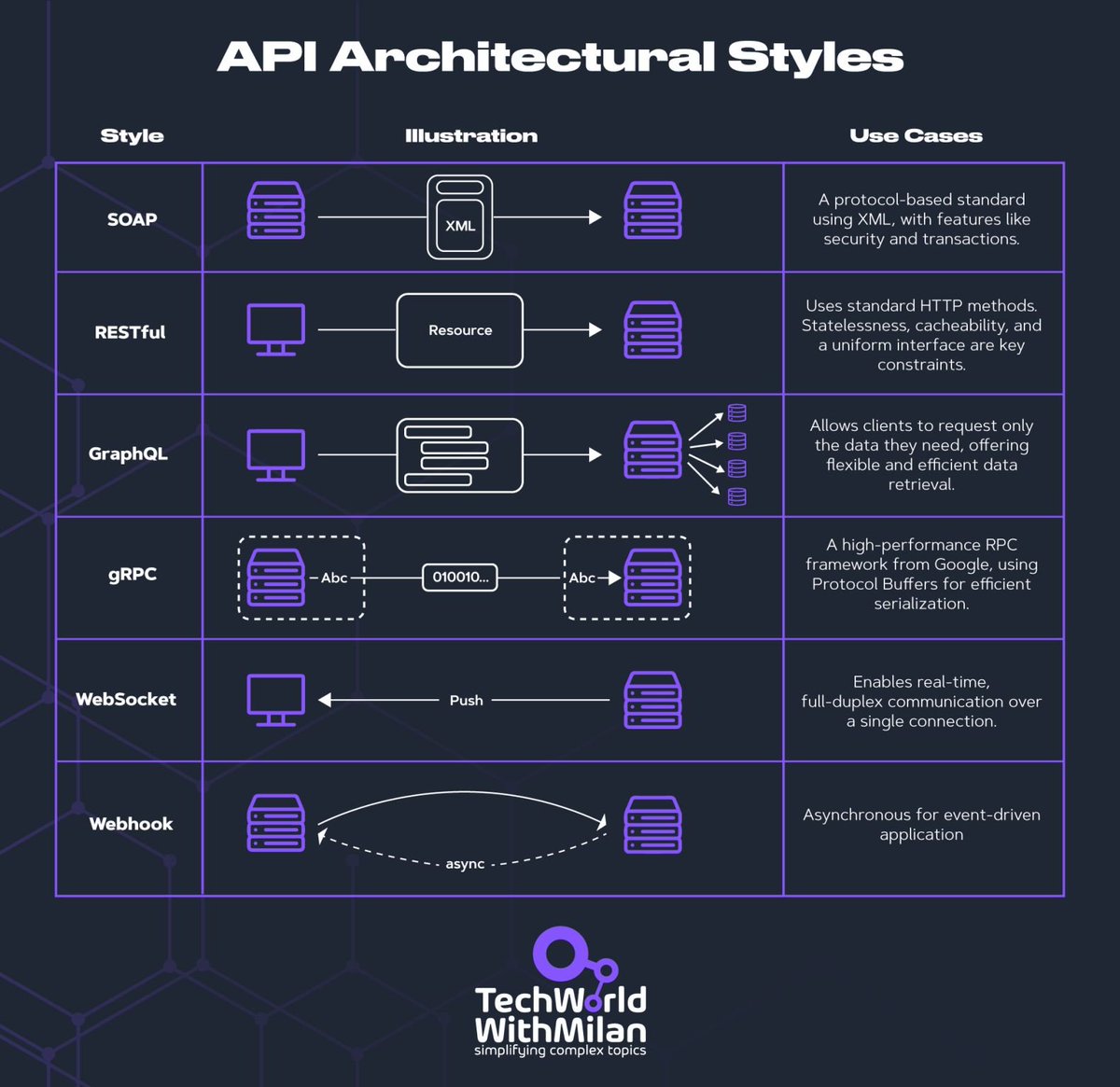
𝗪𝗵𝗮𝘁 𝗮𝗿𝗲 𝘁𝗵𝗲 𝗺𝗮𝗶𝗻 𝗔𝗣𝗜 𝗔𝗿𝗰𝗵𝗶𝘁𝗲𝗰𝘁𝘂𝗿𝗮𝗹 𝘀𝘁𝘆𝗹𝗲𝘀?
I've just released the new issue of my 𝗻𝗲𝘄𝘀𝗹𝗲𝘁𝘁𝗲𝗿 to more than 33k+ addresses.
This issue brings a deep dive into 𝘁𝗵𝗲 𝗺𝗮𝗶𝗻 𝗔𝗣𝗜 𝗮𝗿𝗰𝗵𝗶𝘁𝗲𝗰𝘁𝘂𝗿𝗮𝗹 𝘀𝘁𝘆𝗹𝗲𝘀.
🛡️ Also, we will see the new 𝗢𝗪𝗔𝗦𝗣 𝗧𝗼𝗽 𝟭𝟬 𝗔𝗣𝗜 𝘀𝗲𝗰𝘂𝗿𝗶𝘁𝘆 𝗿𝗶𝘀𝗸𝘀 𝗹𝗶𝘀𝘁, with additions and reasoning.
📋 As a bonus, you will get an 𝗔𝗣𝗜 𝗦𝗲𝗰𝘂𝗿𝗶𝘁𝘆 𝗖𝗵𝗲𝗰𝗸𝗹𝗶𝘀𝘁 to secure your APIs.
➡️ Check it out from the following link: https://t.co/Cb46Yj9Ehy
#softwareengineering #programming #api
I've used Clean Architecture on many projects in the past with success.
Here's why you should consider it for complex projects: https://t.co/mJLbtNE3ET
7 must-know strategies to scale your database.
1 - Indexing:
Check the query patterns of your application and create the right indexes.
2 - Materialized Views:
Pre-compute complex query results and store them for faster access.
3 - Denormalization:
Reduce complex joins to improve query performance.
4 - Vertical Scaling
Boost your database server by adding more CPU, RAM, or storage.
5 - Caching
Store frequently accessed data in a faster storage layer to reduce database load.
6 - Replication
Create replicas of your primary database on different servers for scaling the reads.
7 - Sharding
Split your database tables into smaller pieces and spread them across servers. Used for scaling the writes as well as the reads.
Over to you: What other strategies do you use for scaling your databases?
--
Subscribe to our weekly newsletter to get a Free System Design PDF (158 pages): https://t.co/FIzCeaWsZV
How to load your websites at lightning speed?
Check out these 8 tips to boost frontend performance:
1 - Compression
Compress files and minimize data size before transmission to reduce network load.
2 - Selective Rendering/Windowing
Display only visible elements to optimize rendering performance. For example, in a dynamic list, only render visible items.
3 - Modular Architecture with Code Splitting
Split a bigger application bundle into multiple smaller bundles for efficient loading.
4 - Priority-Based Loading
Prioritize essential resources and visible (or above-the-fold) content for a better user experience.
5 - Pre-loading
Fetch resources in advance before they are requested to improve loading speed.
6 - Tree Shaking or Dead Code Removal
Optimize the final JS bundle by removing dead code that will never be used.
7 - Pre-fetching
Proactively fetch or cache resources that are likely to be needed soon.
8 - Dynamic Imports
Load code modules dynamically based on user actions to optimize the initial loading times.
Over to you: What other frontend performance tips would you add to this cheat sheet?
--
Subscribe to our weekly newsletter to get a Free System Design PDF (158 pages): https://t.co/FIzCeaWsZV
You can use CQRS to build fast and scalable applications.
The CQRS pattern separates the writes and reads in the application.
This separation can be logical or physical.
CQRS has many benefits:
- Complexity management
- Improved performance
- Scalability
- Flexibility
- Security
My preferred approach is starting with logical CQRS.
One database - but separate flows for writes and reads.
You can design a data model fine-tuned for each operation.
Here's how to implement CQRS: https://t.co/fLyuxqVTKj
What do you think about this pattern?
---
Subscribe to my weekly newsletter to accelerate your .NET skills: https://t.co/6VWa67Jxz7