Microsoft is now bundling Intune Remote Help with M365 E3/E5, no more separate add-on needed for many orgs. Our step-by-step guide covers licensing, RBAC setup, app deployment & troubleshooting:
https://t.co/7b4Iiw9Lcg
#MSintune#RemoteHelp#Microsoft365
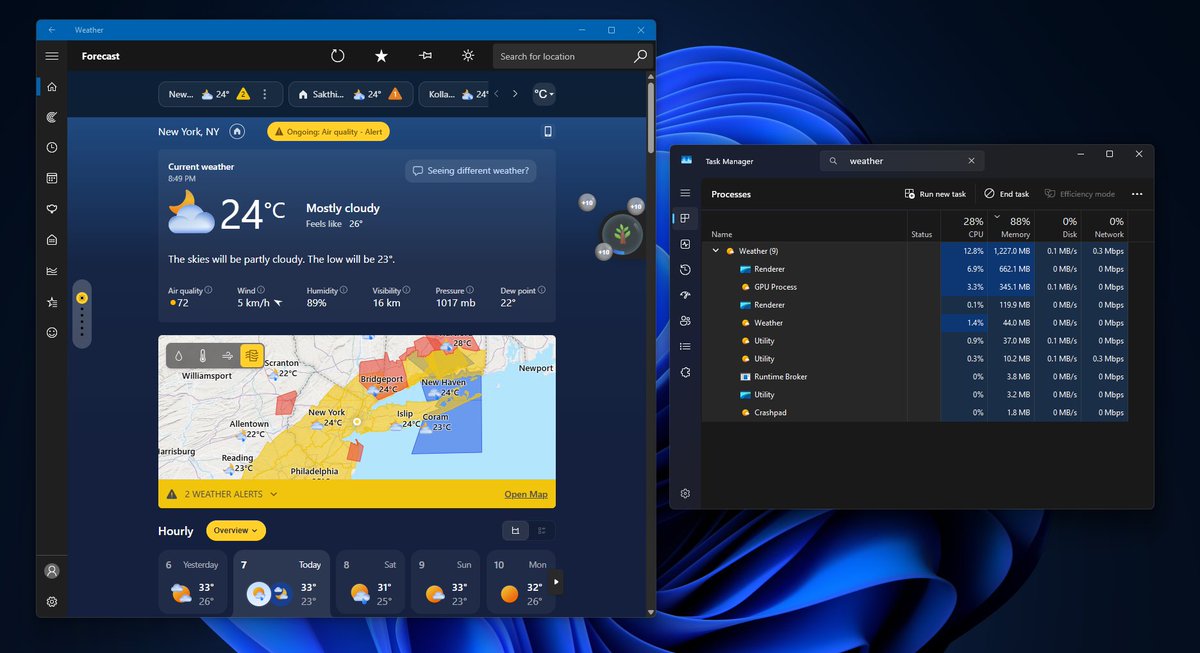
Windows 11's built-in Weather app should not be using over 1GB of RAM just to show me whether it will rain.
I opened Weather during heavy rain because my phone was charging. The forecast itself was good: radar, hourly precipitation, wind, AQI, moon phase, severe alerts, the works.
But Task Manager showed the app climbing past 1.2GB RAM without me doing anything serious.
Then I expanded the process tree, and the reason became obvious. Weather is not really a native Windows app.
It is MSN Weather running as a WebView2/Chromium wrapper with multiple browser-like processes under it.
And yes, it also shows ads.
A default Weather app on a paid operating system should not feel like an MSN page wearing a forecast icon.
Apple’s Weather app on macOS gives detailed weather data without ads and used about 247MB of RAM in my comparison.
Windows Weather used nearly five times that.
I hope Microsoft's leadership does something about the inbox apps.
BRING BACK NATIVE APPS
Breaking: Microsoft confirms it accidentally released "OneDrive Photos" to Windows 11 PCs more broadly than it should have.
This explains why the app also showed up on enterprise PCs, where it does not work, as it only works with a Microsoft account (personal).
As Windows Latest first reported, IT admins are fuming because they cannot remove OneDrive Photos without deleting the OneDrive sync client.
Microsoft says it's working on a fix, and it'll be more careful next time.
OneDrive Photos comes with a "People" feature, which uses AI to group similar faces, but Microsoft insists it's not training its AI models on your faces. This feature is also turned off by default.
If you don't want the OneDrive Photos app to pop up on your PC in the coming days, remove all OneDrive-related features/apps.
Microsoft has promised it'll soon let you remove "OneDrive Photos" without removing the OneDrive sync client.
"This is unacceptable, Microsoft." IT admins are furious as Microsoft has just installed "OneDrive Photos" on Windows 11 PCs, and you cannot even use it without a personal Microsoft account.
"I’m running an ENTERPRISE version of Windows. I shouldn’t see this BETA app on any machine with this SKU. Also, it is nowhere on the Microsoft roadmap, nor is there a single mention of it in the Message Center," one furious IT admin wrote in a comment.
The OneDrive Photos app is being quietly installed on all PCs, including consumer PCs, where the OneDrive sync client is installed.
You cannot remove the OneDrive Photos app without deleting OneDrive entirely, and even if you use scripts to remove it, the Photos app comes back again.
Some users are also upset that OneDrive Photos is a Microsoft Edge-based app, so you could simply use OneDrive dot com instead.
Moreover, OneDrive is already integrated into File Explorer and the Microsoft Photos app. This app was not required.
The new OneDrive Photos app also uses AI to club similar faces, but the feature is opt-in.
"With OneDrive, you can now group similar faces in your photos. To do this, we collect and use information from images of faces in your photos to find similar faces. This facial data might be biometric data in certain jurisdictions," Microsoft noted.
Windows 11 emergency update released after July 2026 Update caused "unexpected shutdowns, poor performance, increased heat, and battery drain."
The new update is Windows 11 KB5121767 (Build 26200.8894), and it fixes these issues on affected machines, mostly Dell PCs.
Microsoft says today's patch is only recommended for affected Dell PCs, but here’s the messy part... this out-of-band update can automatically download on other PCs too if “Get the latest updates as soon as they’re available” is turned on.
An emergency Dell-focused fix can still show up as a generic: “2026-07 Update (KB5121767)."
The root cause is an incompatibility between Intel’s Innovation Platform Framework Processor Participant driver and Microsoft’s new Windows USB-C Connection Manager interface.
That driver helps manage thermals, power, fan noise, and performance, which explains the heat and shutdown reports.
Affected Dell PCs should install it. Everyone can skip it, but nothing would happen if you choose to install it on non-Dell PCs.
And please turn off that “latest updates” toggle unless you actually want Windows Update to grab everything Microsoft throws into the channel.
Been putting off getting rid of SMS and Voice authentication methods? Well now you must get ahead of it! > https://t.co/nOCn8eKlc3 💨
By 𝟏𝐬𝐭 𝐅𝐞𝐛𝐫𝐮𝐚𝐫𝐲 𝟐𝟎𝟐𝟕, Microsoft are shutting down their SMS and Voice services. Meaning, by that time, you must transition your users away from these methods (preferred), or you must connect to a third-party telephony provider (which will cost you money and is not preferred).
Follow the guidance in my article linked above to audit which users are still on SMS so you can perform a targeted rollout of better authentication methods which are not so susceptible to compromise!
#Entra #Microsoft
Intel’s major driver update for Windows 11 delivers a performance boost and ships with Microsoft’s quality promise.
On June 30, Intel released Wi-Fi and Bluetooth driver version 24.50.0, and the key line is that it includes enhancements aligned with Microsoft’s Windows ecosystem quality initiative.
That’s Microsoft’s Driver Quality Initiative, or DQI.
At WinHEC 2026, Microsoft told Intel, AMD, Qualcomm, HP, and other partners that drivers need to stop hurting Windows 11’s reliability and reputation.
Bad drivers cause BSODs, failed installs, overheating, broken Wi-Fi, update loops, and users blame Windows even when the OEM or silicon vendor caused it.
DQI is Microsoft trying to raise the floor.
It comes with Microsoft-authored class drivers, less unnecessary kernel-mode interference, and more user-mode drivers where possible.
📸 ASUS ZenBook Duo with dual-screen setup
‼️ A 16-year-old Linux KVM vulnerability called Januscape (CVE-2026-53359) lets a root user inside a guest VM escape to the host on Intel and AMD x86 systems, and a proof of concept that crashes hosts is already public.
Canonical says patched Ubuntu kernels are still pending for all releases and recommends disabling nested virtualization in the meantime.
Windows 11 has been secretly running a keylogger in the background
this whole time
and sending every keystroke to Microsoft servers.
Here's the fix they don't want you to know about
Win+R → regedit → HKEY_LOCAL_MACHINE\SOFTWARE\Microsoft\Input\TIPC → Double click "Enabled" → Set value to 0 → Restart PC
Stop Microsoft from reading every word you type in Valorant chat, Discord, and Chrome.
🚨 Hackers found a way into Palo Alto’s GlobalProtect VPN without a password.
The flaw, tracked as CVE-2026-0257, lets attackers bypass PAN-OS authentication and establish unauthorized VPN sessions.
Palo Alto says it’s already being used in real attacks.
If you run GlobalProtect, check this now.
Details ➝ https://t.co/OSarZ4i9jF
NONE. And this is one of the most common misconceptions in networking.
PING uses ICMP, the Internet Control Message Protocol. ICMP operates at the network layer, layer 3, sitting alongside IP rather than above it. It does not use TCP or UDP and therefore has no concept of ports at all.
Ports are a transport layer construct. They exist in TCP and UDP to distinguish between different services running on the same host. ICMP predates that abstraction entirely and was never designed to use it.
When you run a ping command you are sending an ICMP Echo Request packet directly to an IP address. The receiving host responds with an ICMP Echo Reply. No port number is involved at any stage of that exchange.
This is why firewalls block PING separately from blocking ports. You cannot block PING by closing a port because there is no port to close. You block it by writing a firewall rule that drops ICMP Echo Request packets specifically. Many network administrators do exactly this, which is why a host that is fully reachable on port 443 might not respond to a ping at all.
It also means port scanners like Nmap often send ICMP probes separately from their TCP and UDP port scanning, because they are fundamentally different types of traffic requiring different handling.
ICMP does have type and code fields that function somewhat analogously to ports in that they distinguish between different kinds of ICMP messages. Echo Request is type 8. Echo Reply is type 0. But these are not ports and do not behave like ports in any meaningful sense.
No port. Just ICMP.
You can remove preinstalled Microsoft Store apps such as Clipchamp, Xbox, Weather, and Feedback Hub. Follow our guide to learn more:
https://t.co/ag8YAaQSle
#MSIntune#Microsoft#Apps#SCDudes
Recently, a United Airlines flight was turned around due to a Bluetooth security issue. Guess what, we had previously written a guide on "Securing Bluetooth on Windows Devices with Intune".
https://t.co/kTlOuEaX4P
#MSintune#Windows#Bluetooth#cybersecurity
Microsoft officially confirms Windows 11 26H2 will finally bring one of the platform's most requested features, and you can already try it out. #Windows11#Microsoft https://t.co/7MXjg7ZwGI
After the May Windows update, the Company Portal started failing during Autopilot pre-provisioning when assigned in system context.
The app files were already on the device, but #Windows had not completed the registration needed for ESP to recognize the app as installed. Autopilot therefore returned error 0x87D1041C and blocked the enrollment.
The root cause pointed to a flight that was added and enabled with the May update: FixInstallUnderSystemContext.
Which is pretty funny when you think about it...
A fix that ended up breaking the system context installation it was meant to improve.
Full technical breakdown and fix in the blog:
https://t.co/xlQIt8wTuV
#WindowsAutopilot #Intune #MSIntune #WindowsUpdates @PatchMyPC