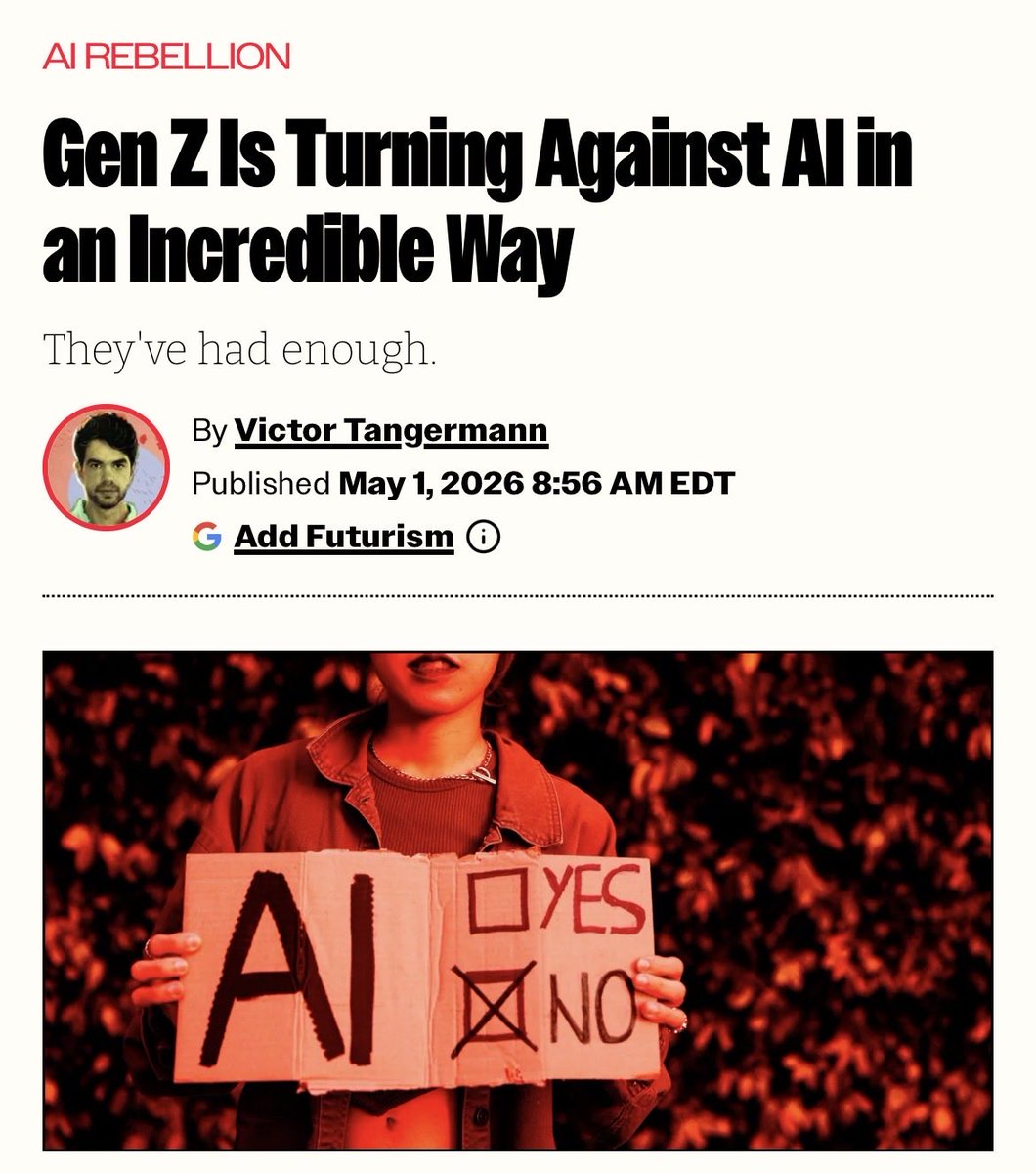
Resistance against changes is always something that humans know how to use. But now it comes from a surprising group and in a very creative (and dangerous) way. 😱
How we prompt AI is very different in 2026 than 2022 when ChatGPT came out.
I'm teaching a new course, AI Prompting for Everyone, to help you become an AI power user — whatever your current skill level.
It covers skills that apply across ChatGPT, Gemini, Claude, and other AI tools. How to use deep research mode for well-researched reports on complex questions. How to give AI the right context, including more documents and images than most people realize you can provide. When to ask AI to think hard for several minutes on important decisions like what car to buy, what to study, or what job to take. And how to use AI to generate images, analyze data, and build simple games and websites.
I also cover intuitions about how these models work under the hood, so you know when to trust an answer and when not to.
Along the way, you'll see flying squirrels, a creativity test, some of my old family photos, and fireworks.
Join me at https://t.co/tcQc4iJAJG
Instead of watching Netflix tonight.
Spend a day mastering Claude here: https://t.co/Vn60ElPZ2i
→ Level 1 - 24 min: The basics.
Claude For Dummies: https://t.co/HNa5MrCLVU
Claude Setup: https://t.co/jw2qdIcjnh
→ Level 2 - 1 hour: Real workflows.
Claude Cowork: https://t.co/uWTpOI3Woc
Claude for teams: https://t.co/qxlcqhf8bM
Claude Design: https://t.co/ZY8Fg5D2ea
Cowork + Projects: https://t.co/Q7AN9CZAbO
Claude for slides: https://t.co/L0bPMgXci6
Claude Skills: https://t.co/6cHYYfjXEA
→ Level 3 - 3.5 hours: The pro moves.
Avoid sycophancy: https://t.co/5i8xSJBGUl
Claude Code: https://t.co/UgE9xBXVbE
Claude 101: https://t.co/OvBmlvnVqL
Stop hitting Claude limits: https://t.co/j5fEzSH5br
Stop Prompting: https://t.co/j1LATSJiat
→ Level 4 - 8 hours: Expert mode.
Claude Computer: https://t.co/TxYuHPjgbV
Build with Claude API: https://t.co/RcCbfNjlzz
Pro tip: Don't binge it. Do one level per sitting.
Actually apply each guide before moving to the next
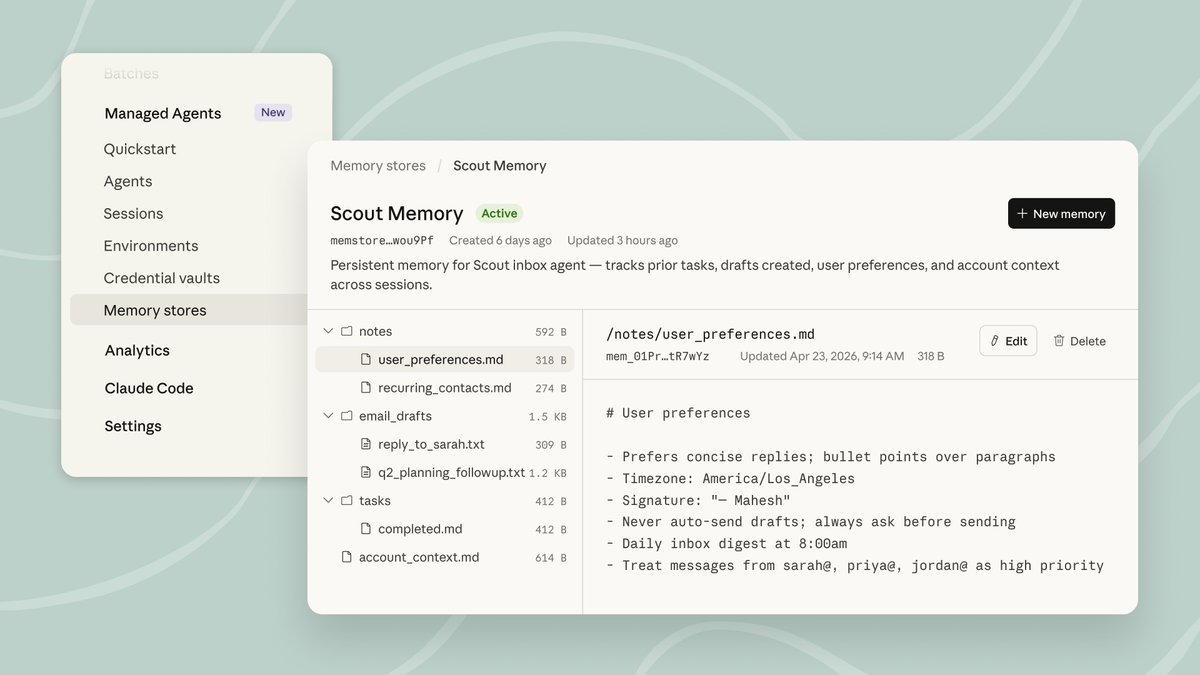
Memory on Claude Managed Agents is now in public beta.
Your agents can now learn from every session, using an intelligence-optimized memory layer that balances performance with flexibility.
Stop bookmarking 50 guides you'll never read.
You can skip all of it with these 15 free guides:
Claude 101: https://t.co/jw2qdIcjnh
Claude Code: https://t.co/UgE9xBXVbE
Claude Skills: https://t.co/6cHYYfjXEA
Stop prompting: https://t.co/j1LATSJiat
Claude in Excel: https://t.co/mfcXYSACWR
1M followers with AI: https://t.co/jZwxZr4ZhU
Claude for your team: https://t.co/qxlcqhf8bM
No prompt saves you: https://t.co/SDKJWylftC
AI Slides (PPT in 2026): https://t.co/L0bPMgXci6
Set up Claude Cowork: https://t.co/uWTpOI3Woc
Claude to sound like you: https://t.co/99RzxXU3p0
Claude interactive charts: https://t.co/ebCHGZqOF1
Claude as your computer: https://t.co/TxYuHPjgbV
Claude Cowork + Project: https://t.co/Q7AN9CZAbO
Set up AI before prompting: https://t.co/pE3OF72A04
___
1. Save this list for later (three dots, top right).
2. Share it with a friend by ♻️ reposting this image.
3. Subscribe to my free newsletter: https://t.co/psB7XxB2Y4.
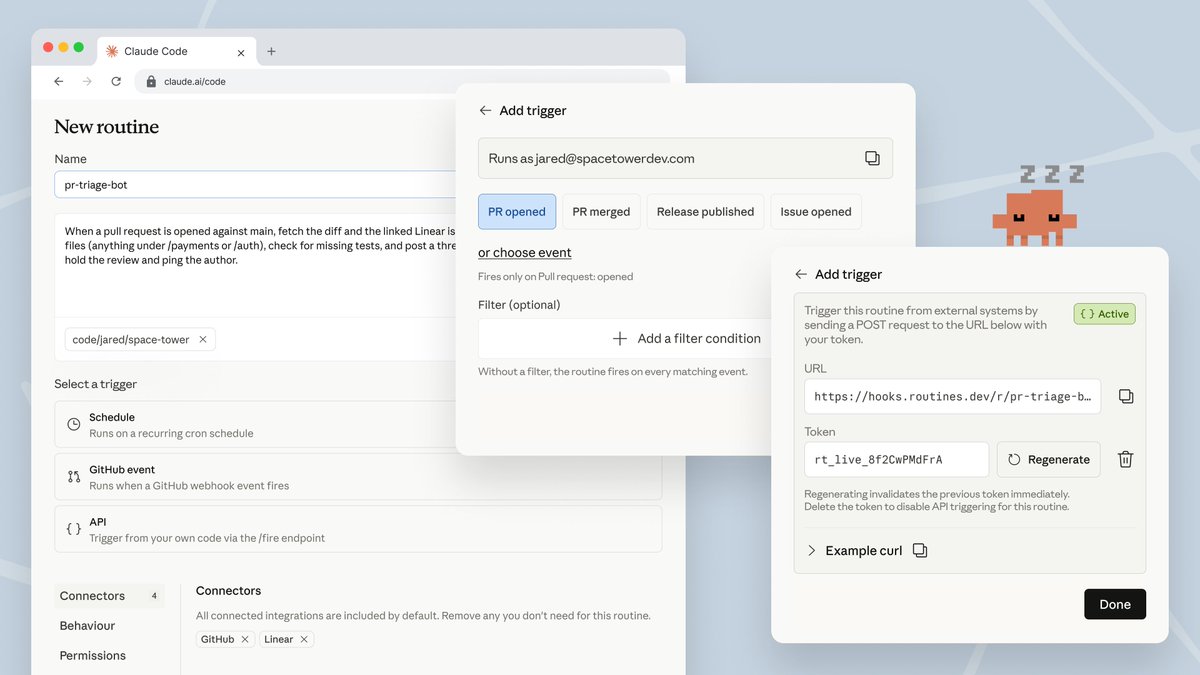
Now in research preview: routines in Claude Code.
Configure a routine once (a prompt, a repo, and your connectors), and it can run on a schedule, from an API call, or in response to an event.
Routines run on our web infrastructure, so you don't have to keep your laptop open.
As AI agents accelerate coding, what is the future of software engineering? Some trends are clear, such as the Product Management Bottleneck, referring to the idea that we are more constrained by deciding what to build rather than the actual building. But many implications, like AI’s impact on the job market, how software teams will be organized, and more, are still being sorted out.
The theme of our AI Developer Conference on April 28-29 in San Francisco is The Future of Software Engineering. I look forward to speaking about this topic there, hearing from other speakers on this theme, and chatting with attendees about it. We’re shaping the future, and I hope you will join me there!
It is currently trendy in some technology and policy circles to forecast massive job losses due to AI. Even if they have not yet materialized, these losses certainly must be just over the horizon! I have a contrarian view that the AI jobpocalypse — the notion that AI will lead to massive unemployment, perhaps even rioting in the streets — won’t be nearly as bad as dire forecasts by pundits, especially pundits who are trying to paint a picture of how powerful their AI technology is.
Among professions, AI is accelerating software engineering most, given the rise of coding agents. According to a new report by Citadel Research, software engineering job postings are rising rapidly. So if software engineering is a harbinger of the impact AI will have on other professions, this expansion of software engineering jobs is encouraging.
Yes, fresh college graduates are having a hard time finding jobs. And yes, there have been layoffs that CEOs have attributed to AI, even if a large fraction of this was “AI washing,” where businesses choose to attribute layoffs to AI, even though AI has not changed their internal operations much yet. And yes, there is a subset of job roles, such as call center operator, that are more heavily impacted. Many people are feeling significant job insecurity, and I feel for everyone struggling with employment, whether or not the cause is AI-related. And many other factors, such as over-hiring during the pandemic and high interest rates, have contributed to the slowdown in the labor market, and the notion that AI is leading to unemployment is oversimplified.
In software engineering, I see a lot of exciting work ahead to adapt our workflows. It is already clear that: (i) As AI makes coding easier, a lot more people will be doing it. (ii) Writing code by hand and even reading (generated) code is not that important, because we can ask an LLM about the code and operate at a higher level than the raw syntax (although how high we can or should go is rapidly changing). (iii) There will be a lot more custom applications, because now it’s economical to write software for smaller and smaller audiences. (iv) Deciding what to build, more than the actual building, is becoming a bottleneck. (v) The cost of paying down technical debt is decreasing (since AI can refactor for you).
At the same time, there are also a lot of open questions for our profession, such as:
- In the future, what will be the key skills of a senior software engineer? And for junior levels, what should be the new Computer Science curriculum?
- If everyone can build features, what skills, strategies, or resources create competitive advantage for individuals and for businesses?
- What are the new building blocks (libraries, SDKs, etc.) of software? How do we organize coding agents to create software?
- What should a software team look like? For example, how many engineers, product managers, designers, and so on. What tooling do we need to manage their workflow?
- How do AI agents change the workflow of machine learning engineers and data scientists? For example, how can we use agents to accelerate exploring data, identifying hypotheses, and testing them?
I’m excited to explore these and other questions about the future of software engineering at AI Dev. I expect this to be an exciting event. Please join us!
[Original text: The Batch newsletter.]
https://t.co/i4bQevDG4i
Introducing Project Glasswing: an urgent initiative to help secure the world’s most critical software.
It’s powered by our newest frontier model, Claude Mythos Preview, which can find software vulnerabilities better than all but the most skilled humans.
https://t.co/NQ7IfEtYk7
You can now enable Claude to use your computer to complete tasks.
It opens your apps, navigates your browser, fills in spreadsheets—anything you'd do sitting at your desk.
Research preview in Claude Cowork and Claude Code, macOS only.
Become a Claude Certified Architect
Here is the complete resource list in one place:
Link to join: https://t.co/OXQyTmfCmb
Training courses: https://t.co/UaJzLeXKrP (13 free courses)
Cookbook: https://t.co/SLnSUT7xT1
Exam Guide: https://t.co/A2pbDcyGwa
Practice questions: https://t.co/90eXwUxiXQ (free)
MCP documentation: https://t.co/SbwZI0fjVz (free)
API documentation: https://t.co/9rmnLWypxc (free)
Partner Network: https://t.co/diT5OE6ePJ (free to join)
Personal Playbook someone created after the exam: https://t.co/qhXan3XVri
I'm excited to announce Context Hub, an open tool that gives your coding agent the up-to-date API documentation it needs. Install it and prompt your agent to use it to fetch curated docs via a simple CLI. (See image.)
Why this matters: Coding agents often use outdated APIs and hallucinate parameters. For example, when I ask Claude Code to call OpenAI's GPT-5.2, it uses the older chat completions API instead of the newer responses API, even though the newer one has been out for a year. Context Hub solves this.
Context Hub is also designed to get smarter over time. Agents can annotate docs with notes — if your agent discovers a workaround, it can save it and doesn't have to rediscover it next session. Longer term, we're building toward agents sharing what they learn with each other, so the whole community benefits.
Thanks Rohit Prsad and Xin Ye for working with me on this!
npm install -g @aisuite/chub
GitHub: https://t.co/OCkyxXQMCq
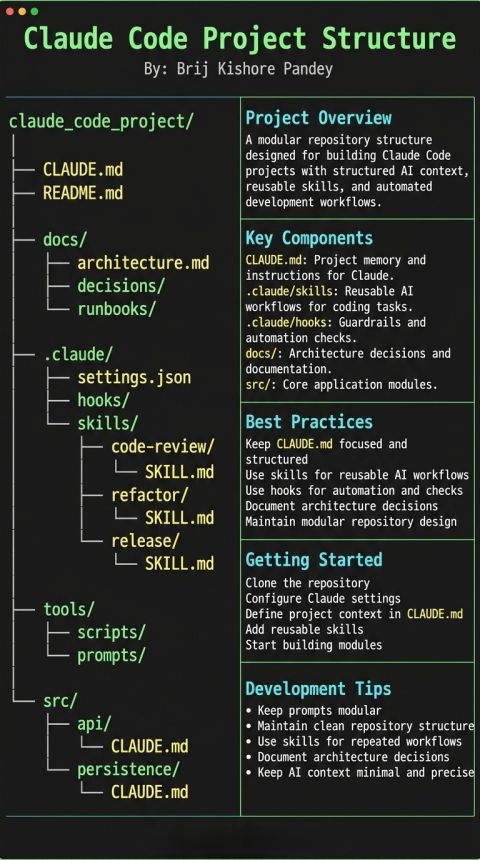
Most people treat Claude Code like a smarter chat window.
That works… until your project grows.
This structure highlights something deeper: once you move beyond single prompts, you need separation of concerns. The same principles we use in software engineering apply here, too.
Look at the layout carefully.
https://t.co/YF2dqGxlFx is not just a note file. It becomes project memory.
It defines:
→ Standards
→ Constraints
→ Tone
→ Non-negotiables
→ Guardrails
Instead of repeating instructions in every prompt, you centralize them. That reduces token waste and behavioral drift.
Then you see skills/.
This is where things get powerful. A skill is essentially a reusable workflow.
If you’re repeatedly doing:
-Code reviews
-Refactoring
-Output formatting
-Structured analysis
It should not live in an ad-hoc prompt. It should live as a reusable capability.
That shifts you from prompting to system design.
Next, hooks/.
Hooks are underrated. They let you enforce checks:
→ Clean tool output
→ Validate structure
→ Log commands
→ Transform JSON
If you’re not using hooks, you’re manually correcting outputs that could have been automated.
Then the repository itself stays modular:
-docs/ for architecture decisions
-src/ for actual logic
-tools/ for scripts and utilities
This prevents your AI layer from bleeding into your application layer.
When I started organizing projects this way, three things improved:
-Fewer repeated instructions
-More predictable outputs
-Easier collaboration
Especially once you add:
→ Subagents
→ MCP integrations
→ GitHub Actions automation
→ Plugin development
Without structure, context becomes clutter. With structure, Claude operates within clear boundaries.
This is not about making things complex. It’s about treating AI workflows like first-class engineering components instead of temporary chat experiments.
If you're learning Claude Code and want to see how I implement this step by step, from installation to CLI usage, skills, hooks, subagents, MCP, GitHub Actions, and plugins, I’ve recorded the full process while building real workflows.
This is the Claude Code Full Course Link- https://t.co/vyorOTkdVs
Image Credit- Brij Kishore Pandey
Happy Learning!
#ClaudeCode #claudeai
🚨 Anthropic just dropped 6 FREE AI courses that make most “AI degrees” look outdated.
They quietly dropped 12 FREE courses that teach you how to actually build with Claude in 2026:
• Make real API calls and ship tool-using agents
• Build and deploy full RAG pipelines
• Connect models to live tools and data with MCP
• Spin up production-grade MCP servers with logs + scaling
• Run Claude inside Amazon Bedrock and Google Vertex AI
• Automate dev work from the CLI with Claude Code
• Integrate GitHub, workflows, prompt scoring, multi-turn agents
This is the stack serious builders are learning while everyone else is still arguing about prompts.
If you’re not learning agent workflows and Model Context Protocol this year, you’re already behind.
Anthropic released a 33-page guide on building Skills.
Here's everything you need to know (under 370 words):
First, what are Skills?
A skill is a folder that teaches Claude how to handle specific tasks. You teach it once, and it works every time. No more re-explaining your preferences in every conversation.
Skills aren't locked to Claude. They've been published as an open standard, so you can use them with AI agents like OpenClaw, too.
Here's the simplest way to think about it:
MCP gives Claude access to your tools. Skills teach Claude how to use them well. One without the other is incomplete.
The guide breaks things down into 3 use cases:
1. Workflow Automation: You have processes that need to run the same way every time. A skill can pull your project status, evaluate team capacity, and create tasks without you walking Claude through each step again.
2. MCP Enhancement: Your team has years of accumulated knowledge about how things should work. A skill captures that expertise so Claude handles edge cases the way your best team member would.
3. Document Creation: Every team has standards for how presentations, code, and designs should look. A skill lets Claude follow those standards without you pasting your style guide into every conversation.
The setup is more straightforward than you'd think:
One SKILL. md file with some structured metadata at the top is all that's required. Scripts, templates, and reference docs are optional.
Two fields in that metadata matter most:
- name (lowercase with hyphens, no spaces or capitals)
- description (what the skill does + specific phrases that should activate it)
Nail the description, and Claude picks up your skill at exactly the right moment. Get it wrong, and it sits there doing nothing.
The guide walks through 5 patterns that actually work:
1. Sequential Workflow Orchestration: processes that need to happen in a fixed order, like onboarding a customer or deploying a service.
2. Multi-MCP Coordination: your workflow touches multiple services, say design in Figma, tasks in Linear, updates in Slack. One skill ties them together.
3. Iterative Refinement: the skill validates its own work, catches issues, and refines the output before handing it to you.
4. Context-Aware Tool Selection: Claude picks the right tool automatically depending on the file type, size, or situation instead of you telling it every time.
5. Domain-Specific Intelligence: your skill carries specialized knowledge like compliance rules or security checks that Claude wouldn't know on its own.
Pitfalls the guide warns you about:
- Vague descriptions like "Helps with projects" that never trigger
- Important instructions buried inside walls of text
- No fallback when a tool call fails
- One skill trying to do too much
Here's the bigger insight:
AI doesn't have to be general-purpose in every conversation. Give it focused knowledge for the workflows you actually repeat, and it stops being a chatbot and starts being a genuine part of how you work.
I've shared a link to the PDF in the next tweet.
Cline v 3.58.0 is out and now has native subagents.
Your AI coding agent can spin up sub-tasks that run in parallel, each with their own context. Pair it with auto-approval and you've got fully autonomous multi-threaded workflows.
Plus GLM 5 support, Bedrock parallel tool calling, and a bunch more.