i've been testing Claude Opus 4.8 + the 40-skill outreach plugin to run an entire LinkedIn outbound system inside 1 conversation...
and it has been ABSOLUTELY cooking
so i've decided to document the ENTIRE system...
covering onboarding, ICP definition, list building, LinkedIn sequencing, and closed-loop reply handling that takes you from blank project to fully briefed outbound running at 40%+ acceptance and 18%+ reply rate in under 60 seconds as a LinkedIn outbound operator (agency, founder, solo closer, demand gen lead, etc)
here's what's included inside the guide:
→ phase 1, the onboarding system
(/nl-outreach:onboard runs 8 skills in sequence: company analysis, value props, offer definer, ICP definer, persona definer, competitor finder, TAM sizer, and pain identifier. one command writes outreach-brief.md. every skill reads from it automatically from that point forward. replaces the entire session setup loop)
→ phase 2, ICP definition down to buying signals
(stops targeting by job title. defines the specific trigger events that make someone worth contacting today: new funding, new leadership, SDR hiring spikes, tech stack changes. the brief captures these as signals, not demographics)
→ phase 3, list building from signal filters
(company-finder and people-finder translate your ICP signals into exact platform filter configurations for Apollo, lemlist, and Clay. no manual filter building. no false positive VP titles from consultants. returns a list ready to sequence)
→ phase 4, LinkedIn sequencing by seniority from one brief
(linkedin-outbound-angle and linkedin-sequence write VP, Manager, and IC touchpoints automatically. same company, three entry points, all pulling from the same brief. the thing that makes the message land is the signal in line 1. the skill puts it there without being told)
→ phase 5, reply handling and pipeline diagnosis that runs itself
(reply-handler qualifies every response and routes the hot ones. outbound-analyst surfaces where the campaign is bleeding. pipeline-analysis tells you which tier is converting and what to change. no manual inbox review. no spreadsheet)
all backed by benchmark data from 244,000+ outbound campaigns baked into the copywriting-analyzer that scores every message before it sends
like + comment "OUTREACH" and i'll send it over
(must be following + repost for priority access)
@MichLieben The underlying trend is not just consolidation but integration. Revenue teams gain leverage when data, workflows, and decision making operate as one connected system rather than isolated tools.
@yanndine The value here is not the automation itself, but the systemization of context and quality control. Consistent execution often comes from better process design, not more prompts.
@AlfieJCarter The real innovation here is not automated outreach. It is codifying GTM knowledge into repeatable workflows that improve consistency, speed, and decision quality across the entire process.
You don't need more leads. You need leads that already trust you.
The default B2B growth instinct is volume.
More outreach. More prospects. More pipeline.
It feels productive.
The numbers rarely agree.
Here's what the data actually shows:
The average B2B cold outreach sequence converts at 1–3%.
A sequence targeting prospects with prior brand exposure converts at 11–18%.
(Demand Gen Report, 2024)
That's not a marginal improvement.
That's a 6–9x multiplier — from the same effort.
More leads into a low-trust funnel means:
→ More time on calls that go nowhere
→ More proposals that don't close
→ More SDR burnout chasing cold contacts
Fewer leads into a high-trust funnel means:
→ Higher show-up rates
→ Shorter sales cycles
→ Less price resistance at the close
Quality of trust is the multiplier.
Volume is just the input.
You don't have a lead quantity problem.
You have a lead temperature problem.
Fix the temperature first.
Then scale the volume.
#B2BMarketing #LeadGeneration
LLM traffic isn't always stickier than traditional search traffic.
Sure, conversion rates are generally higher, but the way visitors interact with your website varies drastically by page type.
Check out this data from Saltbox. Tools and Demo requests get much more engagement from LLM traffic.
But service/product and articles get less engagement than traditional search traffic.
Claude Code is PERFECT for GTM engineering.
It's helped us ship outbound systems and generate pipeline faster for teams who are done re-briefing Claude every session.
I've just broken the system down so you can do the same:
- A CLAUDE.md primer so Claude loads your ICP, tone rules, and standards automatically every session
- The 5 skills written in full: ICP filter, cold email copywriter, account researcher, LinkedIn content writer, output reviewer
- 12 copy-paste prompts to make sure every sequence, post, and brief is clean before it goes live
Want me to send it over?
Like + comment "Agents"
(must be following)
@neilpatel An important nuance. Higher conversion does not automatically mean deeper engagement. User intent from AI referrals appears highly contextual, making page type and journey design increasingly important.
@AlfieJCarter The most scalable GTM systems are built on reusable context and clear operating standards. Reducing rework and preserving institutional knowledge creates a significant execution advantage.
@rubenhassid Useful framework. The broader lesson is that AI effectiveness increasingly depends on workflow design, context management, and selecting the right tool for the task rather than prompt complexity.
What 'lead generation' actually means at month 6 vs month 1
Month 1 and month 6 are not the same game.
Most founders play them as if they are.
Here's how the definition of a 'lead' actually shifts:
Month 1 lead:
Someone who accepted your connection request.
Or opened your cold email.
Engagement-level signal. Not a buying signal.
Month 3 lead:
Someone who replied to your DM after seeing your content twice.
Warm. Familiar. Mildly curious. Still evaluating.
Month 6 lead:
Someone who reached out to you.
They've read 6–8 of your posts.
They already believe in your POV.
They're asking about next steps.
Same channel. Same ICP. Completely different conversation.
The problem: most companies set month 6 KPIs in month 1.
Then quit at month 2 when reality doesn't match the target.
HubSpot data shows inbound leads close at a 14.6% rate.
Cold outbound closes at 1.7%.
Month 6 produces inbound-quality leads.
Month 1 produces outbound-quality leads.
Both matter. But they're not the same benchmark.
Stop measuring them as if they are.
#B2BMarketing #LeadGeneration
Being included in Wikipedia means different things to different platforms.
Look at how Google views Wikipedia versus how ChatGPT does.
Based on data from Brightedge, Google looks at Wikipedia as more of a social site.
And ChatGPT sees it more as a resource site.
@neilpatel This highlights an important shift in information retrieval. Search engines and AI models evaluate authority differently, which means visibility strategies must adapt to both ecosystems.
R.I.P building your sales, marketing, and RevOps workflows from scratch every time a new quarter starts.
You don't need separate tools, separate setups, and separate teams for each function anymore.
You can use 67 Claude Code plugins running 92 agents to handle your full business operation from one repo and one install session.
All you need is Claude Code, a GitHub account, the three-step install process, and one afternoon.
I usually charge $2,000 for this setup.
But for the next 24 hours, I'm sharing the complete system for free.
To get it...
Comment "AGENTS" and I'll DM it to you.
(First 500 only.)
@rubenhassid A valuable lesson in enterprise AI adoption. The quality of outcomes is increasingly driven by context access and workflow integration rather than prompt engineering alone.
@jack_9947 The most interesting shift is not automation itself, but workflow convergence. When sales, marketing, and operations share context, execution becomes far more scalable and aligned.
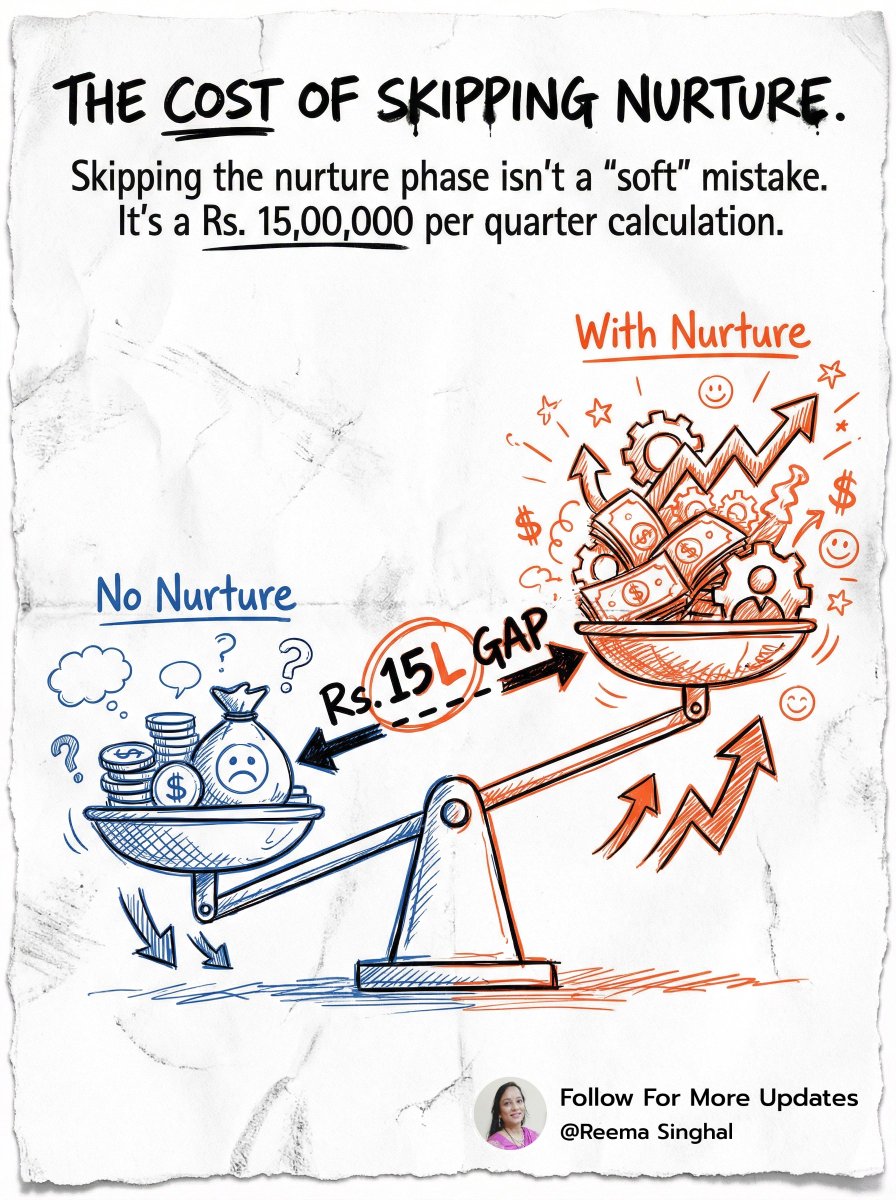
The hidden cost of skipping the nurture phase — how to calculate it
Nobody budgets for skipping nurturing.
But it costs more than most marketing line items.
Here's a simple framework to calculate it:
Step 1 — Your average deal value
Let's say: Rs. 3,00,000 per client.
Step 2 — Your current close rate without nurturing
Industry average for cold B2B outreach: 2–4%.
Let's use 3%.
Step 3 — Close rate with a 60-day nurture sequence
Aberdeen Group benchmark: 20–30% lift in close rate for nurtured leads.
Conservative estimate: 3% becomes 3.9%.
Step 4 — The pipeline impact
If you're running 500 prospects per quarter —
Without nurture: 15 closes. Revenue: Rs. 45,00,000.
With nurture: 19–20 closes. Revenue: Rs. 57,00,000–60,00,000.
That's Rs. 12,00,000–15,00,000 per quarter in missed pipeline.
From skipping a process that costs time, not budget.
Nurturing isn't a soft strategy.
It's a revenue calculation.
Most companies can't show you what it costs to skip it.
Now you can.
#B2BMarketing #LeadNurturing
R.I.P hiring a head of growth, an SDR, and a RevOps hire to run your pipeline motion.
You don't need three separate roles for this anymore.
You can use Claude Chat, Claude Code, and Cowork to run prospecting, sequencing, pipeline management, and reporting from a single setup.
All you need is a Claude Pro plan, your ICP, 12 copy-paste prompts, and one afternoon to wire it together.
I usually charge £1,500 for this build.
But for the next 24 hours, I'm sharing the complete stack for free.
To get it...
Comment "STACK" and I'll DM it to you.
(First 200 only.)
How to use Claude in 25 different ways:
(takes 60 seconds to read, saves you 60 hours)
1. Bookmark this image. You'll need it tomorrow.
2. Full guide + prompts at: https://t.co/psB7XxAv8w.
3. Don't pay anything. It's free in the email.
---
1. ASK → Chat
☑ Quick questions. Quick answers.
☑ Don't use Cowork for "write a good email?"
2. THINK → Opus 4.8
☑ The smartest model. Always switch to it.
☑ For deep work, complex writing & thinking.
3. SPEED → Sonnet 4.6
☑ Faster, cheaper, still excellent.
☑ Use it for grammar, summaries, short answers.
4. REASON → Extended Thinking
☑ Toggle it on for hard problems.
☑ Turn it off for simple ones (saves tokens).
5. BUILD → Cowork
☑ Where serious work happens. .docx, .xlsx, .pptx.
☑ Point it at a folder. It works like an employee.
6. SHIP → Claude Code
☑ For developers (and curious non-devs).
☑ Build websites and apps from your terminal.
7. MODEL → Claude in Excel
☑ Install the add-in from the Excel store.
☑ Real formulas, real models, no copy-paste.
8. SLIDES → Gamma connector
☑ One prompt. Full presentation. With research.
☑ Connect Gamma inside Claude.
9. MOCKUP → Claude Design
☑ Go to claude .ai/design. Build websites in 1 hour.
☑ Upload a DESIGN .md. Export to Canva, PDF.
10. BROWSE → Claude in Chrome
☑ A browsing agent. Reads any page for you.
☑ Acts inside the browser, not just talks about it.
11. CLICK → Computer Use
☑ Settings > Turn it on.
☑ Claude clicks, types, browses on your Mac.
12. REMOTE → Dispatch
☑ Connect your phone. Text a task.
☑ It works on your computer while you're away.
13. SEARCH → Web Search
☑ Click the '+'. turn it on.
☑ It reads the live web before answering.
14. INVESTIGATE → Research
☑ For deep multi-source reports.
☑ 13 minutes. 50+ sources. One markdown file.
15. TRIGGER → Skills
☑ "Use the skill-creator to build a skill for [task]."
☑ Type /skill. It fires automatically.
16. STACK → Plugins
☑ Cowork > Customize > Browse Plugins.
☑ Bundles of skills for marketing, legal, sales.
17. PERSIST → Projects
☑ One Project per recurring deliverable.
☑ Upload one gold-standard example.
18. AUTOMATE → Scheduled Tasks
☑ Every Monday at 7am, Claude runs your report.
☑ Set it up once. No manual work.
19. CONNECT → Connectors
☑ Gmail, Drive, Slack, Notion, Granola, Calendar.
☑ 50+ apps. Claude reads, writes & acts inside.
20. RENDER → Artifacts
☑ Side pane where Claude opens charts, docs.
☑ Interactive. Editable. Shareable.
21. VOICE → Custom Styles
☑ Set "Concise" or build your own.
☑ Saves you from re-explaining your voice.
22. SHARE → Team Projects
☑ Same Project. Whole team inside.
☑ Skills, files, instructions. Shared once.
23. GUARD → Global Instructions
☑ Settings > Cowork > Global Instructions.
☑ Tell Claude what to always do.
24. ORGANIZE → Obsidian Vault
☑ Free app. Opens your Cowork folder neatly.
☑ Edit files like Google Docs.
25. BRIEF → about-me file.
☑ One md. file. Under 2,000 words.
☑ Your style, your rules, your voice.
A cold outreach campaign was never one job. You build the list, score it against your ICP, layer in intent signals, find the right decision-makers, enrich and validate the data, write the copy, then push it live.
Every one of those steps usually has its own tool, and usually its own person.
We now run all of it inside Claude Code, start to finish, without leaving the terminal.
Here's every step Claude Code handles for us:
1. List building
A few ways to build the list:
→ lookalikes of the companies already paying you, pulled with PredictLeads
→ standard B2B databases like Apollo, CompanyEnrich, and Sales Navigator
Claude chews through 50k+ row CSVs without breaking a sweat.
2. Account scoring
We built custom GTM skills (lead-scoring is the big one) to run our ICP criteria against the raw list.
Every account gets sorted into Tier 1 (manual outreach), Tier 2 (multichannel), or Tier 3 (email only).
Claude does the scoring and filtering on its own.
3. Intent signals
APIs like PredictLeads and Trigify catch the signals that matter: hiring, press releases, product launches, social engagement.
Claude calls the right one and layers intent on top of the targeting.
4. Decision-maker filtering
LeadsFactory pulls multiple decision-makers per company, matched to our ICP: title, seniority, department.
So we reach the people who can actually say yes, not just one name per account.
5. Data enrichment & validation
Claude runs a waterfall across providers to find phones and emails: Apollo, FullEnrich, Prospeo, CompanyEnrich.
Then it scrubs the risky addresses before anything reaches a sequencer.
6. Copy generation & deployment
Claude pulls our best-performing copy straight out of lemlist or Instantly through their API.
Then it writes fresh copy around the signals, the company's current moves, and the persona we're after.
It works in batches of 100-200 leads at a time, so quality never slips.
7. Feedback & auto-improvement
After launch, Claude keeps reading the campaign metrics.
It finds the segments that are converting, pulls lookalikes off those winners, and feeds them straight into the next campaign.
The whole thing compounds on itself, the way a Meta ad pixel gets smarter the longer it runs.
What you need to set it up:
→ a CLAUDE.md file with your scoring rules, tool preferences, and workflow logic
→ your custom outbound skills
→ your API keys
The GTM stack we plug in, by layer:
> Data → Clay, Apollo, CompanyEnrich, Openmart
> Enrich → Prospeo, FullEnrich, CompanyEnrich, LeadsFactory
> Signals → PredictLeads, Trigify
> Orchestration → Clay, Relevance AI, n8n
> Action → Expandi, Instantly, lemlist
> Validation → BounceBan





![rubenhassid's tweet photo. How to use Claude in 25 different ways:
(takes 60 seconds to read, saves you 60 hours)
1. Bookmark this image. You'll need it tomorrow.
2. Full guide + prompts at: https://t.co/psB7XxAv8w.
3. Don't pay anything. It's free in the email.
---
1. ASK → Chat
☑ Quick questions. Quick answers.
☑ Don't use Cowork for "write a good email?"
2. THINK → Opus 4.8
☑ The smartest model. Always switch to it.
☑ For deep work, complex writing & thinking.
3. SPEED → Sonnet 4.6
☑ Faster, cheaper, still excellent.
☑ Use it for grammar, summaries, short answers.
4. REASON → Extended Thinking
☑ Toggle it on for hard problems.
☑ Turn it off for simple ones (saves tokens).
5. BUILD → Cowork
☑ Where serious work happens. .docx, .xlsx, .pptx.
☑ Point it at a folder. It works like an employee.
6. SHIP → Claude Code
☑ For developers (and curious non-devs).
☑ Build websites and apps from your terminal.
7. MODEL → Claude in Excel
☑ Install the add-in from the Excel store.
☑ Real formulas, real models, no copy-paste.
8. SLIDES → Gamma connector
☑ One prompt. Full presentation. With research.
☑ Connect Gamma inside Claude.
9. MOCKUP → Claude Design
☑ Go to claude .ai/design. Build websites in 1 hour.
☑ Upload a DESIGN .md. Export to Canva, PDF.
10. BROWSE → Claude in Chrome
☑ A browsing agent. Reads any page for you.
☑ Acts inside the browser, not just talks about it.
11. CLICK → Computer Use
☑ Settings > Turn it on.
☑ Claude clicks, types, browses on your Mac.
12. REMOTE → Dispatch
☑ Connect your phone. Text a task.
☑ It works on your computer while you're away.
13. SEARCH → Web Search
☑ Click the '+'. turn it on.
☑ It reads the live web before answering.
14. INVESTIGATE → Research
☑ For deep multi-source reports.
☑ 13 minutes. 50+ sources. One markdown file.
15. TRIGGER → Skills
☑ "Use the skill-creator to build a skill for [task]."
☑ Type /skill. It fires automatically.
16. STACK → Plugins
☑ Cowork > Customize > Browse Plugins.
☑ Bundles of skills for marketing, legal, sales.
17. PERSIST → Projects
☑ One Project per recurring deliverable.
☑ Upload one gold-standard example.
18. AUTOMATE → Scheduled Tasks
☑ Every Monday at 7am, Claude runs your report.
☑ Set it up once. No manual work.
19. CONNECT → Connectors
☑ Gmail, Drive, Slack, Notion, Granola, Calendar.
☑ 50+ apps. Claude reads, writes & acts inside.
20. RENDER → Artifacts
☑ Side pane where Claude opens charts, docs.
☑ Interactive. Editable. Shareable.
21. VOICE → Custom Styles
☑ Set "Concise" or build your own.
☑ Saves you from re-explaining your voice.
22. SHARE → Team Projects
☑ Same Project. Whole team inside.
☑ Skills, files, instructions. Shared once.
23. GUARD → Global Instructions
☑ Settings > Cowork > Global Instructions.
☑ Tell Claude what to always do.
24. ORGANIZE → Obsidian Vault
☑ Free app. Opens your Cowork folder neatly.
☑ Edit files like Google Docs.
25. BRIEF → about-me file.
☑ One md. file. Under 2,000 words.
☑ Your style, your rules, your voice.](https://pbs.twimg.com/media/HKB93Q0bEAAebav.jpg)





