Anthropic pays $750,000+ a year for engineers who can build LLMs from scratch.
Not how to prompt them.
Not how to fine-tune them.
Not how to build RAG pipelines.
But how to build them from scratch.
This 2-hour Stanford lecture teaches you everything.
Scaling laws.
Data collection.
Architecture design.
Post-training alignment.
Free. From Stanford.
Watch first. Then read this.
The lecture is the theory.
And this article shows you how to actually build it (with code) ↓
🚨 Anthropic just showed a 27-minute workshop on how to actually do prompts for Claude.
Taught by the people who built it.
Free. No registration. No paywall.
I've seen $300 courses that don't cover what they teach in the first 8 minutes.
Watch it and bookmark it now.
Personal update: I've joined Anthropic. I think the next few years at the frontier of LLMs will be especially formative. I am very excited to join the team here and get back to R&D. I remain deeply passionate about education and plan to resume my work on it in time.
Instead of watching an hour of Netflix, watch this 2 hour hour Stanford lecture will teach you more about how LLMs like ChatGPT and Claude are built than most people working at top AI companies learn in their entire careers.
LLM Knowledge Bases
Something I'm finding very useful recently: using LLMs to build personal knowledge bases for various topics of research interest. In this way, a large fraction of my recent token throughput is going less into manipulating code, and more into manipulating knowledge (stored as markdown and images). The latest LLMs are quite good at it. So:
Data ingest:
I index source documents (articles, papers, repos, datasets, images, etc.) into a raw/ directory, then I use an LLM to incrementally "compile" a wiki, which is just a collection of .md files in a directory structure. The wiki includes summaries of all the data in raw/, backlinks, and then it categorizes data into concepts, writes articles for them, and links them all. To convert web articles into .md files I like to use the Obsidian Web Clipper extension, and then I also use a hotkey to download all the related images to local so that my LLM can easily reference them.
IDE:
I use Obsidian as the IDE "frontend" where I can view the raw data, the the compiled wiki, and the derived visualizations. Important to note that the LLM writes and maintains all of the data of the wiki, I rarely touch it directly. I've played with a few Obsidian plugins to render and view data in other ways (e.g. Marp for slides).
Q&A:
Where things get interesting is that once your wiki is big enough (e.g. mine on some recent research is ~100 articles and ~400K words), you can ask your LLM agent all kinds of complex questions against the wiki, and it will go off, research the answers, etc. I thought I had to reach for fancy RAG, but the LLM has been pretty good about auto-maintaining index files and brief summaries of all the documents and it reads all the important related data fairly easily at this ~small scale.
Output:
Instead of getting answers in text/terminal, I like to have it render markdown files for me, or slide shows (Marp format), or matplotlib images, all of which I then view again in Obsidian. You can imagine many other visual output formats depending on the query. Often, I end up "filing" the outputs back into the wiki to enhance it for further queries. So my own explorations and queries always "add up" in the knowledge base.
Linting:
I've run some LLM "health checks" over the wiki to e.g. find inconsistent data, impute missing data (with web searchers), find interesting connections for new article candidates, etc., to incrementally clean up the wiki and enhance its overall data integrity. The LLMs are quite good at suggesting further questions to ask and look into.
Extra tools:
I find myself developing additional tools to process the data, e.g. I vibe coded a small and naive search engine over the wiki, which I both use directly (in a web ui), but more often I want to hand it off to an LLM via CLI as a tool for larger queries.
Further explorations:
As the repo grows, the natural desire is to also think about synthetic data generation + finetuning to have your LLM "know" the data in its weights instead of just context windows.
TLDR: raw data from a given number of sources is collected, then compiled by an LLM into a .md wiki, then operated on by various CLIs by the LLM to do Q&A and to incrementally enhance the wiki, and all of it viewable in Obsidian. You rarely ever write or edit the wiki manually, it's the domain of the LLM. I think there is room here for an incredible new product instead of a hacky collection of scripts.
Claude Code and Codex (GPT-5 High)
Complete Vibe Coding Guide
We build 12 apps in this video of varying difficulty
PART 1: INTRO
00:00 Intro
03:25 What are these tools?
04:40 Learning Claude Code
05:16 First Prompt in Claude Code
06:12 Editing Prompt with Claude Code (Making a linktree)
07:02 Prompting Codex w GPT-5 and Gemini CLI
08:38 Running on Skip Permissions Mode (Yolo Mode) by default
09:53 Commands in Claude Code /cost /model /clear / compact
13:34 Resume Previous Chats with /Resume in Claude Code
14:42 Sharing web app links immediately with sharable links
[Use all these tools in @sandboxvibe]
PART 2: VIBE MARKETING AND STATIC PAGES
15:30 Building Static Pages (Vibe Marketing)
17:55 Vibe Marketing 1: landing page in Claude Code and Codex
19:38 Evaluating the Landing Pages with Claude Code, Codex, and Gemini
20:10 Making edits to our landing pages + Context Management + Wispr Flow
24:57 Vibe Marketing 2: Creating a Lead Magnet with Claude Code, Codex w GPT-5
26:06 Using Tally to embed into our Lead Magnets
32:40
33:13 Vibe Marketing 3: Creating a research Presentation with Codex
36:15 Polishing and editing our presentation
37:35 Vibe Marketing 4: Building Prototype, Analytics Dashboard, and Game at the same time with Claude Code and Codex
38:30 Using Canvas app to mockup for prototype (Excalidraw)
41:33
46:49 Dealing with an error in Codex w/ GPT-5 high
49:45 Vibe Marketing Recap... What we created
PART 3: WEB APPS WITH AUTH AND DATABASE
50:56 PART 3: Building Notes App with Database and Authentication using Instant DB
51:07
51:23 Using InstantDB to build apps
01:01:31 API's (AI Power ups for your vibe coded apps)
01:01:45 Building Thumbnail Editor App with Nano Banana API
01:07:04 Bringing a Prototype to life with Nano-Banana
01:09:19 What are API Keys? Why do you need them?
01:11:51 Getting Google API key for Nano Banana
PART 4: MOBILE APPS WITH API'S
01:18:43 Building a Mobile app on @v_computer
01:20:53 Building a mobile app using AI API's
01:29:27 Deploying Mobile apps to the App Store
01:33:03 Deploying your apps from Sandbox
Get access to all of these tools in one subscription in next tweet: 🔽🔽
OpenAI bought OpenClaw
Your initial gut reaction might be anger and rage, but I promise you are mistaken.
This is a win for EVERYONE involved (including you):
• OpenClaw remains open source
• The team gets way more resources to build incredible products and advance the vision of OpenClaw
• OpenAI gains an incredible builder (Peter Steinberger)
• Get the biggest PR boost ever
• They are finally viewed as 'Open'
• Get millions of people signing up for expensive ChatGPT plans to plug into OpenClaw
• Connect their name to the most powerful AI tool ever made
• Peter Steinberger's entire bloodline never has to worry about money ever again
OpenAI will NEVER close source OpenClaw or end the project. It would be brand suicide. They have no option but to keep it open source.
Their play here is clear: incentivize using OpenAI models for OpenClaw. Get a massive reputation boost. Hire the smartest builder in AI.
This will lead to WAY more revenue for OpenAI and even more importantly: gain the favor of the millions of people who adopted OpenClaw. This will be the biggest PR win in the history of AI and make Anthropic look like closed off walled garden authoritarians for banning people the last month.
Expect faster OpenClaw acceleration, ChatGPT plans BUILT for OpenClaw, and an AI tool that will only continue to dominate the world.
This is a win for everyone except Anthropic.
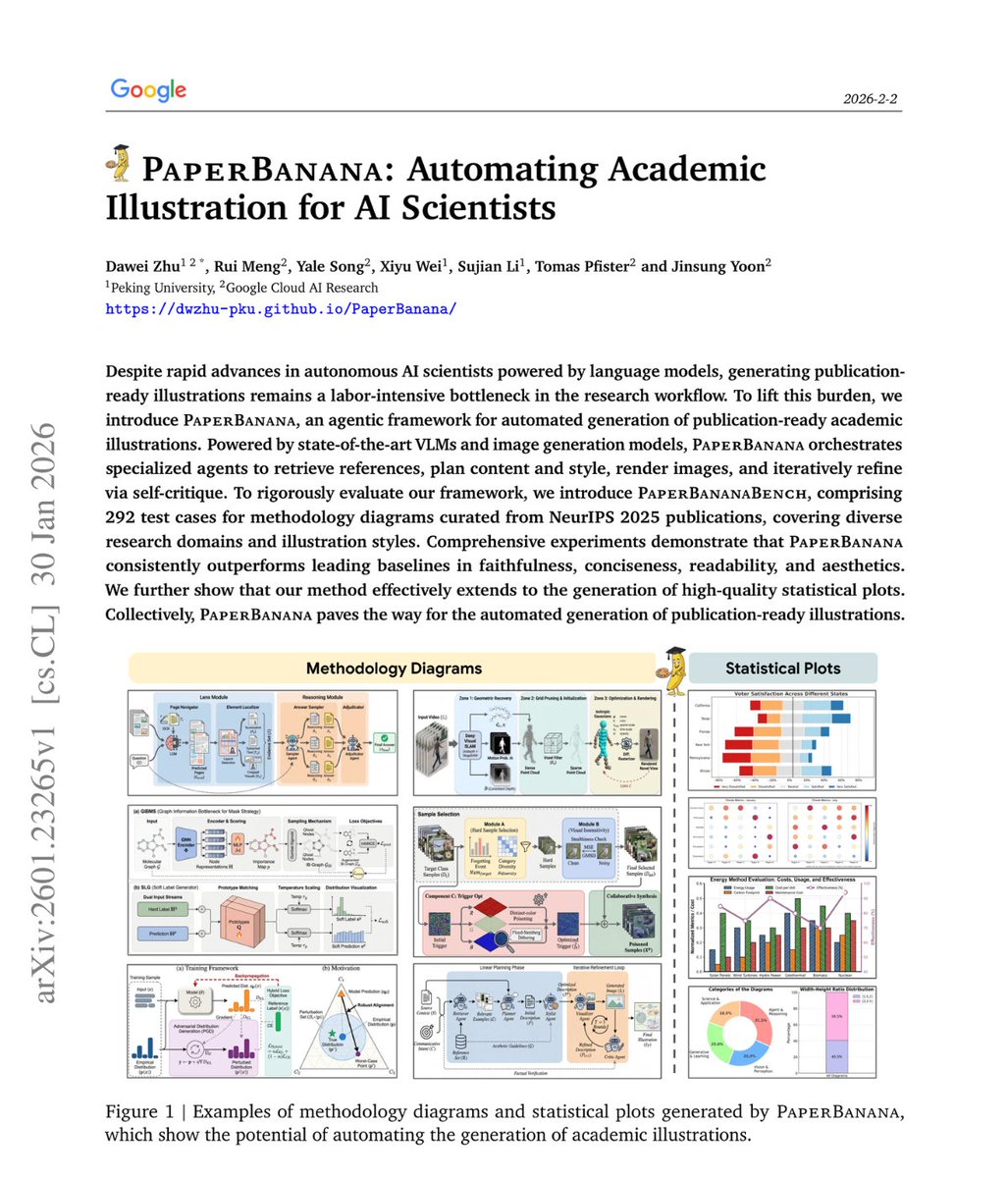
🚨BREAKING: Google just dropped another hit!
It's called PaperBanana and it generates publication-ready academic illustrations from just your methodology text.
No Figma. No manual design. No illustration skills needed.
Here's how it works:
A team of AI agents runs behind the scenes
→ One finds good diagram examples
→ One plans the structure
→ One styles the layout
→ One generates the image
→ One critiques and improves it
Here's the wildest part:
Random reference examples work nearly as well as perfectly matched ones. What matters is showing the model what good diagrams look like, not finding the topically perfect reference.
In blind evaluations, humans preferred PaperBanana outputs 75% of the time.
This is the recursion we've been waiting for AI systems that can fully document themselves visually.
Waitlist’s open, Link in the first comment.
The @karpathy interview
0:00:00 – AGI is still a decade away
0:30:33 – LLM cognitive deficits
0:40:53 – RL is terrible
0:50:26 – How do humans learn?
1:07:13 – AGI will blend into 2% GDP growth
1:18:24 – ASI
1:33:38 – Evolution of intelligence & culture
1:43:43 - Why self driving took so long
1:57:08 - Future of education
Look up Dwarkesh Podcast on YouTube, Apple Podcasts, Spotify, etc. Enjoy!
That's not all folks... Long story short, you can now control the length of your Audio Overviews (English only, but more soon!)
With short (~5+ min), long (~20+ min), and default (~10+ min) settings, try fully customizing the depth and length the AI hosts discuss your sources!
Yann LeCun: I'm not interested in LLMs anymore - they're the past. The future is in four more interesting areas: machines that understand the physical world, persistent memory, reasoning, and planning.
Major AI breakthrough: Diffusion Large Language Models are here!
They're 10x faster and 10x cheaper than traditional LLMs.
Here's everything you need to know:
Announcing @MistralAI OCR - the world’s best document understanding API.
🔍 State-of-the-art understanding of complex documents
🌍 Natively multilingual and multimodal
⚡ Fastest in its category
📄 Doc-as-prompt, structured output
🔒 Available for on-prem deployment
Transformers have dominated LLM text generation, and generate tokens sequentially. This is a cool attempt to explore diffusion models as an alternative, by generating the entire text at the same time using a coarse-to-fine process. Congrats @StefanoErmon & team!
We are excited to introduce Mercury, the first commercial-grade diffusion large language model (dLLM)! dLLMs push the frontier of intelligence and speed with parallel, coarse-to-fine text generation.
This is interesting as a first large diffusion-based LLM.
Most of the LLMs you've been seeing are ~clones as far as the core modeling approach goes. They're all trained "autoregressively", i.e. predicting tokens from left to right. Diffusion is different - it doesn't go left to right, but all at once. You start with noise and gradually denoise into a token stream.
Most of the image / video generation AI tools actually work this way and use Diffusion, not Autoregression. It's only text (and sometimes audio!) that have resisted. So it's been a bit of a mystery to me and many others why, for some reason, text prefers Autoregression, but images/videos prefer Diffusion. This turns out to be a fairly deep rabbit hole that has to do with the distribution of information and noise and our own perception of them, in these domains. If you look close enough, a lot of interesting connections emerge between the two as well.
All that to say that this model has the potential to be different, and possibly showcase new, unique psychology, or new strengths and weaknesses. I encourage people to try it out!