Truly blessed and grateful for the opportunity to join the Dallas Mavericks coaching staff as a Video Coordinator Intern for the upcoming 2026-2027 NBA season. #MFFL 💙
Your AWS app is not “online” just because the backend works.
Users still need a clean way to reach it.
That is where beginners should understand:
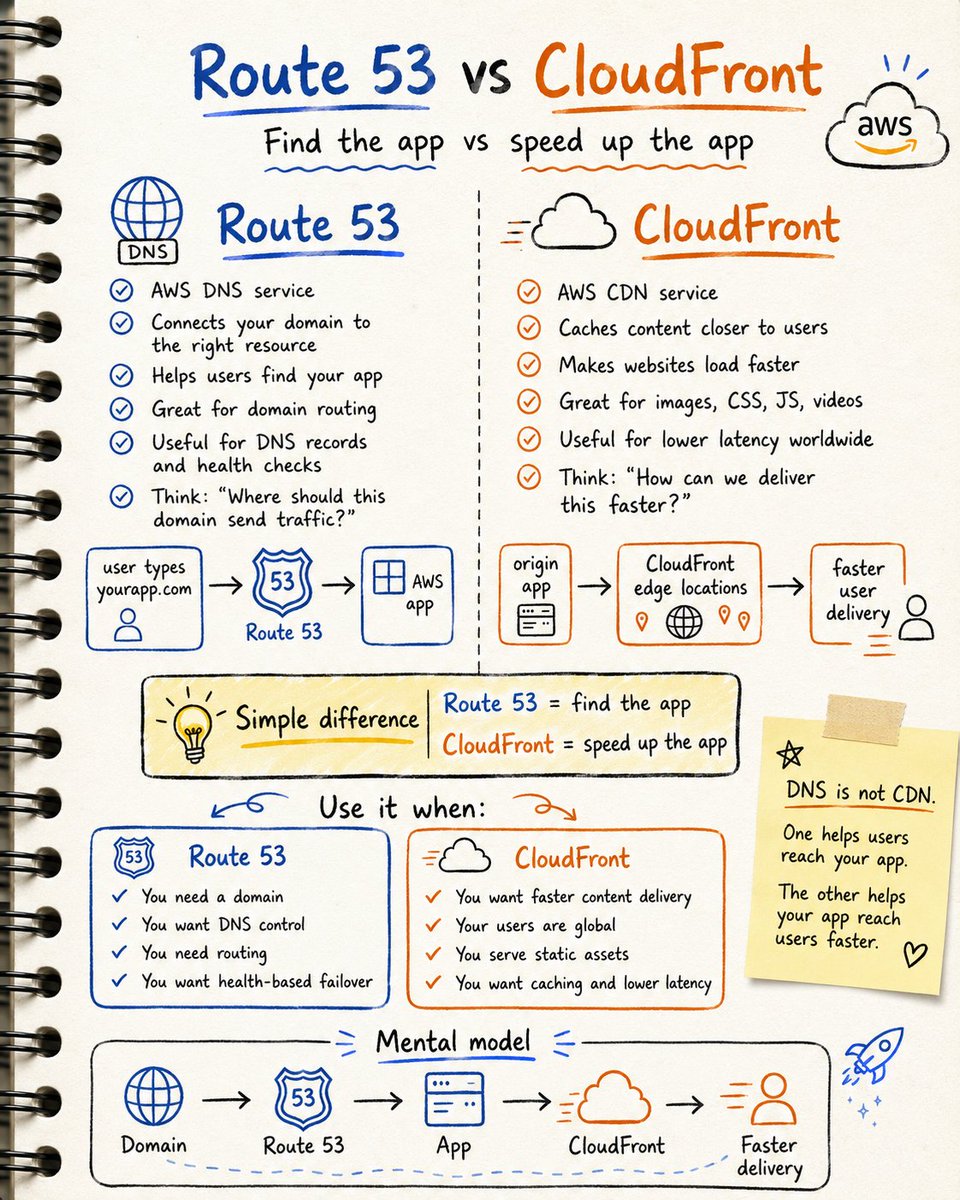
Route 53 vs CloudFront
They sound connected.
But they solve different problems 👇
1. Route 53
Route 53 is AWS DNS.
It helps users find your app using a domain name.
Example:
User types:
https://t.co/3hR04fecqV
Route 53 points that domain to the right AWS resource.
Think of it as:
“Where should this domain send traffic?”
2. CloudFront
CloudFront is AWS CDN.
It delivers your content faster by caching it closer to users.
Instead of every user reaching your main server directly,
CloudFront serves content from edge locations.
Think of it as:
“How can we deliver this faster?”
3. Simple difference
Route 53 = connects domain to your app
CloudFront = speeds up content delivery
Route 53 helps users find the app.
CloudFront helps users load it faster.
4. Use Route 53 when:
→ you own a domain
→ you need DNS records
→ you want to route traffic
→ you want health-based routing
→ you want domain-level control
5. Use CloudFront when:
→ your users are in different countries
→ your website loads static files
→ you serve images, videos, or frontend assets
→ you want lower latency
→ you want caching
6. Simple example
You host a static website on S3.
Route 53 connects:
https://t.co/3hR04fecqV → your website
CloudFront helps deliver:
HTML
CSS
JS
images
faster to users around the world.
7. Beginner mistake
Thinking DNS and CDN are the same.
They are not.
DNS helps users reach your app.
CDN helps your app reach users faster.
Simple mental model:
Route 53 = find the app
CloudFront = speed up the app
Route 53 handles domain routing.
CloudFront handles content delivery.
If you want your AWS app to feel production-ready,
don’t just deploy it.
Give it a domain.
Add caching.
Improve delivery.
That is how real cloud apps are served.
How you can build a moat with self-learning agents:
If you can build an agent that gets better every time people use it, you will be unstoppable.
Here is what you can do:
1. Learn from two sources, not one. Agent traces show what the agent did and where it broke. In-browser activity shows how users steered and fixed the results. Most products capture the first source and forget the second.
2. You have three options to apply new learnings: fine-tune your model, update the harness, or provide in-context information to the agent. Make sure you take advantage of all three.
3. When deciding what your agent should remember, lean on procedural memory (where you store workflows and rules) and episodic memory (where you store specific things that happened). Don't over-index on semantic memory, as it can go stale and become a liability.
4. Set boundaries around how far learning spreads (per-user, per-team, per-app). Be careful not to leak facts between different users' contexts.
5. You want to own the data your agent learns from. This data is your most valuable asset. Try to keep it in your infrastructure so it doesn't get stolen by Big Cloud.
6. Use open, framework-agnostic standards to capture and apply learnings.
Here is an article with more information:
Day 1 → What is CI/CD?
CI = Continuous Integration → merge + auto build/test often
CD = Continuous Delivery → always release-ready, manual approval
CD = Continuous Deployment → auto to prod, no manual gate
In plain words: automating software delivery from code to production.
The pipeline at a glance:
Developer → Git → Build → Test → Artifact → Deploy → Monitor
Key terms to know:
Pipeline → the full workflow
Stage → a major step (Build, Test, Deploy)
Job → a task inside a stage
Artifact → output of the build (JAR, Docker image)
Trigger → what starts the pipeline
Environment → where the app runs (Dev/Staging/Prod)
Think of it like a factory assembly line for code.
Why it matters: faster releases, fewer bugs, less manual work, ship with confidence.
Everything starts with Git.
Day 2 tomorrow: SDLC & DevOps Lifecycle.
#CICD #DevOps #Git #Docker
🐧 Day 1 · Linux Fundamentals & Filesystem
Before you automate anything, you have to understand the machine you're standing on.
How Linux is actually built - 4 layers:
Hardware → Kernel → Shell → User Programs
The kernel talks to hardware. The shell (Bash) is how you talk to the kernel. Master that conversation and the rest of DevOps opens up.
Distros aren't different operating systems - same kernel, different packaging:
→ Debian family (Ubuntu, Debian) → apt
→ Red Hat family (RHEL, CentOS, Fedora) → yum/dnf
Learn the filesystem map - you'll live in it daily:
/etc = configs ·
/var = logs ·
/home = users ·
/bin = essential commands ·
/proc = live kernel info
And the rule that explains everything: in Linux, everything is a file - even devices and processes.
Your first 4 commands to run right now:
pwd # where am I?
ls -lah # list files (long, all, human sizes)
cd /var/log
whoami # which user am I?
���️ One trap to remember:
/ is the root of the tree.
/root is the root user's home. Don't confuse them.
That's Day 1. You now understand the structure.
Tomorrow we move fast through essential commands & navigation.
Save this. Day 2 drops tomorrow. 🚀
25 Networking fundamentals you should know
① Network → devices connected together
② IP Address → device identity on a network
③ MAC Address → hardware identity
④ Router → moves traffic between networks
⑤ Switch → connects devices inside a network
⑥ DNS → converts domain names to IPs
⑦ DHCP → assigns IP addresses automatically
⑧ Subnet → smaller part of a network
⑨ Gateway → exit point to another network
⑩ Firewall → allows or blocks traffic
⑪ Port → entry point for an app/service
⑫ TCP → reliable data delivery
⑬ UDP → faster, less reliable delivery
⑭ HTTP → web communication
⑮ HTTPS → secure web communication
⑯ NAT → private IP to public IP translation
⑰ VPN → secure private connection
⑱ LAN → local network
⑲ WAN → wide area network
⑳ Bandwidth → maximum data capacity
㉑ Latency → delay in communication
㉒ Packet → small unit of data
㉓ Packet Loss → missing data during transfer
㉔ Load Balancer → distributes traffic
㉕ CDN → delivers content faster globally
Networking gets easier when you stop memorizing terms
and start understanding how data moves.
A new era in Morrow starts today!! The Clayton State Department of Athletics has formally introduced Carl Little as the new head men's basketball coach #LOCHIN
Photo Credit: Sean Thompson, CSU Marketing and Communications
“Young people, you need to bet on yourself.
If you think you're that good, you don't need a handout. You just allow your work to speak for itself."
Do not ask to be chosen.
Work until you cannot be ignored.
IAM IS THE CHEAT CODE
I am officially IAM pilled
Zero required certs
Helpdesk counts as IAM experience
Relatively easy (no disrespect to my IAM peeps)
Pays well
THE HELPDESK TO IAM PIPELINE IS ALIVE
AND AI PROOF