Want to Be a Linux Pro? Master These 15 Skills First 🐧
1. COMMAND LINE NAVIGATION
→ Navigate directories with cd → List files with ls → Find your location with pwd
The terminal is your home in Linux.
2. FILE MANAGEMENT
→ Create files and folders → Copy, move, and delete files → Understand file paths
Learn commands like cp, mv, rm, and mkdir.
3. FILE PERMISSIONS
→ Understand read, write, and execute permissions → Use chmod and chown → Secure files properly
Permissions are critical for Linux security.
4. USER & GROUP MANAGEMENT
→ Create users → Manage groups → Assign permissions
Multi-user systems rely on proper access control.
5. PROCESS MANAGEMENT
→ View running processes → Stop problematic applications → Monitor resource usage
Master ps, top, htop, and kill.
6. PACKAGE MANAGEMENT
→ Install software → Update packages → Remove applications
Learn tools like APT, DNF, YUM, and Pacman.
7. SHELL SCRIPTING
→ Automate repetitive tasks → Write Bash scripts → Schedule jobs
Automation separates beginners from professionals.
8. TEXT PROCESSING
→ Search files using grep → Transform text with sed → Analyze data using awk
Text manipulation is a superpower in Linux.
9. NETWORKING BASICS
→ Check connectivity → Inspect network interfaces → Troubleshoot network issues
Learn commands like ping, curl, netstat, and ss.
10. SYSTEM MONITORING
→ Monitor CPU usage → Check memory utilization → Analyze disk usage
Use top, vmstat, free, and df.
11. SERVICE MANAGEMENT
→ Start and stop services → Enable services at boot → Manage daemons
Master systemctl and Systemd.
12. LOG ANALYSIS
→ Read system logs → Diagnose errors → Troubleshoot applications
Logs tell the story behind every issue.
13. SSH & REMOTE ACCESS
→ Connect to remote servers → Transfer files securely → Manage systems remotely
SSH is essential for every Linux professional.
14. SECURITY HARDENING
→ Configure firewalls → Secure SSH access → Keep systems updated
Security should always be a priority.
15. DOCKER & CLOUD TOOLS
→ Run containers → Deploy applications → Work with cloud infrastructure
Modern Linux professionals must understand containers.
Master these 15 skills and you'll have a strong foundation for System Administration, DevOps, Cloud Computing, Backend Development, Cybersecurity, and Site Reliability Engineering.
📚 Grab the Linux Handbook:
https://t.co/DeHjJ1Wubf
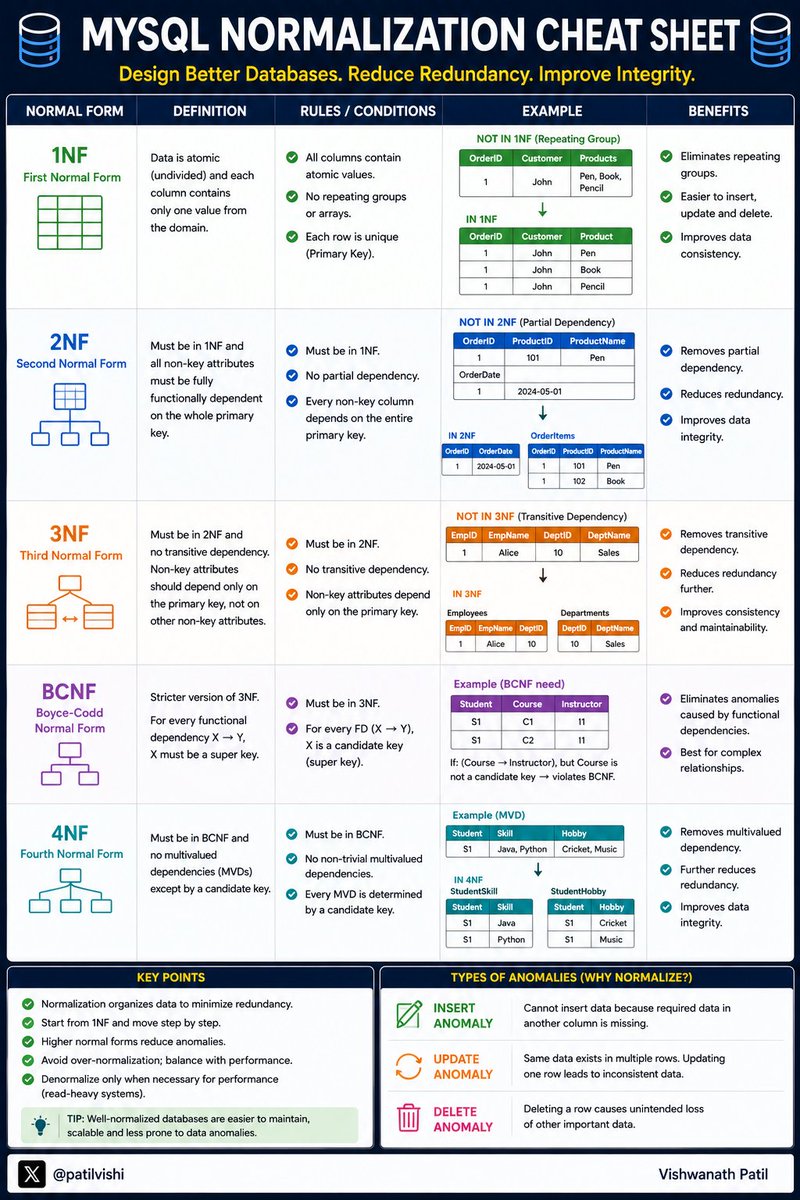
Database Normalization is one of those topics every developer learns...
But many forget the difference between
✅ 1NF
✅ 2NF
✅ 3NF
✅ BCNF
✅ 4NF
A well-normalized database:
• Reduces redundancy
• Improves data integrity
• Prevents update anomalies
• Makes systems easier to maintain
Here's a quick MySQL Normalization Cheat Sheet 👇
Save it for your next system design or database interview...
Found one of the most underrated DevOps learning repos on GitHub 🤯
Most people try to learn DevOps by jumping between random YouTube videos, blog posts, and outdated tutorials.
This repo puts everything in one place.
- Linux.
- Docker.
- Kubernetes.
- Terraform.
- AWS.
- CI/CD.
- Monitoring.
- Networking.
- GitOps.
And a lot more.
Basically a curated roadmap of free resources for anyone trying to get into DevOps or level up their skills.
Definitely worth starring ⭐
Repo: https://t.co/czH0YNXL78
𝐖𝐡𝐚𝐭 𝐢𝐬 𝐂𝐀𝐏 𝐓𝐡𝐞𝐨𝐫𝐞𝐦?
Distributed systems must make trade-offs.
The CAP Theorem explains why no distributed system can guarantee everything at the same time when network failures occur.
𝐖𝐡𝐚𝐭 𝐢𝐬 𝐂𝐀𝐏 𝐓𝐡𝐞𝐨𝐫𝐞𝐦?
• CAP stands for Consistency, Availability, and Partition Tolerance.
• It states that a distributed system can only guarantee two out of the three properties during a network partition.
• When communication between nodes breaks, the system must choose between consistency and availability.
• CAP helps engineers design databases, distributed systems, and cloud applications.
𝐓𝐡𝐞 𝟑 𝐏𝐢𝐥𝐥𝐚𝐫𝐬
1. 𝐂𝐨𝐧𝐬𝐢𝐬𝐭𝐞𝐧𝐜𝐲 (C)
All users see the same data at the same time.
Example:
User A updates a profile → User B immediately sees the updated profile.
Consistency guarantees every read returns the latest write.
2. 𝐀𝐯𝐚𝐢𝐥𝐚𝐛𝐢𝐥𝐢𝐭𝐲 (A)
Every request receives a response.
Even if some servers fail, the system remains operational.
Availability guarantees users always get a response, although the data may not be the latest version.
3. 𝐏𝐚𝐫𝐭𝐢𝐭𝐢𝐨𝐧 𝐓𝐨𝐥𝐞𝐫𝐚𝐧𝐜𝐞 (P)
The system continues working despite network failures between nodes.
Servers can become temporarily disconnected but the system keeps operating.
Partition tolerance is essential in modern distributed systems.
𝐁𝐞𝐟𝐨𝐫𝐞 𝐍𝐞𝐭𝐰𝐨𝐫𝐤 𝐏𝐚𝐫𝐭𝐢𝐭𝐢𝐨𝐧
Node A ⇄ Node B ⇄ Node C
All nodes communicate normally.
Consistency and availability can coexist.
𝐀𝐟𝐭𝐞𝐫 𝐍𝐞𝐭𝐰𝐨𝐫𝐤 𝐏𝐚𝐫𝐭𝐢𝐭𝐢𝐨𝐧
Node A ✕ Node B
Communication breaks.
The system must choose:
• Maintain consistency and reject some requests (CP).
• Maintain availability and serve requests with possibly stale data (AP).
𝐂𝐀𝐏 𝐂𝐨𝐦𝐛𝐢𝐧𝐚𝐭𝐢𝐨𝐧𝐬
CP (Consistency + Partition Tolerance)
System prioritizes correct data.
During a partition, some requests may be rejected.
Examples:
• Distributed databases focused on strong consistency.
• Financial and banking systems.
AP (Availability + Partition Tolerance)
System prioritizes serving requests.
During a partition, users may receive outdated data.
Examples:
• Social media platforms.
• Content delivery systems.
• DNS services.
CA (Consistency + Availability)
Possible only when partitions do not occur.
Not practical for large-scale distributed systems because network failures are inevitable.
𝐇𝐨𝐰 𝐂𝐀𝐏 𝐓𝐡𝐞𝐨𝐫𝐞𝐦 𝐖𝐨𝐫𝐤𝐬?
User → Request → Distributed System → Network Partition Occurs → Choose CP or AP → Return Response
𝐓𝐡𝐞 𝐅𝐥𝐨𝐰
1. User sends a request.
2. Request reaches a distributed system.
3. A network partition occurs between nodes.
4. The system detects communication failure.
5. Engineers choose consistency or availability.
6. The system continues operating based on that choice.
7. Users receive a response.
𝐖𝐡𝐲 𝐂𝐀𝐏 𝐓𝐡𝐞𝐨𝐫𝐞𝐦 𝐌𝐚𝐭𝐭𝐞𝐫𝐬
• Guides distributed system architecture.
• Helps choose the right database.
• Explains real-world trade-offs.
• Improves reliability and scalability decisions.
• Forms the foundation of modern cloud systems.
Before CAP, distributed systems seem simple. After CAP, you realize every system is making trade-offs.
CAP Theorem is one of the most important concepts in System Design.
📘 Grab this ebook to Master System Design here: https://t.co/WIMretQFPE
How Cisco is using AI to Fix Networks
Watch this video on YouTube:
https://t.co/JjMwQFrmum
Thank you to @Cisco for sponsoring this video and my trip to Cisco Live!
Two smartwatches can track the same walk and still report very different step counts.
Why? Well here, Shradha explains how wearables use accelerometers, gyroscopes, and algorithms to estimate your steps.
You'll learn why and how wrist movement, walking speed, false steps, and brand-specific models can all affect the final number.
https://t.co/86UodQy8PS
System Design Series II is officially back!
This time, we're going deeper, more practical, and far more detailed than before.
Over the next 60 days, I'll be breaking down System Design from the ground up — covering everything needed for interviews, real-world engineering, and scalable product building.
Whether you're preparing for internships, SDE roles, or simply want to understand how large-scale systems work, this series is designed to take you from beginner to interview-ready.
Day 1 drops soon. 🔥
Follow along, bookmark the posts, and let's master System Design together.
#SystemDesign #SoftwareEngineering
🐧 Day 3/30 — #Linux
Before managing files, installing software, or administering servers, you must know how to move around the Linux filesystem.
Navigation is one of the most important Linux skills every developer should master.
Navigating Linux – Essential Linux Commands for Directories and Paths
Linux organizes everything in a hierarchical directory structure that starts from the root directory (/).
The most essential navigation commands are:
→ pwd — Print the current working directory
→ ls — List files and directories
→ cd — Change directory
→ mkdir — Create a new directory
→ rmdir — Remove an empty directory
Examples:
→ pwd
Displays your current location in the filesystem.
→ ls
Shows files and folders in the current directory.
→ cd Documents
Moves into the Documents directory.
→ cd ..
Moves one level up.
→ cd ~
Returns to your home directory.
Understanding Linux Paths
→ Absolute Path
Starts from the root directory.
Example: /home/user/Documents
→ Relative Path
Starts from your current directory.
Example: Documents/project
Why This Matters:
→ Navigate the filesystem efficiently
→ Access files quickly
→ Manage projects from the terminal
→ Build confidence using the command line
→ Prepare for advanced Linux administration tasks
Mastering navigation commands is the foundation of everything you'll do in Linux.
🐧 Grab the Linux Ebook: https://t.co/DeHjJ1Wubf