Claude vs. Claude Code vs. Cowork.
Anthropic offers three distinct ways to interact with Claude, and each one targets a fundamentally different workflow. Think of it as: Chat for thinking, Code for building, and Cowork for doing.
Here's a quick breakdown:
1️⃣ Claude Chat
This is the conversational AI assistant most people already know. You type a prompt, Claude responds, and you iterate together.
- Turn rough ideas into structured plans through conversation
- Write emails, reports, essays, and long-form content
- Research and summarize complex topics in minutes
- Analyze documents, PDFs, and images
- Build interactive prototypes through Artifacts
The key here is that everything happens through conversation. You're thinking with Claude, not delegating work to it.
It's available on every device, has a free tier, and supports persistent memory across sessions.
The tradeoff is that it has no direct access to your local files (upload only), and it can't generate raster images natively.
2️⃣ Claude Code
This is a terminal-native coding agent. You describe what you want in plain English, and Claude reads your codebase, writes code, runs tests, fixes errors, and ships the result.
- Build and debug entire features across the full codebase
- Write, run, and fix tests automatically
- Manage git workflows and create pull requests
- Spawn multiple parallel agents working on different parts of a task simultaneously
It handles the full development cycle end to end, from planning to execution to testing. With the CLAUDE(.)md configuration file, you can teach it your project's conventions, patterns, and constraints so it writes code the way your team expects.
The tradeoff is a steeper learning curve compared to Chat, and token costs can add up during heavy sessions.
3️⃣ Claude Cowork
This is the newest addition. Anthropic describes it as Claude Code for the rest of your work.
It's an agentic desktop assistant that automates file management and repetitive tasks through a GUI. You describe an outcome, and Claude plans, executes, and delivers finished work: formatted documents, organized file systems, spreadsheets with working formulas, and synthesized research.
- Direct local file access and editing (no upload/download cycle)
- Schedule recurring tasks automatically
- Assign tasks remotely via Dispatch from your phone
- Computer Use lets Claude control your screen directly
It runs inside a sandboxed virtual machine on your computer, so Claude can only access folders you explicitly grant. You don't need to know how to code to use it.
The tradeoff is that your computer must stay awake for tasks to run, and it's still in research preview.
Here's how to think about choosing between them:
→ If you need to think through a problem or get writing/research help, use Chat
→ If you're building software and want an autonomous coding partner, use Code
→ If you have a clearly defined deliverable that involves local files and desktop workflows, use Cowork
All three are included in the same subscription starting at $20/month, which makes it one of the highest-leverage subscriptions in productivity software right now.
I've put together a visual below that maps the workflow of each product side by side.
Also, if you want to go deeper into Claude Code specifically, my co-founder wrote a detailed article covering the anatomy of the .claude/ folder, a complete guide to CLAUDE(.)md, custom commands, skills, agents, and permissions, and how to set them all up properly.
Read it below.
Stop wasting hours trying to learn AI.
I have already done it for you.
With one list. Zero confusion. And no fluff.
📹 Videos:
1. LLM Introduction: https://t.co/sfqLeUwf3W
2. LLMs from Scratch: https://t.co/GbnKbfvhcg
3. Agentic AI Overview (Stanford): https://t.co/EnqB4YMpeY
4. Building and Evaluating Agents: https://t.co/vp8RCDEoZP
5. Building Effective Agents: https://t.co/mngwlvMHna
6. Building Agents with MCP: https://t.co/TVk18pOf6Z
7. Building an Agent from Scratch: https://t.co/bfnRYfrFjd
8. Philo Agents: https://t.co/SQcGLseeM1
🗂️ Repos
1. GenAI Agents: https://t.co/cXJNVqPZqv
2. Microsoft's AI Agents for Beginners: https://t.co/WHiolowRZi
3. Prompt Engineering Guide: https://t.co/rVMK9vZfBJ
4. Hands-On Large Language Models: https://t.co/zpmaATDtdr
5. AI Agents for Beginners: https://t.co/WHiolowRZi
6. GenAI Agents: https://t.co/s9uA1N24PV
7. Made with ML: https://t.co/AKffs9HkUz
8. Hands-On AI Engineering: https://t.co/h9OVhJ3tWn
9. Awesome Generative AI Guide: https://t.co/lV1YMGL52R
10. Designing Machine Learning Systems: https://t.co/IUXQzlY97i
11. Machine Learning for Beginners from Microsoft: https://t.co/KrSHxdZMju
12. LLM Course: https://t.co/6U4Vww6Uyk
🗺️ Guides
1. Google's Agent Whitepaper: https://t.co/5Wpf7xvQqz
2. Google's Agent Companion: https://t.co/bVmjIK8Xam
3. Building Effective Agents by Anthropic: https://t.co/7SsNu6xr6Y
4. Claude Code Best Agentic Coding practices: https://t.co/X22UJOHlbC
5. OpenAI's Practical Guide to Building Agents: https://t.co/Bn5SYDT9KR
📚 Books:
1. Understanding Deep Learning: https://t.co/csAFkaw3Qp
2. Building an LLM from Scratch: https://t.co/72W4q5QV4z
3. The LLM Engineering Handbook: https://t.co/WgHM7dn8xq
4. AI Agents: The Definitive Guide - Nicole Koenigstein: https://t.co/2vXzCQXEqg
5. Building Applications with AI Agents - Michael Albada: https://t.co/MQAwMPbzQZ
6. AI Agents with MCP - Kyle Stratis: https://t.co/CcaNk01utK
7. AI Engineering: https://t.co/GD45IogK63
📜 Papers
1. ReAct: https://t.co/Nk77rLspmX
2. Generative Agents: https://t.co/CJEokZcGSw
3. Toolformer: https://t.co/GVKiIt2pj3
4. Chain-of-Thought Prompting: https://t.co/YyoEidCGMi
🧑🏫 Courses:
1. HuggingFace's Agent Course: https://t.co/288ifz8r9R
2. MCP with Anthropic: https://t.co/F07zf0lfXi
3. Building Vector Databases with Pinecone: https://t.co/6MFjlpTHab
4. Vector Databases from Embeddings to Apps: https://t.co/ngGDY3Rc7r
5. Agent Memory: https://t.co/BnlgGadL7o
Follow @iansh04_ for more!!
👇 Comment “AI” for more resources
Repost for your network ♻️
Bookmark for future.
The prompt structure I use for every Claude task.
7 sections. Each one earns its place.
Most people type one sentence and hope for the best.
That's like handing someone a blank page and saying "make something good."
This structure fixes that:
1. Task → What you want + what success looks like
2. Context Files → The files Claude needs to read first
3. Reference → Examples of what good output looks like + the rules you extracted from them
4. Success Brief → Output type, length, tone, and what to avoid
5. Rules → Your standards and constraints. Claude checks these before writing
6. Conversation → Ask clarifying questions before executing
7. Plan → List the 3 most relevant rules, then map out the approach
The difference between a generic output and a useful one is almost always the prompt, not the model.
Save this. Try it on your next task.
Anthropic’s CEO when he saw this leaked 1-hour Claude course where some guy literally shows how he automated his entire business and makes $100K/year on autopilot
I HAVEN’T OPENED A SINGLE BOOK THIS MONTH. CLAUDE READ 34 OF THEM FOR ME
I built a vault in Obsidian, connected Claude and added Notebooklm
went to sleep
woke up with flashcards, mind maps, and an AI that answers from my own notes only
my friends are still highlighting pdfs manually
the only thing separating us is one setup: claude + obsidian + notebooklm
every idea captured. every book processed. zero knowledge lost
if this is the setup you’ve been looking for - like & bookmark so you don’t lose it
🚨 SOMEONE JUST KILLED THE REAL ESTATE INDUSTRY
A guy scanned an entire house with his phone. Uploaded it.
Now anyone on Earth can walk through it in a browser tab. No app. No VR. No agent. No appointment.
Click → you’re inside. Every room. Every angle. Every shadow. Photoreal.
The numbers are insane:
- Agent fee on a $500k home: $15,000
- Cost to make this scan: ~$200
- Time to “tour” 50 houses: one evening
- File size: smaller than a TikTok
The science is wild too:
It’s called 3D Gaussian Splatting instead of polygons (how games render), it uses millions of tiny glowing “splats” of color and depth.
AI reconstructs reality from your photos. The result loads on a phone and looks like you’re THERE.
The grift opportunity is even wilder:
Freelancers are already charging $300–$800 per scan for realtors, Airbnbs, venues, car dealers, museums.
One person + one phone + one weekend = a business.
100% Open source. Built on PlayCanvas.
🔖 Claude Cookbook is worth bookmarking.
81 practical guides across 15 categories, covering agents, tools, RAG, evals, multimodal apps, Skills, integrations, and production workflows by @AnthropicAI
https://t.co/lgkTL6Av8F
A HUMAN INVENTED A TOOL THAT CAN BUILD A MILLION-DOLLAR COMPANY - AND IT'S FREE
Vannevar Bush described this idea back in 1945 - a machine that expands the human brain to infinity, stores everything you know and connects every idea to every other one automatically. For 80 years nobody could build it.
Now it's a free app on your laptop.
One properly built Obsidian vault replaces an operations director, an analyst, a content strategist and a project manager simultaneously - running 24 hours a day with no days off, no salary and no Slack messages asking for clarification.
The people who figured this out first are already running $15,000-$20,000/month businesses completely alone, no team, no office, no investors.
The limits of this tool are the limits of your thinking. And judging by what the best users are doing with it - there are no limits.
40% of the code Claude writes for you is wasted. you're paying for the rewrite.
a 65-line markdown file fixes it. 120,000 developers have starred it.
the author tested it on "30 codebases over 6 weeks" and reported a mistake rate drop from 41% to either 11% or 3%
depending on whether you read the headline or the body.
the irony is that the article is right.
CLAUDE.md is the most under-leveraged file in your stack.
65 lines of behavioral rules outperform a 4,000-token preferences dump.
"be careful" is useless. testable imperatives are gold.
"be senior" doesn't work Claude already thinks it is.
the 4 rules that ship the most leverage:
/ state assumptions, never guess silently
/ minimum code, nothing speculative
/ surgical changes, don't refactor adjacent code
/ define success, loop until verified
compliance: ~80%. mistake rate: from ~40% to single digits.
no human caught the contradicting numbers in the title.
nobody had to.
🚨 Anthropic just showed a 24-minute workshop on how to actually do prompts for Claude.
Taught by the people who built it.
Free. No registration. No paywall.
I've seen $300 courses that don't cover what they teach in the first 8 minutes.
Watch it and bookmark it now.
🚨 SOMEONE JUST KILLED THE COACHING INDUSTRY
a developer spent 22,000 hours building a Personal AI Operating System on top of Claude Code
now anyone with a terminal can install it for FREE
it knows your goals, remembers every decision you've made, and prepares your morning briefing while you sleep
[ the numbers are insane ]:
- hours of dev work in it: 22,000
- sessions logged: 6,000
- time saved per day: 2-3 hours
- GitHub stars: 12,100
- skills built in: 45
- workflows wired up: 171
- safety hooks: 37
- cost to install: $0
[ the science is wild too ]:
no embeddings, no vector databases, no AI magic you can't read
every memory, decision, and context lives in plain markdown files
you read it with cat, search it with ripgrep, version it with git
4 memory types compound over time:
- work memory (active projects, open decisions)
- knowledge memory (domain expertise, research)
- people memory (contacts, companies, relationships)
- learning memory (patterns, mistakes, what works for YOU)
every complex task routes through a 7-step cycle:
OBSERVE → THINK → PLAN → BUILD → EXECUTE → VERIFY → LEARN
privacy is enforced by CODE, not prompts
a hook called ContainmentGuard physically blocks sensitive data from being written outside designated zones
[ the grift opportunity is even wilder ]:
freelancers are already charging $500-2,000 per personal AI setup for executives, founders, and busy operators
one person + one weekend = a consulting business that didn't exist 6 months ago
every AI productivity app you're paying $30/month for is replaceable by 4 hours of setup work and this one repo
REPO: https://t.co/fwLoyuaUKh
100% OPEN SOURCE, FREE
This 30-minute speech by the Head of Anthropic "Coding Agents" researcher will teach you more about vibe coding than 100 paid courses.
Bookmark it & give it 30 minutes today. This video will change the way you use AI forever,
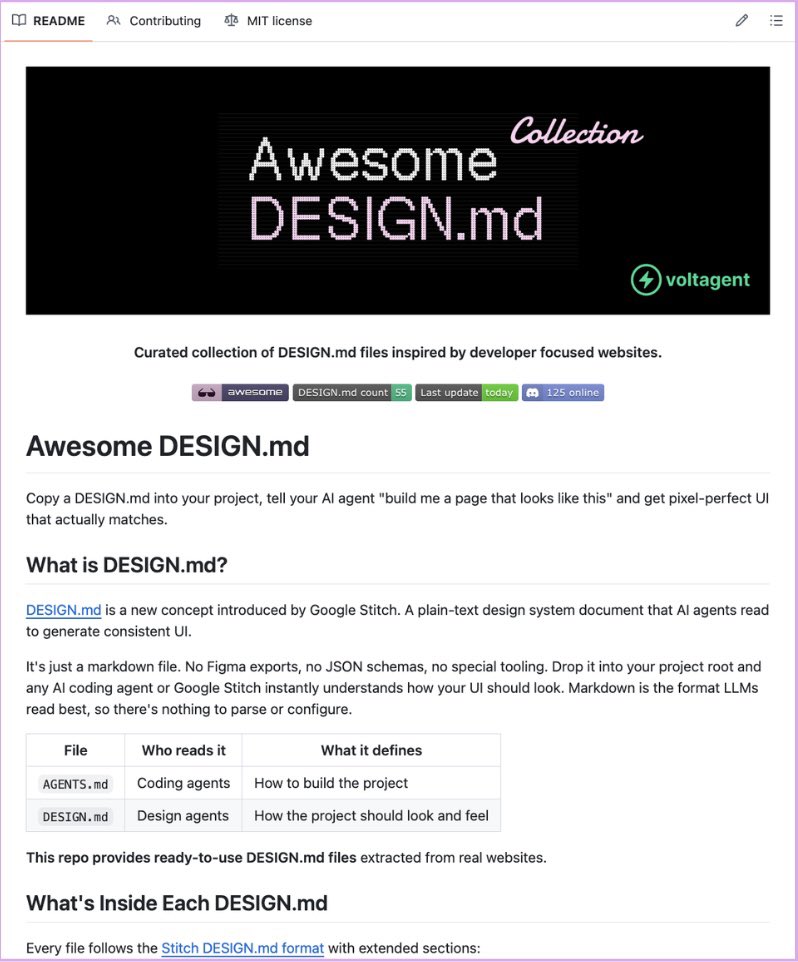
Google Stitch has released 𝗗𝗘𝗦𝗜𝗚𝗡.𝗺𝗱 🤯
One markdown file that teaches your AI coding agent your entire design system.
→ No Figma exports
→ No JSON schemas
→ Nothing to configure
The part that saves the most time:
A free collection of 40+ pre-built files already exists, extracted from real products. Stripe, Vercel, Linear, Notion, Lovable, Claude, ElevenLabs, Cursor, Warp, Zapier, and more.
Drop it in your project root. Claude Code, Cursor, Gemini CLI, and GitHub Copilot all read it natively.
100% Free and Open-Source.
Best GitHub repos for Claude code that will 10x your next project in 2026:
1. Claude Mem
https://t.co/PzlmPwaA4X
2. UI UX Pro Max
https://t.co/mcpLn9KjQU
3. n8n-MCP
https://t.co/zeNRbHtKv5
4. Obsidian Skills
https://t.co/66WEas0u0U
5. LightRAG
https://t.co/bfzlPxZjFw
6. Everything Claude Code
https://t.co/6vzCMOA0us
7. Superpowers
https://t.co/yMLM1JIVz0
8. Awesome Claude Code
https://t.co/fktVylnNj0
9. GSD (Get Shit Done)
https://t.co/qnImunzbLS
💀 R.I.P. EXPENSIVE VIDEO EDITORS
AI can now create YouTube videos just like MrBeast’s team… for free.
Here are 9 copy-paste prompts using Claude Opus 4.6 + Kling 3.0 that can build 10-minute viral videos in 3 hours 👇👇
Bookmark this 🔖 — you’ll need it later.
Dash global payments are expanding! 🌏
We're thrilled to be added to @QRwallet_X, a seamless payments-focused crypto wallet, expanding our reach in Vietnam, the Philippines, Thailand, and more!
Excited to build together. 🤝