Acquiring knowledge is easy, the hard part is knowing what to apply and when.
That’s why all true learning is “on the job.”
Life is lived in the arena.
If you're building AI agents, read this twice:
There’s a new invisible OS being written for the autonomous future. It’s built on two emerging protocols:
• Model Context Protocol (MCP)
• Agent-to-Agent Protocol (A2A)
Here’s why they’re a big deal—and why you need to care:
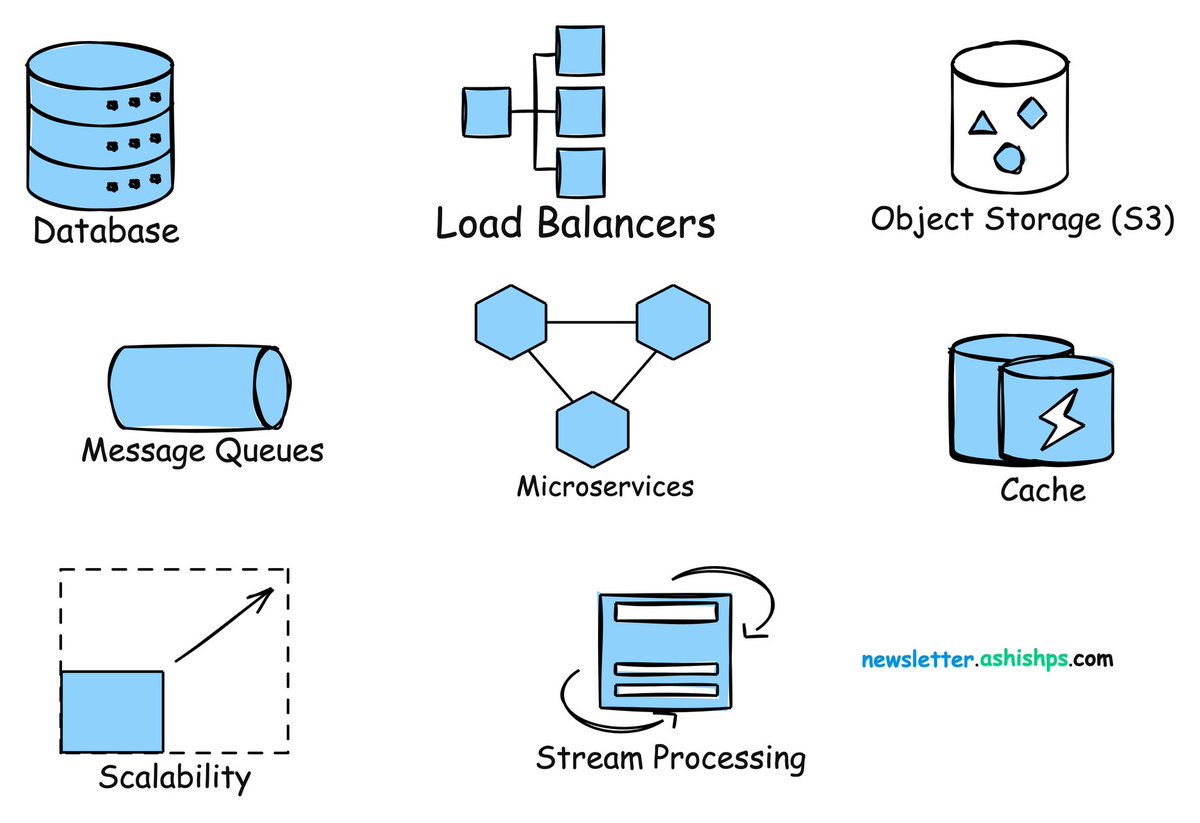
System Design was HARD until I learned these 13 concepts (bookmark worthy 🧵🔖)
1. API Gateway vs Load Balancer? https://t.co/nsBptrVFrZ
2. Reverse Proxy vs Forward Proxy? https://t.co/bWRJ2g2Klq
3. Horizontal scaling vs vertical scaling? https://t.co/1aUWxJg7Gr
Some people today are discouraging others from learning programming on the grounds AI will automate it. This advice will be seen as some of the worst career advice ever given. I disagree with the Turing Award and Nobel prize winner who wrote, “It is far more likely that the programming occupation will become extinct [...] than that it will become all-powerful. More and more, computers will program themselves.” Statements discouraging people from learning to code are harmful!
In the 1960s, when programming moved from punchcards (where a programmer had to laboriously make holes in physical cards to write code character by character) to keyboards with terminals, programming became easier. And that made it a better time than before to begin programming. Yet it was in this era that Nobel laureate Herb Simon wrote the words quoted in the first paragraph. Today’s arguments not to learn to code continue to echo his comment.
As coding becomes easier, more people should code, not fewer!
Over the past few decades, as programming has moved from assembly language to higher-level languages like C, from desktop to cloud, from raw text editors to IDEs to AI assisted coding where sometimes one barely even looks at the generated code (which some coders recently started to call vibe coding), it is getting easier with each step.
I wrote previously that I see tech-savvy people coordinating AI tools to move toward being 10x professionals — individuals who have 10 times the impact of the average person in their field. I am increasingly convinced that the best way for many people to accomplish this is not to be just consumers of AI applications, but to learn enough coding to use AI-assisted coding tools effectively.
One question I’m asked most often is what someone should do who is worried about job displacement by AI. My answer is: Learn about AI and take control of it, because one of the most important skills in the future will be the ability to tell a computer exactly what you want, so it can do that for you. Coding (or getting AI to code for you) is a great way to do that.
When I was working on the course Generative AI for Everyone and needed to generate AI artwork for the background images, I worked with a collaborator who had studied art history and knew the language of art. He prompted Midjourney with terminology based on the historical style, palette, artist inspiration and so on — using the language of art — to get the result he wanted. I didn’t know this language, and my paltry attempts at prompting could not deliver as effective a result.
Similarly, scientists, analysts, marketers, recruiters, and people of a wide range of professions who understand the language of software through their knowledge of coding can tell an LLM or an AI-enabled IDE what they want much more precisely, and get much better results. As these tools are continuing to make coding easier, this is the best time yet to learn to code, to learn the language of software, and learn to make computers do exactly what you want them to do.
[Original text: https://t.co/HdI3Jb9HmF ]
Introducing Free AI Agents for Product Managers:
✅ 𝐏𝐑𝐃 𝐆𝐞𝐧𝐞𝐫𝐚𝐭𝐨𝐫: Helps you generate Product Requirement Documents
✅ 𝐏𝐌 𝐑𝐞𝐬𝐮𝐦𝐞 𝐑𝐞𝐯𝐢𝐞𝐰𝐞𝐫: Provides a detailed review of your PM resume
✅ 𝐏𝐫𝐨𝐝𝐮𝐜𝐭 𝐒𝐭𝐫𝐚𝐭𝐞𝐠𝐢𝐬𝐭: Helps you develop a winning product strategy
🧵
My newsletter recently crossed 30,000 subscribers.
Here are the 10 most-read articles:
1. How I Mastered Data Structures and Algorithms: https://t.co/CmpD3qPpHV
2. LeetCode was HARD until I Learned these 15 Patterns: https://t.co/dFv9UPK853
3. System Design - What is Scalability: https://t.co/Gbpjax24gd
4. 20 Patterns to Master Dynamic Programming: https://t.co/A1GZ9diBo4
5. How to Answer a System Design Interview Problem: https://t.co/vvVRaM6I8K
6. Design a URL Shortener - System Design Interview: https://t.co/p1AjJXMe9K
7. Basic OOP Concepts Explained with Code: https://t.co/amRKFxbOAz
8. System Design - How to Scale a Database: https://t.co/vZ7rdPddoC
9. S.O.L.I.D Principles Explained With Code: https://t.co/E8ewUYoVuC
10. CAP Theorem Explained: https://t.co/Aaq5s96WFU
Subscribe for more such articles every week.
𝗗𝗼 𝗬𝗼𝘂 𝗡𝗲𝗲𝗱 𝗧𝗼 𝗞𝗻𝗼𝘄 𝗔𝗹𝗹 𝗗𝗲𝘀𝗶𝗴𝗻 𝗣𝗮𝘁𝘁𝗲𝗿𝗻𝘀?
The answer is no. Even though we have 23 design patterns, around 10 are mostly used in everyday development. Knowing which patterns exist overall is good, but you need to know these very well.
Design patterns can be divided into three main types:
𝟭. 𝗖𝗿𝗲𝗮𝘁𝗶𝗼𝗻𝗮𝗹 𝗣𝗮𝘁𝘁𝗲𝗿𝗻𝘀
These design patterns deal with object creation mechanisms, trying to create objects in a manner suitable to the situation.
Important patterns in this group are:
𝗙𝗮𝗰𝘁𝗼𝗿𝘆: This pattern allows delegating the instantiation logic to factory classes. The Factory Method creates objects without exposing the instantiation logic to the client.
𝗦𝗶𝗻𝗴𝗹𝗲𝘁𝗼𝗻: The Singleton pattern ensures that a class has only one instance and provides a global point of access to it. It's useful when exactly one object is needed to coordinate actions across the system.
𝟮. 𝗦𝘁𝗿𝘂𝗰𝘁𝘂𝗿𝗮𝗹 𝗣𝗮𝘁𝘁𝗲𝗿𝗻𝘀
These patterns deal with the composition of classes and objects that form larger structures.
Important patterns in this group are:
𝗔𝗱𝗮𝗽𝘁𝗲𝗿: This pattern works as a bridge between two incompatible interfaces. It wraps an existing class with a new interface to become compatible with the client's interface.
𝗙𝗮𝗰𝗮𝗱𝗲: The Façade pattern provides a unified interface to a set of interfaces in a subsystem. Façade defines a higher-level interface that makes the subsystem easier to use.
𝗗𝗲𝗰𝗼𝗿𝗮𝘁𝗼𝗿: This pattern dynamically adds/overrides behavior in an existing method of an object. This pattern provides a flexible alternative to subclassing for extending functionality.
𝗣𝗿𝗼𝘅𝘆: The Proxy pattern provides a surrogate or placeholder for another object to control access to it. In its most general form, a proxy is a class functioning as an interface to something else.
𝟯. 𝗕𝗲𝗵𝗮𝘃𝗶𝗼𝗿𝗮𝗹 𝗣𝗮𝘁𝘁𝗲𝗿𝗻𝘀
These patterns are specifically concerned with communication between objects and how they interact and distribute work.
Important patterns in this group are:
𝗖𝗼𝗺𝗺𝗮𝗻𝗱: The Command pattern encapsulates a request as an object, thus allowing users to parameterize clients with queues, requests, and operations.
𝗧𝗲𝗺𝗽𝗹𝗮𝘁𝗲 𝗠𝗲𝘁𝗵𝗼𝗱: This pattern defines the program skeleton of an algorithm in a method called template method, which defers some steps to subclasses.
𝗦𝘁𝗿𝗮𝘁𝗲𝗴𝘆: The Strategy pattern defines a family of algorithms, encapsulates each one, and makes them interchangeable. Strategy lets the algorithm vary independently from clients that use it.
𝗢𝗯𝘀𝗲𝗿𝘃𝗲𝗿: This pattern defines a one-to-many dependency between objects so that all its dependents are notified and updated automatically when one object changes state.
Check out this helpful cheat sheet below.
#softwareengineering #programming #developers
Why most engineers don't make it to Staff:
They have the wrong behaviors and mindsets.
I went from Junior to Staff in 3 years at Meta largely because of the way I worked.
3 behaviors that helped me (feel free to copy):
𝗗𝗼 𝗬𝗼𝘂 𝗡𝗲𝗲𝗱 𝗧𝗼 𝗞𝗻𝗼𝘄 𝗔𝗹𝗹 𝗗𝗲𝘀𝗶𝗴𝗻 𝗣𝗮𝘁𝘁𝗲𝗿𝗻𝘀?
The answer is no. Even though we have 23 design patterns, around 10 are mostly used in everyday development. Knowing which patterns exist overall is good, but you need to know these very well.
Design patterns can be divided into three main types:
𝟭. 𝗖𝗿𝗲𝗮𝘁𝗶𝗼𝗻𝗮𝗹 𝗣𝗮𝘁𝘁𝗲𝗿𝗻𝘀
These design patterns deal with object creation mechanisms, trying to create objects in a manner suitable to the situation.
Important patterns in this group are:
🔹𝗙𝗮𝗰𝘁𝗼𝗿𝘆: This pattern allows delegating the instantiation logic to factory classes. The Factory Method creates objects without exposing the instantiation logic to the client.
🔹𝗦𝗶𝗻𝗴𝗹𝗲𝘁𝗼𝗻: The Singleton pattern ensures that a class has only one instance and provides a global point of access to it. It's useful when exactly one object is needed to coordinate actions across the system.
𝟮. 𝗦𝘁𝗿𝘂𝗰𝘁𝘂𝗿𝗮𝗹 𝗣𝗮𝘁𝘁𝗲𝗿𝗻𝘀
These patterns deal with the composition of classes and objects that form larger structures.
Important patterns in this group are:
🔹𝗔𝗱𝗮𝗽𝘁𝗲𝗿: This pattern works as a bridge between two incompatible interfaces. It wraps an existing class with a new interface to become compatible with the client's interface.
🔹𝗙𝗮𝗰𝗮𝗱𝗲: The Façade pattern provides a unified interface to a set of interfaces in a subsystem. Façade defines a higher-level interface that makes the subsystem easier to use.
🔹𝗗𝗲𝗰𝗼𝗿𝗮𝘁𝗼𝗿: This pattern dynamically adds/overrides behavior in an existing method of an object. This pattern provides a flexible alternative to subclassing for extending functionality.
🔹𝗣𝗿𝗼𝘅𝘆: The Proxy pattern provides a surrogate or placeholder for another object to control access to it. In its most general form, a proxy is a class functioning as an interface to something else.
𝟯. 𝗕𝗲𝗵𝗮𝘃𝗶𝗼𝗿𝗮𝗹 𝗣𝗮𝘁𝘁𝗲𝗿𝗻𝘀
These patterns are specifically concerned with communication between objects and how they interact and distribute work.
Important patterns in this group are:
🔹𝗖𝗼𝗺𝗺𝗮𝗻𝗱: The Command pattern encapsulates a request as an object, thus allowing users to parameterize clients with queues, requests, and operations.
🔹𝗧𝗲𝗺𝗽𝗹𝗮𝘁𝗲 𝗠𝗲𝘁𝗵𝗼𝗱: This pattern defines the program skeleton of an algorithm in a method called template method, which defers some steps to subclasses.
🔹𝗦𝘁𝗿𝗮𝘁𝗲𝗴𝘆: The Strategy pattern defines a family of algorithms, encapsulates each one, and makes them interchangeable. Strategy lets the algorithm vary independently from clients that use it.
🔹𝗢𝗯𝘀𝗲𝗿𝘃𝗲𝗿: This pattern defines a one-to-many dependency between objects so that all its dependents are notified and updated automatically when one object changes state.
Check out this helpful cheat sheet below.
Also, check my full e-book on Design patterns: https://t.co/tElCWHyX4K
#technology #softwareengineering #programming #techworldwithmilan #developers
I interviewed over 100 front-end engineers in the last 4 years.
I created a new Notion "Learn Frontend Development Pack" that contains a learning path & projects to become a frontend dev with only free resources.
RT and reply with "free" and I'll DM it to you.
(need to follow)