Action required: Microsoft Entra ID SSPR will require registered authentication methods starting September 7, 2026!
Currently, SSPR may allow users to verify their identity using contact information stored in directory attributes such as mobile phone, business phone, and alternate email, even if those values were never explicitly registered as authentication methods.
To strengthen identity security, SSPR will require explicitly registered authentication methods for verification. This change is part of Microsoft's Secure Future Initiative and ensures password reset verification is based on trusted, user-validated methods rather than directory-sourced attributes.
𝗥𝗼𝗹𝗹𝗼𝘂𝘁 𝗦𝗰𝗵𝗲𝗱𝘂𝗹𝗲:
• August 6, 2026: SSPR registration campaign begins prompting users and administrators to register authentication methods if SSPR setting requires registration and users do not have enough methods.
• September 7, 2026: Enforcement begins. SSPR will no longer accept directory-sourced contact information for verification.
• General Availability (Worldwide, GCC, GCC High): Early September 2026 through mid-September 2026.
𝗪𝗵𝗼 𝗶𝘀 𝗮𝗳𝗳𝗲𝗰𝘁𝗲𝗱:
• All users (including administrators) in tenants with SSPR enabled.
• Applies to Public cloud and US Government clouds (GCC, GCC High, DoD).
𝗣𝗹𝗮𝘁𝗳𝗼𝗿𝗺𝘀/𝗦𝗲𝗿𝘃𝗶𝗰𝗲𝘀:
• Microsoft Entra ID.
• Self-Service Password Reset (SSPR).
• Web and admin portal experiences.
𝗪𝗵𝗮𝘁 𝘄𝗶𝗹𝗹 𝗵𝗮𝗽𝗽𝗲𝗻:
• Only explicitly registered authentication methods will be accepted for SSPR verification.
• Directory attributes (such as mobilePhone, businessPhone, otherMails) will no longer be valid unless registered.
• Approximately 86% of SSPR verifications already use registered methods today.
• Users without registered methods at enforcement will be:
• Unable to complete password resets.
• Prompted to register methods or contact an administrator.
• The registration campaign will proactively prompt affected users starting August 6, 2026.
𝗔𝗰𝘁𝗶𝗼𝗻 𝗶𝘀 𝗿𝗲𝗾𝘂𝗶𝗿𝗲𝗱 𝗯𝗲𝗳𝗼𝗿𝗲 𝗦𝗲𝗽𝘁𝗲𝗺𝗯𝗲𝗿 𝟳, 𝟮𝟬𝟮𝟲:
• Review authentication method registration coverage:
• Go to Microsoft Entra admin center → Authentication methods → User registration details.
• Ensure all users (including admins) have at least one registered authentication method that satisfies your SSPR policy.
• Allow or enable the SSPR registration campaign to prompt users automatically.
• Plan fallback processes:
• Helpdesk-assisted registration.
• Alternative onboarding scenarios for users unable to self-register.
• Communicate this change to:
• IT admins and helpdesk teams.
• Users (encourage registration via My Security Info).
#Microsoft365 #EntraID #Cybersecurity #IAM
.@Office365#Microsoft365 DLP now allows OWA to switch to the client-side checking for rule violations used by the new Outlook. Sounds good, but before you switch, make sure that everything your DLP policies check for is covered...
https://t.co/lSNQfWzVs7
This is a big release, and a great example of the Microsoft security community in action.
✅ AI agent security checks
✅Azure DevOps tests
✅CIS updates
✅Multi-tenant reporting
+ more
Watch or listen at https://t.co/2wK1Gfizx1
Microsoft introduces cross-tenant security group synchronization in Microsoft Entra ID!
A new capability that enables organizations to synchronize security groups across Microsoft Entra tenants.
This feature simplifies collaboration scenarios by allowing shared access to resources across tenants while maintaining centralized group management.
It also streamlines administration of multiple tenants by centralizing group membership control, reducing duplication and manual overhead.
𝐖𝐡𝐞𝐧 𝐭𝐡𝐢𝐬 𝐰𝐢𝐥𝐥 𝐡𝐚𝐩𝐩𝐞𝐧:
General Availability (Worldwide, GCC, GCC High, DoD): Rollout begins in late April 2026 and completes by end of May 2026.
Read more: https://t.co/TGDkT3japv
#EntraID #Microsoft365 #Microsoft
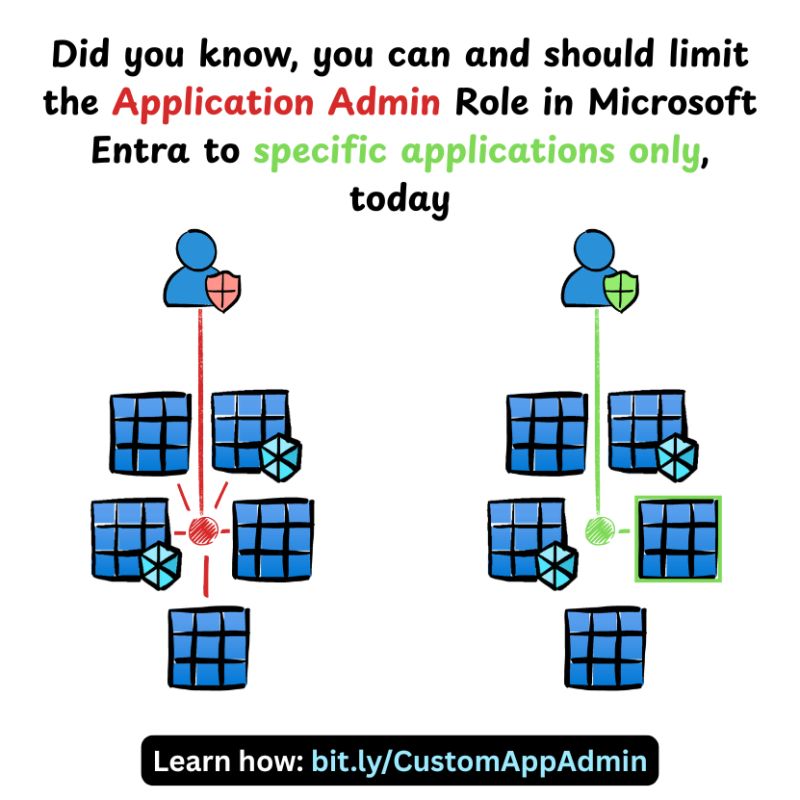
𝐃𝐢𝐝 𝐲𝐨𝐮 𝐤𝐧𝐨𝐰? You can create custom Entra Roles scoped to only specific applications/principals in Microsoft Entra > https://t.co/6uoZbCRasw
It's super easy to do and extremely effective, enabling privileged users to only be able to modify specific settings on specific applications without assigning them a built-in tenant-wide role!
#Microsoft #Entra
If you are not occasionally overwhelmed by what is going on with AI, you are either:
1) Not paying attention.
2) Not understanding what you are seeing.
3) Made of much sturdier stuff than I.
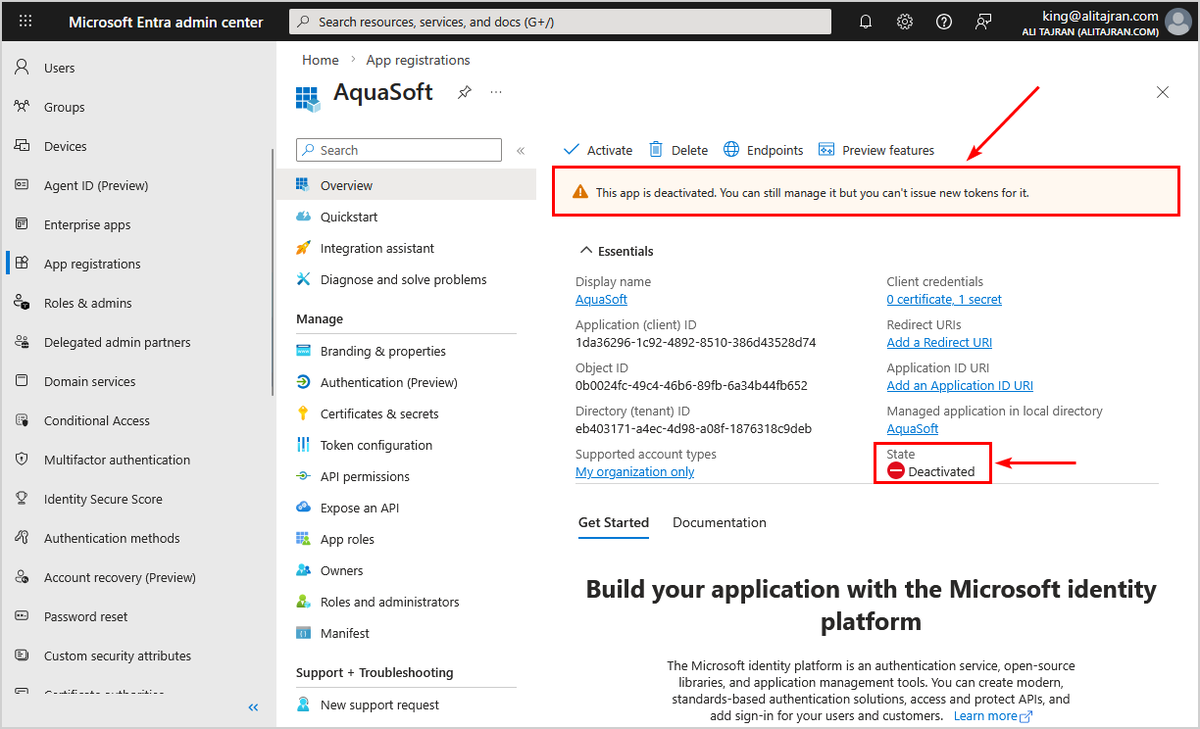
You can now deactivate app registration in Microsoft Entra ID!
Deactivating an app registration provides a reversible way to prevent the application from accessing protected resources without permanently removing it from your tenant.
When you deactivate an application, it immediately stops receiving new access tokens, but existing tokens remain valid until they expire. This approach is useful for security investigations, temporary suspension of suspicious applications, or when you need to maintain application configuration data.
Unlike permanently deleting an application, deactivation preserves all application metadata, permissions, and configuration settings, making it easy to reactivate the application if needed. The application remains visible in your tenant's enterprise applications list, but users can't sign in and no new tokens are issued.
When an application is deactivated, the following behavior occurs:
𝐈𝐦𝐦𝐞𝐝𝐢𝐚𝐭𝐞 𝐞𝐟𝐟𝐞𝐜𝐭𝐬:
- New access token requests are denied
- Users can't sign in to the application
- Application can't access protected resources with new tokens
𝐏𝐫𝐞𝐬𝐞𝐫𝐯𝐞𝐝 𝐞𝐥𝐞𝐦𝐞𝐧𝐭𝐬:
- Existing access tokens remain valid until their configured lifetime expires
- Application configuration, permissions, and metadata are preserved
- Application remains visible in Enterprise applications list with deactivated state
- Service principal object is maintained in the tenant with "isDisabled": true
When users attempt to sign in to a deactivated application, they receive an error message indicating the application has been disabled by its owner: AADSTS7000112 - Application is disabled. This is different from other error messages like invalid credentials or access denied.
Learn more:
https://t.co/hB3bTORwHo
Important: Application owners can re-activate an application after it has been deactivated. Therefore, remove all owners from the application before deactivating it. This ensures that only administrators can re-activate the application.
#EntraID #Microsoft365 #Cybersecurity
Ever need to find out what Entra authentication methods your users are using but don't have Log Analytics/Sentinel? :)
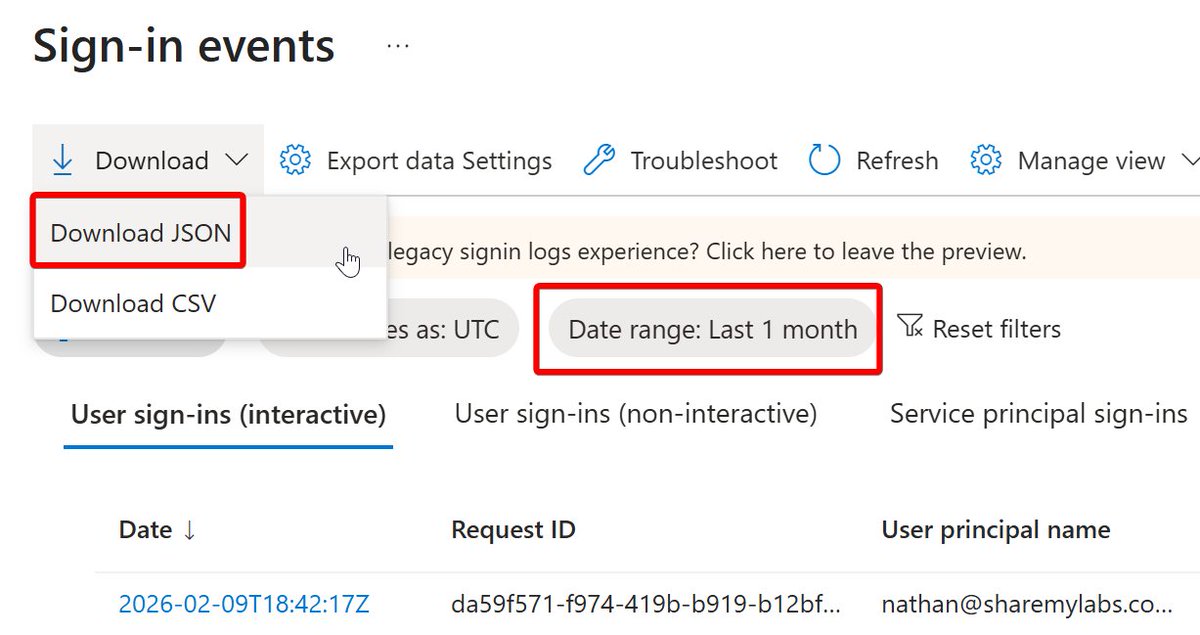
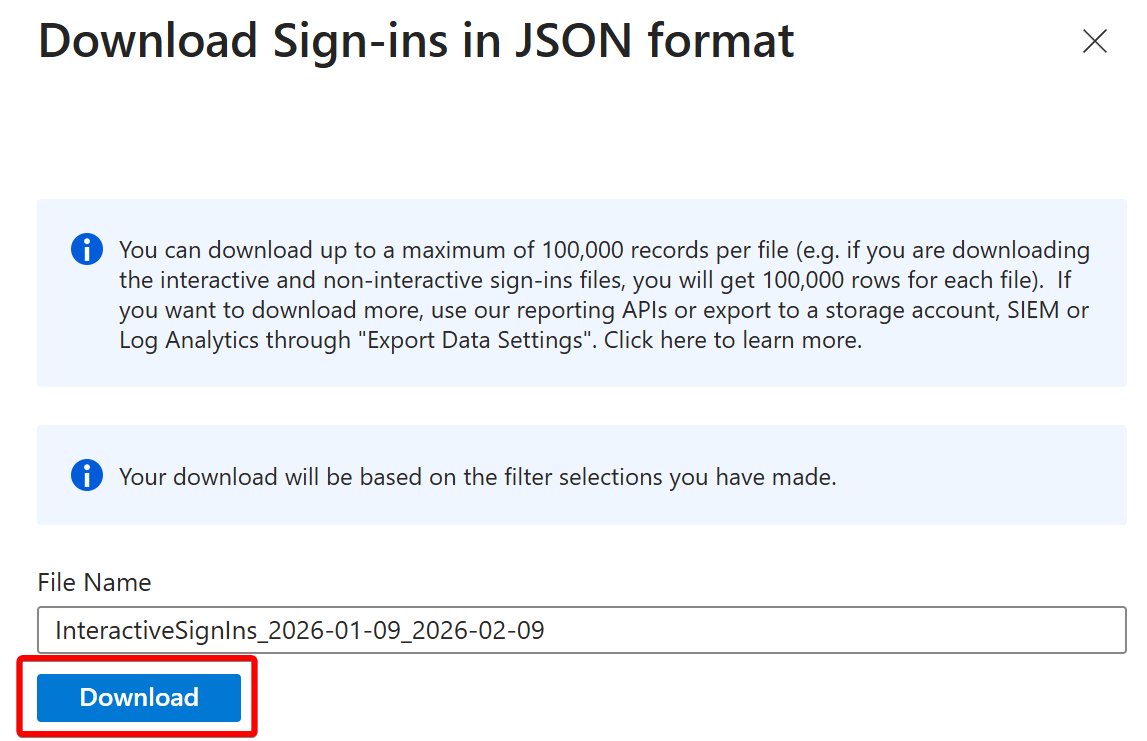
It's not as difficult as you might think! To get started, log into the Entra portal, go to Sign-in logs, set the date range to 1 month, then download the JSON:
Microsoft recently updated the YouTube training for the exam
SC-300 - Microsoft Identity and Access Administrator
Bookmark this 🔻
https://t.co/4FChbQKJbH
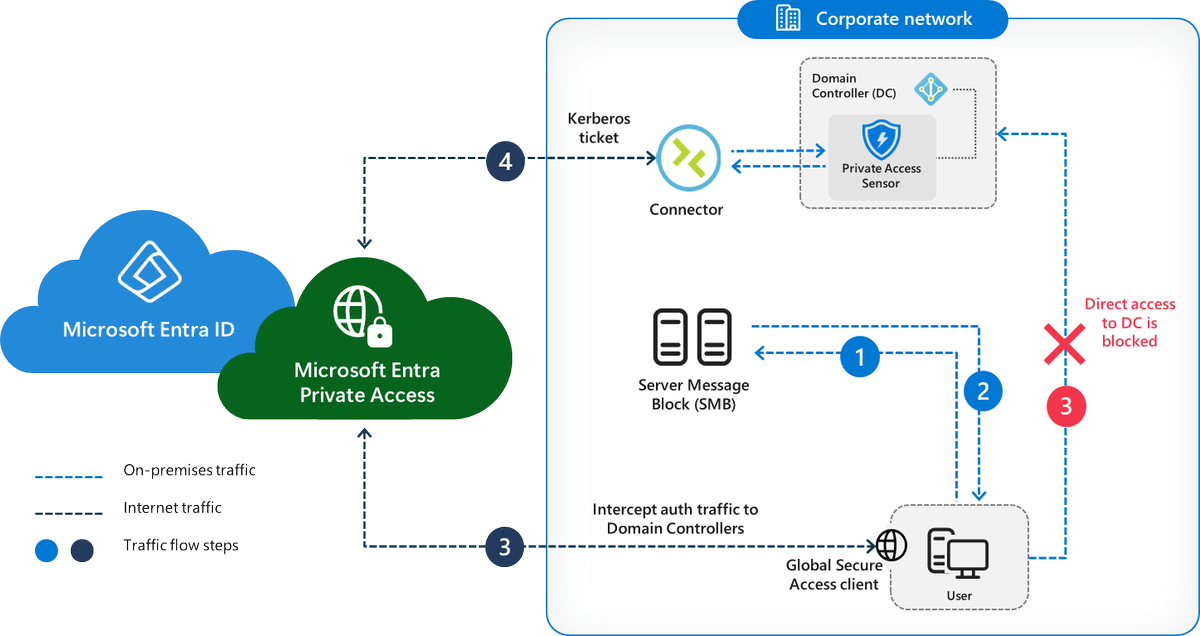
NEW Microsoft Entra SSE feature in public preview:
"IT Admins can now set detailed SPN-level policies, such as requiring MFA for cifs/* file shares, enabling compliant device access to MSSQL/* servers, and applying step-up authentication for sensitive RDP servers. This allows for precise risk-based segmentation and tailored service access."
https://t.co/8CMleW3UId
Over 28,000 Microsoft Exchange servers remain exposed to the internet with a critical vulnerability (CVE-2025-53786)!
This affects hybrid environments where an on-premises Exchange Server connects to Microsoft 365. If attackers gain admin rights on-premises, they could breach your cloud systems unnoticed.
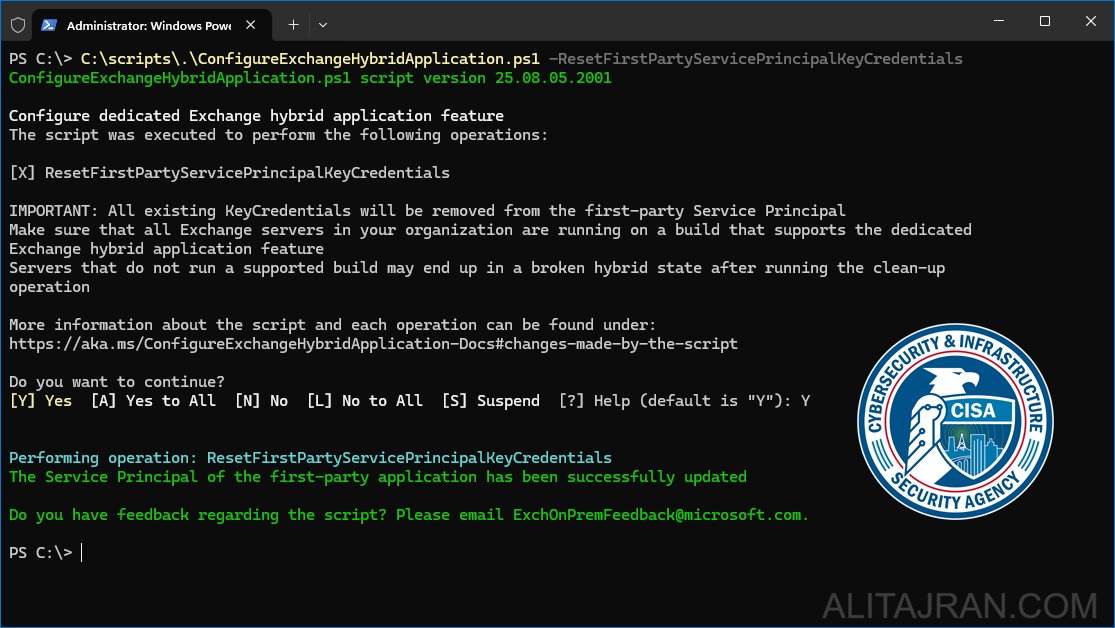
Suppose you don't have an Exchange Server running anymore, but have previously configured the Hybrid Configuration Wizard or OAuth authentication between Exchange Server and your Exchange Online organization. You must still run the script to delete all certificates of the Office 365 Exchange Online first-party application's Service Principal.
If you're unsure whether action is needed, run the script to remove any leftover certificates!
Service Principal clean up:
https://t.co/aYCzD9Qb1T
CVE-2025-53786 (Microsoft):
https://t.co/yTTboQJ6lL
#ExchangeServer #ExchangeOnline #Cybersecurity #Microsoft365 #PowerShell
CRITICAL: Microsoft Releases Guidance on High-Severity Vulnerability (CVE-2025-53786) in Exchange Hybrid Deployments!
The Cybersecurity and Infrastructure Security Agency (CISA) issues an Emergency Directive (ED 25-02), as exploitation could lead to complete identity takeover across an organization's cloud and on-premises environments.
Attackers can use this vulnerability to escalate privileges in the Exchange Online cloud environment. This risk arises because Exchange Server and Exchange Online share the same service principal in hybrid configurations. This could allow an attacker with administrative access to an on-premises server to gain undetected access to the cloud environment.
While Microsoft says no exploit has been observed in the wild, CISA warns that the impact could be significant. Failure to address this vulnerability could compromise the identity integrity of an organization's Exchange Online (Microsoft 365) service.
CVE-2025-53786 (Microsoft):
https://t.co/sw4KYQlhH2
CISA:
https://t.co/XJzDSzPOVz
CISA Emergency Directive (ED 25-02):
https://t.co/4P3n2ft5QS
#ExchangeServer #ExchangeOnline #CISA #Cybersecurity #Microsoft365 #PowerShell
.@Office365 I'm not sure if many will want to run Purview eDiscovery cases via #PowerShell in app-only mode, including Azure Automation runbooks, but if you do, here's how: https://t.co/qydcSpL8ok
#Microsoft365