Higgsfield just revolutionized the real estate industry.
They just handed anyone with a laptop the keys. Analyze the listing, build the 3D tour, spin up the site, make the photos actually sell the place, then pitch the owner and move to the next one.
This is what MCP-powered tools look like when they stop being demos and start being income streams.
Disclaimer: This content was produced in collaboration with the other party and is intended for informational purposes only. It does not constitute financial or investment advice. Always conduct your own research before making any financial decisions.
DRONE VIDEOGRAPHERS CHARGE $10K FOR THIS SHOT. HE PULLS IT FROM GOOGLE EARTH AND A PROMPT
You never buy a drone, book a pilot, or leave the house. You pick any city on Earth, trace the flight path you want, and let Gemini render it as real-looking FPV footage. Clients pay thousands for this shot. You make it from a screenshot
Here is the exact process:
1. Open Google Earth. Find the city or building you want. Frame the angle you'd want a drone to start from and take a screenshot
2. Draw the path. On that screenshot, draw a red line showing exactly where the drone should fly through the scene. This line is what the AI follows
3. Open Gemini and drop in the screenshot. Use the video generation in the Gemini app, the part that animates a still image into motion. Nano Banana handles images, the video engine is what turns your shot into footage
4. Paste the prompt. Tell it to follow the red flight path through the city, fast smooth motion, banking around buildings, golden-hour light, motion blur, 9:16 vertical, real FPV drone look. Full prompt is in the comments
5. Generate and clean it up. One clip is a few seconds. Stitch a couple together for a full flythrough and you have a reel
Set the prompt once and you can re-run it for any location on the planet
Who pays for this:
Real estate agents, hotels, restaurants and event venues all need aerial b-roll and almost none can afford a real drone shoot
Pull listings or venues with flat, ground-level photos and zero aerial footage. Send a free sample flythrough of their own location, then charge per clip or a monthly rate for ongoing reels
One agent with ten listings is a recurring client, fully online
Full prompt in the comments
Bookmark this
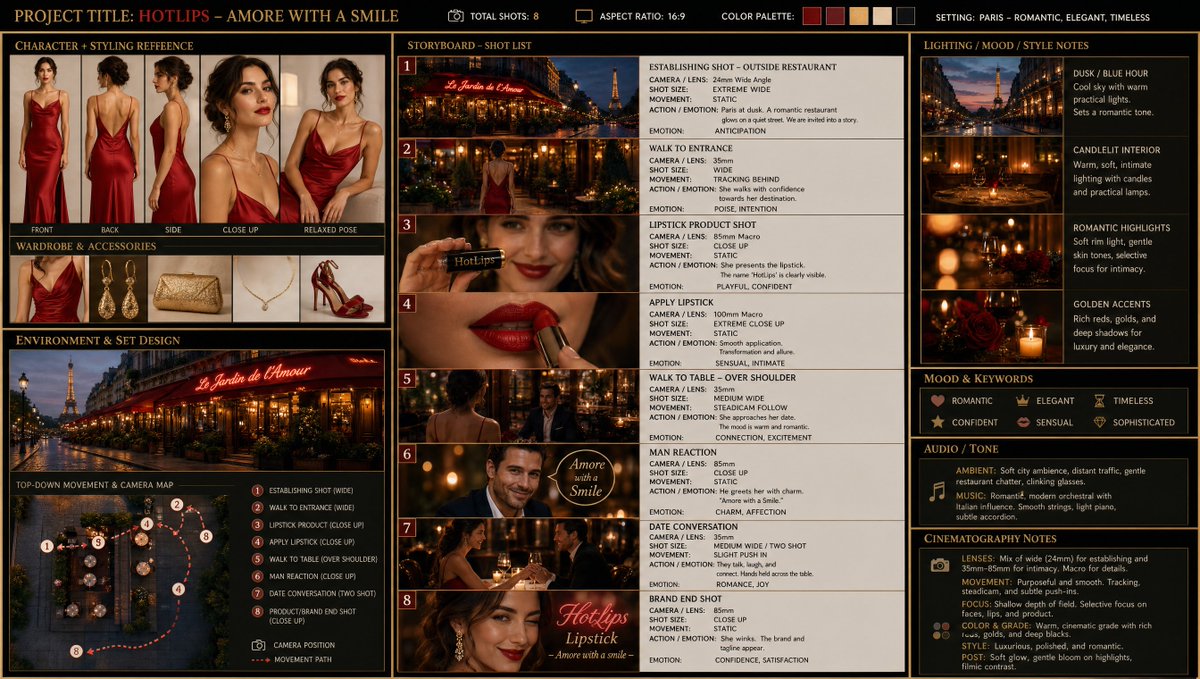
1) describe every scene
2) make sure the story board actually has everything the way you want it
3) you can create a seperate charactere rotation sheet (in that case create the character first and use it as input for the Story Board)
The ChatGPT Image 2 Prompt:
story = a woman in a elegant red dress uses her lipstick then sits own in a restaturant to have a date with a elegant man
1) establishing shot of the outside of the restaurant in paris
2) wide angle of the woman walking towards the entrace of the restaurant
3) closeup of smiling woman holding the round lipstick sideways to that the label "HotLips" is clearly visible on the Lipstick
4) closeup of the lips of the woman as she applies the red lipstick
5) over the shoulder of the woman walking towards the table with the man
6) closeup of the man smiling and saying "Amore with a Smile"
7) medium-wide shot of both sitting across each other talking and laughing while holding hands across the table
8) closeup of the woman winking at the camera with a smile and the elegant text "HotLips Lipstick - Amore with a smile"
avoid scenes that are too similar to each other
Create a cinematic production board / visual planning sheet that presents a complete concept for a short film or commercial. The layout should be clean, grid-based, and divided into clearly labeled sections.
Include:
Shared creative direction (top bar): overall constraints such as number of shots, unified color palette, and general environmental context.
Character + styling reference section:
A model shown from multiple angles (front, back, side, close-ups, relaxed pose), accompanied by wardrobe and accessory references. Emphasize consistency of identity while allowing minor variations for specific scenes.
Environment and set design section:
A scenic outdoor location with dramatic natural features, plus a top-down diagram illustrating movement through the space. Include camera positions and labeled shot types mapped along a route.
Storyboard section:
A sequence of numbered frames (about 8 shots) showing progression of the scene. Each frame includes:
Camera type / lens feel
Shot size (wide, medium, close-up, macro)
Movement (static, tracking, handheld, etc.)
Brief description of action and emotional progression
Lighting / mood / style notes:
Visual examples paired with short descriptions of lighting conditions, atmosphere, and texture. Include transitions across time of day and variations in light quality.
Mood and keywords block:
A concise list of emotional tones and thematic descriptors guiding the piece.
Audio / tone section:
Indications of ambient sound, music style, and overall sonic atmosphere.
Cinematography notes:
General visual philosophy including lens characteristics, movement style, and post-processing feel.
The entire board should feel cohesive, cinematic, and professionally designed—like a director’s pre-production guide that communicates tone, pacing, and visual storytelling at a glance.
A super simple workflow: 2 character images → GPT Image 2.0 storyboard → Seedance 2.0 animation.
Just upload two character images and use the prompt below in GPT Image 2.0 to generate a full storyboard on a single page.
Prompt: Create a clean, colorful storyboard poster in a 3x4 grid layout with 12 panels on a single page.
Title at the top: "[MAIN TITLE]"
Each panel must include:
a scene number in a small circle,
a short scene title,
a colorful illustrated image,
a 1–2 line description under the image.
Main characters must remain visually consistent across all 12 panels:
Character 1: [describe main character in detail]
Character 2: [describe second character in detail]
Theme/story: [overall story theme]
Scene breakdown:
[Scene title] – [what happens]
[Scene title] – [what happens]
[Scene title] – [what happens]
[Scene title] – [what happens]
[Scene title] – [what happens]
[Scene title] – [what happens]
[Scene title] – [what happens]
[Scene title] – [what happens]
[Scene title] – [what happens]
[Scene title] – [what happens]
[Scene title] – [what happens]
[Scene title] – [what happens]
Design style: cute 3D animated storybook style, warm emotional lighting, bright colors, soft shadows, child-friendly, clean panel borders, readable typography, neat poster composition, high detail.
Important: Keep all 12 panels inside one single image.
Make the layout clean and balanced.
Keep the characters consistent in face, outfit, and colors.
Make the text readable and properly placed.
No cropped panels.
No extra characters unless mentioned.
Then upload that storyboard to Seedance 2.0 and use this prompt:
Prompt: Generate a scene using the shots in the uploaded film storyboard. No text on screen.
That’s it.
CLAUDE FULL COURSE 4 HOURS
This is the most detailed Claude guide I’ve seen online.
Bookmark this before you forget.
4 hours.
Build tools.
Automate work.
Learn how people build bots and systems.
Claude → Tools → Automation → Products → Money
A sneaker ad creative made entirely with Kling 3.0. Watch how our Creative Partner @CharaspowerAI created this ad from concept to final cut using Kling. Learn more about the process in the thread! 🧵
NVIDIA just killed the awkward pause in voice AI 😱
PersonaPlex 7B is a real-time conversational model that listens AND speaks simultaneously. Like actually interrupts you mid-sentence like a human.
Beat Gemini Live on dialog naturalness. 18x faster interruptions.
100% open source. Run it locally. No API bill. No latency.
I shared some secret tips with Anna about Seedance 2.0, Magnific and a super pro way of achieving PERFECT consistency using "smart image references" and now she's sharing them with everybody! 😅😘
call me crazy..but I will keep saying this..
the new millionaires of 2026 won't come from crypto.
they'll be blue collar business owners who figured out Claude + SEO.
DON'T bookmark this if it crosses your timeline.
Just paste this entire thing into Claude.
thank me later.
🚨 One photo of your face. That's all someone needs to become you on a live video call. In real time. Right now. The tool is free and open source.
It's called Deep-Live-Cam.
One image. One click. You become anyone on a live webcam feed. No training. No datasets. No waiting. Instant.
Your face. Your expressions. Your mouth movements. All stolen from a single photo.
Here's what this thing does:
→ Upload one photo of any face
→ Turn on your webcam
→ You are now that person. Live. In real time.
→ It matches your pose, your expressions, even your lighting
→ Mouth masking so the swapped face moves its lips when you talk
→ Multi-face mapping. Swap different faces on different people in the same call.
→ Virtual camera output. Plug it into Zoom, Google Meet, Teams. Nobody knows.
→ Works on NVIDIA, AMD, Intel, and Apple Silicon
Here's the part that should terrify you:
Your boss could be on a Zoom call with someone wearing your face right now. A scammer could call your parents looking exactly like you. A stranger could take your LinkedIn photo and become you in a video meeting.
IShowSpeed's reaction when he saw it: "What the F**! This shit is crazy!"
SomeOrdinaryGamers: "That's fucking freaky dude... that's so wild."
This was the #1 trending repo on GitHub the day it launched. 1,600 stars in 24 hours. 80K+ stars today.
No one is ready for what this means. And it's already out there.
100% Open Source.





![bmx_ai13's tweet photo. A super simple workflow: 2 character images → GPT Image 2.0 storyboard → Seedance 2.0 animation.
Just upload two character images and use the prompt below in GPT Image 2.0 to generate a full storyboard on a single page.
Prompt: Create a clean, colorful storyboard poster in a 3x4 grid layout with 12 panels on a single page.
Title at the top: "[MAIN TITLE]"
Each panel must include:
a scene number in a small circle,
a short scene title,
a colorful illustrated image,
a 1–2 line description under the image.
Main characters must remain visually consistent across all 12 panels:
Character 1: [describe main character in detail]
Character 2: [describe second character in detail]
Theme/story: [overall story theme]
Scene breakdown:
[Scene title] – [what happens]
[Scene title] – [what happens]
[Scene title] – [what happens]
[Scene title] – [what happens]
[Scene title] – [what happens]
[Scene title] – [what happens]
[Scene title] – [what happens]
[Scene title] – [what happens]
[Scene title] – [what happens]
[Scene title] – [what happens]
[Scene title] – [what happens]
[Scene title] – [what happens]
Design style: cute 3D animated storybook style, warm emotional lighting, bright colors, soft shadows, child-friendly, clean panel borders, readable typography, neat poster composition, high detail.
Important: Keep all 12 panels inside one single image.
Make the layout clean and balanced.
Keep the characters consistent in face, outfit, and colors.
Make the text readable and properly placed.
No cropped panels.
No extra characters unless mentioned.
Then upload that storyboard to Seedance 2.0 and use this prompt:
Prompt: Generate a scene using the shots in the uploaded film storyboard. No text on screen.
That’s it.](https://pbs.twimg.com/media/HHRiCM6bQAAgr_T.jpg)