USO CLAUDE TODO EL DIA SIN ALCANZAR EL LÍMITE DE USO.
Claude no cuenta mensajes — cuenta tokens. Eso significa que algunos chats consumen tu límite 10× más rápido que otros.
Si quieres usar Claude todo el día sin quedarte sin acceso, utiliza estos 9 trucos inteligentes:
GOODBYE CAPCUT 👋
Gemini can now script and edit full videos in minutes.
No dragging timelines. No manual cuts. No creative blocks.
Here are 7 prompts to make it happen 👇🏽
GPT image 2.0 workflow:
> generates smm design for socials
> brand name + prompt = visuals
> you can edit the prompt for customized output
Prompt 👇
> snipe more design prompts in my pinned
Many people think you can only shop from China using Alibaba or AliExpress… but that’s not true.
These are alternative sourcing websites from China:
1. Industrial equipment
https:// www.made-in-china. com
2. Jewelry & accessories
https://www. gooddiy. com
3. Small goods (non-bulk items)
https://www.yiwugo. com
4. Beauty products & cosmetics
https://www.nala. com. cn
5. Women’s shoes
https://www.go2. cn
6. Toys & kids items
https://www.ctoy. cn
7. Children’s clothing
https://www.3e3e. cn
8. Small batch / wholesale products
https://www.dhgate. com
9. Electronics & gadgets
https://www.globalsources. com
10. Fashion (affordable clothing & accessories)
https://www.zaful. com
BREAKING: AI can now build you a complete website in 2 hours (for free).
Here are 9 insane Claude Opus 4.6 + Figma Make prompts that create $5,000 websites in 2 hours:
(Save this before your competitors do)
50+ AI Tools for SEO and GEO:
1/ Keyword Research:
Ahrefs | Semrush | Google Keyword Planner | Ubersuggest | KeySearch | KWFinder
2/ Technical SEO:
Google Search Console | Screaming Frog | Ahrefs Site Audit | Sitebulb | SEObility | Lumar
3/ Content Optimization:
Surfer SEO | Clearscope | Frase | MarketMuse | NeuronWriter | Dashword
4/ On-Page SEO:
Yoast SEO | RankMath | Surfer SEO | PageOptimizer Pro | SurgeGraph | JEEP AI
5/ Link Building:
Ahrefs | Semrush | BuzzStream | Pitchbox | https://t.co/b5o1TJzmYT | Respona
6/ Rank Tracking:
Ahrefs | Semrush | SE Ranking | Nightwatch | AccuRanker | SERPWatcher
7/ Local SEO:
Google Business Profile | BrightLocal | Whitespark | Moz Local | GeoGrids | LocalFalcon
8/ AI Visibility / GEO Tracking:
Profound | Goodie AI | AthenaHQ | HubSpot AI Grader | Semrush One | Bear AI
9/ GEO Content Optimization:
Surfer SEO | Clearscope | Sight AI | Rankability | Frase | Contently
10/ AI Search Monitoring:
Rankscale | SE Ranking AI Tracker | Nightwatch | Morningscore | Peec AI | Gumshoe
There it is. Your guide to AI tools for SEO.
Find this useful?
Repost ♻️, Save 📄, and Follow me 🔔 for daily growth gems.
P.S. Want to see exactly how I use AI to build SEO lead magnets? It's all yours: https://t.co/ULj4hZPeE3
We're now being cited in Google AI Overviews for core SEO terms.. right next to Moz and SEMRush 👀
No links, no authority play, just clever old school NLP SEO re-tuned for the new AI search interface...
Here is the STEP-BY-STEP play:
1 - Reverse engineer SERP gaps; Your site needs to be able to rank in the traditional algo first, so pages where you are already in the top 100 are a must and the higher the start, the better the result.
2 - Identify the gaps between what THEY cover and what the AI Overview is trying to answer.
3 - Write a section on YOUR page that fills that exact gap, formatted clearly with a definition, example, or list that Google can easily extract as a standalone chunk. I added several more anchor text types using this exact method, "generic" wasn't the only one I targeted here.
4 - Make sure that chunk can stand alone as a complete answer to a sub-question within the broader topic.
That's it! You're not competing for the whole page, you're competing for ONE chunk of the AI Overview.
It's very similar to how we used to optimize for featured snippets, but with a lot more dynamic inputs required - It's usually not the one H2 anymore, you need to optimize (at least) several chunks to have the best chance of getting visibility.
In this case, we were cited for the definition because our page had the clearest, most concise explanation with a practical example - Something our competitors either buried in paragraphs or didn't isolate properly.
Unfortunately, we usually don't get to directly "win" a #1 spot anymore in these new SERPs, BUT the upside is you can now get visibility for queries your page would NEVER have ranked #1 for traditionally.. and you can get cited MULTIPLE times across the same AI Overview if you optimize several chunks well.
Less clicks, more visibility and "brand awareness" - A lot of corporate marketers would actually prefer this anyway....
And this all rewards going broader and deeper on your pages.
The more well structured, extractable chunks you have, the more chances you give Google to pull from you.
The traditional algo is linear, this new search is much more dynamic, less ranking, more retrieval.
If you guys want to rank #1 on Google with the SEO Vomit Website Strategy everyone worships, paste this into your vibe coding app: 🤮🤮🤮
Build me a contractor website with this exact structure
SITE ARCHITECTURE:
Homepage
/services/[service-name]-[city]-[state]
/service-areas/[county]-[state]
/service-areas
5 services x 9 service areas = 45 pages minimum.
PAGE TITLE FORMAT:
"[Service Name] [City] [State] | [Company Name]"
META DESCRIPTION FORMAT:
"Professional [service] in [city], [state]. [One benefit sentence]. Call today!"
H1 FORMAT:
"Professional [Service Name] in [City], [State]"
One H1 per page. Keyword loaded. Not creative. Literal.
HEADING STRUCTURE (every service page):
H1: Professional [Service] in [City], [State]
H2: Why Choose Us for [Service] in [City], [State]
H2: Why Trust Our [Service] Services in [City], [State]
H2: [Service] Questions for [City] Property Owners
Each H2 section needs 1500-2000 words with 3 bullet points minimum with bold lead-ins:
• Expert Local Team: [description]
• Efficient Modern Equipment: [description]
• Eco Friendly Methods: [description]
Total page content: 5000-7000 characters minimum per page. Not 200 words and a stock photo.
IMAGE ALT TEXT:
Every image gets a keyword-rich sentence describing exactly whats in the photo AND the location AND the company name.
Bad: "service photo"
Bad: "IMG_4032.jpg"
Good: "professional [service] work on residential property in [City] [State], [Company Name] team completing [specific task] with commercial-grade equipment"
Good: "completed [service] results showing finished project in [City] [State]"
Alt text should read like a caption. Include city names, service keywords, and company name.
LEAD FORMS:
Two per page.
• Lead form above the fold in the hero section with fields: Name, Phone, Email, Service Type, Property Details
• CTA button: "GET A QUOTE" linking to #contact anchor
• Second "Get Free Quote" button between content sections
• Footer contact form as final capture point
INTERNAL LINKING STRUCTURE:
Navigation must include:
• Services dropdown with every service page listed by full name: "[Service] in [City], [State]"
• Service Areas dropdown with every county listed: "[County Name], [State]"
Footer must duplicate all navigation links:
• All service pages listed with full location names
• All service area pages listed
• Both nav and footer link to every single page
Every service page links to all other service pages. Every service area page links to all other service areas. Hub pages link down to all children.
OUTBOUND AUTHORITY LINKS:
Link city names to their Wikipedia page. Every time you mention a city it should be a hyperlink to the Wikipedia article for that city.
Link your company name to your Google Business Profile or main site URL.
SCHEMA MARKUP (on every page):
1. WebPage schema with url, name, description, datePublished, dateModified, breadcrumb reference
2. BreadcrumbList schema: Home > Services > [Service] in [City], [State]
3. FAQPage schema with every FAQ as a Question/Answer pair
4. Organization schema with name, url, logo, alternateName
5. ImageObject schema for the primary page image
SERVICE AREA PAGES (/service-areas/[county]-[state]):
Same structure as service pages but focused on geographic coverage. Cross-link to every service available in that area. Include local terrain, vegetation, weather, and regulation references specific to that county. Same content length requirements.
FAQ SECTION (every page):
5 questions minimum. Questions must be specific to the city and service.
Bad: "How much does it cost?"
Good: "Do I need a permit for [service] in [City] [State]?"
Good: "What types of properties benefit from [service] in [City]?"
Each answer 2-3 sentences. Conversational but informative.
FOOTER:
• Email link
• Social media links
• Full service list with city names
• Full service area list
• Duplicated navigation sections
SEO Tips!
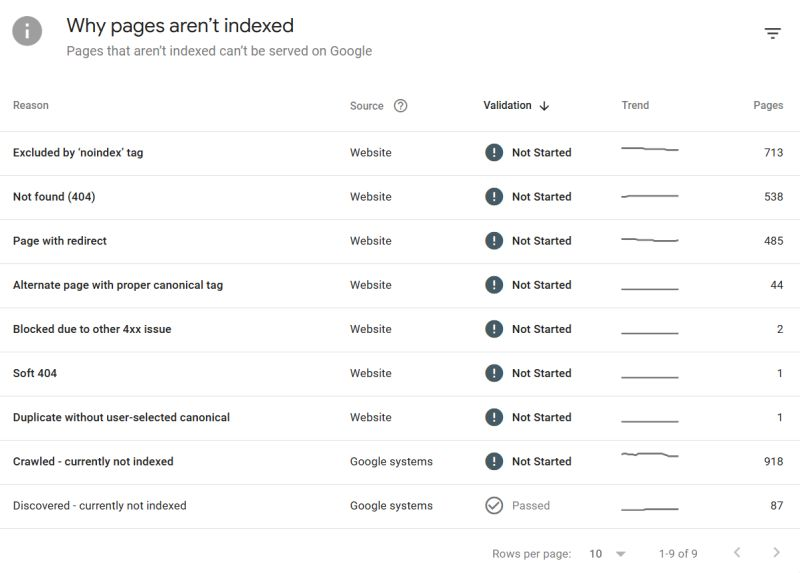
If you are in SEO and you are unsure on how to deal with non indexed page reasons & getting to know search console - here are some things that may help you.
Lesson 1: How to use performance tools in Google Search Console
https://t.co/dfh4IWhqrb
Lesson 2: How to use URL Inspection tool in Google Search Console
https://t.co/PUEgUwpMey
Lesson 3: Google Discover - what is it?
https://t.co/RZSvYGHIQg
Lesson 4: An introduction to Page Indexing / Non Indexed Pages in Search Console
https://t.co/v0HPEahpQu
Lesson 5: Alternative Page with Proper Canonicals
https://t.co/PzrvZNUIBu
Lesson 6: Page with Redirect
https://t.co/hiWrgiDRIX
I will be recording more videos for other non indexed page reasons - this should get you started.
Below is further guidance:
PRIORITY ITEMS:
➡️ CRAWLED / DISCOVERED CURRENTLY NOT INDEXED
Generally, this is content that Google no longer deems to be of value and therefore it is not indexed. Crawled/Discovered are the "same thing" in respect of content perception, it's just the route of URL finding was different.
Things to note:
> Not all URLS reported will be valid (HTTP 200) - always http status check
> Some URLS will be erroneous, malformed or random/parameter driven
> Generally, THIN content / low or non value pages tend to end up here
> Pages that have content where there is no demand can end up here
> Pages that are poorly linked can end up here
Generally - you'll want to clean these URLS up.
> Delete dead content (check for internal and external links)
> Clean up parameters (robots.txt management) subject to parameter checks i.e. you wouldn't block a parameter path that is contributory in other ways
> Filter down to HTTP 200 URLS - this will help you get a much clearer view of what is not indexed but is active
➡️ DUPLICATE WITHOUT USER-SELECTED CANONICAL
Basically, these are URLS Google considers to be duplicate of other URLS where a canonical hasn't been provided to direct Google to the parent URL.
You don't want these, always ensure if there ARE techincal issues or reasons why URLS must exist where they are very similar, specify a canonical parent.
IDEALLY, you shouldn't have a website that facilitates duplicate content, cull / consolidate.
➡️ BLOCKED DUE TO OTHER 4XX ISSUE
High priority, BUT, generally quicker to check, you just need to ensure the URLS Google has tried to access are valid to be blocked (check which 4XX issue you get via httpstatus(.)io
QUICK AND EASY WINS!
➡️ NOT FOUND 404
Crawl site, find internal links, eliminate 404s. Check NOT FOUND 404S in GSC, you may find URLS that are not on the crawl, these may be random or legacy URLS.
Tip! Export the URLS and put them into AHREFS BATCH ANALYSIS to see if any of them have external links (if they do, 301 to preserve link equity)
➡️ SOFT 404
Just double check the pages, generally it's when Google interprets a page that looks like a not found page but returns a HTTP 200 status code.
#SEO
SEO is dead.
The new game is GEO ( Generative Engine Optimization ).
If Perplexity or Google AI Overviews can't summarize your content, you don't exist in 2026.
Here are 6 prompts to audit if your content is "AI-readable" 👇
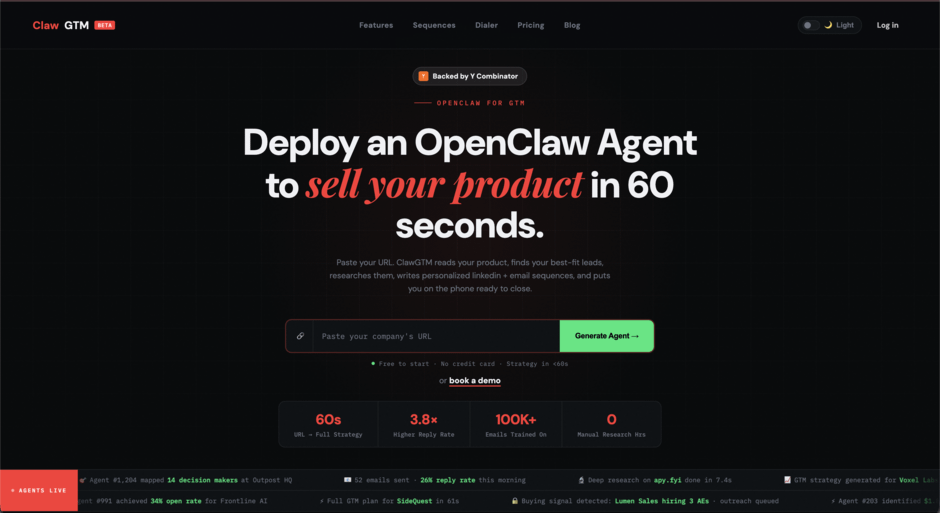
🚨 BREAKING: Someone just turned OpenClaw into an autonomous sales agent
It's called Claw GTM.
Paste your website and it builds your outbound pipeline automatically.
I tried it this morning.
From one URL, it:
→ mapped my ideal customer profile
→ found 47 companies with buying signals
→ researched each account automatically
→ generated personalized email + LinkedIn outreach
No prospecting. No spreadsheets. No generic outreach.
Here's why this is interesting:
→ most outbound tools rely on static lead lists
→ Claw scans millions of job posts for buying signals
→ it surfaces companies actively hiring for the problem you solve
Meaning you're reaching companies already investing in your category.
Here's the wildest part:
It starts with just your website URL.
Claw reads your product, pricing, and positioning and builds your entire GTM strategy automatically.
Paste URL → get your first outbound pipeline in about a minute.
Link in the comments